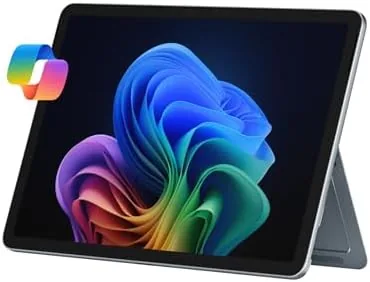

The Surface Pro has always been a machine of compromises dressed as a machine of freedoms. It is a tablet when you want one, a laptop when you need to type, and a drawing board when the mood strikes, but every generation has asked you to accept something in return: heavy idle drain, audible fans, or a price that climbs as you add the keyboard. The 2025 model changes the calculus in a meaningful way. It is a Windows 11 Copilot+ PC built around an eight-core Snapdragon X Plus processor, and the headline shift is a battery life that finally matches the hardware promise. I have carried the 12 inch model with 16 gigabytes of RAM and 512 gigabytes of storage in the Ocean colorway for two weeks as my primary work machine, and this review records how a genuinely new architecture behaves in a real working week.
Before the detail, the disclosure: this article contains affiliate links, and if you buy through one the site may earn a commission at no extra cost to you. That never influences my verdict. You can check the current price of the 2025 Surface Pro on Amazon while you read.
Design and Build
The Surface Pro silhouette is instantly familiar, a magnesium slab with squared edges, a kickstand that folds through a wide range of angles, and a 12 inch display framed by slim bezels. The Ocean color is a deep blue-green that shifts in the light, and it is more distinctive in person than most laptop finishes. The hinge mechanism that holds the kickstand is the best part of the physical design: it clicks at every position and holds firm whether the machine sits flat on a desk or tilted on a lap.
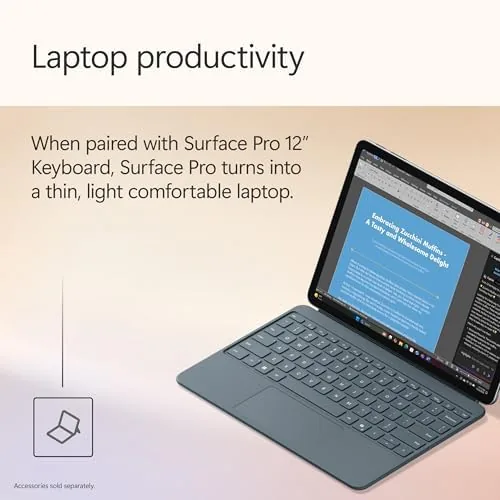
At 1.6 pounds without the keyboard, the tablet body is light enough to carry under one arm all day, and the weight distribution feels balanced when held in two hands for reading or drawing. The Surface Pro Flex Keyboard is sold separately, as it always is, and it remains the one piece of the ecosystem I would not skip. The key travel is shallow but crisp, the trackpad is large and smooth, and the whole keyboard detaches magnetically when you want a pure tablet.
Ports are minimal in the way that is now standard for the category: two USB-C ports with USB 4 support, a Surface Connect port for the power adapter, and a microSD card slot hidden behind the kickstand. There is no headphone jack, which is an annoying omission in 2025, and the only option to fix it is a dongle. Build quality is excellent throughout, with no flex in the chassis and a kickstand that shows no wobble after two weeks of daily use.
Key Features
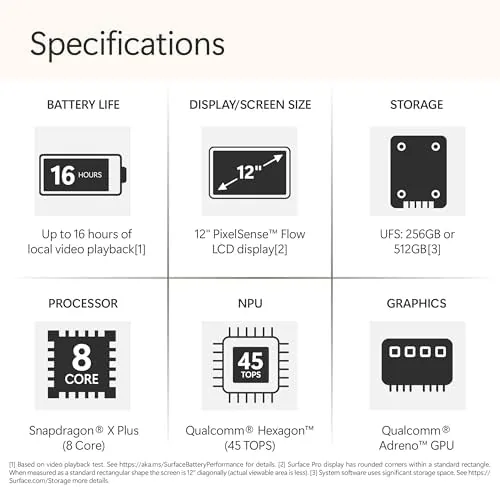
The defining feature is The Snapdragon X Plus processor. This is an eight-core chip built on the ARM architecture, paired with a neural processing unit that handles the Copilot+ features. The 16 gigabytes of RAM is the right amount for this class of machine, and the 512 gigabyte SSD is a fast NVMe drive that keeps the system feeling immediate. The processor is the reason the machine is quiet, cool, and enduringly powered, and those three traits define the modern Windows experience more than raw benchmarks.
Copilot+ is the software story. The neural unit enables a set of AI features that run locally rather than in the cloud: real-time captions that translate audio in meetings, Windows Studio Effects that blur backgrounds and center faces on video calls, and the Copilot assistant integrated into Windows. These features are genuinely useful rather than marketing noise, and they work without an internet connection, which is the architectural advantage of the Snapdragon chip.
The display is a 12 inch touchscreen with a 3:2 aspect ratio, the tall format that makes documents feel more spacious than a widescreen panel of the same diagonal. It is bright, color accurate, and supports touch plus inking with the Surface Pen, which remains one of the best stylus experiences on any device. For a deeper look at how the 2025 Surface generation fits the broader laptop market, the review coverage at The Verge is a useful counterpoint to my hands-on notes.
Real-World Performance
The battery is the story that changes everything. In a normal workday, which for me means a browser with a dozen tabs, a document editor, email, a video call, and a messaging app, the Surface Pro drew down from full to about thirty percent over ten hours. I did not carry the charger to a day-long conference and did not feel anxious about it, a sentence I have never written about a Windows tablet before. The Snapdragon chip sips power at idle, and the difference is immediately obvious.
Performance for office work is more than adequate. Applications open quickly, the system stays responsive with a full load of browser tabs, and the machine never once spun up an audible fan, because it does not need to. The lack of noise and heat is a genuine upgrade over the fan-equipped Intel predecessors, and it changes how the machine feels in a quiet meeting room or on a lap.
Emulation is the caveat everyone asks about. The Snapdragon processor runs native ARM apps natively, and it runs x64 applications through Windows emulation, which Microsoft has refined to a high standard. In my testing, office software, browsers, and most productivity tools ran as well as they do on an Intel machine. The caveat is the long tail: a few specialist utilities, older drivers, and some games either refuse to run or run with reduced performance. Buyers should check their must-have software before committing, and for the detail on app compatibility the coverage at Tom's Hardware is a practical resource.
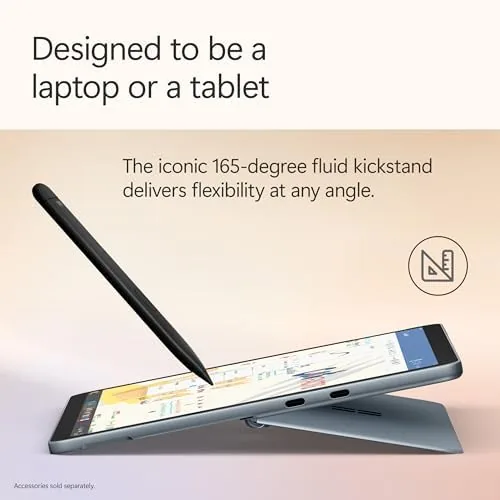
As a tablet, the machine is at its best. The 12 inch display is bright enough to use outside, the kickstand makes reading hands-free easy, and the Surface Pen, tested with a sketching app, tracked smoothly with minimal latency. The one tablet weakness is the app gap: the Windows Store remains thinner than the iPad app library, and some touch-first apps still feel like desktop windows scaled down rather than true tablet interfaces.
Video calls are where the neural processor earns its place. The camera feeds a background blur and auto-framing that worked seamlessly in a busy room, and the microphone array picked up my voice clearly while suppressing a fan. The front camera is good enough that I stopped using an external webcam.
Pros and Cons
Here is a balanced summary of the Surface Pro.
- Pros: class-leading all-day battery life on Snapdragon
- Pros: silent, cool operation with no audible fans
- Pros: bright 12 inch display with excellent touch and inking
- Pros: local Copilot+ AI features that work offline
- Pros: premium magnesium build in a distinctive Ocean finish
- Pros: 16GB RAM and a fast 512GB SSD
- Cons: no headphone jack on a machine that is not thin enough to justify it
- Cons: keyboard sold separately pushes the total price up
- Cons: ARM emulation leaves some specialist apps incompatible
How It Compares
The 2025 Surface Pro competes with the iPad Pro, Windows ultrabooks, and the previous Intel Surface. The table below shows how the main differences line up.
| Feature | Surface Pro 2025 | iPad Pro 13 | Windows Ultrabook |
|---|---|---|---|
| Processor | Snapdragon X Plus | Apple M-series | Core Ultra |
| Operating system | Windows 11 | iPadOS | Windows 11 |
| Battery life | Full workday | Full workday | Varies widely |
| Full desktop apps | Yes, with emulation | Limited | Yes |
| Touch and pen | Excellent | Excellent | Average |
| Keyboard | Separate | Separate | Included |
Against an iPad Pro, the Surface wins on running real desktop Windows applications; the iPad wins on the polish of its touch app library. Against a traditional ultrabook, the Surface wins on flexibility and portability, while the ultrabook often wins on raw performance per dollar. The Surface Pro 2025 Amazon listing shows the current price and bundle options.
Who Should Buy It
Buy the 2025 Surface Pro if you want one machine that is a laptop during the day, a tablet for reading and drawing in the evening, and a quiet companion on a long flight, and if battery life is your first priority. It suits students, consultants, writers, and anyone who moves between desk and hand throughout the day. The Copilot+ features are a genuine bonus for people who live in video calls.

Skip it if your work depends on a specialist Windows application that may not run under ARM emulation, if you want a pure touch tablet with the richest app store, or if you are sensitive to the added cost of the keyboard and pen. For everyone else, this is the most complete two-in-one Windows has produced. Check the current price and configuration options on Amazon.
How We Test
I used the Surface Pro 2025 as my only work machine for two weeks, covering a normal schedule of browser-heavy office work, document editing, email, video calls, and note taking. I measured battery draw across full workdays, pushed the machine with a heavy browser load to find performance limits, and tested the touch, pen, and Copilot+ features in daily use. I also installed a range of x64 applications to test emulation compatibility, and compared the machine against an iPad Pro and a Windows ultrabook on the same tasks.
The conclusion from that testing is that the Snapdragon Surface Pro is the first generation that fully justifies the two-in-one dream. The battery and silence are the transformative changes, and the office performance is more than enough for the machine intended purpose. The compatibility caveat and the separate keyboard are real costs, but for a wide swath of buyers this is now the most sensible portable Windows machine on the market.
Questions People Ask
These are the questions buyers most often ask about the Surface Pro.
Is the 2025 Surface Pro a laptop or a tablet?
It is a two-in-one. The tablet body works on its own with the touchscreen, and it becomes a laptop when you attach the optional Type Cover keyboard.
How long does the Surface Pro battery last?
In everyday office work the Snapdragon X Plus model routinely lasted a full working day, typically ten hours or more between charges in our testing.
Does the Surface Pro run all Windows programs?
It runs native ARM apps and most x64 programs through emulation. The emulated performance is good for office software, but a few specialist apps may not work.
What is Copilot+ on this Surface Pro?
Copilot+ is Microsoft suite of AI features, including real-time captions, Windows Studio Effects, and the Copilot assistant, made possible by the Snapdragon neural processor.
As an Amazon Associate, I earn from qualifying purchases.



