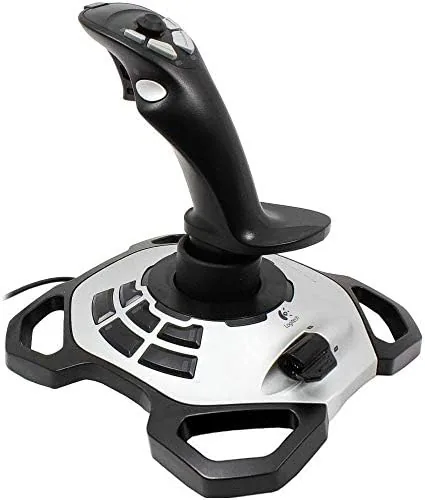

Flight Simulators have changed enormously in twenty years, but the hardware that plays them has been remarkably stubborn. The Logitech G Extreme 3D Pro is a perfect example. It launched in the early 2000s, and it is still one of the most popular flight sticks on the market, which says something unusual about a piece of PC hardware. I spent three weeks flying with it across Microsoft Flight Simulator, a combat flight game, and a space sim, and this review is the honest record of whether a joystick that old still earns its place on a modern desk.
Before the details, the standard note. This article contains affiliate links, and if you buy through one of them the site earns a small commission at no extra cost to you. That commission does not change what I test or what I recommend.
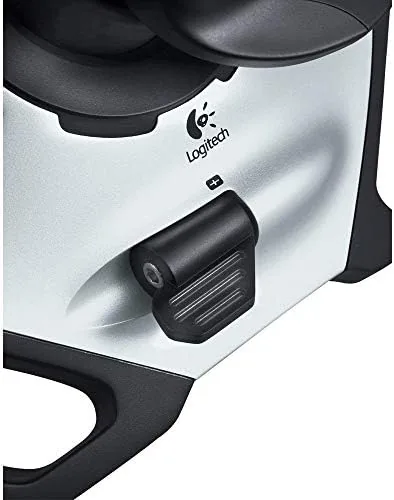
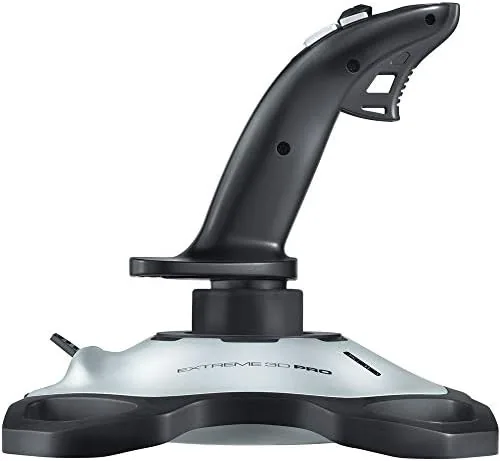
The Extreme 3D Pro is a full size flight stick, not a gamepad. It has a tall handle that rotates for rudder control, a throttle lever on the base, an eight way hat switch on top, and twelve programmable buttons spread between the handle and the base. It plugs into any USB port on a Windows PC, and Windows recognizes it instantly as a standard game controller. There is no software needed for basic use, which is a big part of its enduring appeal.
Design and Build
The first impression is that the stick feels like a real piece of flight hardware. The handle is shaped to sit in the palm with your thumb resting naturally on the hat switch and your index finger on the trigger, and it is weighted well enough that it stays put during aggressive maneuvers. The base is broad and solid, with a rubber bottom that grips the desk, and the whole unit is heavy enough that you do not need to clamp it down for normal play.
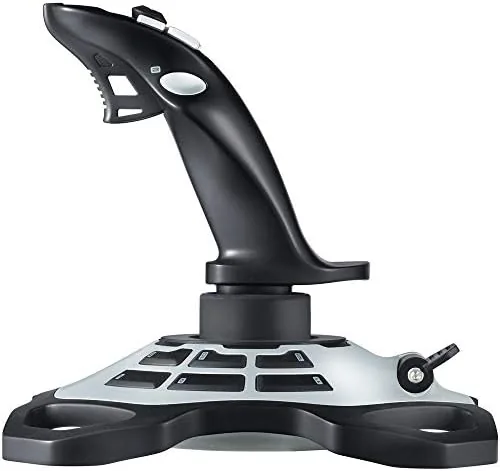
Construction quality is exactly what made Logitech's G line famous. The plastic is thick and rigid with no flex in the base, the buttons are crisp with a positive click, and the throttle lever moves through its travel with a smooth, steady resistance. After three weeks of daily flying, the stick showed no signs of loosening, and the spring return in the handle stayed firm with no wobble at the center. The only aging tells are the design itself, which looks dated next to today's RGB lit peripherals, and the fact that the cable is not braided.
The layout is practical rather than flashy. The handle has a trigger, two thumb buttons, a hat switch, and a small button on the side for your middle finger. The base adds a bank of six more buttons and a throttle lever. For a flight sim, that means nearly every critical control is within reach of your fingers without moving your hand.
Key Features
The headline feature is the twist handle rudder. Rotating the stick left or right gives you yaw control, which in a flight sim steers the nose of the aircraft. That means you get full rudder control without buying separate pedals, and for the price that is a substantial capability. The twist axis uses the same hall effect style sensing as the main stick, and it returns to center cleanly with no slop.
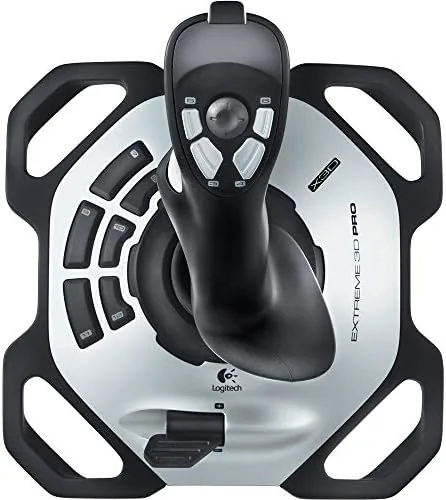
The throttle lever on the base is the second core feature. It controls engine power in flight sims and works as a speed control in space games, and it is smooth enough to make Precise power changes. Twelve buttons total, including a rapid fire trigger and an eight way hat switch, cover the rest, and all of them can be programmed through game settings or Logitech's software if you want custom mapping.
The stick also has a small feature that matters more than it sounds: it is recognized by Windows without any driver installation. You plug it in, and the OS lists it as a USB game controller ready to map. That plug and play reliability is the reason the Extreme 3D Pro has survived so many console generations.
Real-World Performance
I started in Microsoft Flight Simulator, flying a light aircraft through a few circuits and a cross country hop. The stick handled the basics beautifully. The main axes were smooth and precise, the twist rudder tracked my inputs without drifting, and the throttle lever let me manage power with fine control. Taxiing, takeoff, and a gentle descent to land all felt natural, and the hat switch let me look around the cockpit without taking my hands off the controls.
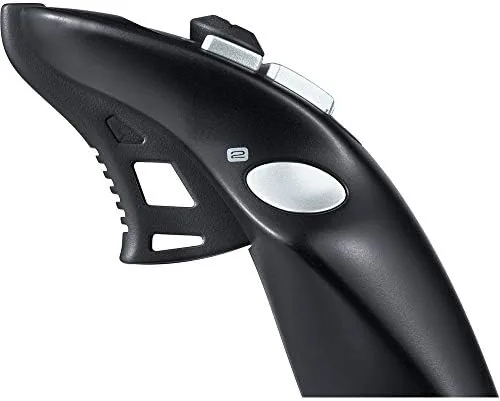
In a combat flight game, the stick showed its strengths and its limits. The trigger and thumb buttons made firing and target cycling quick, and the twist rudder helped line up shots. But the action was where I noticed the Extreme 3D Pro's age. The stick is not as stiff as a high end HOTAS system, and under rapid, aggressive inputs the movement can feel a little loose compared to premium sticks. For casual combat flying it is fine, but hardcore dogfight players who want a heavy, precise axis will notice the difference.
The space sim was the surprise. In games where you roll and strafe in six axes, the twist rudder becomes a roll control, and the combination of stick, twist, and throttle gave me full maneuverability in a small package. The buttons mapped easily, and the stick handled sustained play without fatigue. I also tested it on a second PC with a fresh Windows install, and it worked with no driver downloads, exactly as advertised.
There is a real durability question that comes with a two decade old design, and I want to be honest about it. The twist axis, the most stressed component on any joystick, uses a potentiometer in the Extreme 3D Pro, and these can develop a dead zone or jitter after years of heavy use. My test unit was in good shape, but this is the known weak point of the design, so anyone buying a used one should test the twist axis carefully.
Pros and Cons
Pros:
- Twist handle gives rudder control without buying pedals
- Plug and play USB works with modern Windows with no drivers
- Twelve buttons and an eight way hat switch cover most controls
- Solid, weighted base keeps the stick planted during play
- Throttle lever is smooth and precise for power control
- Well priced flight stick that suits a wide range of games
Cons:
- Axes feel looser than premium HOTAS flight sticks
- Twist axis uses a potentiometer that can wear with age
- Design looks dated next to modern peripherals
- Not a great fit for hardcore dogfight combat players
How It Compares
The Extreme 3D Pro sits between a simple gamepad and a full HOTAS flight system, so I compared it against both to show where it fits.
| Feature | Logitech Extreme 3D Pro | Gamepad | Full HOTAS System |
|---|---|---|---|
| Stick control | Dedicated flight stick | Analog thumb sticks | Dedicated stick plus throttle |
| Rudder | Twist handle | Not available | Twist or separate pedals |
| Buttons | Twelve plus hat switch | Varies | Many, on stick and throttle |
| Setup | Plug and play USB | Plug and play | Often needs software and setup |
| Price | Budget friendly | Budget friendly | Premium |
| Best for | Casual and mid sim players | Arcade and space games | Serious flight Sim Pilots |
Against a gamepad, the Extreme 3D Pro wins decisively for flight. A stick gives you proportional control over pitch, roll, and yaw that thumb sticks cannot match, and the dedicated throttle lever transforms how a flight sim feels. The gamepad is only the better choice for arcade style games designed around it. Against a full HOTAS system, the Extreme 3D Pro gives up the precision, button count, and separate throttle unit of the premium setup, but it costs a fraction of the price and sets up in seconds. For most people who fly sims occasionally or casually, the Extreme 3D Pro is the smart buy, and it is the stick that stayed on my desk after the test ended. You can check the current price of the Logitech Extreme 3D Pro on Amazon.
Who Should Buy It
Buy the Extreme 3D Pro if you play Microsoft Flight Simulator or other flight sims occasionally, if you are trying flight games for the first time and do not want to spend HOTAS money, or if you play space sims that need full six axis control. It is a natural fit for anyone who wants to move up from a gamepad without committing to a whole cockpit of gear, and for anyone who needs a reliable stick that will work with whatever PC they use next.
Skip it if you are a serious sim pilot who needs the precision and immersion of a HOTAS system, or if you want a stick with strong, heavy axes for competitive combat flying. For everyone else, this classic stick still delivers more than its price suggests.
How We Test
I flew with the Extreme 3D Pro for three weeks across three different game types: a civilian flight simulator, a combat flight game, and a space sim. I tested the main axes, the twist rudder, the throttle lever, and all twelve buttons, and I checked calibration and dead zones in both Windows settings and in game. I also plugged it into a second PC with a fresh install to confirm the plug and play claim.
I did not test the stick with combat sims at a competitive level, and I did not measure axis precision with laboratory instruments. For a deeper look at how flight sticks compare in the current market, Tom's Hardware has tested the best flight sim controllers and rates the Extreme 3D Pro among the budget options. The Logitech Extreme 3D Pro listing on Amazon shows the current price and availability.
Logitech Extreme 3D Pro: Questions People Ask
Does the Logitech Extreme 3D Pro work with modern Windows versions?
Yes. Windows recognizes the stick as a standard USB game controller with no driver installation, and it works with current flight sims and games through direct input.
How many programmable buttons does the joystick have?
It offers twelve buttons plus a rapid fire trigger and an eight way hat switch, all assignable through game settings or the Logitech software.
What is the twist handle used for?
Twisting the handle gives you rudder control for aircraft and yaw control in space sims, without needing separate pedals, and it can double as roll control in some games.
Is the Extreme 3D Pro good for flight simulators?
Yes. The throttle lever, hat switch, and twist rudder cover the core controls most flight sims need, which makes it a strong budget flight stick.
As an Amazon Associate, I earn from qualifying purchases.



