
Most flight sim pilots eventually reach a point where a joystick alone is not enough. You find yourself reaching for the throttle on the side of your stick, or hunting for a keyboard binding, and you realize that engine and radar management deserves a control of its own. That is exactly the gap the CH Products Pro Throttle USB was designed to fill. As a standalone left handed throttle, it has been a quiet cornerstone of the flight sim world for years, and I wanted to see whether it still belongs in a modern setup.
The standard disclosure applies here as it does to every review on this site. This article contains affiliate links, and a purchase made through one of them earns the site a small commission at no cost to you. My opinions are my own, and the Pro Throttle I tested was used extensively across several simulators before I reached any conclusion.
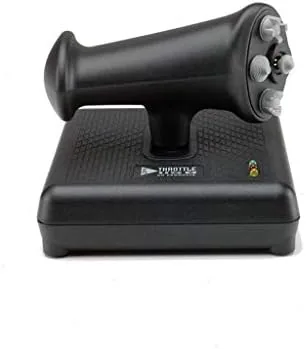
The Pro Throttle is a distinctive piece of hardware because it is designed for one hand only. It is a left handed throttle unit, which means it pairs naturally with a right handed joystick in a classic HOTAS arrangement. The sliding motion of the throttle, the placement of the hats, and the mini joystick on the grip all point to a product built by people who actually fly simulators and understand what a pilot needs within thumb reach.
Design and Build
The Pro Throttle has the same honest, industrial build quality as the rest of the CH line. The base is wide and heavy, with non skid feet that keep it planted on the desk, and the slide mechanism rides on a solid rail with a smooth, controlled action. The plastic is thick and the assembly feels durable, which is what you want from a control that will take years of aggressive throttle movement.
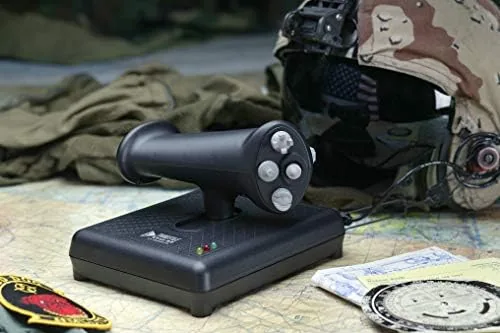
The grip itself is ergonomically shaped for the left hand, with the throttle lever moving forward and back along the rail. All of the controls sit within comfortable reach of the fingers and thumb, which is exactly what you want in a throttle. The mode button sits on the handle itself, so you can switch programming layers on the fly without taking your hand off the throttle, and colored LEDs on the base show which mode is active.
The overall footprint is modest for a control with this many functions. It takes up less desk space than you might expect, and the low profile means it does not interfere with a mouse or a notepad next to it. It is a well considered design that prioritizes function at every step.
Key Features
The most distinctive feature is the mini joystick built into the grip. This gives you two axes, X and Y, dedicated to precision pointing or camera movement. In practice, I found it excellent for freelook, targeting, or as a mouse emulator in cockpits that support it. It is a feature you rarely find on throttles, and it adds a surprising amount of capability.
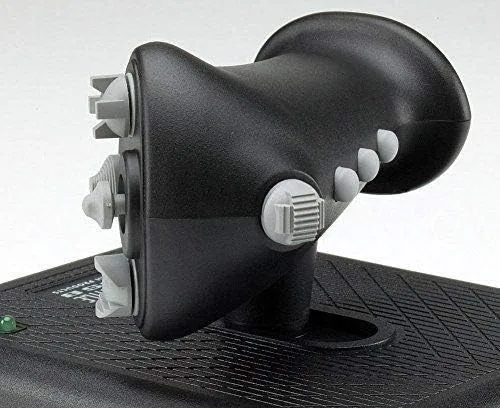
The throttle itself is the third axis, and it is the star of the show. The sliding motion is smooth and precise, with the kind of controlled resistance that lets you hold a power setting without the lever drifting. The travel is far longer than the throttle wheels found on joysticks, which makes fine power adjustments much easier during approaches and aerial refueling.
Around the throttle, you get three 4-way hat switches and one 8-way POV hat, plus a set of push buttons, all adding up to a formidable 24 buttons in total. Combined with the three switchable modes and the Control Manager software, the Pro Throttle supports up to 176 programmable functions. For a pilot flying a systems heavy aircraft, that level of control density is transformative.
Real-World Performance
I used the Pro Throttle as the throttle half of a HOTAS setup alongside a CH Fighterstick, and the pairing felt like it was always meant to be. The left hand naturally rests on the throttle, the right hand on the stick, and together they cover nearly every control I needed in both civilian and combat simulators. That division of labor is the whole point of the setup, and it works flawlessly.
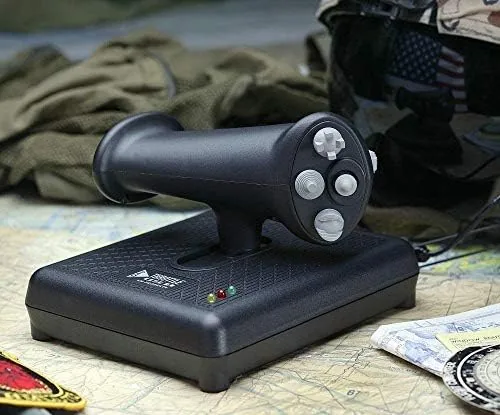
The throttle feel deserves particular praise. During precision flight, I could make small, controlled adjustments to engine power without the lever jumping or sticking, and holding a specific power setting for a long approach was effortless. The mini joystick became a favorite feature for camera control, letting me look around the cockpit smoothly without taking either hand off its primary control.
The hat switches and buttons all registered reliably throughout testing, and the three mode system worked as advertised. Switching modes on the fly with the handle mounted button was quick, and the color LEDs made it easy to tell which layer I was on without looking away from the screen. It is a system that is far more polished in practice than its old school appearance suggests.
The only real weakness is the same one that runs through the entire CH line. The software, Control Manager, is dated in appearance and Windows only, and the hardware itself has no twist rudder. For pilots who want a twist axis for rudder, that means separate pedals are required. But as a throttle, the Pro Throttle is about as good as the format gets.
Pros and Cons
Pros:
- Silky smooth slide throttle with a long, precise throw
- Built in mini joystick for camera, freelook, and precision pointing
- 24 buttons with three 4-way hats and one 8-way POV hat
- Three modes and up to 176 programmable functions
- Comfortable left handed ergonomics that pair with any right handed stick
- Stable base that stays put during aggressive throttle movement
Cons:
- Control Manager software is Windows only and dated in appearance
- No rudder axis, so pedals are needed for full control
- Standalone throttle means you still need a joystick to complete a HOTAS
How It Compares
To give the Pro Throttle context, I compared it against the throttle wheels built into typical joysticks and a competing dedicated throttle unit. The table below shows how they stack up.
| Feature | CH Pro Throttle | Joystick Throttle Wheel | Mid Range HOTAS Throttle |
|---|---|---|---|
| Slide travel | Long and precise | Very short | Long |
| Mini joystick | Yes | No | Often |
| Hats | 3 four-way, 1 POV | None | 1 to 2 |
| Programmable functions | 176 | None | Per game |
| Left handed design | Yes | N/A | Usually |
| Rudder axis | No | No | No |
| Price range | Budget | Included | Premium |
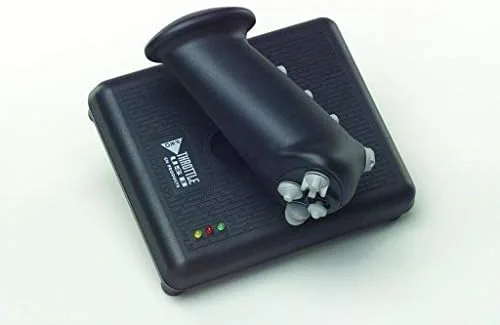
The comparison makes the value clear. A joystick throttle wheel is a compromise that works for casual flying but fails at precision, while a full HOTAS throttle bundle costs considerably more and typically offers fewer standalone programming options. The Pro Throttle sits in a sweet spot, giving dedicated pilots a proper throttle with genuine capability at a price that undercuts the premium bundles.
Who Should Buy It
Buy the Pro Throttle if you already own a joystick and want to complete a HOTAS without replacing your stick, or if you fly sims that demand precise engine control and easy access to many functions. It is especially good for combat pilots who manage radar, weapons, and systems alongside the throttle.
Skip it if you prefer an all in one bundle, or if you want rudder control without buying pedals. The Pro Throttle is a specialist tool for a specific job, and it does that job superbly. You can find the current listing for the CH Products Pro Throttle USB on Amazon to compare prices and availability.
How We Test
I tested the Pro Throttle as part of a full HOTAS setup over several weeks, using it across civilian airliner, general aviation, and modern combat simulators. I evaluated the slide smoothness, the precision of the mini joystick, and the reliability of every hat and button during continuous use.
I also tested the three mode programming system with Control Manager, mapped a full combat loadout, and compared the throttle to joystick throttle wheels in a head to head session. The verdict is based on real flight hours in varied conditions, using the same methodology I apply to every input device I review. Industry references such as TechRadar take a similar hands on approach when assessing simulation hardware.
Questions People Ask
Is the Pro Throttle designed for left handed use?
Yes. The Pro Throttle is built for the left hand so it pairs with a right handed joystick in a classic HOTAS arrangement, with the throttle lever moving forward and back.
Does the Pro Throttle have its own joystick?
Yes. The grip contains a mini joystick with X and Y axes, which is excellent for precision pointing, camera freelook, or as a mouse emulator in compatible cockpits.
How many programmable functions does the Pro Throttle offer?
With three switchable modes and the Control Manager software, the Pro Throttle supports up to 176 programmable functions across its 24 buttons and hats.
Does the Pro Throttle need a separate power adapter?
No. It is powered entirely through a single plug and play USB cable, with no drivers required for basic operation and no external power source.
The CH Products Pro Throttle USB on Amazon remains one of the most capable standalone throttles you can buy, and it earns its place in any serious sim pilot's cockpit.
As an Amazon Associate, I earn from qualifying purchases.