Most gaming keyboards ask you to choose between speed and practicality. The Razer Huntsman V3 HE TKL makes that choice easier by keeping the keys you use every day while building in serious competitive speed. It drops the number pad but keeps the function row, the arrows, and the navigation cluster, and it fills the switches with Hall effect magnetic technology instead of mechanical contacts. The result is an 8000 Hz wired board with Rapid Trigger, Snap Tap, and Snap Flex, wrapped in a layout that does not make you relearn typing. I spent two weeks with this keyboard, splitting time between competitive shooters and real work, and this review records how it handles both.
Before the details, the disclosure. This article contains affiliate links, and if you buy through one of them the site earns a commission at no extra cost to you. That never changes what I test or what I recommend.
Design and Build
The TKL form factor is the middle ground that many players actually want. It cuts the number pad, which few gamers touch, but it leaves the main typing block, the function row, the arrows, and the navigation keys exactly where decades of habit expect them. On my desk, the keyboard freed up real estate for a wider mouse sweep without forcing me to memorize layers for everyday keys.
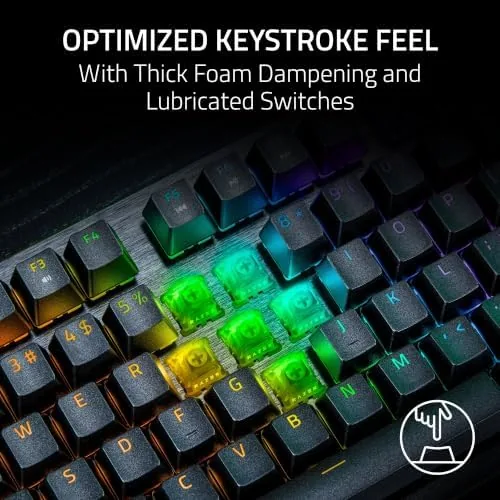
The construction is sturdy without being showy. An aluminum top plate gives the frame rigidity, the board has almost no flex under aggressive typing, and the doubleshot keycaps have a matte texture that stays comfortable in long sessions. The keyboard sits on a rubber base that grips the desk, and the detachable braided USB cable means the board packs easily for travel or a LAN night.
Key Features
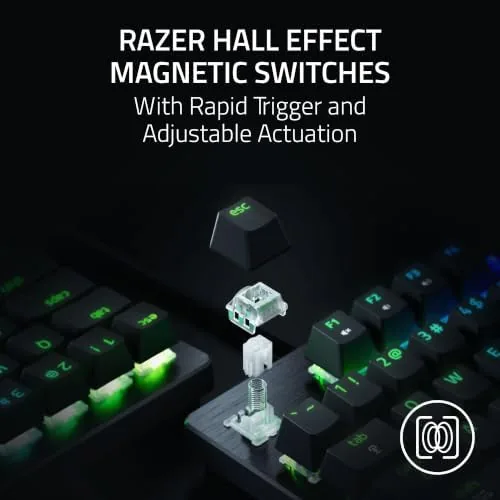
The Hall effect magnetic switches are the defining technology. Each key carries a magnet, and a sensor reads its position continuously, with no physical contact between moving parts. That design brings two advantages: the switches have nothing to wear down over years of use, and the keyboard knows exactly how far every key is pressed at all times, which unlocks the speed features below.
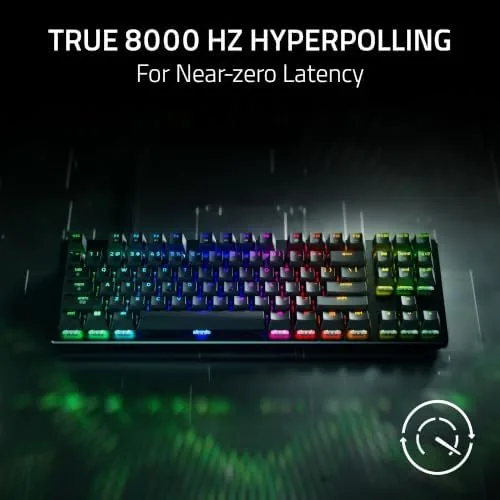
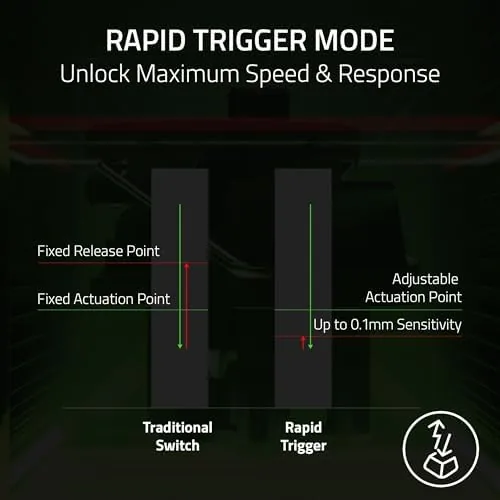
Rapid Trigger is the feature that changes how repeated inputs feel. Instead of waiting for a key to reset at the top of its travel, the switch resets the moment you start to release, so rapid taps register at maximum frequency. The 8000 Hz polling rate keeps those inputs flowing to your system at eight times the rate of a standard board, which matters when a duel comes down to a single frame.
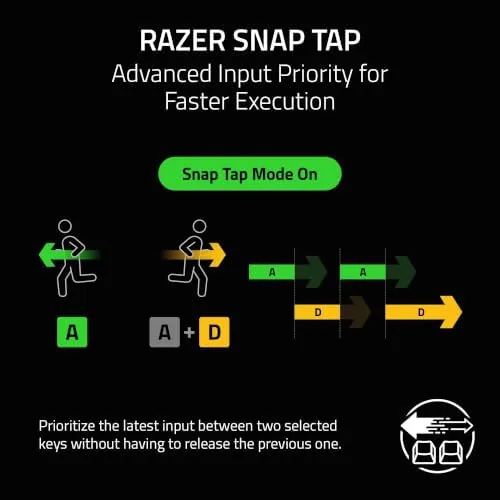
Snap Tap and Snap Flex handle the movement side of competitive play. Snap Tap gives priority to the newest key pressed between two bound inputs, which sharpens strafing and counter-strafing. Snap Flex tunes the sensitivity of that priority so you can dial the behavior from crisp to forgiving. Adjustable actuation rounds out the feature set, letting you set a different trigger depth for every single key. For a current look at the price and the available layouts, the Amazon listing for the Razer Huntsman V3 HE TKL is a useful reference.
Real-World Performance
I used this keyboard as my daily driver for two weeks, switching between a competitive shooter and regular work without changing boards. The split personality is the TKL's real strength. In the game, Snap Tap tightened my strafing the same way it does on the compact model, and Rapid Trigger made every rapid input feel crisp and immediate. Between matches, the same keyboard typed out long documents without missing a beat.
The layout made the transition painless. Because the function row and arrows stayed in place, I did not lose my typing muscle memory, and the numpad's absence never came up in gaming. The per key actuation let me set the movement keys to a shallow trigger for instant response while keeping the keys I type on at a deeper point, which reduced accidental presses without slowing me down.
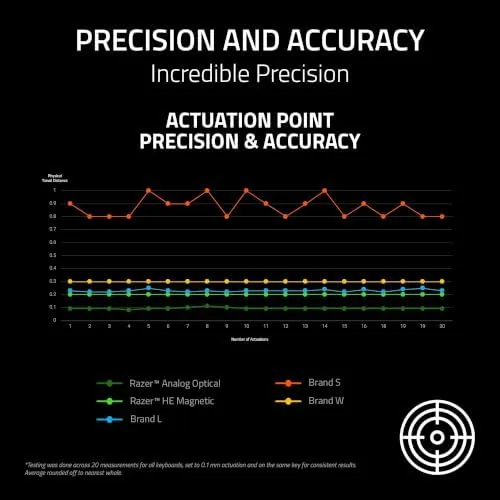
Typing quality surprised me in the best way. Hall effect switches feel linear and smooth, and the stabilized keys on the spacebar and shifts sounded consistent rather than rattly. The board is quiet enough for shared spaces, with a soft bottom out that did not fatigue my hands during a long writing session.
Latency felt effectively invisible in play. Dueling in a shooter, the keyboard never once felt like the bottleneck, and the 8000 Hz rate combined with Rapid Trigger produced the same instant, predictable response on every input. The RGB lighting is bright and configurable, and the software held my profiles across both Gaming and Work settings without fuss.
Honest criticism comes in two places. The first is price, which sits firmly at the top of the wired keyboard market. The second is that the advanced tuning lives in the Razer software, so a first time user should budget a session to set up actuation and Snap profiles. Neither is a flaw in the hardware, and both are the predictable cost of this much control.
Pros and Cons
Pros:
- Keeps the function row and arrows for practical daily use
- Hall effect switches enable per key adjustable actuation
- Rapid Trigger delivers faster repeated inputs
- Snap Tap and Snap Flex sharpen competitive movement
- 8000 Hz polling keeps input latency extremely low
- Solid aluminum build with little flex and easy travel packing
Cons:
- Number pad is gone for anyone who works with figures
- Premium price at the top of the wired market
- Advanced features depend on Razer software tuning
- Linear switches will not suit fans of tactile feedback
How It Compares
At this tier you choose between compact 65% boards, full size boards, and TKL boards like this one. I compared the Huntsman V3 HE TKL against a 65% Hall effect board and a full size mechanical board.
| Feature | Huntsman V3 HE TKL | 65% Hall Effect Board | Full Size Mechanical |
|---|---|---|---|
| Layout | TKL, no numpad | 65%, no function row | Full size with numpad |
| Switch technology | Hall effect magnetic | Hall effect magnetic | Mechanical contacts |
| Rapid Trigger | Yes | Yes | No |
| Function row | Yes | No | Yes |
| Typing comfort | High, standard spacing | Medium, compact spacing | High, full spacing |
| Price | Premium | Premium | Mid range |
Against a 65% Hall effect board, the TKL wins on everyday practicality, since it keeps the function row and standard key spacing for comfortable typing, while giving up nothing in speed features. Against a full size mechanical board, the TKL wins on response and desk space, since no mechanical board can match per key actuation and Rapid Trigger. The 65% board wins if you want the smallest footprint, and the full size board wins if a numpad is essential. For a player who also types, the TKL is the most balanced choice of the three.
Who Should Buy It
Buy the Huntsman V3 HE TKL if you want competitive speed without abandoning the layout you already type on, if your desk is too small for a full size board but too busy for a 65%, or if you want a single Keyboard That moves between gaming and work without a swap. It is also a strong pick for players who want per key actuation control.
Skip it if you crunch numbers and cannot live without a numpad, if you prefer tactile switches to linear ones, or if the premium price is beyond what you want to spend on input. For a gamer who types, this is the sweet spot of the Huntsman family. You can check the current price for the Huntsman V3 HE TKL on Amazon when you are ready to upgrade.
How We Test
I tested the TKL over two weeks as my only keyboard, alternating between competitive shooters and daily typing and document work. I compared response with Rapid Trigger and Snap Tap on and off, tuned per key actuation for different games, and checked typing comfort over long sessions.
I used the Razer software to build separate gaming and work profiles and to adjust Snap Flex sensitivity, and I carried the board between two desks using the detachable cable. I did not measure latency with a hardware rig, so latency findings are based on subjective competitive play. For independent coverage of Hall effect keyboards, reviews such as TechRadar's review of the Keychron K2 Ultra 8K examine the same switch technology. The Huntsman V3 HE TKL listing on Amazon shows the current price and available options.
Razer Huntsman V3 HE TKL: Questions People Ask
What is the difference between TKL and full size keyboards?
A TKL keyboard removes the number pad but keeps the main typing block, the function row, and the arrow and navigation keys, so it saves desk space without giving up the keys you use every day.
Can I set a different actuation point for each key?
Yes. The Hall effect switches allow per key actuation tuning through the Razer software, so each key can trigger at a depth that suits your play style and your typing habits.
Is the Huntsman V3 HE TKL good for typing as well as gaming?
Yes. The linear Hall effect switches feel smooth and consistent for typing, and the TKL layout keeps the keys most people need for work within easy reach.
Does this keyboard work with game consoles?
The board is a wired USB keyboard and works with platforms that support USB keyboards. The advanced tuning features are set up on PC through the Razer software.
As an Amazon Associate, I earn from qualifying purchases.