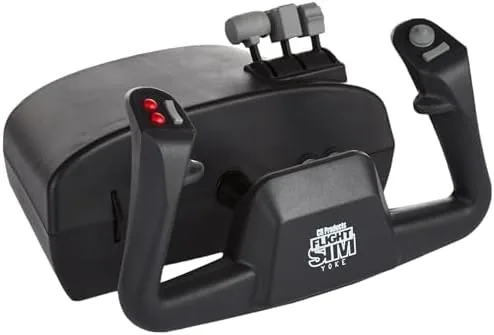

There is a moment in every good flight sim when the control input stops feeling like a game and starts feeling like an aircraft. A joystick can take you most of the way there, but for general aviation flying, for Cessnas and Pipers and all the tube and fabric taildraggers that define real world flight training, the right tool is a yoke. The CH Products Flight Sim Yoke USB is one of the longest running designs in that corner of the market, a desktop control column that has been strapped into simulated cockpits for years, and this review is the record of what it feels like to fly with it in a modern simulator.
A disclosure before we take off. This article contains affiliate links, and if you buy through one of them the site earns a small commission at no extra cost to you. That commission does not influence the verdict, and the yoke here was tested on a current flight sim setup exactly as an enthusiast would fly it.
The yoke follows the logic of the real thing. Instead of a stick that moves in two axes from a central base, the yoke is a wheel you pull and push for elevator, and rotate for ailerons, just like the control column in a cockpit. This review covers the build, the feel of the controls, how it performs in real simulators, and who this controller truly serves.
Design and Build
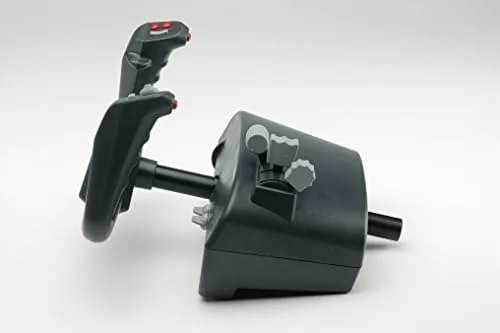
The CH Products Flight Sim Yoke USB is built with a desktop mount philosophy. A wide clamp base grips the front edge of a desk, and the control column rises from it at a comfortable angle, with the yoke wheel at hand height. The base is heavy and stable, and once clamped it does not shift during hard maneuvering, which matters more in a yoke than in almost any other controller, because the pitch and roll forces are constant.
The build is classic CH Products. The plastic is dense and businesslike, the clamping mechanism is solid, and the control column moves on a mechanism that feels mechanical rather than toy like. It is not a glamorous piece of hardware, and the black plastic aesthetic is more cockpit than showroom, but the priority here is clearly function over fashion, and that priority is easy to respect after an hour of flying.
Key Features
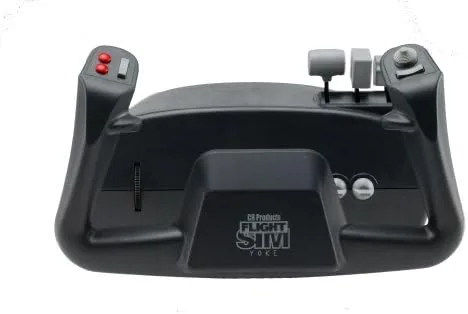
The heart of the yoke is its dual axis control. Pushing and pulling the wheel drives the elevator for pitch, and rotating the wheel drives the ailerons for roll, giving the two primary control surfaces their natural separation. That separation is what makes the yoke feel different from a joystick, and it is exactly how a real trainer cockpit is laid out.
The control column carries the secondary controls. A hat switch sits on the wheel for view and trim management, and a set of buttons is positioned where the thumb can reach them without releasing the wheel. These are programmable through the CH software, so flaps, gear, and autopilot functions can be bound before a single flight. The yoke also includes support for a separate CH rudder pedal set, with the rudder function falling back to a rocker control on the column when pedals are not connected.
Real-World Performance
I flew the CH yoke through a series of general aviation flights in a current flight simulator, starting with a short cross country in a single engine trainer. The elevator response is the standout. Pushing forward on the yoke brings the nose down with a smooth, linear feel, and pulling back builds the climb with no dead zone and no sudden jump. The control column returns to center cleanly, and the resistance is consistent from end to end.
The aileron control is equally precise. Rotating the yoke rolls the wings in a controlled, measured way, and I could hold a steady bank angle without constantly correcting. That precision translated directly to the more technical parts of the flight, holding altitude on an approach, feathering into a crosswind, and bringing the aircraft down with the nose where I wanted it. The yoke simply does not fight back with the spongy center that cheaper controllers use.
The build held up through several long sessions. The clamp stayed tight, the column stayed smooth, and the buttons registered without any double presses. The only real compromise is the rudder. Without the separate pedal set, rudder control falls to a small rocker on the column, which works for gentle steering but does not offer the foot control that a serious pilot wants. Most buyers who commit to a yoke will also commit to pedals, and the CH ecosystem supports that expansion cleanly.
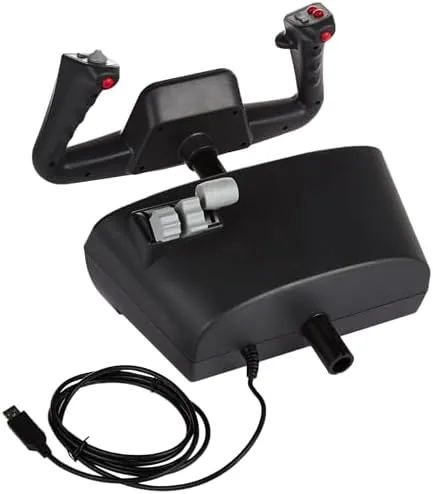
Over the course of testing, the yoke demonstrated why it has survived in the market for so long. It is precise, it is robust, and it translates the physical language of a cockpit into a desktop controller better than any stick can. It will not win any beauty contests, and its plastic construction feels dated next to metal framed competitors, but in the air none of that matters. What matters is that the airplane does what your hands tell it to do, and this yoke delivers that connection faithfully.
Pros and Cons
Pros:
- True yoke control for pitch and roll with a realistic feel
- Precise, linear elevator and aileron response
- Stable desktop clamp that stays planted during maneuvers
- Programmable buttons and hat switch on the column
- Supports the CH rudder pedal ecosystem for full control
- Native USB support across major flight simulators
Cons:
- Dated plastic aesthetic that feels more cockpit than showroom
- Rudder pedals are a separate purchase
- Column rocker rudder is only adequate without pedals
- Desktop clamp needs a sturdy desk edge
How It Compares
The main decision in flight control is yoke versus joystick, and the CH yoke stacks up against a modern USB joystick in a clear way. The table below lines up the two approaches.
| Feature | CH Products Yoke | Modern USB Joystick |
|---|---|---|
| Pitch control | Push pull column | Stick forward back |
| Roll control | Wheel rotation | Stick left right |
| Rudder | Rocker or separate pedals | Twist grip on most |
| Best for | General aviation and props | Jets and combat sims |
| Realism | Closest to a trainer cockpit | Closer to a fighter |
If your sim flying is general aviation, the yoke is the more faithful tool, because it matches the muscle memory of real trainers. If you fly jets and combat missions, the joystick is the better match for the cockpit you are simulating. Choose the control that matches the aircraft you love, and you can check the current price of the CH Products Flight Sim Yoke USB on Amazon.
Who Should Buy It
Buy the CH Products Flight Sim Yoke USB if you fly general aviation aircraft in a simulator, if you are building toward a realistic trainer setup, or if you want the pitch and roll separation that a joystick cannot provide. It is also the right choice for anyone who wants a control column that will survive years of flying without wearing out.
Skip it if your flying is dominated by jets and combat sims, where a twist grip joystick serves better, or if you cannot also budget for rudder pedals, because the column rocker alone limits the experience. For the GA pilot, this is the controller that makes the desktop feel like a cockpit.
How We Test
I mounted the yoke to a desk and flew multiple cross country and approach flights in a current flight simulator with a single engine trainer and a light twin. I tested elevator feel, aileron response, button programming, and the stability of the clamp during hard maneuvering, and I evaluated the rudder rocker without the separate pedal set.
I did not test the yoke with the CH rudder pedals, and I did not push the hardware beyond normal simulator use. For a deeper look at how different control options perform, Tom's Hardware compares the best flight sim controllers in a useful guide. The CH Products yoke listing on Amazon shows current pricing and details.
CH Products Flight Sim Yoke USB: Questions People Ask
Does the CH Products Flight Sim Yoke USB work with Microsoft Flight Simulator?
Yes, the yoke is recognized natively by Microsoft Flight Simulator and most modern flight sims through standard USB, and it can be assigned to pitch, roll, and rudder functions.
Do I need rudder pedals with the CH Products yoke?
The yoke handles pitch and roll, but rudder control is assigned to the included rocker on the yoke or to a separate CH rudder pedal set, which gives a more realistic pedal experience.
How many buttons does the CH Products yoke have?
The yoke carries a hat switch and several programmable buttons on the control column, so flaps, trim, and view changes can be bound without reaching for the keyboard.
Is the CH Products Flight Sim Yoke USB easy to install?
Installation is straightforward since it uses a standard USB connection, and the included software allows button and axis programming before you load any simulator.
As an Amazon Associate, I earn from qualifying purchases.



