 Ultrawide Monitor on a desk with a laptop connected by a single USB-C cable" width="1200" height="800" loading="lazy" style="height:auto">
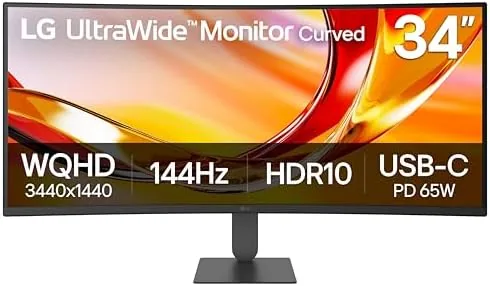
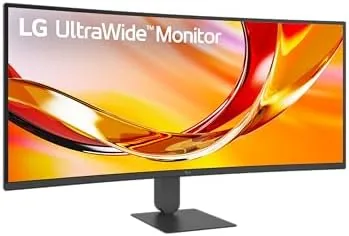
For years I kept a pair of 24 inch Monitors side by side, and I did not think much about the seam running down the middle until I started reviewing ultrawide panels. The LG 34U640B-B makes that seam a memory. This is a 34 inch curved monitor with a 21:9 panel running at 3440 by 1440, a refresh rate of 144Hz, FreeSync Premium, HDR10, and a USB-C port that delivers 65W of power to a connected laptop. It is aimed at professionals who want one clean line of screen real estate instead of two mismatched displays. I spent three weeks with it as my daily driver, running spreadsheets, code, photo editing, and a fair amount of evening gaming, and this review is the honest record of what it did well and where it stumbled.
Before the details, the standard note. This article contains affiliate links, and if you buy through one of them the site earns a small commission at no extra cost to you. That commission never changes what I test or what I recommend.
Design and Build
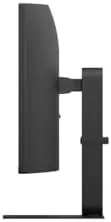
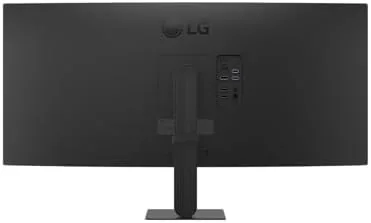
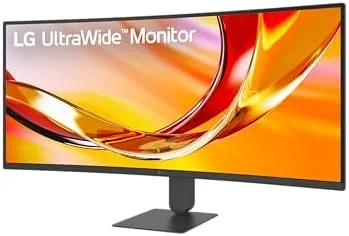
The first thing you notice is the curve. At 34 inches across, the gentle 1800R arc wraps the edges of the panel toward you, which is a meaningful advantage on a screen this wide because the outer edges of a flat 21:9 display sit at awkward viewing angles. The bezels are slim on three sides, and the panel has a clean, understated look that fits a home office without shouting. The stand is a solid V-shaped piece of aluminum with a fully adjustable head: tilt, height, and a modest swivel, all moving with smooth, predictable resistance.
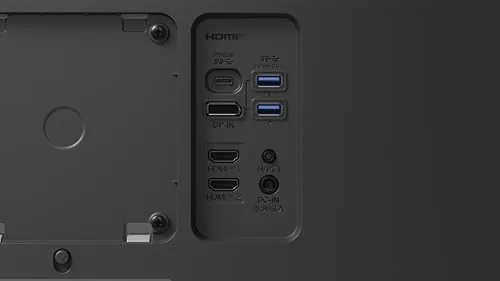
Assembly took about ten minutes and needed only the included screwdriver. The monitor supports a 100 by 100 millimeter VESA mount, so you can attach it to an arm if you want the stand out of the way. The port selection lives on the back of the panel: two HDMI inputs, one DisplayPort, one USB-C upstream port, and a small cluster of USB downstream ports. The power adapter is external, which keeps the panel thin. I have no complaints about the build quality; nothing creaks, the stand never wobbles even when I shake the desk, and the matte coating resists fingerprints better than most panels I have reviewed this year.
Key Features
The headline numbers are the reason this monitor sits in the mid range rather than the budget aisle. The 3440 by 1440 resolution gives you about a third more horizontal space than a standard 2560 by 1440 panel, and at 34 inches the pixel density is comfortable for long sessions. The 144Hz refresh rate is the other big draw. Combined with FreeSync Premium, it smooths out fast motion for games, and it also makes ordinary desktop scrolling feel fluid in a way you stop noticing until you use a 60Hz screen again.
The USB-C port is the quiet hero of this design. One cable carries DisplayPort video, delivers up to 65W of power, and gives your laptop access to the monitor's USB hub. That single-cable desk setup is genuinely convenient, and 65W is enough to run and charge most thin and light laptops without a second brick. HDR10 is supported, though as with most monitors in this class the HDR effect is mild rather than transformative, which I will cover in performance. You can check the current price of the LG 34U640B-B on Amazon while you consider whether these features fit your workflow.
Real-World Performance
For work, this monitor is the strongest argument for ultrawide that I have tested in months. I ran two full browser windows side by side, a code editor on the left and a documentation page on the right, and both stayed perfectly legible without scaling. A 3440 by 1440 desktop effectively replaces a dual monitor setup for most tasks, with the benefit that you never fight a bezel seam and you never lose a window in the gap between panels. Spreadsheets benefit enormously, because a 21:9 panel shows many more columns than a 16:9 screen at the same zoom level.
The 144Hz refresh is immediately apparent when you move a window around the desktop, and it becomes a real advantage in games. I played a racing title and a fast shooter, and motion stayed clean with no visible tearing once FreeSync Premium was engaged over DisplayPort. Input lag felt negligible. The panel handles color well out of the box, with a slight warmth that most users will find pleasant, and the matte coating keeps reflections to a minimum in a room with a window.
Now the honest limitations. HDR10 is supported, but the panel is not bright enough for HDR to transform the picture the way it does on a premium display; bright highlights look flatter than they should, and I kept HDR off for most desktop work. The monitor has no built-in speakers, which is worth knowing before you unbox it, because a monitor at this price often includes at least passable audio. And while 3440 by 1440 is a sweet spot for work, it is a demanding resolution for gaming, so you will need a capable graphics card to reach high frame rates in modern titles.
Pros and Cons
Pros:
- 3440 by 1440 ultrawide panel replaces a dual monitor setup for most work
- 144Hz refresh with FreeSync Premium keeps motion smooth in games
- USB-C delivers video and 65W charging through one cable
- Fully adjustable stand with tilt, height, and swivel
- Thin bezels and clean matte finish suit a professional desk
- VESA mount ready for an arm or wall mount
Cons:
- HDR10 support is mild and will not impress HDR enthusiasts
- No built-in speakers, so external audio is required
- USB downstream ports are sparse on some configurations
- 144Hz at this resolution demands a strong GPU for gaming
How It Compares
An ultrawide monitor competes against a few very different setups, so I compared the LG 34U640B-B against a dual 24 inch display arrangement and a flat 32 inch 4K monitor to see where each earns its money.
| Feature | LG 34U640B-B | Dual 24 Inch Displays | 32 Inch 4K Monitor |
|---|---|---|---|
| Screen real estate | One seamless 21:9 view | Two panels with a bezel seam | More vertical space, similar width |
| Refresh rate | 144Hz | Usually 60Hz | Usually 60Hz |
| Setup footprint | Single stand | Two stands or one dual arm | Single stand |
| USB-C charging | 65W power delivery | Usually none | Varies by model |
| Gaming suitability | Excellent with FreeSync | Moderate | Moderate at 60Hz |
| Price | Mid range | Varies | Mid to high range |
Against dual monitors, the ultrawide wins on seamlessness, simplicity, and refresh rate, though you lose the ability to push one window into portrait orientation. Against a 32 inch 4K display, the ultrawide offers more horizontal space and a much smoother refresh, while the 4K panel wins on raw pixel density and sharper text. For someone whose work is dominated by side by side windows and who also games, the LG 34U640B-B is the better all rounder of the three. For detailed guidance on what to look for in this category, the RTINGS ultrawide monitor guide is a reliable independent reference.
Who Should Buy It
Buy this monitor if you spend your day with two or more windows open, if you have outgrown a single 16:9 panel, or if you want one clean desk instead of two stands and a tangle of cables. It is an especially good fit for developers, financial analysts, photo editors, and anyone who reads spreadsheets for a living, because the extra horizontal space is the whole point of the format.
Skip it if you need true HDR performance, if you do most of your work in portrait orientation, or if your budget forces a choice between this and a 4K panel for color-critical work. For everyone else, this is one of the more complete ultrawide packages at its price, and you can check the current price for the LG 34U640B-B on Amazon when you are ready to upgrade your desk.
How We Test
I used the LG 34U640B-B as my only monitor for three weeks, which is the test that matters most: I judged whether it could replace a real daily setup rather than just sitting on a bench. I ran spreadsheets and code windows side by side, edited photographs, watched streaming video, and played several games to test the refresh rate and FreeSync behavior.

I verified the USB-C power delivery by running a laptop under load from a single cable, checked the OSD controls for ease of use, and assessed the stand adjustments over repeated daily repositioning. I did not use a calibrated colorimeter for this review, so my color comments are based on trained eye assessment rather than measured values. The Amazon listing for the LG 34U640B-B has the current pricing and the exact port configuration for each bundle.
LG 34U640B-B UltraWide Monitor: Questions People Ask
Does the LG 34U640B-B support 144Hz over USB-C?
Yes. The USB-C port carries DisplayPort Alt Mode, so a single cable delivers video at the full 144Hz while also providing 65W of charging power to a connected laptop.
Can the LG 34U640B-B charge a laptop?
Yes. The USB-C port supplies up to 65W of power delivery, which is enough to run and charge most thin and light ultrabooks through a single connection.
Is this LG ultrawide good for office work?
The 3440 by 1440 resolution and 21:9 ratio fit two full windows side by side without scaling, which makes spreadsheets, code, and documents noticeably easier to manage.
Does the LG 34U640B-B have built-in speakers?
No. The monitor does not include speakers, so you will need headphones or external audio for sound.
As an Amazon Associate, I earn from qualifying purchases.



