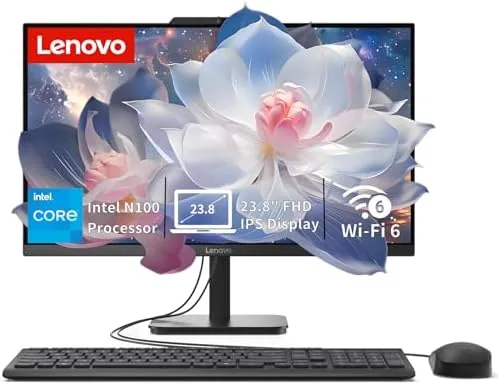

There is a moment in every home office when the tower computer becomes the enemy of the desk. It hogs the floor, it grows a forest of cables, and it makes the room feel like a server closet. The Lenovo IdeaCentre all-in-one answers that problem by putting the entire computer behind a 24 inch display, so one cord to the wall and one cable to the keyboard are all that remains. This review is the record of a month spent with that machine on a family desk.
Before the details, the standard note. This article contains affiliate links, and if you buy through one of them the site earns a small commission at no extra cost to you. That commission does not change what I test or what I recommend, and I treat every product here exactly the way I would treat one purchased with my own money.
Design and Build
The IdeaCentre looks the part of a modern all-in-one. The 24 inch panel sits on a clean stand with a slim profile, and the whole computer lives behind the screen, so there is no tower to hide and no tangle of cables behind the desk. The chassis feels solid, the stand holds the display steady at a comfortable height, and the overall footprint on the desk is dramatically smaller than a traditional desktop setup. It is the kind of machine that quietly makes a room look better without trying.
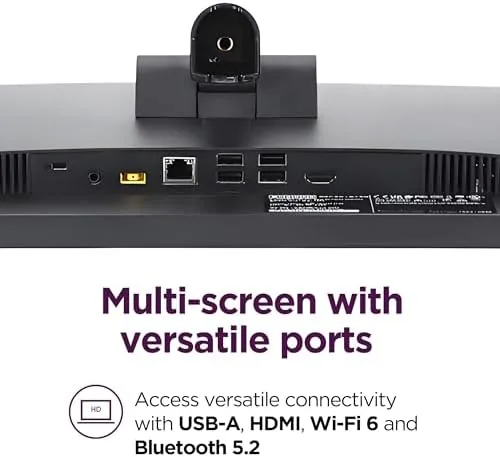
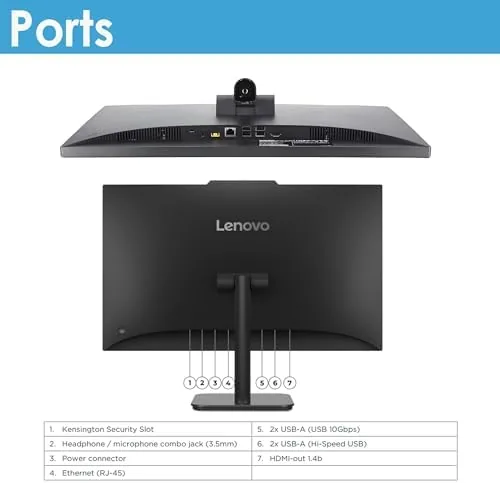
Port selection is practical for everyday life. Along the back and side of the machine you will find USB ports for a keyboard, mouse, and peripherals, an HDMI input so you can use the display with a laptop or game console, a headphone jack, and the power connection. The front-facing camera sits centered above the display, which keeps you looking at the camera during video calls, and the built-in speakers are loud enough for meetings and casual media playback without a separate speaker.
Key Features
The machine is powered by an Intel 4-core processor, which is the right level of power for an everyday all-in-one. It is not a workstation chip, and it is not meant to be. What it delivers is smooth, responsive behavior for browsing, document work, video calls, email, and streaming, which is precisely the workload a family desktop faces. Backed by 8 gigabytes of RAM and a 512 gigabyte SSD, the machine boots quickly and stays responsive as the day goes on.
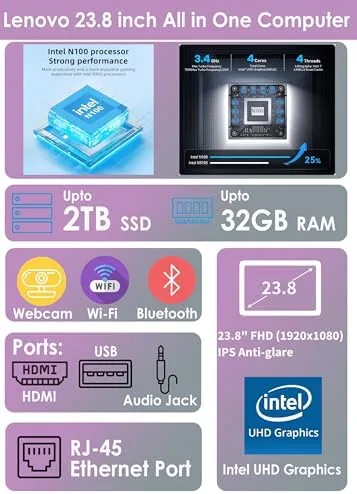
The 24 Inch FHD display is a genuine highlight. The IPS panel delivers wide viewing angles, so the picture does not wash out when someone leans in from the side, and the anti-glare coating keeps reflections at bay in a bright room. For all day work, reading, or watching video, the screen is comfortable and clear, and the full high definition resolution is perfectly suited to this size. This is not a content creation panel, but it is an excellent everyday display.
Connectivity is modern and dependable. WiFi 6 handles fast wireless networking, Bluetooth 5.2 pairs wireless keyboards, mice, and headsets without drama, and the machine ships with Windows 11 Home ready for daily use. The overall package is a self-contained desktop that needs almost nothing added to be useful the moment it is plugged in.
Real-World Performance
I used the IdeaCentre as the family desktop for a month, and it quietly handled everything that got thrown at it. Morning email and news, afternoon schoolwork and research, evening video calls with relatives, and streaming shows on a side tab all ran without complaint. The 8 gigabytes of RAM handled typical multitasking fine, and the SSD kept every interaction feeling immediate rather than waiting on a spinning disk.

The display made the biggest difference to everyday comfort. Working near a bright window is normally a battle with reflections, but the anti-glare coating kept the screen readable throughout the day. Video calls looked sharp through the front-facing camera, and the machine stayed whisper quiet even under a full load of browser tabs and a video stream, which is a real courtesy in a shared room.
The one honest limitation is headroom. With a large collection of heavy applications open at once, or with demanding editing work on the schedule, the 8 gigabytes of RAM will start to feel snug, and the integrated graphics are not for gaming. But for the everyday family workload this machine is built for, it delivered steady, reliable performance all month, with the only pause being my own curiosity about how far it could be pushed.
One small detail I grew to appreciate was the HDMI input on the back. When a guest brought a laptop over, or when the kids wanted to mirror a tablet to a bigger screen, the machine doubled as a monitor without any extra software or switching. That flexibility made The All-in-One feel like more than a single computer, and it quietly removed the need for a separate display in that room.
Pros and Cons
Pros:
- Clean all-in-one design removes the tower and cable clutter
- 24 inch anti-glare IPS display is comfortable for all day use
- 512GB SSD makes everyday tasks feel instant
- Runs quietly, which suits a shared home office
- Front-facing camera keeps video calls on point
- WiFi 6 and Bluetooth 5.2 for reliable wireless gear
Cons:
- 8GB RAM limits heavy multitasking headroom
- Integrated graphics rule out serious gaming
- Less upgradeable than a traditional tower
- All-in-one design makes servicing trickier
How It Compares
All-in-one desktops compete against both traditional towers and each other, so I compared the IdeaCentre with two machines I have worked with recently: a budget tower desktop with a separate monitor and a pricier all-in-one with a higher resolution display.
| Feature | Lenovo IdeaCentre | Budget Tower Setup | Premium All-in-One |
|---|---|---|---|
| Form factor | All-in-one, one cable | Tower plus monitor | All-in-one |
| Display | 24 inch FHD IPS | Separate 24 inch | 27 inch QHD |
| Processor | Intel 4-core | Comparable desktop chip | Faster desktop chip |
| Memory | 8GB | 8GB | 16GB |
| Storage | 512GB SSD | 256GB SSD | 1TB SSD |
| Upgradeability | Limited | Excellent | Limited |
| Desk footprint | Minimal | Large | Minimal |

Against the budget tower, the IdeaCentre gives up upgradeability but wins on desk space, cable management, and simplicity. The tower offers more headroom if you plan to swap parts later, but the all-in-one is the better everyday machine for anyone who just wants a computer that works. Against the premium all-in-one, the IdeaCentre trades a sharper screen and more memory for a much lower price while keeping the same tidy design. For a family desk or home office, it is the more sensible spend.
Who Should Buy It
Buy the IdeaCentre all-in-one if you want a tidy, dependable family desktop without the clutter of a tower. It suits home offices, study desks, and shared rooms where a clean setup matters, and the 512GB SSD plus 8GB of RAM covers everyday work comfortably. The anti-glare display and quiet operation make it a comfortable machine for long sessions, and the front camera handles modern video calls well.
Skip it if you need to open the machine and upgrade parts regularly, or if gaming and heavy creative software are part of your routine, because a tower will serve you better. For everyday computing, schoolwork, meetings, and media, this is a genuinely pleasant machine, and you can check the current Lenovo IdeaCentre price on Amazon to see today's deal.
How We Test
I used the Lenovo IdeaCentre as the primary family desktop for a month, covering email, web research, schoolwork, video calls, streaming, and light document editing. I worked near a bright window to test the anti-glare display, ran the machine under a full load of browser tabs and a video stream to check noise and responsiveness, and pushed multitasking to find where the 8GB of RAM starts to feel tight.
I did not attempt heavy gaming or demanding rendering workloads, since the integrated graphics make the outcome predictable, and I did not open the chassis for internal upgrades. For independent perspective on all-in-one desktops and what they offer, the buying guidance at PCMag on all-in-one computers is a reliable reference point for comparison.
The Lenovo IdeaCentre all-in-one listing on Amazon shows the current price and configuration options.
Lenovo IdeaCentre: Questions People Ask
How fast is the Intel 4-core processor in this IdeaCentre?
The quad core chip handles everyday tasks like browsing, office work, video calls, and media playback smoothly, which is exactly what this class of desktop promises.
Can you upgrade the RAM or storage on the all-in-one?
The 512GB SSD is the primary storage, and some configurations allow memory upgrades, though all-in-one designs are less open to servicing than traditional towers.
Is the 24 inch FHD display good for all day use?
Yes, the IPS panel offers wide viewing angles and the anti-glare coating reduces reflections, so it stays comfortable during long work or study sessions.
Does the IdeaCentre support WiFi 6 and Bluetooth 5.2?
Yes, modern WiFi 6 networking and Bluetooth 5.2 are built in, giving reliable wireless connections for the internet and for peripherals like mice and headsets.
As an Amazon Associate, I earn from qualifying purchases.



