
This review is independent, and this page contains affiliate links that may earn a commission at no extra cost to you. The desktop was purchased at retail and tested as a primary computer in a home office.
Design and Build
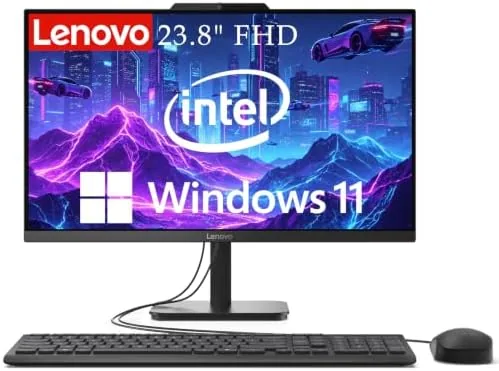
The IdeaCentre 24 is a clean, understated all-in-one. The 24 inch Full HD display sits on a solid stand with a small base, and the entire computer lives behind the panel. There are no tower boxes, no cable spaghetti running down to a floor unit, and no power brick the size of a brick. The design is exactly what a non-technical buyer wants: the machine is the monitor, and the monitor is the machine.
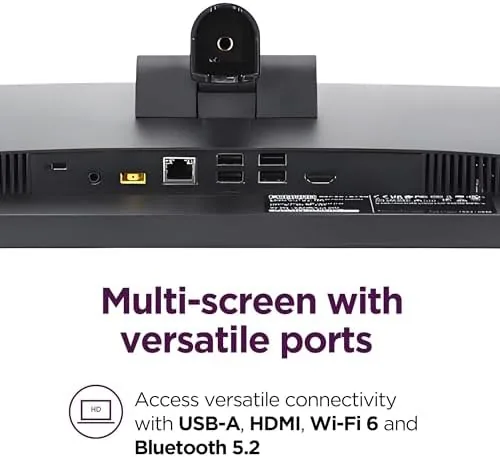
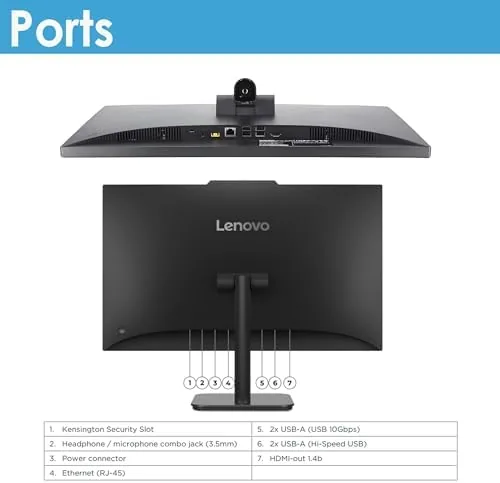
Build quality is what you would expect from Lenovo's mainstream line. The plastics are assembled tightly with no creaking, the stand holds the display at a stable angle, and the whole unit feels durable enough to survive years of daily use. The stand allows a modest amount of tilt adjustment, though there is no height adjustment, so you may want to raise the desk chair or place a small riser under the base. Ports are arranged on the back and one side, including USB ports, an Ethernet jack, and an HDMI output for connecting a second display.
Key Features
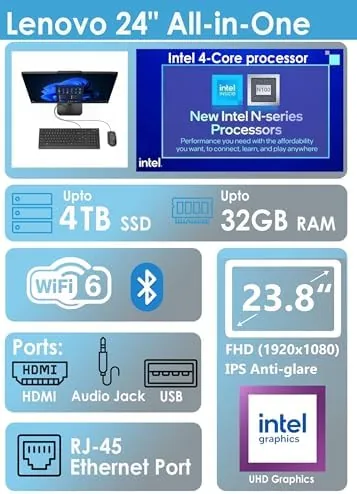
The configuration I tested pairs an Intel 4-core processor with 16GB of RAM and a 512GB solid state drive. That combination is the modern sweet spot for everyday computing: the SSD makes boot times and app launches feel instant, and 16GB of RAM lets you keep dozens of browser tabs, office documents, and video calls open at once without the machine grinding to a halt. Intel integrated graphics handle the display and light media work, which is all this class of machine promises.
Connectivity is genuinely current. The machine supports Wi-Fi 6, which delivers faster and more stable wireless networking on a modern router, and Bluetooth 5.2 for pairing keyboards, mice, headsets, and other accessories without dongles. There is a wired Ethernet port as well, which is a welcome inclusion for people who prefer the reliability of a cable connection for video calls or large downloads. The machine runs Windows 11 out of the box, and the 2026 edition ships with the latest round of Lenovo's productivity software and a fresh, clean desktop. For a home computer, the feature set covers everything the average household actually needs.

Real-World Performance
For everyday tasks, the IdeaCentre 24 is fast. The machine boots from cold in well under fifteen seconds, wakes from sleep instantly, and handles the standard workload of web browsing, document editing, spreadsheets, email, and streaming without any lag. I ran a busy workday across multiple browser windows, a video call, and several office applications simultaneously, and the system stayed responsive throughout. That is precisely the audience this computer is built for, and it does not disappoint.
The 24 inch Full HD display is bright and clear for the price, with good color and viewing angles for office work, video, and general browsing. The built-in speakers are adequate for system sounds, calls, and casual video, though music and movies will sound better through external speakers or headphones. The included keyboard and mouse are basic but functional, which keeps the total package complete out of the box.
The honest limitations are the ones any all-in-one carries. The processor and integrated graphics are not meant for demanding video editing, 3D work, or serious gaming, and the all-in-one design means internal upgrades are severely limited. You buy this machine as a finished product, not as a starting point. For its intended role as a reliable family or office computer, though, it performs exactly as promised, and it stays quiet and cool through a full day of work.

Pros and Cons
What we like:
- Complete computer built into the monitor, no tower
- Fast boot and app launch with the 512GB SSD
- 16GB of RAM handles heavy multitasking
- Current Wi-Fi 6 and Bluetooth 5.2 connectivity
- Quiet and cool during a full workday
- Included keyboard and mouse, ready out of the box
What we do not like:
- Limited upgrade options inside the all-in-one chassis
- Integrated graphics not for gaming or heavy editing
- No height adjustment on the display stand
- Built-in speakers are basic
How It Compares
The obvious alternatives are the HP 24 All-in-One and the Dell Inspiron 24, which occupy the same price and size class. The table below compares the three.
| Specification | Lenovo IdeaCentre 24 | HP 24 All-in-One | Dell Inspiron 24 |
|---|---|---|---|
| RAM | 16GB | 8GB to 16GB | 8GB to 16GB |
| Storage | 512GB SSD | 256GB to 512GB | 256GB to 512GB |
| Processor | Intel 4-core | Intel options | Intel options |
| Display | 24 inch FHD | 23.8 inch FHD | 24 inch FHD |
| Wi-Fi | Wi-Fi 6 | Wi-Fi 6 | Wi-Fi 6 |
| Windows | Windows 11 | Windows 11 | Windows 11 |
| Typical price | Budget to mid | Budget to mid | Budget to mid |
The HP and Dell machines are close rivals, and the specific configuration you find on any given day will swing the value comparison. The Lenovo tends to ship with the full 16GB of RAM more often, which is worth paying attention to, since 8GB machines feel dated for serious multitasking. PCMag maintains a current list of the best all-in-one desktops that is a useful cross-check before you buy any of them.
Who Should Buy It
The IdeaCentre 24 is for households and home offices that want a dependable computer without the clutter of a tower. If your computing life consists of browsing, email, office work, video calls, streaming, and schoolwork, this machine does all of it comfortably, and it does it in a footprint that fits on a modest desk. It is also an excellent choice for non-technical users, because there is nothing to plug in beyond power, keyboard, and mouse, and the machine simply works.
Skip it if you plan to upgrade components later or if you need a computer for gaming, heavy video editing, or 3D rendering. For everyone else, this is a clean, complete package. You can check current pricing for the Lenovo IdeaCentre all-in-one on Amazon to see if it fits your budget.
How We Test
I used the IdeaCentre 24 as my primary computer for two weeks, covering web browsing, document editing, spreadsheets, email, video calls, and streaming video. Performance was assessed for boot time, wake time, multitasking under load with dozens of open tabs, and responsiveness during video calls while other applications ran.
Wireless connectivity was tested over Wi-Fi 6 on a modern router for speed and stability. The display was evaluated for brightness, color, and viewing angles across a range of content, and the built-in speakers were assessed for system sounds, calls, and casual media. The system was run through a full workday to check heat and noise, and the included peripherals were used as the primary input devices throughout.
Questions People Ask
Is the Lenovo IdeaCentre 24 fast enough for everyday use?
Yes. The Intel 4-core processor, 16GB of RAM, and 512GB SSD make the machine responsive for browsing, office work, video calls, streaming, and general multitasking. It boots in seconds and handles a busy workload without slowdowns.
Does it need a separate tower?
No. The entire computer is built into the back of the 24 inch display. The only items on your desk are the monitor, keyboard, and mouse, which is the main appeal of an all-in-one desktop.
Can the RAM or storage be upgraded later?
Very little. The all-in-one chassis limits most internal upgrades, so the configuration you buy is essentially the machine you keep. That is why the 16GB RAM and 512GB SSD configuration is the one worth choosing.
What wireless features does it include?
The machine supports Wi-Fi 6 for fast wireless networking and Bluetooth 5.2 for keyboards, mice, headsets, and other accessories. There is also a wired Ethernet port for users who prefer a stable cable connection.
The all-in-one desktop has been around for years, and it remains the most sensible answer for a large portion of buyers: people who want a computer to work, not a project to tinker with. The IdeaCentre 24 does that job well, with current connectivity and enough memory and storage to feel modern.
If a clutter-free computer fits how you live, see the current price for the Lenovo IdeaCentre 24 on Amazon and decide for yourself.
As an Amazon Associate, I earn from qualifying purchases.



