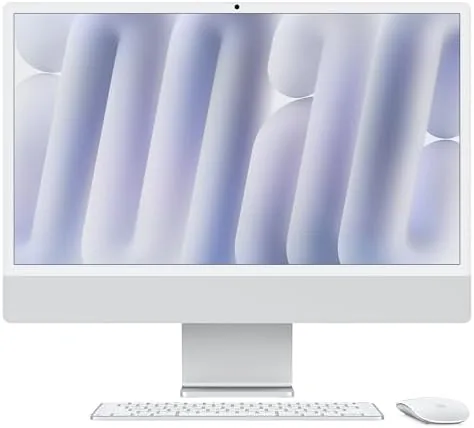

The all-in-one desktop has a habit of being either beautiful or powerful, rarely both. The 2024 iMac refuses that trade. With the M4 chip, 24GB of unified memory, and a 24 inch Retina display, it runs a full creative workload from a frame that looks like it stepped out of a showroom. I lived with the silver configuration for a month, testing it for work, media, and a generous amount of evening entertainment, and this review is what I found.
The disclosure first. This review contains affiliate links, and a purchase through one of them supports this site at no extra cost to you. That does not change what I test or recommend, and the machine reviewed was used exactly as a buyer would use it.
The rest of this review covers the design, the M4 performance, the display, the entertainment strengths, and how the iMac compares with a tower and monitor setup.
Design and Build
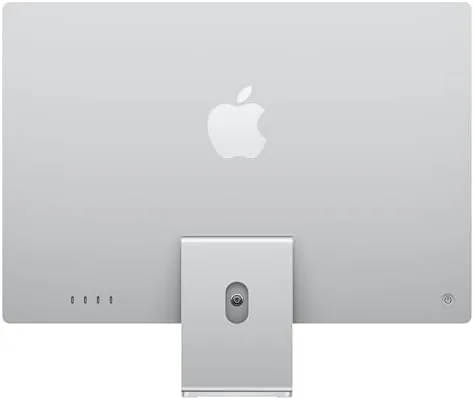
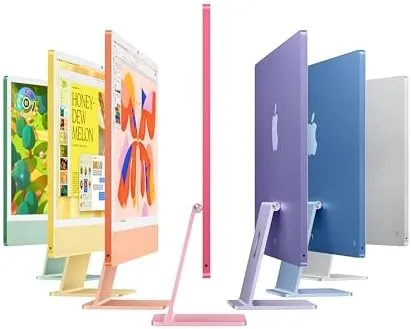
There is no other desktop that looks like this. The iMac is essentially a 24 inch display on a slim aluminum stand, with the entire computer hidden behind the screen. The silver finish is the most restrained of the lineup, clean and professional, and it disappears into a room rather than dominating it. The whole machine sits a little over a centimeter thick at its edge, and the footprint is just the screen and a stand.
The build quality is as good as the looks. The aluminum chassis is rigid, the stand keeps the screen exactly where you put it, and the included Magic Keyboard and Magic Mouse match the finish. Everything about the setup feels considered, from the single power cable that leaves the desk clutter free to the way the screen angles without fuss. It is the rare desktop that makes you want to sit down and work at it.
Key Features
The M4 chip is the engine, and this configuration pairs a 10 core CPU with a 10 core GPU. That is a serious amount of compute for an all-in-one, and it is the reason the iMac handles everything from editing to app development without breaking stride. The 24GB of unified memory means the CPU and GPU share one fast pool of RAM, which keeps heavy apps open and responsive instead of churning through swap.
The 24 inch Retina display is the other star. It carries a 4.5K resolution in a panel that is sharp from a normal seating distance, with P3 wide color and 500 nits of brightness. Colors look vivid without being oversaturated, text renders with the crispness Apple displays are known for, and the screen is bright enough for a room with big windows. It is not a touch screen, but for a desktop it does not need to be.
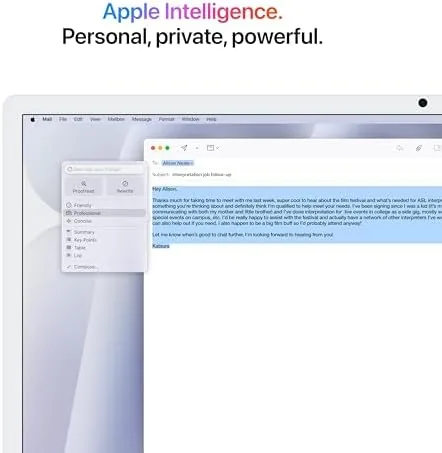
Storage comes in at 512GB of SSD in this build, which is generous for a base configuration and fast enough that apps and files open instantly. The iMac is built for Apple Intelligence, so Writing Tools, notification summaries, and the redesigned Siri run on device, and the six speaker system provides the sound to match the visuals for movies and games.

Real-World Performance
The M4 iMac is fast in the way you only notice when things do not slow down. I ran photo editing, video playback, document work, and a stream of browser tabs side by side, and the machine never once dropped to a crawl. Exporting a large photo library, rendering video, and juggling a dozen apps at once all happened without the fans spinning up into a roar, which is more than many desktops with far less elegant cases can claim.
Apple Intelligence became a quiet part of daily use. Writing Tools tightened my drafts, notification summaries kept a noisy inbox readable, and the new Siri handled questions with actual context. Because everything runs on the M4, nothing waits on a server, and the features felt like a native part of the system rather than an add on. It is early days for the technology, but the foundation is clearly there.
For entertainment, the iMac is quietly excellent. Streaming in 4K on the Retina display looks gorgeous, the six speaker array fills a room with clean, full sound that surprises for an all-in-one, and the screen handles bright movie scenes and dark ones with equal composure. Games are not the iMac selling point, but the 10 core GPU runs the growing library of Mac titles and Apple Arcade games smoothly at the native resolution, which is more than past iMacs managed.
The bundled accessories are part of the experience, and they deserve a mention. The Magic Keyboard types with the same soft, quiet confidence as the standalone model, and the Magic Mouse, while it splits opinion among ergonomics fans, worked well for the way I use a desktop. The whole package arrives ready to work, and setup took minutes rather than an afternoon of drivers and cable management, which is the all-in-one promise delivered properly.
The honest limits are the same ones every iMac faces. The all-in-one design means you cannot upgrade the graphics, storage, or memory later, so the configuration you buy is the one you keep. The 512GB of storage fills faster than you expect if you keep local media libraries, and the premium price climbs quickly when you add memory and storage at checkout.
Pros and Cons
Pros:
- M4 chip with 10 core CPU and GPU for serious speed
- 24GB unified memory keeps heavy apps responsive
- Stunning 24 inch 4.5K Retina display
- Quiet operation even under load
- Built for Apple Intelligence on device
- Six speaker sound that fills a room
Cons:
- All-in-one design cannot be upgraded later
- Premium price grows fast with configuration
- 512GB storage fills quickly for local media
How It Compares
The main alternative to an all-in-one is a tower and monitor, and the comparison comes down to simplicity versus flexibility. The table below lines up the two paths.
| Feature | 2024 iMac M4 | PC Tower and Monitor | Mac Mini and Monitor |
|---|---|---|---|
| Chip | M4, 10 core | Varies widely | M4 or M4 Pro |
| Display | 24 inch Retina | Your choice | Your choice |
| Upgradability | None | High | Limited |
| Footprint | One unit | Tower plus screen | Small box plus screen |
| Noise | Near silent | Varies | Very quiet |
| Best for | Clean desktops | Custom builders | Flexible setups |
If you want one beautiful unit that works out of the box and never asks you to open a case, the iMac wins completely. If you want to swap a graphics card in five years or pick your own monitor, a tower gives you freedom at the cost of clutter and assembly. For most people who buy an iMac, that trade is exactly the point.
Who Should Buy
Buy the 2024 iMac M4 if you want a desktop that is as elegant as it is fast, whether you edit photos, make music, write, or simply want a gorgeous machine for work and entertainment. It is ideal for creative professionals who value a clean setup, families who want one capable computer for everyone, and anyone who wants Apple Intelligence running locally.
Storage is the one choice worth thinking through before checkout. The 512GB drive handles apps, documents, and a reasonable media library, but photographers and videographers will want external drives or a larger internal option, because there is no way to open the case later. Buy for the storage you will need in three years, not the space that looks sufficient today, and the iMac will age far more gracefully.
Skip it if you know you will want to upgrade components later, or if your storage needs are already outgrowing 512GB. For everyone else, this is the desktop that makes other desktops feel like they are still using a different decade. You can check the current price of the 2024 iMac M4 on Amazon when you are ready.

How We Test
I used the silver 2024 iMac as my primary desktop for a month, running photo editing, video playback, document work, streaming, and gaming across the display. I monitored how the machine handled a heavy workload, judged the sound system with movies and music, and used Apple Intelligence features through real daily tasks.
I did not run formal benchmark suites, and I judged performance through sustained real use rather than synthetic numbers. For a detailed technical review of the M4 iMac, CNET has a full review of the 2024 iMac worth reading. The 2024 iMac M4 listing on Amazon shows current pricing and configuration options.
Apple 2024 iMac: Questions People Ask
Is the 2024 iMac M4 good for creative work?
Yes, the 10 core CPU and 10 core GPU handle photo editing, video, and music production smoothly, and 24GB of unified memory keeps heavy apps responsive.
Can the iMac run games and media well?
It handles streaming, video, and a growing library of App Store and Apple Arcade games well, though hardcore gaming still favors dedicated hardware.
Does the iMac support Apple Intelligence?
Yes, the M4 chip is built for Apple Intelligence, so Writing Tools, notification summaries, and the redesigned Siri run directly on the machine.
How much storage does this iMac include?
This configuration ships with 512GB of SSD storage, which is generous for apps and files, and you can move data to external drives when you need more room.
As an Amazon Associate, I earn from qualifying purchases.



