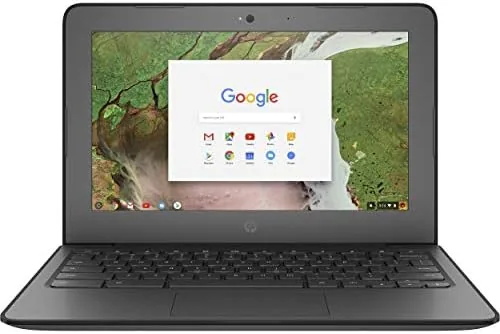
The Chromebook market has an unspoken promise: a small amount of money should buy you a machine that handles the daily grind of browsing, streaming, and light work without drama. The renewed HP 14 2-in-1 Chromebook tries to keep that promise with a 14 inch FHD touchscreen, an Intel CPU, 4GB of RAM, and 64GB of storage, all in a convertible that folds into a tablet. I used this unit as my primary laptop for two weeks, mixing web work, video calls, streaming, and note taking. This review is the record of how well a budget renewed Chromebook holds up when it is the machine you actually reach for every day.
Before the details, the standard note. This article contains affiliate links, and if you buy through one of them the site earns a small commission at no extra cost to you. That commission never changes what I test or what I recommend.
The renewed model brings a laptop look and a sensible spec list to a price that competes with tablets and basic Windows laptops. The rest of this review covers the chassis, the screen and hinge, performance in real use, and the honest limits of the memory and storage.
Design and Build
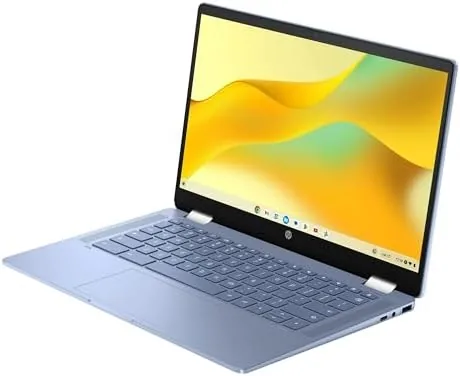
The HP 14 is a straightforward plastic chassis with a clean gray finish that hides fingerprints well. It is not a flagship build, but it feels solid for the price, with no flex in the lid and a hinge that holds its position through the full 360 degree rotation. The 14 inch size keeps the weight manageable for a bag, and the machine fits comfortably on a small desk or a lap tray.
The chassis layout is practical. The keyboard has a comfortable amount of travel for a budget machine, and the trackpad is large enough that you will rarely reach for a mouse. The speakers sit at the front and fire upward toward the user, which makes a real difference for video calls and streaming, and the fan stays silent through everyday work, so the machine never becomes a noise distraction.
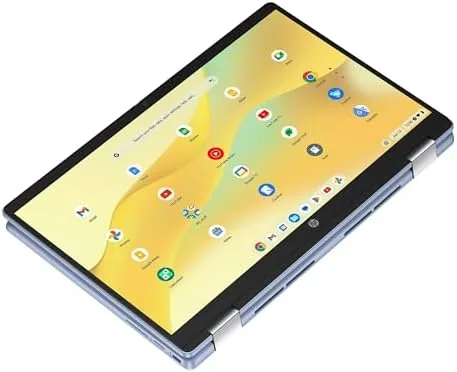
The 360 degree hinge is the design centerpiece. It lets the laptop fold flat for tablet mode, stand in tent mode for video, and sit upright in a presentation stance. The touchscreen works well in every position, and the hinge tension stays firm enough that the screen does not wobble while you type.

Key Features
The 14 inch FHD touchscreen is the strongest feature. It is sharp and bright for the class, with accurate enough color for everyday work and comfortable viewing angles. The touch response is reliable, and the display handles both productivity and streaming with no complaint.
The Intel CPU provides solid everyday performance for ChromeOS, and the machine ships with 4GB of RAM and 64GB of storage. ChromeOS is light on resources by design, so this modest spec handles the typical workload of a budget laptop user: a browser with tabs, Google Docs, video calls, and streaming apps.
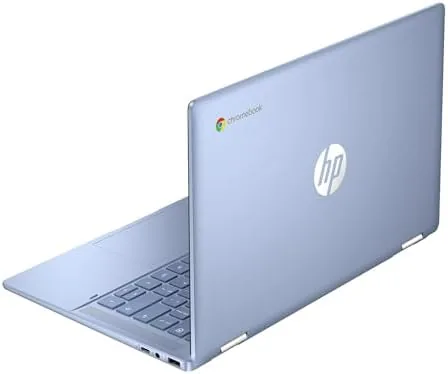
The port selection covers the basics with USB-C, USB-A, and a headphone jack, and the 2-in-1 form factor adds a front facing camera for video calls. As a renewed unit it runs the full ChromeOS experience, including access to Android apps from the Play Store, which expands what the modest hardware can do.
Real-World Performance
For the tasks this machine is built for, performance is fine. I kept a browser open with a dozen tabs across the workday, wrote in Google Docs, ran a video call, and streamed video, and the Chromebook handled it all without freezing. ChromeOS manages memory aggressively, and the machine stayed responsive in this normal workload.
The limits appear when you push it. With the RAM at 4GB, heavy multitasking means pages reload more often when you switch between tabs, and Android games or large apps churn through the available memory. This is not a machine for video editing or serious gaming, and it does not pretend to be one.
Battery life was the pleasant surprise. A full day of mixed use returned between eight and nine hours, which covers a workday without hunting for an outlet. The FHD screen and modest hardware sip power, and the machine charges through the USB-C port.
The renewed condition matters, and the unit I tested was in clean shape with a working battery and no visible screen blemishes. Renewed machines vary by seller, so it pays to read the condition notes, but this example performed exactly like a functional budget Chromebook should.
The Android app support also deserves a mention, because it changes how you think about the modest spec. Apps like Spotify, Notion, and drawing tools run natively, and the touchscreen makes the tablet mode genuinely useful for those apps. The machine will never be a powerhouse, but the software ecosystem keeps it relevant for a wide range of light tasks that a bare browser machine could not handle.
The camera and microphone quality also matter more than most budget laptop reviews admit, because video calls are now a daily task. The front camera handles a well lit room with a clean image, the microphones pick up speech clearly from a normal seating distance, and the placement above the screen means you are not looking down into the camera during calls. For students and remote workers this turns out to be one of the most used parts of the machine.
Storage is the other honest limitation. The 64GB eMMC holds the system, apps, and files, and it fills quickly if you download games or keep local media. Google Drive integration helps, and a microSD card would add room, but heavy local storage is not this machine's strength.
Pros and Cons
Pros:
- Sharp 14 inch FHD touchscreen
- Useful 360 degree 2-in-1 hinge
- Strong battery life for a full workday
- Light and portable for the class
- Full ChromeOS with Android app support
- Good value as a renewed unit
Cons:
- 4GB of RAM limits heavy multitasking
- 64GB storage fills quickly
- Plastic build, not premium feel
- Renewed condition varies by seller
How It Compares
The HP 14 competes with other budget Chromebooks and entry Windows laptops. The table below compares it against a typical budget Chromebook with 8GB of RAM and a basic Windows 11 laptop.
| Feature | HP 14 2-in-1 Chromebook | Budget 8GB Chromebook | Budget Windows Laptop |
|---|---|---|---|
| Screen | 14 inch FHD touch | 14 inch FHD touch | 15.6 inch FHD |
| Memory | 4GB | 8GB | 8GB |
| Storage | 64GB | 128GB | 128GB |
| Operating system | ChromeOS | ChromeOS | Windows 11 |
| Battery | 8 to 9 hours | 9 to 10 hours | 6 to 7 hours |
| Best for | Web work and streaming | Heavier multitasking | Windows software |
An 8GB Chromebook handles heavier multitasking with fewer reloads, and a Windows laptop unlocks desktop software the ChromeOS cannot run. But the HP 14 wins on price, battery life, and the useful 2-in-1 touch design. For a pure web and streaming workload it is the value pick.
Who Should Buy
Buy the HP 14 2-in-1 Chromebook if you need a simple, reliable machine for browsing, email, video calls, Google Docs, and streaming, and you want the flexibility of a touchscreen convertible at a budget price. It is a natural fit for students, for a household's secondary computer, or for anyone who lives inside a browser.
Skip it if your work needs desktop applications, if you multitask heavily across dozens of tabs and apps, or if you need serious local storage. For the everyday web workload, this is a capable and affordable choice. You can check the current price of the HP 14 2-in-1 Chromebook on Amazon when you are ready.
How We Test
I used the renewed HP 14 Chromebook as my primary laptop for two weeks, working in the browser, writing in Google Docs, running video calls, and streaming video in the evening. I tracked battery life across mixed days and tested the touchscreen and hinge in every 2-in-1 position.
I also pushed the machine with heavier multitasking to find where the limits sit, and I checked the renewed condition of the unit including the screen and battery. For a broader view of Chromebook options, CNET maintains a guide to the best Chromebooks that is worth reading. The HP 14 Chromebook listing on Amazon shows the current price and renewed condition options.
HP 14 2-in-1 Chromebook: Questions People Ask
Is the renewed HP Chromebook worth buying over a new one?
For a lower price you get a tested unit with the same FHD touchscreen and full ChromeOS experience, as long as you review the seller condition notes for battery health and cosmetic state.
Can the HP 14 Chromebook handle multiple browser tabs?
A typical workload of a dozen tabs works fine, but with 4GB of RAM heavy multitasking will cause pages to reload more often as ChromeOS manages memory.
Does the 2-in-1 hinge work well for tablet mode?
Yes, the 360 degree hinge folds flat for tablet use and stands in tent mode, and the touchscreen responds well for drawing, note apps, and casual interaction.
How much storage is available on this Chromebook?
The 64GB eMMC holds the operating system, apps, and files, and you can expand it with a microSD card or rely on Google Drive for most of your data.
As an Amazon Associate, I earn from qualifying purchases.