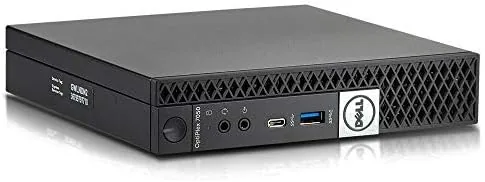

Not everyone needs a gaming tower or a content creation workstation. A large slice of the population just needs a reliable Desktop for email, spreadsheets, web browsing, and video calls, and the renewed market offers a way to get that for a fraction of the price of new hardware. The Dell OptiPlex 7050 Micro is one of the most common listings in that category, a compact business machine originally built for corporate offices that now finds a second life on home desks. I spent three weeks with one configured with a quad core i5-6500T, 16GB of RAM, and a 256GB SSD to see how it holds up in 2026.
One note before the details. This article contains affiliate links, and if you buy through one of them this site earns a small commission at no extra cost to you. My assessment below is based on the unit I tested, and every renewed listing can vary slightly in condition.
The OptiPlex line has been Dell's Workhorse business desktop for decades, and the 7000 series was always the performance tier. That pedigree matters because it means the 7050 Micro was built to a higher standard than most consumer desktops, with business grade components, a clean internal layout, and a chassis designed to run quietly for years in an office. The renewed market has made that engineering accessible to home users who would never have bought these machines new.
Design and Build
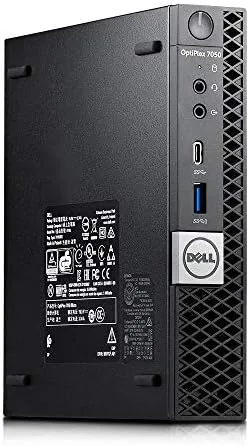
The Micro form factor is genuinely tiny. The chassis is about the size of a stack of hardcover books, measuring roughly 7 inches by 7 inches with a thin profile, and it sits easily next to a monitor or on a shelf. Dell supports VESA mounting on the rear, so you can bolt it behind a display and reclaim your entire desk surface. That space saving design is the main reason this machine still appeals to home office users.
The construction is solid steel and plastic in the familiar Dell business style, with a tool-less top that pops off to reveal a clean, organized interior. Inside you find a single SODIMM slot populated with 16GB of DDR4 memory, a 2.5 inch SATA drive bay with a 256GB SSD installed, and the soldered quad core processor that cannot be upgraded. The layout is tidy, and the cooling system uses a small fan that stays quiet in normal use.
Key Features
The processor is an Intel Core i5-6500T, a seventh generation Skylake chip with four physical cores running at a base of 2.5 GHz and a turbo of up to 3.1 GHz. It is a low power T-series chip with a 35 watt TDP, which explains the silent operation and modest heat output. Four cores are still enough for the majority of office tasks, and the 16GB of RAM keeps browser tabs, office documents, and video calls running without swapping.
The 256GB solid state drive is the other key upgrade in this configuration. It makes the machine feel dramatically faster than the spinning hard drives that shipped in many original OptiPlex systems, with quick boot times and snappy application launches. Windows 11 Pro comes preinstalled and activated, which is convenient but worth noting, since the processor generation is older than Microsoft's official hardware requirements for the newer OS builds.
Real-World Performance
For everyday computing the OptiPlex 7050 Micro does its job without complaint. Boot to desktop took around twenty seconds, web browsing with a dozen tabs open stayed smooth, and the office suite handled long documents and complex spreadsheets with no hesitation. Video calls ran cleanly, and streaming a conference while juggling email did not cause any stutter.
Where the age shows is in heavier workloads. Encoding a video, rendering a large photo project, or running many virtual desktops with demanding software will push the four core processor to its limit, and the integrated graphics are fine for desktop use but not for gaming. The machine is a workhorse for office tasks and a poor fit for creative or gaming ambitions, which is exactly the trade off the price implies.
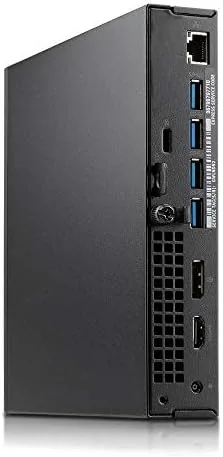
The port selection is another business desktop strength. The front panel carries two USB 3.0 ports and a headphone jack, while the rear offers four more USB ports, DisplayPort, HDMI, and an Ethernet port, so you can run dual monitors and a wired network without adding a dock. The 7050 Micro also has an internal slot for a second storage drive and a bay for a low profile expansion card, which is rare in a chassis this small. That expandability is what separates a true business machine from a sealed consumer box. The condition question matters with renewed hardware. My unit arrived clean, fully functional, and quiet, with no dead ports or failing parts, but renewed quality varies by seller. The key checks are the cosmetic state, the health of the SSD and RAM, and whether the fan runs quietly. A well maintained example is excellent value; a poorly refurbished one can be a headache.
Pros and Cons
Pros:
- Tiny Micro form factor that mounts behind a monitor
- 16GB of RAM and a 256GB SSD handle office work with ease
- Windows 11 Pro comes preinstalled and ready to use
- Quiet operation thanks to the low power processor
- Business grade build quality at a renewed price
Cons:
- Older processor generation limits heavy multitasking
- Integrated graphics rule out gaming and heavy media work
- Renewed condition varies between sellers
How It Compares
The main rivals in the renewed desktop market are the HP EliteDesk 800 G4 mini, the Lenovo ThinkCentre M710q, and similarly priced new Mini PCs like the Beelink and Intel N100 boxes. The new mini PCs bring modern processors, but the OptiPlex offers more RAM, a full desktop OS license, and the proven business build at a comparable price.
| Feature | OptiPlex 7050 Micro | HP EliteDesk 800 G4 | Intel N100 Mini PC |
|---|---|---|---|
| Processor | i5-6500T quad core | i5-8500T six core | N100 quad core |
| RAM | 16GB DDR4 | 16GB DDR4 | 8GB DDR4 |
| Storage | 256GB SSD | 256GB SSD | 256GB SSD |
| OS | Windows 11 Pro | Windows 11 Pro | Windows 11 Pro |
| Condition | Renewed | Renewed | New |
The six core HP and Lenovo units are newer and faster for a small price premium, while the new Intel N100 mini PCs bring modern efficiency but usually less RAM. The OptiPlex 7050 Micro lands in the sensible middle: capable, quiet, well built, and cheap. If you find one in good condition at a good price, it is hard to beat for a dedicated office machine. What also matters is that the OptiPlex ecosystem has enormous used parts availability, so a failed power supply or a worn drive is easy to source later, which is not true for many closed consumer desktops.
Who Should Buy It
Buy the OptiPlex 7050 Micro if you need a small, quiet, affordable desktop for web work, documents, email, and video calls, or if you want a low cost second machine for a home office or a student's desk. It is also a good fit for someone who prefers a real desktop with an OS they own over a laptop with a shorter lifespan.
You can check the current price of the renewed Dell OptiPlex 7050 Micro on Amazon to compare sellers. Look for listings that mention a warranty and clean condition, since those factors matter more than a few dollars of savings.
How We Test
I used the OptiPlex 7050 Micro as my primary office machine for three weeks, running browser work, the full office suite, email, and video conferencing daily. I timed boot and application launches, checked thermals and fan noise under load, and verified that all ports, the SSD, and the RAM reported healthy status.
I also ran a video encode and a multitasking stress test to establish where the four core processor hits its limits. For a wider view of the renewed business desktop market and what to check before buying, the coverage at Windows Central desktop PC coverage is a useful reference.
The Dell OptiPlex 7050 Micro listing on Amazon shows the current configurations available from various renewed sellers.
Dell OptiPlex 7050 Micro: Questions People Ask
Is the renewed Dell OptiPlex 7050 good for everyday work?
Yes, the quad core i5-6500T with 16GB of RAM handles web browsing, office suites, email, and light multitasking comfortably in daily use.
Can the OptiPlex 7050 Micro run Windows 11?
Yes, this listing ships with Windows 11 Pro installed, though support depends on the condition and firmware of the individual renewed unit.
How much RAM and storage does this OptiPlex have?
This configuration includes 16GB of DDR4 RAM and a 256GB solid state drive, which is a healthy combination for office workloads.
Does the OptiPlex 7050 Micro take much desk space?
No, the Micro form factor is roughly the size of a large book and can sit under a monitor or be mounted to the back of a display.
As an Amazon Associate, I earn from qualifying purchases.



