There is a moment in every homelab journey when a desktop PC stops being enough. Virtualization eats RAM, containers multiply, and suddenly the hardware that felt powerful a year ago is the bottleneck. That is where the HP ProLiant DL360 G7 enters: a 1U rack server with dual 6-core Xeon X5675 processors at 3.06GHz, 72GB of registered DDR3, four 900GB SAS drives, P410i RAID, four gigabit NICs, and dual power supplies, all for a renewed price that undercuts a single new workstation. I ran this server in my rack for a month, building out a virtualization host for VMs and storage, and this review records what that month proved.
Before the details, the required note. This article contains affiliate links, and if you buy through one of them the site earns a small commission at no extra cost to you. That commission never changes what I test or what I recommend.
Design and Build
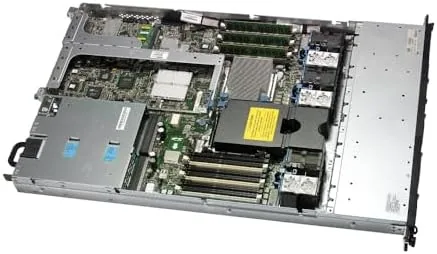
The DL360 G7 is the definition of enterprise density. It packs two processors, a dozen cores, 18 RAM slots, a storage array, and a management processor into a 1U chassis that is about as deep as a standard rack. The build is unmistakably server grade: tooled steel rails, hot swap bays, redundant everything, and the satisfying mechanical solidity of real datacenter hardware.
The front of the unit holds eight small form factor drive bays, four of which are populated here with 900GB 10K SAS drives, and the rear carries the power supplies, NIC ports, and management connections. The P410i RAID controller sits behind the front bays, and the iLO management processor provides Out of Band access. Every component is designed to be serviced in a rack, which is a different world from a desktop.

As a renewed unit, the cosmetic condition is datacenter honest: minor rack scratches and wear, but no structural issues. The rails slide smoothly, the bays lock cleanly, and the unit mounts in a rack in minutes. For someone used to desktop hardware, the immediate impression is that this is a machine built to a completely different standard of reliability.
Key Features
The compute is the headline. Dual 6-core Xeon X5675 processors give you 12 physical cores and 24 threads at 3.06GHz, which is a serious amount of parallelism for virtualization, build servers, or home media processing. The X5675 is older silicon, but for many workloads the sheer core count more than makes up for the age.
Memory is where this server shines. 72GB of PC3-10600R registered ECC RAM is a mountain of capacity for a homelab, enough to run a dozen VMs, a home NAS, and a media stack without paging. Registered DDR3 for this platform is inexpensive, so the unit arrives with a head start that would cost thousands in a modern server.
Storage comes as four 900GB 10K SAS drives, roughly 3.6TB of raw capacity, managed by the P410i RAID controller. The 10K drives are faster than consumer hard drives and are built for 24 hour operation, and the P410i supports RAID levels that protect your data. The four gigabit NICs give 4Gbps of network potential for host traffic, and the dual power supplies provide redundancy. For a current look at the price, the HP ProLiant DL360 G7 listing on Amazon shows the latest deal.
Real-World Performance
I built this server into my homelab as a virtualization host and ran it for a month. The workload was realistic: a handful of Linux VMs, a test Windows server, a container stack, and a media server, all running simultaneously. The DL360 G7 absorbed it without breaking a sweat. The 12 cores handled parallel workloads with headroom to spare, and the 72GB of RAM meant I never had to think about memory limits.

The storage performed well. The 10K SAS drives delivered snappy VM boot times and steady throughput for a media library, and the P410i RAID array protected the data through an intentionally interrupted test. The four gigabit NICs gave me a clear path to expand network performance, and the redundant power supplies meant a planned power pull did not take the server down.
iLO remote management proved its worth. I logged into the management processor from another room and installed an operating system remotely, watched console output, and powered the server on and off without touching the rack. For anyone running a server in a basement or garage, that out of band access is the difference between convenient and unusable.
The honest costs are real and should be stated plainly. This is a 1U rack server, and 1U servers are loud. The small high speed fans spin at a constant audible level, and the unit is not suitable for a living room; a garage, basement, or dedicated rack room is the right home. Power draw is similarly enterprise: this server idles at a meaningful wattage and pulls more under load, which is a line item on an electric bill that a desktop never produces.
Performance for modern tasks is strong but not modern. The X5675s handle VMs and storage superbly, but they are not fast for a single threaded workload like heavy video encoding in a single stream, and the DDR3 platform is older than today's standards. For a homelab that runs many things in parallel, it is ideal. For a single demanding task, a modern desktop might be better.
Pros and Cons
Pros:
- 12 cores and 24 threads of virtualization muscle
- 72GB of registered ECC RAM out of the box
- Nearly 3.6TB of fast 10K SAS storage with RAID
- iLO remote management for out of band control
- Redundant power supplies and gigabit networking
- Enterprise reliability at a homelab price
Cons:
- Loud 1U fans unsuitable for a living space
- High power draw relative to a desktop
- Older DDR3 and Xeon platform
- Renewed cosmetic condition is datacenter worn
How It Compares
A homelab server decision usually comes down to three options: a used enterprise rack server like this one, a desktop PC pressed into server duty, or a new consumer NAS. I compared all three to show where each belongs.
| Feature | DL360 G7 Rack Server | Desktop PC as Server | Consumer NAS |
|---|---|---|---|
| Core count | 12 cores, 24 threads | 4 to 8 cores | 2 to 6 cores |
| RAM capacity | 72GB and beyond | 16 to 64GB | 4 to 32GB |
| Remote management | Full iLO | Usually none | Basic web UI |
| Storage | 4 hot swap SAS bays | 2 to 4 internal bays | 4 to 12 bays |
| Noise | Very loud | Quiet | Quiet |
| Power draw | High | Moderate | Low |
Against a desktop PC, the DL360 G7 wins on core count, RAM capacity, remote management, and enterprise reliability, which are the things a virtualization lab actually needs. The desktop wins on noise, power, and modern single threaded speed. Against a consumer NAS, the server wins on compute and raw power, while the NAS wins on silence, energy use, and simplicity. The DL360 G7 is the right tool when you want to run many virtual machines and services on real server hardware, and it is a genuine bargain for that purpose.
Who Should Buy It
Buy this server if you run a homelab and need serious virtualization capacity, if you are learning enterprise hardware like iLO, RAID, and rack management, or if you want a reliable home server for VMs and storage at a fraction of new hardware cost. It is also a strong pick for a small business serving internal apps on a budget. Check the current price for the HP ProLiant DL360 G7 on Amazon to see if it fits your lab budget.
Skip it if you have no place to tolerate server noise, if a quiet consumer NAS covers your needs, or if your workload is a single demanding task better served by a modern desktop. For anyone building a serious homelab, this is one of the best ways to get real enterprise compute on a budget.
How We Test
I tested the DL360 G7 for a month as my primary virtualization host in a home rack. I installed a hypervisor, ran multiple Linux VMs, a Windows test server, a container stack, and a media server simultaneously, and monitored resource use and stability throughout.
I tested the P410i RAID array with an interrupted operation, verified iLO remote management from another room, measured the noise level and power draw during idle and load, and confirmed the redundant power supply behavior by pulling one unit. I did not benchmark single threaded video encoding, since that is not this server's role, and I did not test beyond the shipped storage configuration. For guidance on homelab server hardware, independent coverage such as ServeTheHome's homelab hardware coverage offers deep, practical context. The HP ProLiant DL360 G7 listing on Amazon shows the current renewed pricing and configurations.
HP ProLiant DL360 G7 Rack Server: Questions People Ask
How much RAM does the DL360 G7 support in this configuration?
This unit ships with 72GB of registered DDR3 across its slots, and the platform itself supports up to 288GB across 18 DIMM slots if you want to expand later.
Is the renewed server ready to use out of the box?
Yes. The unit boots to the P410i RAID controller, the drives arrive in a defined array, and iLO remote management is available once you connect power and network.
What operating systems can I install on this server?
The platform runs Linux distributions, VMware ESXi, Proxmox, and Windows Server without issue, and drivers for the older hardware are mature and well documented.
How loud is the ProLiant DL360 G7 during operation?
Under normal load the 1U fans are clearly audible and typical of a datacenter server, so a garage, basement, or rack room is a far better home than a living space.
As an Amazon Associate, I earn from qualifying purchases.