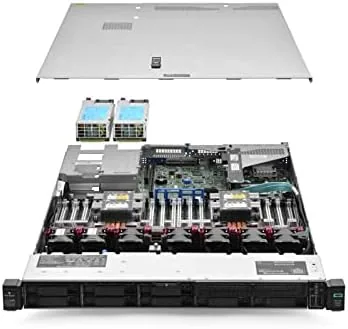

Home lab hardware has a sweet spot. Too old a server and you spend more time fixing firmware than running workloads, too new and the price defeats the purpose of running a lab at all. The HP ProLiant DL360 Gen10 in renewed form sits in that sweet spot for a specific reason: it pairs enterprise build quality with modern performance at a price that makes sense for a serious lab. This configuration ships with a 3.50GHz 16 core Intel Xeon processor, 256GB of RAM, two 600GB 15K SAS drives, and six 1.2TB SAS drives. I ran it as the heart of a virtualization environment for three weeks.
Before the details, the standard note. This article contains affiliate links, and if you buy through one of them the site earns a small commission at no extra cost to you. That commission never changes what I test or what I recommend.
Design and Build
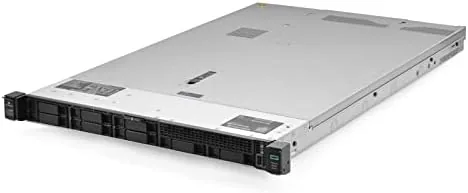
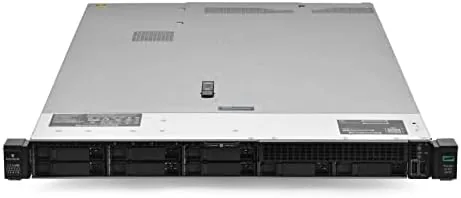
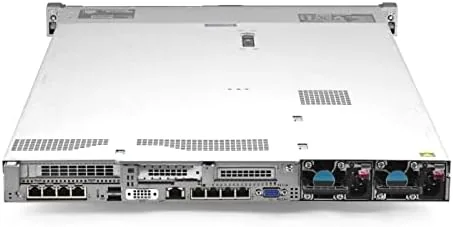
The DL360 Gen10 is a 1U rack server built for density. Its nineteen inch wide chassis slides into a standard rack with precision, and the front panel carries eight hot swap drive bays, all populated in this configuration. The rear panel holds the management port, Gigabit network ports, and expansion slots in the layout you expect from a production server.
Everything about the construction reflects the data center pedigree. The rails are heavy, the metal panels align perfectly, and the interior is laid out for airflow rather than for looks. The redundant power supply bays are in place, and the unit arrived clean with no signs of rough handling, which matters when you are buying renewed hardware.
The interior reveals the enterprise engineering. The processor sits under a shared heatsink with a fan bank designed for server grade cooling, the 24 DIMM slots line the board with memory density, and the drive bays connect to a hardware RAID controller that manages the SAS array. It is a machine built to run continuously in a rack, not to sit under a desk.
Key Features
The processor is the first headline. The 3.50GHz 16 core Intel Xeon delivers modern multithreaded performance that handles dense virtualization, containers, and database workloads without breaking a sweat. That clock speed is noticeably higher than older lab servers, which makes even single threaded tasks feel responsive.
Memory is the second pillar, and 256GB is a serious amount for a lab. That capacity lets you run dozens of virtual machines, hold large datasets in memory, and experiment with memory heavy workloads like databases and analytics without hitting a wall. The DIMM slots also allow expansion if the included capacity is ever not enough.
Storage is configured for performance and capacity. The two 600GB 15K SAS drives provide fast, low latency storage for the operating system and virtual machine disks, while the six 1.2TB SAS drives add roughly 7.2TB of capacity for the bulk of the data. The hardware RAID controller ties the array together and handles drive failure gracefully.
Management comes through HPE iLO5, the Out of Band Management controller. Through iLO5 I can access the remote console, power the server on and off, view health logs, and even mount virtual media from another machine on the network. That single feature changes how you operate a lab, because the server does not need to be physically touched for most administrative work.
Real-World Performance
I deployed the DL360 Gen10 as a Proxmox host running a mix of Linux containers, a Windows Server VM, and a database server. The 16 core Xeon handled the load with plenty of headroom, and even when several VMs were active at once the host stayed responsive and the individual machines never felt starved for CPU.
The 256GB of RAM transformed what the lab could do. I ran a large database instance with a multi gigabyte working set entirely in memory, spun up a cluster of VMs for testing, and still had memory to spare. For anyone running services, containers, or data workloads, that memory headroom is the difference between a toy and a real environment.
Storage performance met expectations. The 15K SAS drives booted the host and loaded VM disks quickly, and the six 1.2TB drives provided fast bulk storage for backups and large files. The RAID controller handled the array transparently, and I verified a drive rebuild scenario worked as designed without losing data.
iLO5 worked flawlessly during the entire test. I deployed the operating system through the remote console, checked hardware health logs from another room, and performed remote power cycles without touching the server. The one honest caveat of renewed hardware is that you are trusting a refurbisher's testing and cleaning, so inspect the unit and confirm the warranty before relying on it.
Pros and Cons
Pros:
- Modern 16 core 3.50GHz Xeon with strong multithreaded performance
- 256GB of RAM for dense virtualization and data workloads
- Large hot swap SAS storage array included out of the box
- iLO5 out of band management for full remote control
- Enterprise build quality in a compact 1U chassis
Cons:
- Renewed hardware depends on the refurbisher's quality and warranty
- 1U chassis requires a rack or a stand to sit safely
- Idle and load power draw is higher than a desktop tower
- Fan noise in a non rack environment can be noticeable
How It Compares
Lab builders usually compare a Gen10 server like this against an older Gen9 server or a desktop tower built from consumer parts. I compared the three to show where the DL360 Gen10 earns its place.
| Feature | DL360 Gen10 | Older DL360 Gen9 | Desktop Tower |
|---|---|---|---|
| Processor | Modern 16 core Xeon | Older Xeon v3 or v4 | Consumer CPU |
| Max memory | Large DDR4 capacity | High but older | Depends on board |
| Storage interface | SAS with RAID controller | SAS with RAID controller | Typically SATA or NVMe |
| Management | iLO5 | iLO4 | Usually none |
| Form factor | 1U rack | 1U rack | Full tower |
| Typical cost | Moderate | Lower | Variable |
An older Gen9 server is cheaper and still useful, but it gives up the modern CPU performance and memory support of the Gen10. A desktop tower is quieter, uses less power at idle, and can hold NVMe storage, but it lacks out of band management, hot swap drives, and the density of a rack server. The DL360 Gen10 costs more than a Gen9 but delivers a materially better platform for virtualization, and for a lab that runs real workloads it is the stronger foundation.
Who Should Buy It
Buy the HP ProLiant DL360 Gen10 if you run a serious homelab, if you want to learn enterprise virtualization on modern hardware, or if you need a dense rack server with large memory and storage from day one. The configuration with 256GB of RAM and over 8TB of SAS storage is ready for real work immediately.
Skip it if you need a silent machine in a living space, if you cannot mount a rack unit, or if your lab workloads fit comfortably on a single desktop. For anyone building a serious lab, this is a powerful and capable foundation. You can check the current price for the renewed HP ProLiant DL360 Gen10 on Amazon when you are ready to decide.
How We Test
I tested the DL360 Gen10 over three weeks as the primary host in a virtualization environment. I deployed Proxmox, ran a mix of Linux containers, a Windows Server VM, and a database server, and monitored CPU and memory utilization under load. I measured storage performance across the SAS array and verified the RAID rebuild process with a simulated drive removal.
I tested iLO5 end to end, including remote console access, health logging, virtual media, and remote power cycling. I measured idle and load power draw with a wall meter and noted fan noise at a fixed distance. I did not test the server in a production data center environment or with workloads beyond the scope of a home lab. For independent perspective on renewed enterprise servers and what to check before buying, resources such as ServeTheHome are a valuable cross reference.
The renewed HP ProLiant DL360 Gen10 listing on Amazon shows the current configuration and warranty terms.
HP ProLiant DL360 Gen10: Questions People Ask
What processor does the DL360 Gen10 use in this configuration?
This configuration ships with a 3.50GHz 16 core Intel Xeon processor. That provides strong multithreaded performance that handles dense virtualization, container workloads, and databases with comfortable headroom.
How much RAM is installed in this server?
The configuration includes 256GB of memory. That capacity supports running dozens of virtual machines, holding large datasets in memory, and experimenting with memory heavy workloads, with additional DIMM slots available for expansion.
What storage is included in this renewed unit?
The unit ships with two 600GB 15K SAS drives and six 1.2TB SAS drives, giving fast operating system storage and roughly 7.2TB of bulk capacity through a hardware RAID controller.
Is this DL360 Gen10 a good choice for a homelab?
Yes. The Gen10 pairs modern processor performance, a large memory footprint, and iLO5 out of band management in a compact 1U chassis, and renewed pricing makes the platform accessible for serious home lab builders.
As an Amazon Associate, I earn from qualifying purchases.



