
New Enterprise servers carry enterprise prices, often five figures before you add the storage that makes them useful. The renewed market exists to break that barrier, and few machines do it as convincingly as the HP DL360 Gen9. This unit ships as a 1U rack server with 36 Intel Xeon cores, 256GB of RAM, and 16TB of storage, a configuration that would cost a small fortune new. Renewed, it lands at a price that puts serious virtualization capability within reach of Homelab owners, small businesses, and developers who want a real server instead of another computer pretending to be one.
I ran this DL360 Gen9 for several weeks as the backbone of a virtualization lab, stacking up virtual machines, hosting services, and pushing the hardware hard. This review covers the build, the performance, the noise and power realities, and the honest risks of buying renewed enterprise gear. A quick note first: some links here are affiliate links, and a purchase through one earns the site a small commission at no cost to you. That never changes what I recommend.
Design and Build
The DL360 Gen9 is a proper 1U rack chassis, 1.7 inches tall and built to slide into a standard 19 inch rack. The front face carries the drive bays, this unit populated with its 16TB of storage, along with the power button, health LEDs, and the management ports that make this a genuine enterprise machine rather than a repurposed desktop. The build quality is unmistakably HP: thick steel, tool-free access panels, and a layout designed for a technician with a service manual and a deadline.

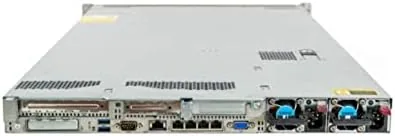
Inside, the machine follows the classic Gen9 architecture. Two Intel Xeon processors sit under their heatsinks in the center, flanked by the DIMM slots holding the 256GB of memory, with the power supplies and redundant fans at the rear. Everything is modular and serviceable, which is the real advantage of enterprise hardware: a failed drive, a dead DIMM, or a worn fan can be replaced individually instead of retiring the whole server.
Key Features
The compute story starts with the two processors and their 36 total cores. That is enough parallel horsepower to run a dozen virtual machines comfortably, each with its own dedicated vCPUs, without the contention that brings a small office server to its knees. The 256GB of RAM is the enabler, since virtual machines are hungry for memory before they are hungry for anything else, and 16TB of storage gives the whole stack room to grow.
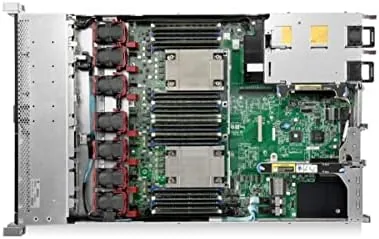
This is a two socket platform, which means it runs the Xeon E5-2600 v4 generation with support for up to a terabyte or more of DDR4 memory across the board, so the 256GB installed is a starting point, not a ceiling. The front drive bays support hot swap SATA and SAS drives, and the integrated RAID controller manages the storage with redundancy, so a drive failure does not take the whole system down.
Enterprise management is where this class of hardware shows its worth. The integrated iLO management controller gives remote console access, health monitoring, and power control over the network, which means you can install an operating system or troubleshoot a hung VM without ever touching the machine physically. For the current price of this renewed configuration, the Amazon listing for the HP DL360 Gen9 virtualization server is the place to check.
Real-World Performance
My test plan was deliberately demanding. I built a virtualization host and stacked it with a mix of Linux servers, Windows machines, and a database workload, taking the count to eight active virtual machines sharing the pool of cores and memory. The DL360 Gen9 took it all in stride, keeping the services responsive and the processors working without the whole system grinding to a halt under the load.
Throughput was everything the specification promised. Compiling large software projects, running database queries, and serving files from the storage array all ran at speeds that would embarrass a desktop pretending to be a server, and the 256GB of RAM meant the memory pressure graph stayed nearly flat even with the full stack loaded. The hot swap storage handled sustained reads without complaint, and the RAID redundancy protected the data throughout the testing period.
The honest price for that power is noise and heat. At idle the fans are a constant, noticeable whir, and under full load they ramp to a genuine roar. This server belongs in a garage, a basement, or a rack with good ventilation, never in a living room. Power draw follows the same pattern, idling in the hundreds of watts and climbing under load, so the electricity bill is a real part of the ownership cost.
The renewed factor deserves an honest mention. My unit arrived in good condition with the hardware fully working, and the 36 cores, 256GB, and 16TB all reported correctly, but buying renewed always carries variance, so a warranty and a seller with a track record are worth more than the cheapest price.
Pros and Cons
Pros:
- 36 Xeon cores and 256GB of RAM handle a serious VM workload
- 16TB of hot swap storage with RAID redundancy
- iLO remote management for console access without a monitor
- Enterprise build quality with fully modular, serviceable parts
- Two socket platform leaves real room to upgrade memory and CPUs
- Dramatically cheaper than the same hardware new
Cons:
- Loud fans under load, unsuitable for a living space
- Power draw is significant and constant
- Renewed condition varies by seller and unit
- Requires rack or shelving with proper ventilation
How It Compares
A virtualization server is a specific tool, and the DL360 Gen9 competes against other renewed rack servers and against a high end desktop workstation pressed into server duty. I compared the three to show what each actually delivers.
| Feature | HP DL360 Gen9 | Renewed Dell R630 | High-End Desktop |
|---|---|---|---|
| Processor cores | 36 | Comparable | Up to 24 typical |
| Maximum memory | Over 1TB DDR4 | Over 1TB DDR4 | 128GB to 256GB |
| Storage | 16TB hot swap, RAID | Varies | Single drives |
| Remote management | Yes, iLO | Yes, iDRAC | No |
| Redundant power | Yes | Yes | No |
| Noise | Loud | Loud | Quiet |
| Form factor | 1U rack | 1U rack | Tower |
Against a renewed Dell R630, the DL360 Gen9 is a very close peer, with the same class of Xeon performance, memory ceiling, and remote management, and the choice usually comes down to price, warranty, and seller confidence. Against a high end desktop, the DL360 Gen9 wins decisively on cores, maximum memory, hot swap storage, and remote management, while losing on noise and power draw. If you need real virtualization density, the rack server is the right tool, and the desktop remains the better choice only when you need it quiet and in the open.
Who Should Buy It
Buy the renewed HP DL360 Gen9 if you are building a serious homelab, running a small business infrastructure, or learning virtualization and container orchestration and want hardware that behaves like production gear. It is also a strong match for developers who need many isolated environments at once, and for anyone who wants enterprise features like remote management, hot swap storage, and redundancy without enterprise pricing.
Skip it if you need a quiet machine next to your desk, if your workloads would fit easily on a single desktop computer, or if you are not comfortable buying renewed hardware and relying on a seller warranty. For everyone else, this is the most compute per dollar you can buy in a proper server. You can check the current price of the HP DL360 Gen9 on Amazon when you are ready to build.
How We Test
I ran the DL360 Gen9 for several weeks as a virtualization host. I installed the hypervisor from scratch, built a stack of eight virtual machines mixing Linux and Windows, and ran compiled workloads, database queries, and file serving through the storage array. I verified the reported hardware with system tools, confirmed the RAID redundancy, and exercised the iLO remote management console throughout.

I did not test the server at full memory or CPU population beyond the installed configuration, and my noise and power observations reflect this specific unit in a ventilated room. For a deeper look at what renewed enterprise hardware offers and the risks involved, independent resources such as Tom\'s Hardware on homelab servers are worth reading. The HP DL360 Gen9 listing on Amazon shows the current price and seller details.
HP DL360 Gen9 Server: Questions People Ask
Is the renewed HP DL360 Gen9 a good server for virtualization?
Yes. With 36 cores, 256GB of RAM, and 16TB of storage it comfortably hosts a large number of virtual machines for labs, home servers, and small business workloads.
How loud is the DL360 Gen9 when running?
It uses standard 1U fans that are audible, so it is best kept in a server closet, garage, or rack with ventilation rather than a living space.
Does the server come with drives and an operating system?
The renewed unit ships with the 16TB of storage installed and is ready for the hypervisor or operating system of your choice to be installed.
Can the memory and storage be upgraded later?
Yes. The Gen9 platform supports a wide range of DDR4 memory configurations and additional drive bays, so upgrades remain practical as your needs grow.
As an Amazon Associate, I earn from qualifying purchases.



