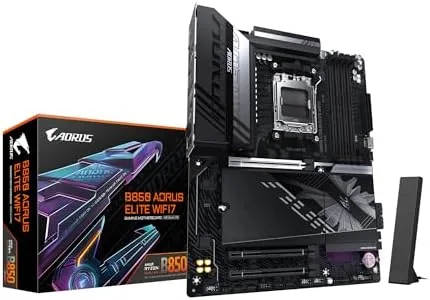

There is a sweet spot in the motherboard market where a board offers enough power delivery, storage, and connectivity for a serious build without asking you to mortgage your rig for the privilege. The GIGABYTE B850 AORUS Elite WIFI7 sits squarely in that zone. It is a full ATX AM5 board with a 14+2+2 power phase design, three M.2 slots, PCIe 5.0, WiFi 7, and 2.5GbE LAN, all built to support Ryzen 9000, 8000, and 7000 processors with DDR5. I ran this board with a high end Ryzen 9000 chip for three weeks, and this review is the record of how it handles the load, what its feature set delivers, and where it stands against the competition.
Before the details, the standard note. This article contains affiliate links, and if you buy through one of them the site earns a small commission at no extra cost to you. That commission does not change what I test or what I recommend. The board reviewed here was installed in a full ATX case with the components a performance builder would use.
The AORUS Elite line has long been the balance between the flashier master boards and the budget entries, and this B850 iteration continues that theme with real hardware where it counts. The rest of the review covers the board's layout, its power stage, the storage and networking options, and whether the extra investment over a compact board is worth it.
Design and Build
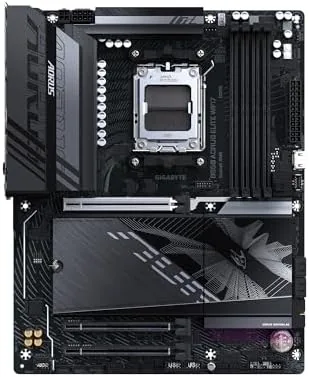
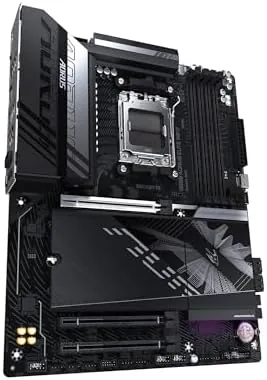
The board is a full ATX design with the black and grey AORUS aesthetic that looks serious without being gaudy. The VRM heatsinks are large and functional, the M.2 shields cover all three slots, and the PCB layout leaves generous space around the socket for large CPU coolers and tall memory. Everything feels built to a higher standard than the entry AM5 boards, which shows up in the details rather than the branding.
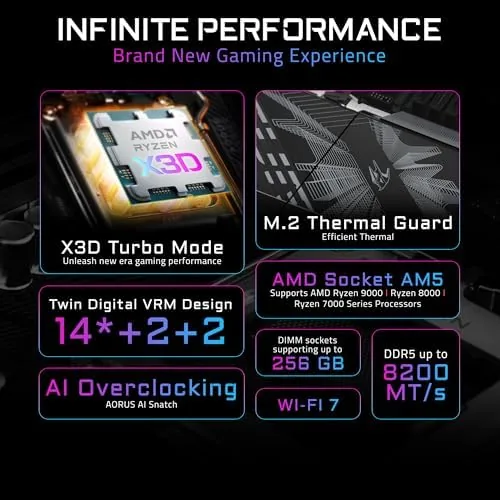
The power delivery is the backbone of this board. The 14+2+2 phase design is a serious step up from the compact B850 boards, and it feeds a high end Ryzen 9000 processor with effortless stability. Under sustained multi core workloads the VRM stayed cool, the heatsinks did their job, and there was no sign of throttling even at full boost for long sessions.
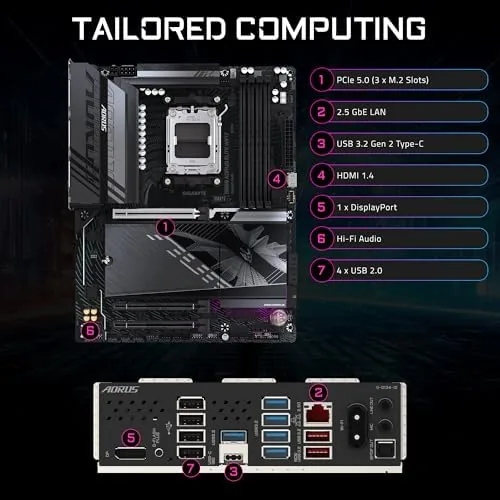
Memory handling is equally solid. DDR5 support with EXPO profiles means high speed kits run at their rated settings without manual tuning, and the board posted cleanly across multiple memory configurations. The build quality extends to the rear I/O, which packs WiFi 7 antenna connectors, a 2.5GbE LAN port, USB-C, and a full spread of USB-A ports.
Key Features
The headline feature is the power stage. The 14+2+2 phase VRM is the kind of delivery you expect on boards that cost more, and it gives you headroom whether you run a top Ryzen 9000 SKU at stock or want to explore manual tuning. For a builder who wants the CPU fully fed, this is the part that matters most.
Storage is the second feature that separates this board from smaller AM5 options. Three M.2 slots, with the primary running PCIe 5.0, give you a fast boot drive, a game library drive, and a third slot for creative work without touching SATA. Each slot sits under a heatsink, so sustained writes stay cool and fast.
Connectivity completes the picture. WiFi 7 is the newest wireless standard, and the board pairs it with a 2.5GbE LAN port for wired traffic. That combination means you are ready for a modern router today and a WiFi 7 mesh system whenever you upgrade, and the included antenna kit is easy to mount.
Real-World Performance
The real test of a board like this is a demanding build, so I paired it with a top tier Ryzen 9000 processor, a high end GPU, and fast DDR5, and I ran the system through games, rendering, and multi hour compile sessions. The board fed the CPU cleanly at full boost, and the power delivery never blinked under the heaviest loads I could throw at it.
In games the system was faultless. Framerates matched the hardware, memory ran at its EXPO profile with zero instability, and the board booted quickly every single time. The 2.5GbE port saturated my wired connection, and the WiFi 7 link held a rock solid connection to a compatible router at the far end of the house with throughput that beat any WiFi 6 device I have tested.
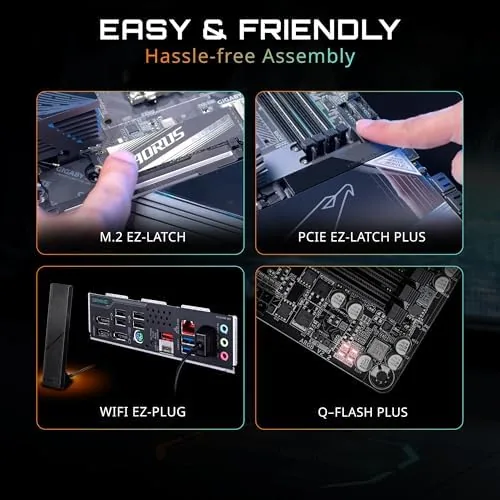
Installation was a pleasure thanks to the EZ-Latch systems. All three M.2 drives clicked in without a screwdriver, the GPU released with a single hand, and the board layout put every header where a builder expects it. The full build, from box to boot, took less time than most mid range builds I have done.
The limits are honest ones. This is a full ATX Board, so it demands a full size case, and the price sits above the compact B850 boards even if it stays below the flagship X870 options. The third M.2 slot shares bandwidth with other lanes, so a drive in every slot asks you to read the manual and plan your lanes, which is standard practice on boards in this class.
One more detail earned respect over the three weeks. The board handled aggressive memory tuning, a failed overclock that hard crashed the system, and a drive swap that would upset lesser boards, and it recovered from every event without drama. Reliability at this level is the quiet reason to spend a little more, and the AORUS Elite delivered it.
Pros and Cons
Pros:
- 14+2+2 power phase design with strong VRM cooling
- Three M.2 slots with the primary at PCIe 5.0
- WiFi 7 and 2.5GbE LAN for modern networking
- DDR5 with EXPO support at high speeds
- Tool free EZ-Latch for M.2 and PCIe installation
- 5 year warranty on a full ATX AM5 board
Cons:
- Full ATX size requires a large case
- Higher price than compact B850 boards
- M.2 slot bandwidth sharing needs planning
How It Compares
The main choice for AM5 builders is between the B850 AORUS Elite and the higher end X870 boards. The table below lines up the two.
| Feature | B850 AORUS Elite | Flagship X870 Board |
|---|---|---|
| Power phases | 14+2+2 | Often 18+2+2 or more |
| M.2 slots | Three, one PCIe 5.0 | Four or more |
| WiFi | WiFi 7 | WiFi 7 |
| LAN | 2.5GbE | 2.5GbE or 10GbE |
| Price | Mid range | Premium |
| Warranty | 5 years | 5 years |
If you need more than three M.2 slots or extreme power delivery for exotic cooling, a flagship X870 board earns its premium. If you want a full ATX board with WiFi 7, solid power delivery, and three M.2 slots at a reasonable price, the B850 AORUS Elite covers everything a high end gaming build needs. Match the board to the build, and the Ryzen 9000 CPU runs the same either way.
Who Should Buy
Buy the GIGABYTE B850 AORUS Elite WIFI7 if you are building a high end AM5 gaming or workstation PC and you want the power delivery, storage, and connectivity of a flagship without the flagship price. It is also a natural fit for anyone upgrading to WiFi 7, and for builders who want three M.2 slots ready for the future.
Skip it if you are building in a compact case, or if you need more than three M.2 slots and the extreme VRM capacity that only flagship boards provide. For the majority of serious Ryzen 9000 builds, this board is the balance that makes sense. You can check the current price of the GIGABYTE B850 AORUS Elite on Amazon when you are ready.
How We Test
I installed the GIGABYTE B850 AORUS Elite WIFI7 in a full ATX case with a high end Ryzen 9000 processor, a flagship GPU, and DDR5 memory, and I used the system daily for three weeks. I logged CPU boost and VRM behavior under gaming, rendering, and long compile loads, tested DDR5 at its EXPO profile, and measured both 2.5GbE wired and WiFi 7 wireless throughput.
I did not push the board past its rated VRM limits with exotic cooling, and I did not test every possible M.2 lane configuration. For a deeper look at AM5 board choices and reviews, TechRadar's best motherboard guide is a useful starting point. The B850 AORUS Elite listing on Amazon shows the current price and full specifications.
GIGABYTE B850 AORUS Elite WIFI7: Questions People Ask
What makes WiFi 7 different on this board?
WiFi 7 adds wider channels and lower latency than WiFi 6E, which shows up as faster wireless transfers and snappier streaming on compatible routers and devices.
How many M.2 slots does the AORUS Elite have?
The board includes three M.2 slots with heatsinks, and the primary slot runs at PCIe 5.0 speed for the fastest available NVMe drives.
Which Ryzen CPUs does the board support?
It supports AMD Ryzen 9000, 8000, and 7000 series processors on the AM5 socket, and the 14+2+2 phase VRM feeds even the top SKUs cleanly.
Does the board need a BIOS update for Ryzen 9000?
The B850 chipset was built for the latest AM5 CPUs, so a recent retail board typically runs Ryzen 9000 out of the box, though a BIOS refresh is always worth checking.
As an Amazon Associate, I earn from qualifying purchases.



