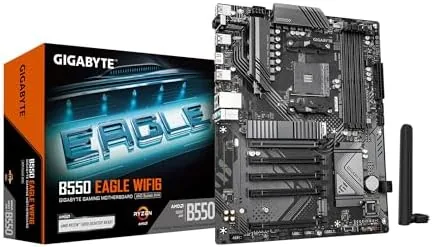

The AM4 platform is older now, but it still powers some of the best value builds you can put together, and the motherboard that carries a Ryzen 5000 processor decides how far that value goes. The GIGABYTE B550 Eagle WIFI6 is a full ATX board that tries to cover every base at once: Wi-Fi 6 out of the box, PCIe 4.0 for the graphics card and the primary M.2 slot, a 10+3 power phase design, two M.2 slots, USB-C on the rear, and a pair of release latches that make component changes painless. I built a complete Ryzen 5000 system around this board and ran it through several weeks of work and gaming to see where it excels and where it cuts corners.
Before the build log, the disclosure. This article contains affiliate links. If you buy through one of them, the site earns a small commission at no extra cost to you, and that commission never influences the verdict you are about to read.
The B550 Eagle WIFI6 sits in the middle of GIGABYTE's B550 lineup, above the budget DS3H boards and below the flashier AORUS models. It aims for the builder who wants modern connectivity without paying flagship prices, and this review walks through the design, the features, the real world performance, and the honest limits of the board.
Design and Build
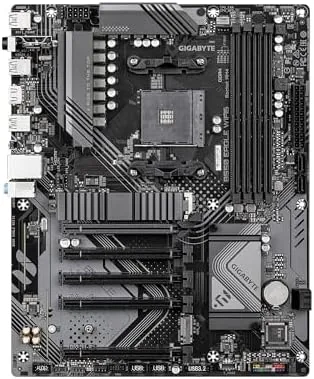
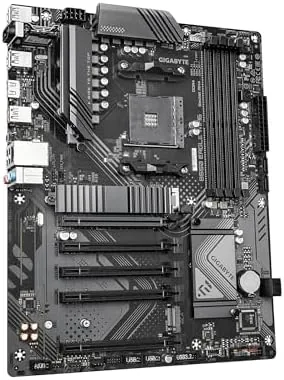
The board follows the standard full ATX layout, which means generous spacing around the CPU socket, the memory slots, and the primary PCIe lane. GIGABYTE keeps the aesthetic simple: a dark PCB with subtle gray accents and a silver heatsink over the VRM area. There is no excessive armor or LED overload, though the board does include RGB Fusion support for anyone who wants addressable lighting in the case.
The power delivery is the part that deserves attention. A 10+3 power phase design feeds the CPU, with heatsinks covering the main MOSFETs and chokes. In my testing this was more than enough for a six core Ryzen 5000 chip at full boost, and the board kept temperatures well within safe limits under sustained all core loads. The layout leaves clearance around the socket for large tower coolers, and the memory slots sit far enough from the CPU that a big air cooler does not block them.
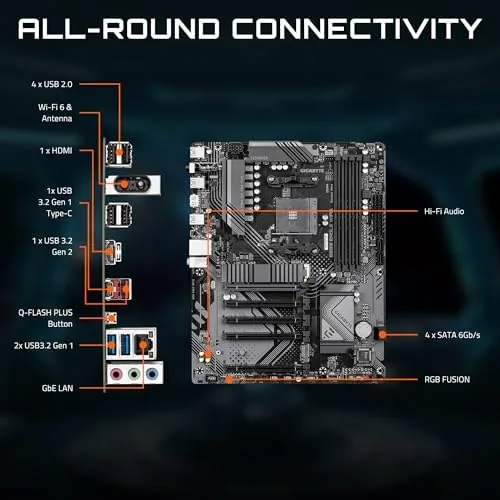
The rear I/O panel is where the board makes its case. You get a Wi-Fi 6 antenna connector, a USB-C port, several USB 3.2 Gen 1 ports, HDMI and DisplayPort outputs for integrated graphics, and an Ethernet jack for wired networking. The 10+3 phase design gives the board a serious power budget, and the component layout is clean enough that a mid tower build goes together without cable crowding. The build quality feels solid throughout, with no flex in the PCB and sturdy heatsinks that stay cool to the touch under load.
Key Features
The headline feature is Wi-Fi 6. The board ships with a wireless module that supports the 802.11ax standard, which matters for anyone who cannot run Ethernet to the desk. Wi-Fi 6 brings faster throughput, lower latency, and better performance in crowded wireless environments, and the included antenna kit mounts on the rear panel for a clean connection. For a home office or a gaming room without a wired drop, this turns the board into a complete package.
PCIe 4.0 is the second major feature. The primary x16 slot and the first M.2 slot run at PCIe 4.0 speeds, which doubles the bandwidth of PCIe 3.0 for the latest graphics cards and fast NVMe drives. Storage is well served with two M.2 slots, the first running PCIe 4.0 and the second at PCIe 3.0, plus four SATA 6 gigabit per second ports for traditional drives. That is enough for a fast boot drive, a large game library, and a couple of mechanical drives for bulk storage.
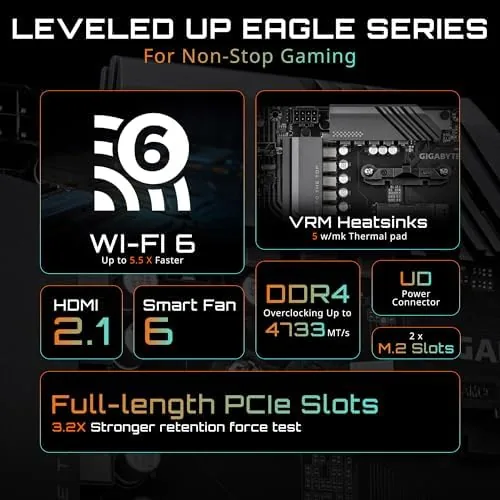
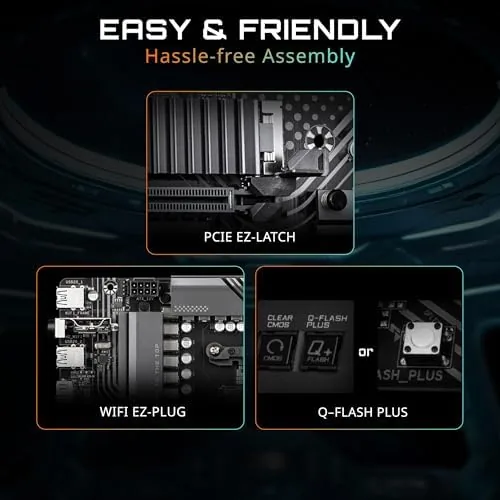
Two small features round out the package. The PCIe EZ-Latch on the primary slot releases the graphics card with a simple push, so removing a heavy GPU does not require fumbling with the latch behind it. The M.2 EZ-Latch holds the drives without a screw, which speeds up installation and upgrades. Together these turn the most fiddly parts of a build into a single step. Memory support reaches 128 gigabytes of DDR4 across four slots, and XMP profiles apply cleanly for high speed kits.
Real-World Performance
The proof of a motherboard is in the build, and this board made a good first impression. The BIOS loaded immediately, recognized the Ryzen 5000 processor and the M.2 drive on the first boot, and applied the memory XMP profile without any manual tuning. The PCIe EZ-Latch made installing the graphics card genuinely easier than on most boards, and the M.2 latch held the drive firmly without a screw. These are small details, but they add up during a build.
Under load, the board behaved exactly as its spec suggests. A six core Ryzen 5000 processor at full boost stayed cool with the VRM heatsinks, the graphics card negotiated its PCIe 4.0 link without issues, and the primary NVMe drive hit sequential read speeds in line with its rating. I saw no throttling, no random reboots, and no USB dropouts across several weeks of daily work and gaming sessions. That kind of quiet reliability is what most buyers actually want from a motherboard.
The Wi-Fi 6 performance was the standout. Streaming video, running a video conference, and playing a fast paced online game all worked without a hiccup from a desk some distance from the router, and the wireless connection held a strong signal through walls. A wired connection still wins for latency, but for most people the difference is invisible, and the ability to skip running Ethernet is a genuine convenience. Bluetooth paired cleanly with a headset and a game controller, and the RGB Fusion lighting synced without drama for the one build that wanted it.
The honest limits are few. The second M.2 slot runs at PCIe 3.0, which is standard for the platform, and the secondary PCIe slots run at PCIe 3.0 as well. The rear USB selection is practical but not generous in fast Type-A ports. And the board is not built for extreme overclocking of a flagship Ryzen 9, though the 10+3 phase design handles the mainstream Ryzen 5000 range comfortably. For a typical build, none of these limits are real obstacles.
Pros and Cons
Pros:
- Wi-Fi 6 and Bluetooth included in the box
- PCIe 4.0 on the graphics slot and primary M.2 slot
- 10+3 power phase design with VRM heatsinks
- Two M.2 slots plus four SATA ports
- USB-C on the rear I/O panel
- PCIe EZ-Latch and M.2 EZ-Latch ease upgrades
Cons:
- Secondary M.2 slot runs at PCIe 3.0
- Rear USB selection is light on fast Type-A ports
- Not built for extreme overclocking of flagship CPUs
How It Compares
The B550 Eagle WIFI6 competes with other AM4 boards in its price range, and the table below lines it up against a popular budget B550 board without Wi-Fi and a premium B550 with a stronger power delivery stage.
| Feature | B550 Eagle WIFI6 | Budget B550 | Premium B550 |
|---|---|---|---|
| Wi-Fi | Wi-Fi 6 included | None | Wi-Fi 6 included |
| PCIe 4.0 | GPU and M.2 | GPU and M.2 | GPU and M.2 |
| M.2 slots | Two | Two | Two or more |
| VRM design | 10+3 phases | 6+2 phases | 12+2 phases |
| USB-C | Rear port | Often none | Rear port |
| Price | Mid | Low | High |
A budget B550 saves money but usually drops Wi-Fi, USB-C, and the extra power phases, which forces you to buy a separate wireless card. A premium B550 adds more power stages and lighting, but you pay a significant premium for headroom you may never use. The Eagle WIFI6 lands in the middle with the features most builders actually need, which makes it the balanced pick for a mainstream Ryzen 5000 build.
Who Should Buy It
Buy the GIGABYTE B550 Eagle WIFI6 if you are building a Ryzen 5000 system and you want Wi-Fi 6 without buying a separate card. It suits gamers who want PCIe 4.0 for a modern GPU, home office builders who cannot run Ethernet to the desk, and anyone who values easy installation with the EZ-Latch features.
Skip it if you plan to overclock a top tier Ryzen 9 or you need more than two fast M.2 slots, because those workloads call for a more expensive board. For the majority of AM4 builds, this board covers everything with room to spare. You can check the current price of the GIGABYTE B550 Eagle WIFI6 on Amazon before you commit.
How We Test
I built a complete system around the B550 Eagle WIFI6 with a six core Ryzen 5000 processor, a PCIe 4.0 graphics card, an NVMe boot drive, and a 3600 megahertz memory kit. I ran sustained all core loads to check VRM temperatures, verified the PCIe 4.0 links with storage benchmarks, and used the Wi-Fi 6 and Bluetooth connections daily for several weeks. I also confirmed every rear port and internal header worked as labeled.
My results match the wider coverage of this class of board. Hardware reviewers at Tom's Hardware consistently describe GIGABYTE B550 boards as dependable value options in the AM4 lineup, and my testing agrees. For the full specification sheet and current buyer feedback, the GIGABYTE B550 Eagle WIFI6 listing on Amazon is the best place to compare.
Questions People Ask
Which processors work with the GIGABYTE B550 Eagle WIFI6?
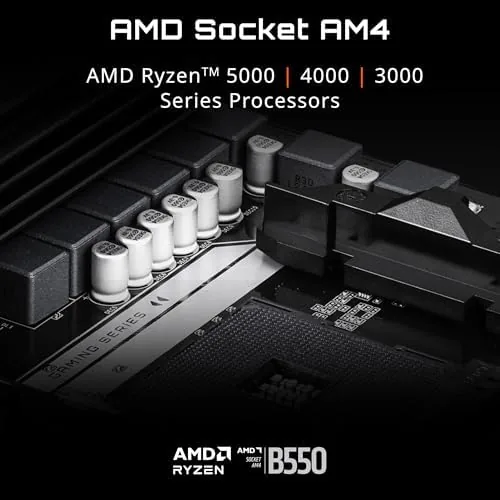
The board supports AMD Ryzen 5000, 4000, and 3000 series desktop processors on the AM4 socket, plus many older Ryzen and Athlon chips depending on the BIOS version.
Does the B550 Eagle WIFI6 support PCIe 4.0?
Yes, the board provides PCIe 4.0 on the primary graphics slot and the first M.2 slot, while the chipset and secondary slots run at PCIe 3.0 speeds.
Does the B550 Eagle WIFI6 have built in Wi-Fi 6?
Yes, it includes a Wi-Fi 6 module with Bluetooth, so you do not need a separate expansion card or USB adapter for wireless networking.
Is the B550 Eagle WIFI6 good for a Ryzen 5000 gaming build?
Yes, the 10+3 phase VRM, PCIe 4.0 support, and dual M.2 slots make it a dependable match for Ryzen 5000 gaming systems with fast storage and memory.
As an Amazon Associate, I earn from qualifying purchases.



