
Traditional drone controllers ask a lot of a new pilot. Two joysticks, four axes of movement, and a dozen muscle memory moves that all need to become automatic before the drone does what you actually want. The DJI RC Motion 3 throws that entire learning curve out the window. It is a single hand controller that steers the aircraft by tilt, with a trigger for speed and a button for tricks, and it is the most intuitive way to fly a drone that DJI has ever shipped. I flew with it for two weeks, starting from a background of traditional stick flying, and this review records how it feels, how the motion control works, and who it is really for.
Before the details, the standard note. This article contains affiliate links, and if you buy through one of them the site earns a small commission at no extra cost to you. That commission does not change what I test or what I recommend, and the controller reviewed here was used exactly the way an owner would use it.
The RC Motion 3 is a smart motion controller designed to pair with DJI FPV goggles and compatible aircraft, and it turns flying into a physical, embodied experience rather than a stick and switch exercise. The rest of this review covers the design, the motion sensing, the emergency brake, the AR cursor, and how fast a new pilot can go from box to flight.
Design and Build
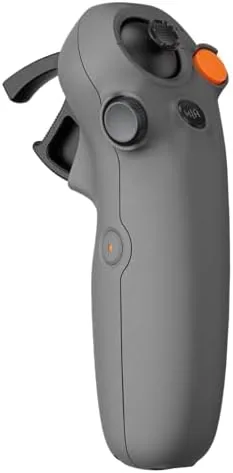
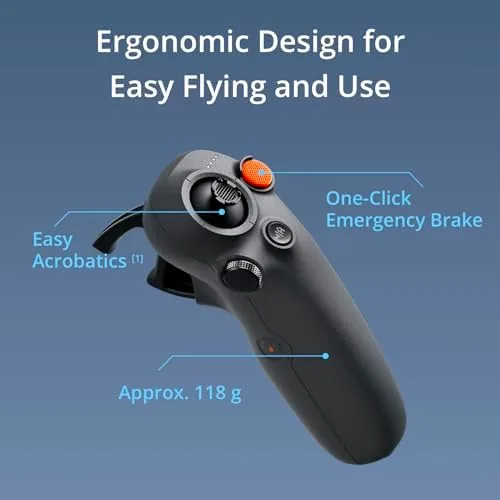
The RC Motion 3 looks like a rounded game controller with most of the buttons stripped away. A single joystick sits under your thumb for fine directional control, a trigger under your index finger controls speed, and a small set of buttons handles camera and flight functions. The body is compact and lightweight enough to hold comfortably in one hand for a whole session, which is exactly the point of the design.
The build quality matches DJI's usual standard. The plastic is smooth and solid, the button travel is crisp, and the controller does not flex or creak when you grip it firmly. The layout is deliberately minimal, because the controller's whole philosophy is that you should fly with your hand, not with your fingers. The joystick on top handles the precision work, while the rest of the flight is about moving your wrist and arm.
Key Features
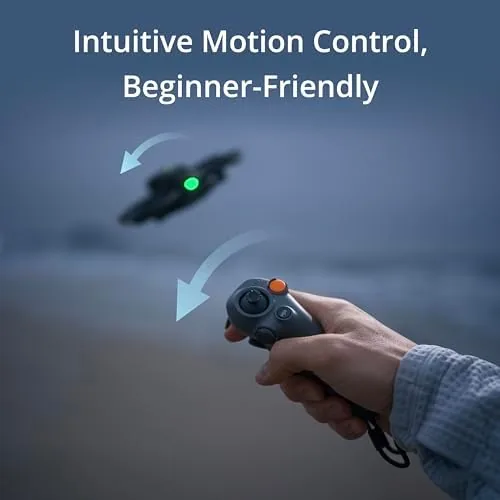
The defining feature is motion control. The controller tracks the movement and tilt of your hand in space, and the drone follows. Tilt forward and the aircraft pitches down and moves forward. Tilt sideways and it banks into a turn. Twist your wrist and the drone yaws. It sounds simple, and that is the genius of it: after about ten minutes, most pilots stop thinking about the control input entirely and start thinking about the flight itself.
The one click emergency brake is the safety feature that makes motion flying practical. A dedicated button on the back stops the drone instantly and holds it in place, giving New Pilots a reliable way out of a moment where the aircraft is heading somewhere it should not go. I used it more than once during testing, and it is the difference between a controller that is fun and a controller that is trustworthy.
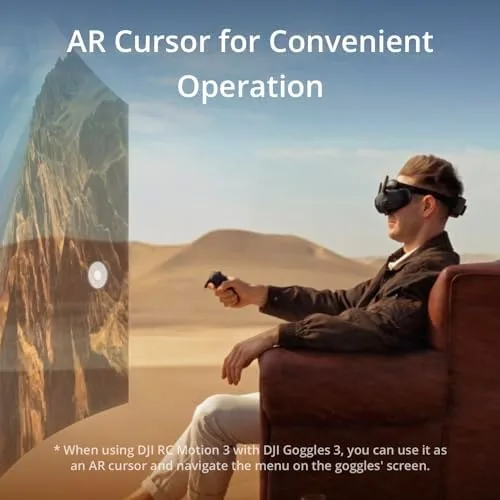
The AR cursor rounds out the control scheme. The goggles display a cursor that points where the controller is aimed, and you use it to steer camera movement and activate guided flight options without cycling through menus. Combined with the motion sensing, it lets the controller act as a pointer and a steering wheel at the same time.
The controller is also compact and portable, folding into a small space in a bag, and it recharges over USB-C between sessions. Multi model compatibility means the same controller drives the drones that DJI lists as supported, so one piece of hardware can cover more than one aircraft in a growing fleet.
Real-World Performance
The first flight with the RC Motion 3 is genuinely memorable. I powered on the drone, took a breath, and tilted the controller forward. The aircraft leaned into the movement and started forward, and for the first time in years of flying I did not have to think about which stick did what. My brain simply moved my hand the way I wanted the drone to move, and the drone moved. That directness is the whole story of this controller, and it is why it works as a gateway into FPV.
The motion sensing is smooth and responsive. Small wrist movements translate into precise adjustments, while larger arm movements produce sweeping turns and climbs. The controller reads tilt reliably with no jitter, and the aircraft holds the attitude you give it without drifting back to level. The trigger controls speed, so you can cruise gently or push into faster passes, and the transition between the two is gradual rather than abrupt.
The emergency brake proved its worth in a way I was happy to experience once. During an early fast pass I let the drone drift toward a tree line, and one press of the brake button stopped it dead in the air a comfortable distance away. The stop is decisive but not violent, and the aircraft holds position afterward, which gives you a second to reorient before continuing. For a nervous new pilot that button alone is worth the price of admission.
The flip and roll moves are where the controller gets its character. A quick circular motion with your wrist sends the drone tumbling through a full rotation, and it recovers into normal flight on its own. It is a spectacular move that feels almost accidental the first time, then becomes a move you reach for whenever you want to show off. New pilots can do it on day one, which is something no traditional controller setup can claim.
Precision work is the one area where motion control shows its limits. For slow, precise camera moves, the joystick on top handles fine adjustment, but the whole controller still rewards broad, confident inputs over delicate ones. If your flying is mostly gentle, locked down cinematography, the motion controller is not the Best tool for it, because you will constantly be fighting the urge to make small corrections that the system turns into larger ones.
Battery life and portability hold up well. The controller runs for hours on a charge, which outlasts the drone's flight batteries, and it charges quickly. The compact size means it slips into a jacket pocket or a small camera bag, which matters when you are hiking to a flying spot.
Pros and Cons
Pros:
- Motion control is intuitive and instantly learnable
- One click emergency brake gives new pilots real confidence
- Flips and rolls are effortless from the very first flight
- Compact and light enough for one hand and a pocket
- AR cursor makes camera control intuitive
- Compatible with multiple DJI drone models
Cons:
- Less precise than traditional sticks for fine camera work
- Requires compatible goggles and aircraft to work
- Motion flying takes a little trust to learn
- Not ideal for slow, locked down cinematography
How It Compares
The natural comparison is between motion control and traditional stick flying, since DJI sells both approaches for the same drones. The table below lines up the RC Motion 3 with a standard controller.
| Feature | DJI RC Motion 3 | Standard Stick Controller |
|---|---|---|
| Learning curve | Minutes | Weeks of practice |
| Control input | Hand tilt and movement | Two joysticks |
| Precision | Good, broad inputs | Very precise |
| Flips and rolls | Wrist flick, easy | Complex stick moves |
| Emergency stop | One click | Requires skill |
| Portability | Compact, one hand | Larger, two hands |
If you want to feel the flight and learn fast, the RC Motion 3 wins. If your work is precise, locked camera moves, the stick controller is the right tool. Many pilots end up owning both, which is the practical answer, because each one covers what the other does not. Check the current price of the DJI RC Motion 3 on Amazon if motion control sounds like the way you want to fly.
Who Should Buy It
Buy the DJI RC Motion 3 if you are new to FPV flying and want a controller that does not stand between you and the experience. It is also the right choice for anyone who wants the fun of flips and rolls without learning complex stick sequences, and for travelers who want a controller that disappears into a bag.
Skip it if your flying is built around slow, precise camera moves, where traditional sticks will serve you better, or if you already fly a drone that does not support the controller. For everyone else, this is the most fun way to fly a drone that money can buy.
How We Test
I flew with the DJI RC Motion 3 across seven sessions over two weeks, pairing it with DJI goggles and a compatible aircraft. I started with slow passes to learn the motion response, then worked up to faster flying, flips, and emergency brake stops from deliberate approaches. I used the AR cursor for camera movements and flew one session entirely with the joystick to compare precision against the motion inputs.
I ran the controller through its full battery cycle and tested charging speed, and I packed it in several bag setups to judge portability. I did not test the maximum compatibility list exhaustively, because DJI publishes the supported models. For a deeper look at motion controllers and FPV flight, Tom's Guide has a guide to the best FPV drones that covers the controller options well. The DJI RC Motion 3 listing on Amazon shows the current price and the compatible drone models.
DJI RC Motion 3: Questions People Ask
Is the DJI RC Motion 3 easy for beginners?
Yes, its motion based flying means a new pilot can take off, steer, and land within the first session, which is far easier than learning traditional stick controls.
How does the emergency brake work?
One press of the brake button stops the drone and holds it in place immediately, giving pilots a reliable way to halt a flight that feels out of control.
Which drones work with the RC Motion 3?
It pairs with DJI drones using O4 transmission such as the Avata 2, and DJI lists supported models so you can confirm compatibility before purchase.
What does the AR cursor do?
The controller projects a cursor into the goggles view, letting you aim camera movements and guided options by simply pointing the controller at the scene.
As an Amazon Associate, I earn from qualifying purchases.