
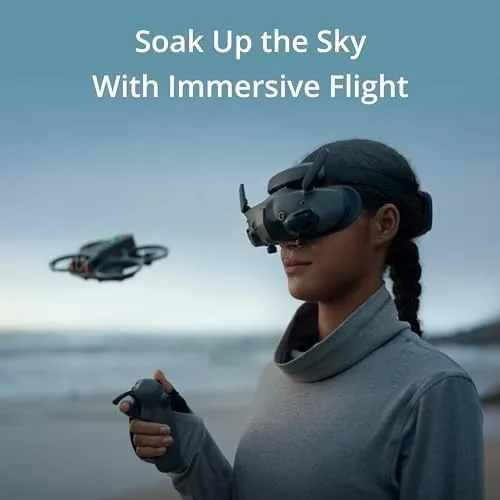
The first time you put on a pair of FPV goggles and take the drone past head height, the world changes. The screen fills your whole field of view, the horizon tilts as the aircraft banks, and your brain stops watching a video feed and starts feeling like it is sitting in the cockpit. That is the experience DJI Goggles 3 are built to deliver, with twin micro-OLED screens, O4 video transmission, and a clever picture in picture view that shows the real world around you. I flew with the Goggles 3 across multiple sessions in varied light, and this review covers picture quality, comfort, the adjustable diopters, and whether they live up to the price.
Before the details, the standard note. This article contains affiliate links, and if you buy through one of them the site earns a small commission at no extra cost to you. That commission does not change what I test or what I recommend, and the goggles reviewed here were used exactly the way an owner would use them.
The Goggles 3 are the newest FPV headset in DJI's lineup, built around a pair of micro-OLED panels and the O4 transmission system that powers the latest DJI drones. The rest of this review looks at the display, the fit, the transmission, the Real View picture in picture feature, and how the goggles handle real flying conditions.
Design and Build
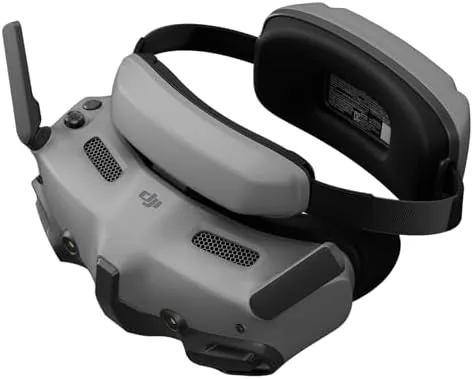
The Goggles 3 are a compact, self contained headset. Two micro-OLED panels sit inside a light plastic shell, the antenna array folds up on top, and the whole unit connects to the drone without a separate battery pack hanging off your head. That last point matters. Older FPV goggles often shipped with a wearable battery pack that added weight and cable management hassle, and DJI has moved the battery into the headset body itself, which makes the Goggles 3 feel far more balanced on the face.
The finish is matte and resistant to fingerprints, the padding around the eyes is soft and wide enough to block stray light, and the straps adjust quickly with a rear dial. The front panel houses the cameras used for the Real View feature, and the goggle body is sized to stay out of the way of your nose and forehead. It is a polished, finished product in the hand, and it does not feel like a prototype the way early FPV headsets did.
Key Features
The headline feature is the display. Each eye gets a 1080p micro-OLED panel, and OLED technology delivers the deep blacks and vivid color that LCD screens cannot match. The result is a bright, contrasty image that makes dusk flights look dramatic and daytime footage look punchy, and the 100 Hz refresh rate keeps the motion smooth without the blur you see on lower refresh displays.
The adjustable diopters are the feature that matters most to glasses wearers. A dial behind each eye lets you correct for near and farsightedness across a range that covers most prescriptions, which means many pilots can fly without wearing glasses at all. That is a genuine quality of life improvement, because fitting glasses inside goggles has always been uncomfortable and prone to fogging.
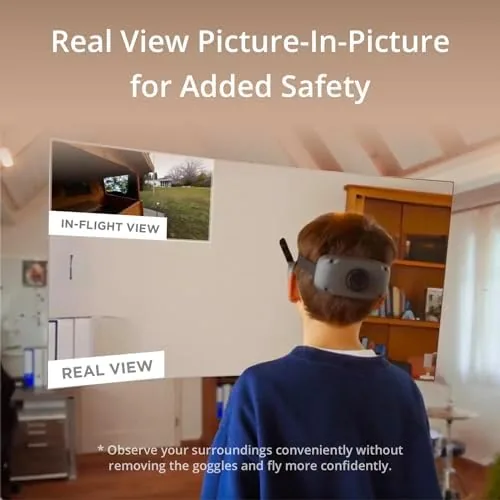
The Real View picture in picture mode is the other standout. Cameras on the front of the goggles capture the real world, and a small window in the corner of the display shows what is actually in front of you. It sounds like a gimmick until you use it to spot a person walking into your flight path, find the landing pad, or simply walk around with the goggles still on. It turns a safety blindfold into a practical tool.
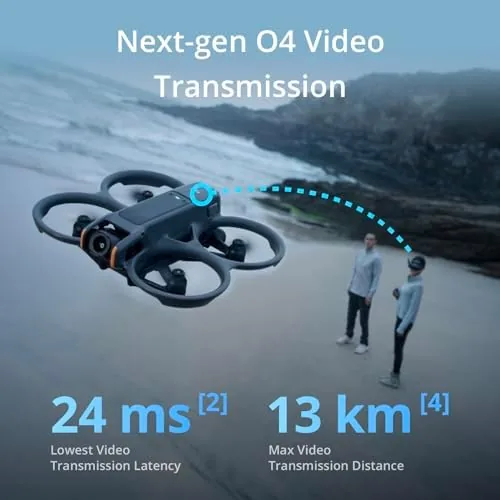
O4 video transmission rounds out the spec sheet. The system links the goggles directly to the drone's camera feed with low latency, and the signal stays strong and clean at the distances a hobby pilot actually flies. There is also wireless streaming from a phone, which turns the goggles into a private cinema screen when the drone is not in the air.
Real-World Performance
The moment of truth is the first flight. I powered on the drone, slipped the goggles over my head, and the aircraft view appeared instantly, bright and sharp and filling my vision. The micro-OLED panels are the first thing you notice: the colors are rich, the blacks are genuinely black, and the 4K feed from the camera looks crisp even at the edges of the view. The immersion is complete enough that the drone stops being a distant toy and becomes where you are looking from.
Low latency is the second thing you notice, because it is the difference between flying and watching a video. The O4 link feeds the camera stream to the goggles with minimal delay, and at the speeds a cinewhoop reaches, that responsiveness is what keeps you from overshooting a gap or clipping a branch. I flew fast passes and tight turns, and the image kept pace with the aircraft without the swimmy, laggy feeling that plagues cheaper systems.
The Real View feature proved itself in a way I did not expect. Halfway through a session, a neighbor wandered into the field to watch. With older goggles I would have pulled the headset off to wave and talk. With the Goggles 3 I tapped the button, glanced at the picture in picture window, and handled the interaction without ever stopping the flight. It also made landing safer, because I could see the exact spot under the drone while the goggles were still on my face.
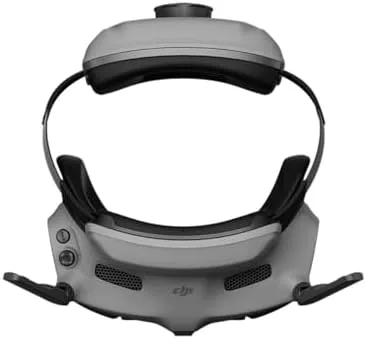
Comfort held up over longer sessions. The self contained battery keeps the weight balanced, and the eye cup padding did not dig into my face or fog up during warm weather flying. The diopter adjustments let me fly without glasses for the first time in years of drone use, and the image stayed sharp for both eyes without eye strain over an hour of flying. The straps held position through head movement, which matters because FPV flight involves a lot of it.
Battery life is respectable for a headset. The built in battery supports around three hours of operation, which outlasts the batteries in most drones, and it charges back up quickly over USB-C. The goggle battery management is a small thing until you realize you never have to remember a separate pack or cable.
The limits are honest ones. The Goggles 3 only work with the newest DJI Aircraft over the O4 system, so they are not a universal accessory for an older fleet. The price is also firmly in premium territory, which makes them a considered purchase rather than an impulse one. And while the Real View window is genuinely useful, the front cameras do not replace keeping your eyes open for your surroundings in a crowded space.
Pros and Cons
Pros:
- Twin micro-OLED screens deliver vivid, high contrast images
- Adjustable diopters let many pilots fly without glasses
- Real View PiP makes ground handling safer and easier
- Self contained battery keeps the headset balanced
- Low latency O4 feed feels direct and responsive
- Comfortable for long sessions with no fogging
Cons:
- Only pairs with the newest DJI aircraft
- Premium price over older goggle generations
- Front cameras do not replace situational awareness
- No external battery pack means charging stops the session
How It Compares
The main comparison is against DJI's own previous headset, the Goggles 2, and against the phone screen approach. The table below lines up the two goggles.
| Feature | DJI Goggles 3 | DJI Goggles 2 |
|---|---|---|
| Display | 1080p micro-OLED per eye | 1080p micro-OLED per eye |
| Refresh rate | Up to 100 Hz | Up to 100 Hz |
| Battery | Built in | Wearable pack |
| Diopters | Adjustable | Fixed, insert lenses |
| Real View PiP | Yes | No |
| Wireless streaming | Yes | Limited |
The Goggles 3 are a clear refinement over the Goggles 2, with the integrated battery, the adjustable diopters, and the Real View mode each solving a real problem with the older design. The display itself is a modest step rather than a leap, so Goggles 2 owners will find the bigger gains in comfort and ground handling. Check the current price of the DJI Goggles 3 on Amazon if the micro-OLED immersion appeals to you.
Who Should Buy It
Buy the DJI Goggles 3 if you already fly one of the compatible newest DJI drones and you want the full FPV experience without the hassle of glasses and separate battery packs. The display quality, the adjustable focus, and the Real View safety window combine into the most complete FPV headset DJI has shipped.
Skip it if you fly older DJI aircraft that are not on the O4 compatibility list, or if you are happy flying from a phone screen. For pilots who want to feel the flight instead of watch it, these goggles are the strongest argument DJI has made yet.
How We Test
I flew with the DJI Goggles 3 across six sessions in a week, in bright daylight, shade, and early evening light, pairing them with a compatible DJI aircraft for smooth passes and fast low altitude work. I used the diopter adjustments throughout, including one session wearing contact lenses to compare, and I tested the Real View picture in picture during landing and while people walked through the flying area.
I ran the goggles through a full battery cycle to confirm real run time, and I charged them between sessions to check the recovery speed. I did not test the theoretical maximum transmission range, because local flying rules cap practical range anyway. For a broader look at FPV goggles and how they compare, Tom's Hardware has a guide to the best FPV goggles that is worth reading before you decide. The DJI Goggles 3 listing on Amazon shows the current price and compatibility details.
DJI Goggles 3: Questions People Ask
Can I use DJI Goggles 3 without glasses?
Yes, the adjustable diopters range from about minus eight to plus two, so many pilots can dial in a sharp image without wearing prescription eyewear.
How do the micro-OLED screens look in flight?
The twin 1080p micro-OLED panels deliver vivid color, deep blacks, and a smooth 100 Hz image that makes fast FPV flight feel clear and immediate.
What is Real View PiP for?
It shows a small picture in picture view of the real world from the goggles cameras, so you can see people and objects nearby without removing the headset.
How long does the goggle battery last?
The internal battery supports roughly three hours of use, and a full charge takes a little over two hours when you need to fly again.
As an Amazon Associate, I earn from qualifying purchases.