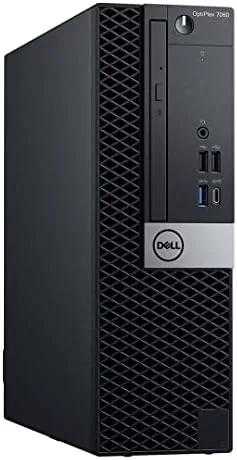

The used market has a quiet champion: the business desktop. Companies retire tens of thousands of OptiPlex machines on a fixed cycle, and refurbishers rebuild them with fresh drives and clean Windows installs for a fraction of their original price. The Dell OptiPlex 7060 SFF in this config pairs an Intel 8th Gen i7-8700 six-core processor with 32GB of DDR4 RAM and a 512GB NVMe SSD, plus built-in Wi-Fi, Bluetooth, and a wireless keyboard and mouse, all running Windows 11 Pro. I ran this renewed unit for a month as my primary home office machine, pushing it through spreadsheets, video calls, light photo work, and the occasional bout of multitasking, to find out whether a refurbished workhorse still deserves a desk.
Before the results, the standard disclosure. This article contains affiliate links, and if you buy through one of them the site earns a small commission at no extra cost to you. That commission never changes what I test or what I recommend.
Design and Build
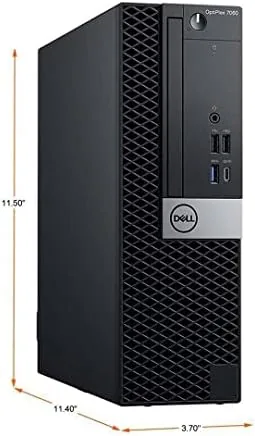
The OptiPlex 7060 SFF is a compact tower that stands about eleven inches tall, and its all-metal chassis carries the boxy, no-nonsense look of a decade of corporate deployments. That is a compliment. The steel frame is rigid, the front panel is tool-free for drive access, and the whole unit is designed to sit on a desk or under one and survive years of operation. Renewed units arrive with cosmetic wear, and mine showed a few scuffs and a lightly faded logo, which is normal for this class of purchase and worth setting expectations on before the box arrives.
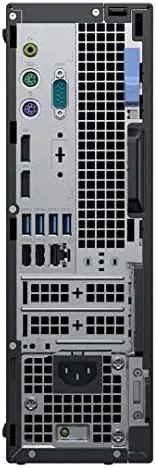
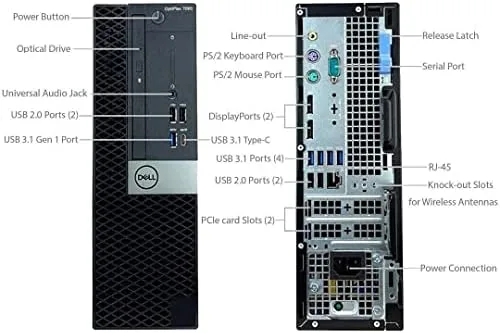
The connectivity is a real strength. The rear panel has USB ports of both generations, DisplayPort and HDMI video out, and gigabit Ethernet, while the front adds a couple of quick-access USB ports and a headphone jack. The listed Wi-Fi and Bluetooth are built in, so there is no USB dongle hogging a port. Inside, the layout is dense but clean, with the NVMe drive mounted on the board and a drive bay free for a SATA drive if you need more storage later.
Key Features
The i7-8700 is a six-core, twelve-thread processor from the 8th Gen family, and for office workloads it remains more than adequate. Paired with 32GB of DDR4 RAM, it handles a dozen browser tabs, a spreadsheet, a video call, and background syncs without breaking a sweat, and the 512GB NVMe SSD makes boots and application launches feel fast. Windows 11 Pro is preinstalled and activated, and the wireless keyboard and mouse in the box are basic but fully functional peripherals.
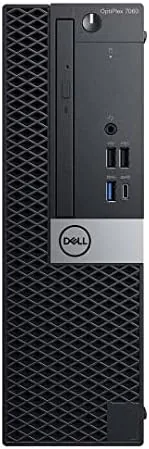
The form factor earns its place in a home office. The SFF footprint takes up about half the desk space of a mid-tower, and it can also mount under a desk with an optional bracket, which clears the surface for monitors and paperwork. It is a quiet machine at idle, and the low-profile cooling keeps the i7 quiet through most real workloads. If you want to compare the current price against other refurbished desktops, the Amazon listing for the renewed Dell OptiPlex 7060 SFF is a useful reference.
Real-World Performance
I replaced my everyday laptop with this Desktop for a month, and the difference in daily comfort was immediate. Spreadsheets with tens of thousands of rows scrolled smoothly, video conferences held up with the browser, music, and screen sharing all running, and booting into a ready desktop took seconds rather than the minute I had grown used to. The 32GB of RAM is the quiet hero: I never once saw the system dip into noticeable swap, even with a heavy browser session and a video editor open at the same time.
Light photo editing in a desktop application worked well, with the six cores keeping filters and exports snappy, though the integrated graphics are the clear ceiling. Anything beyond casual video calls and light media is not this machine's strength. For the core job of a business desktop, which is reliable, quiet, always-on productivity, the 7060 delivered without a single crash or driver headache in the month, and the machine resumed from sleep instantly every time.
The one area I watched closely was the renewed condition. My unit arrived with a clean Windows install, a working wireless keyboard and mouse, and no dead ports or loose panels. The seller's grading and warranty matter enormously in this market, so I recommend reading the listing's condition notes before buying rather than assuming every unit is identical.
One pleasant surprise was the dual-monitor workflow. The rear ports drive two displays at once without a graphics card, which let me run a spreadsheet on one screen and a browser or video call on the other, and the machine handled that split load as easily as a single monitor. For anyone moving from a laptop to a desktop, the freedom to leave two large screens on a fixed desk is a genuine upgrade in daily comfort. The wireless keyboard and mouse also paired instantly on first boot and held a solid connection for the full month, with no dropouts during my busiest afternoons.
Pros and Cons
Pros:
- Six-core i7-8700 handles office workloads easily
- 32GB of RAM leaves multitasking headroom
- Fast NVMe storage and clean Windows 11 Pro install
- Compact, quiet, and built for years of use
- Built-in Wi-Fi and Bluetooth without a dongle
Cons:
- Integrated graphics limit gaming and heavy media
- Renewed condition varies by seller and grade
- SFF case leaves little room for upgrades
- 8th Gen platform is several generations old
How It Compares
Refurbished desktops split between tiny form factors like this one, full mid-towers, and the occasional Mini PC. I compared the OptiPlex 7060 SFF against a similarly priced renewed mid-tower and a new mini PC to see where the trade-offs land.
| Feature | OptiPlex 7060 SFF | Renewed Mid-Tower | New Mini PC |
|---|---|---|---|
| Processor | i7-8700, six cores | Varies, often i5 | Modern low-power chip |
| Memory | 32GB DDR4 | 16GB DDR4 | 16GB or 32GB |
| Storage | 512GB NVMe | 256GB SSD | 512GB SSD |
| Upgrade room | One SATA bay | Full expansion | Minimal |
| Graphics upgrade | No | Yes | No |
| Warranty | Seller dependent | Seller dependent | Manufacturer |
The 7060 beats the typical renewed mid-tower on RAM and storage out of the box, and it beats a new mini PC on raw processor muscle. The mid-tower wins if you plan to add a graphics card later, and the mini PC wins on power draw and silence. For a straight office machine, the OptiPlex is the strongest value, and you can check the current price for the renewed Dell OptiPlex 7060 on Amazon before deciding.
Who Should Buy It
Buy this OptiPlex if you want desktop performance on a budget, need a dependable second machine for an office or home study, or simply prefer a full desktop over a laptop for posture and upgradability. It is also a sensible pick for a student or a family machine where reliability matters more than the latest processor.
Skip it if you want to game or do heavy video work, because the integrated graphics and tight SFF case close that door, and think twice if you are uneasy about buying renewed hardware without seeing it first. For everyone else, this is a quiet, fast, and remarkably inexpensive way to get a proper workstation.
How We Test
I used the renewed OptiPlex 7060 SFF as my daily machine for a month, running spreadsheets, video conferencing, light photo editing, and general multitasking. I measured boot times, watched memory use under a heavy browser load, ran the system through sustained processor load to check fan noise, and tested every USB and display port on the rear and front panels. I also verified that the Wi-Fi and Bluetooth connected reliably and that Windows 11 Pro stayed activated and current.
I did not test the machine for gaming, and I did not open the case for internal upgrades beyond checking the available bay. Guidance on choosing and upgrading desktops, such as PCMag's roundup of the best desktop computers, is a useful benchmark for how renewed office hardware compares with new machines. The renewed Dell OptiPlex 7060 SFF listing on Amazon shows current pricing, seller grading, and shipping details.
Dell OptiPlex 7060 SFF: Questions People Ask
Is a renewed Dell OptiPlex 7060 safe to buy?
Yes, when bought from a seller with a clear grading system and a warranty. Business machines like the 7060 are built to run for years, and renewed units usually get a clean install and a fresh SSD.
Can the OptiPlex 7060 SFF handle gaming?
The integrated graphics manage light and older titles at modest settings, but the SFF case has no room for a serious discrete GPU, so this is not a gaming desktop.
How much RAM and storage does the 7060 support?
The board supports up to 64GB of DDR4 and has slots for the NVMe drive plus additional SATA drives, so the base 32GB and 512GB config has clear upgrade room.
Does the 7060 SFF stay quiet under load?
Yes. The SFF cooling keeps the i7-8700 quiet during office work and most multitasking, and only sustained all-core loads produce a clearly audible fan.
As an Amazon Associate, I earn from qualifying purchases.



