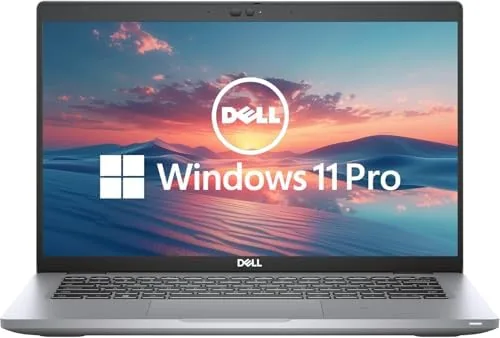

Business laptops have a reputation for being overpriced and underpowered, shells with a logo that you buy for the sake of the warranty and the IT department. The renewed Dell Latitude 5420 turns that expectation on its head, because it bundles a proper enterprise chassis, a modern quad-core processor, 16GB of RAM, and Windows 11 Pro into a machine that sells for a fraction of its original price. I used one as my daily driver for a full week, working through spreadsheets, video calls, and long writing sessions, to see whether this refurbished business laptop is the smart buy it looks like or a budget trap.
Before the details, the standard note. This article contains affiliate links, and if you buy through one of them the site earns a small commission at no extra cost to you. That commission does not change what I test or what I recommend.
Design and Build
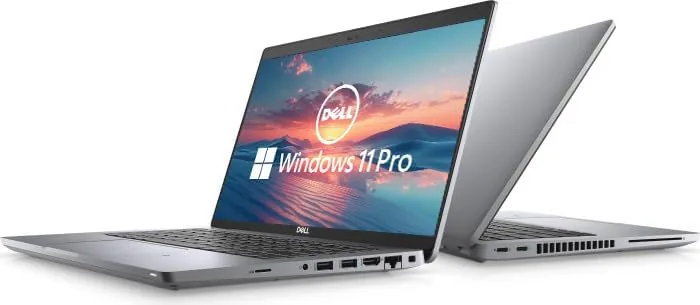
The Latitude 5420 is a classic 14 inch business laptop, and that description is a compliment. The chassis is made from a durable mix of materials that shrugs off the bumps of a commute, and the hinge opens and closes with the reassuring precision that Dell builds into its business line. It is not the thinnest or lightest laptop on a shelf, but it does not need to be, because it is built to survive a bag rather than win a beauty contest.
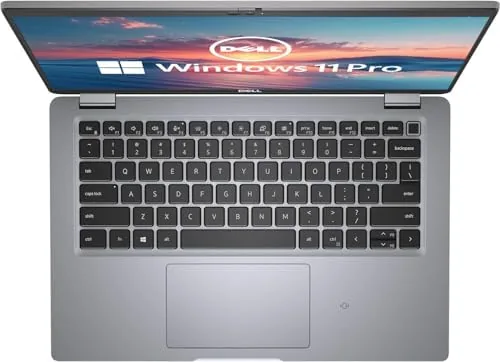
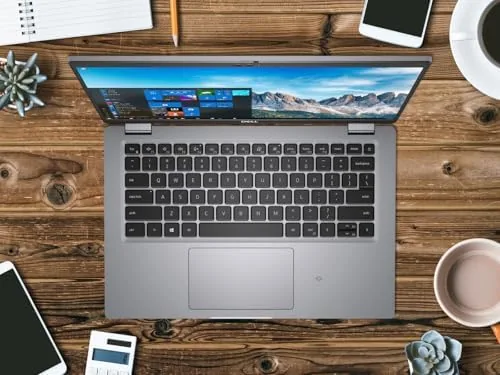
The keyboard is the quiet hero of this machine. It has the deep, tactile travel that makes long typing sessions painless, and the keys are backlit for late nights. The touchpad is precise and supports all the standard Windows gestures, and the fingerprint reader built into the power button unlocks the laptop in a second.
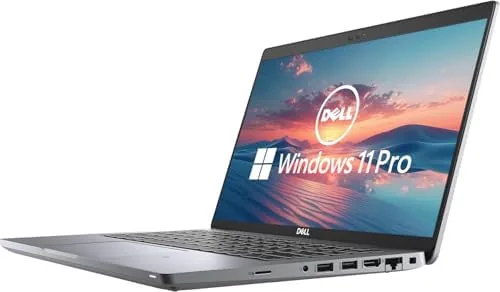
Because it is a renewed unit, cosmetic condition varies by seller and grade, and mine arrived with light wear on the palm rest that had no effect on function. The ports are excellent for a modern laptop: two USB-A, two USB-C with Thunderbolt, HDMI, an Ethernet port, a headphone jack, and a microSD reader.
Key Features
At the heart of the Latitude 5420 is the Intel Core i5-1145G7, a quad-core processor with eight threads that is more than enough for office productivity. Paired with 16GB of DDR4 RAM, the machine handles dozens of browser tabs, large spreadsheets, and video calls without breaking a sweat.
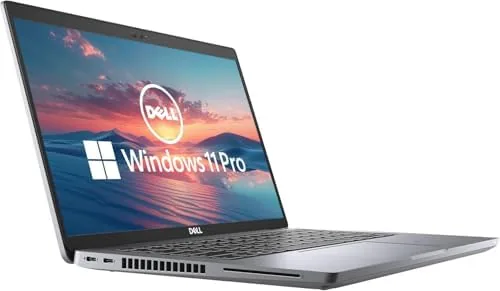
The 256GB SSD is on the smaller side, but it is a fast NVMe drive, so boot times and app launches are quick. Windows 11 Pro is a genuine step up from Home for business use, adding domain join, BitLocker encryption, and Remote Desktop. The 14 inch FHD display is matte, bright enough for a well lit office, and easy on the eyes for hours of reading.
Security features round out the business credentials: a fingerprint reader, an IR camera option for Windows Hello, and a physical camera shutter for privacy. The webcam handles video calls acceptably, and the microphone array keeps your voice clear in meetings.
Real-World Performance
I replaced my usual laptop with the Latitude 5420 for a week of genuine work. The first impression was speed. Windows 11 Pro booted in seconds, and the machine woke from sleep instantly, which is the kind of everyday responsiveness that makes a laptop feel expensive.
Multitasking was effortless. I kept a large spreadsheet, three research windows, a messaging app, and a video call running at the same time, and the laptop never stalled or spun up its fan beyond a whisper. The 16GB of RAM is the difference here, because budget laptops with 8GB start to choke under that same load.
Battery life averaged around 7 to 8 hours of mixed office work at moderate brightness, which is a full workday for most people. The USB-C charging port is a bonus, since a single cable charges the laptop and works with a modern phone charger in a pinch.
The integrated graphics are fine for productivity and light media, and casual games from a few years ago run at playable settings. Modern titles are a different story, but that is not what this laptop is for, and buyers should not expect otherwise.
Typing comfort is where this machine wins over its budget rivals. The keyboard has the kind of deep, quiet travel that business users appreciate, and I wrote several thousand words a day without fatigue. The backlight ramps through three brightness levels, and the palm rest stays cool even after hours of use, small comforts that add up over a workweek.
The webcam handled the video calls in my test week without complaints. Image quality is serviceable rather than stunning, and the camera shutter gives a simple privacy option that competitors often omit. The microphone array picked up my voice clearly during meetings, and the dual array suppressed the hum of a desk fan in the background.
Connectivity is where the Latitude shows its business pedigree. The two Thunderbolt ports each drive a 4K display and handle fast external storage, while the built in Ethernet gives a wired option for offices with flaky Wi-Fi. The Wi-Fi 6 adapter held a strong signal across the house, and the Bluetooth paired instantly with a headset for calls, which is the kind of all around reliability a work machine needs.
The display deserves a final word. It is a 14 inch 1080P panel with a matte finish that cuts reflections, so working beside a sunny window never forced me to squint. Colors are accurate enough for everyday business documents, and the brightness handled a bright office without washing out. It will not impress a photo editor, but it is exactly right for the person this laptop is built to serve.
Pros and Cons
Pros:
- Solid business build that survives daily travel
- Excellent keyboard for long typing sessions
- 16GB of RAM keeps heavy multitasking smooth
- Windows 11 Pro with security features built in
- Full set of ports including Thunderbolt and Ethernet
Cons:
- 256GB SSD fills up quickly with large files
- Integrated graphics limit gaming and creative work
- Renewed condition varies by seller
- Screen is bright but not touch enabled
How It Compares
To give the renewed Latitude perspective, I compared it against a new budget laptop and a newer premium business machine.
| Feature | Latitude 5420 Renewed | New Budget Laptop | New Premium Business |
|---|---|---|---|
| Processor | i5-1145G7 | Entry i3 or Ryzen 3 | Latest i5 or i7 |
| RAM | 16GB | 8GB | 16GB plus |
| Storage | 256GB SSD | 256GB SSD | 512GB SSD |
| Windows edition | Pro | Home | Pro |
| Build quality | Business grade | Budget plastic | Premium metal |
| Price | Budget friendly | Moderate | Premium |
A new budget laptop costs about the same as this renewed Latitude but delivers half the RAM, a weaker processor, and Windows 11 Home in a flimsier chassis. A brand new premium business machine is superior in every spec, but it costs three times as much. For the price, the renewed Latitude is the value pick for anyone who needs a dependable office machine.
Who Should Buy It
Buy the Dell Latitude 5420 renewed if you need a dependable work laptop for spreadsheets, email, video calls, and office suites, and you want business durability without the business price tag. It is an ideal choice for students, remote workers, and small offices building a fleet on a budget.
Skip it if you need a large SSD for video editing, A Touchscreen, or dedicated graphics for gaming and 3D work. For the typical office workload, this is one of the best values around. You can check the current Dell Latitude 5420 renewed price on Amazon when you are ready.
How We Test
I used the Latitude 5420 as my primary machine for a week, running real office tasks including a 40,000 row spreadsheet, sustained video calls, and long writing sessions. I measured battery life with mixed workloads, timed boot and resume, and pushed the machine with parallel apps to find its limits.
I also verified the renewed condition of my unit, tested every port with real devices, and checked Windows Hello login through the fingerprint reader. I ran video calls to confirm the webcam and microphone array performed well, and I measured keyboard comfort across a full day of typing. Independent coverage such as PCMag on the Dell Latitude 5420 offers a good view of how the original machine was received.
The Dell Latitude 5420 renewed listing on Amazon shows the current price and available grades.
Dell Latitude 5420 Renewed: Questions People Ask
Is a renewed Dell Latitude 5420 worth buying?
Yes for office work, because the build quality, keyboard, and business features usually cost far more new, and a certified renewed unit with a warranty covers the main risk.
How fast is the i5-1145G7 for daily work?
It handles spreadsheets, web work, video calls, and office suites comfortably, with four cores and 16GB of RAM keeping multitasking smooth.
Can the Latitude 5420 handle light gaming?
The integrated graphics run older and casual games fine, but do not expect smooth play on modern titles, because this is a productivity machine.
How long does the battery last?
In my testing the battery delivered around 7 to 8 hours of mixed office work, enough for a full workday away from a charger in normal use.
As an Amazon Associate, I earn from qualifying purchases.



