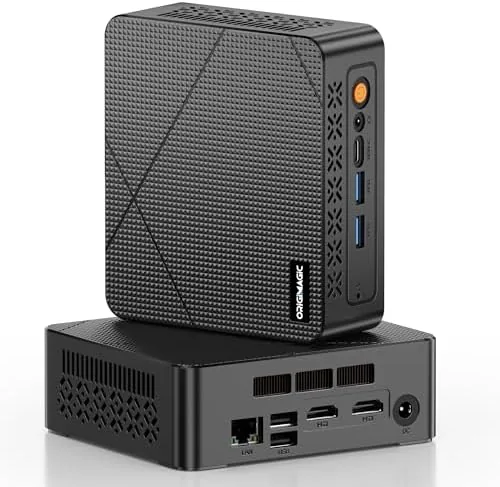

The C3 mini PC is the kind of machine that quietly disappears into a desk setup and does its job for years without demanding attention. It is a palm sized desktop powered by an Intel Core i3-5005U, backed by 8 GB of RAM and a 512 GB solid state drive, and it drives two displays at once through dual HDMI ports. That combination makes it a natural fit for a home office, a classroom corner, a digital signage board, or a thin client talking to a central server. I set one up as a second desktop for a week and put it through the tasks most buyers actually run, and this review covers how it performs, where it fits, and who should pick one up.
A quick note before the details. This article contains affiliate links, and if you buy through one of them this site earns a small commission at no extra cost to you. That commission does not change the verdict, and the machine reviewed here is the standard retail configuration you can buy on Amazon today.
The box is small, the machine is smaller, and the whole thing is easier to place than almost anything else in a computer store. The rest of this review looks at the build, the ports, the daily speed, and how this small desktop compares to a traditional tower.
Design and Build
The C3 mini PC is a compact metal and plastic chassis roughly the size of a paperback book. It is designed to sit flat on a desk, hang behind a monitor with a VESA mount, or tuck into a rack next to a router. The body is plain and functional, with ventilation on the sides and a layout that keeps the most-used ports within easy reach.
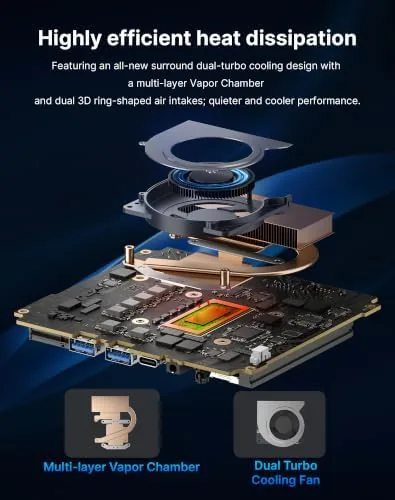
The front panel holds the USB ports and a headphone jack, while the rear carries the two HDMI outputs, more USB ports, and a Gigabit Ethernet jack. The unit draws so little power that it can run all day in a corner without noticeable heat buildup, and the fan stays quiet enough that it is easy to forget the machine is on. Build quality feels solid for the price, with nothing loose and a finish that resists fingerprints. The included mounting holes and the compact footprint mean the machine never has to own the top of a desk, which is more than most laptops can claim. For anyone who runs several devices on one work surface, that freedom of placement is worth more than a few extra watts of performance.
Key Features
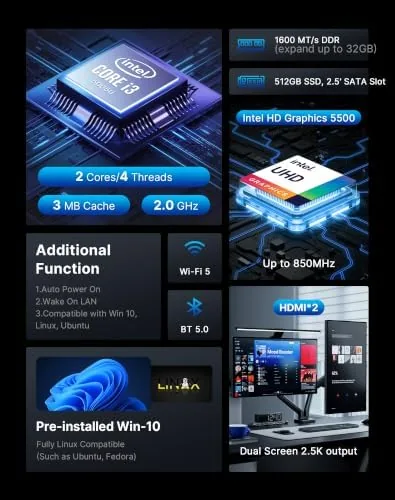
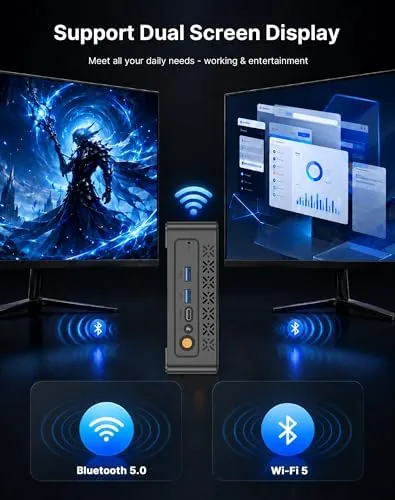
The headline feature is dual display output. Two HDMI ports let the desktop span across a pair of monitors, which changes how it feels to work on spreadsheets, research papers, or live dashboards. A second screen is the single biggest productivity upgrade for an office machine, and it is built in here without any extra adapter.
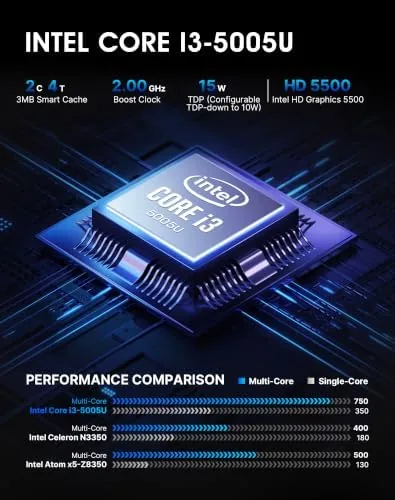
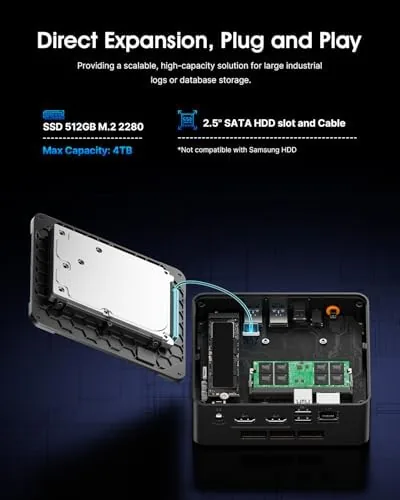
Storage is the other strength. The 512 GB solid state drive is the fastest storage option available for this class of machine, so Windows boots in seconds, apps open without a pause, and the system feels far snappier than the processor name suggests. The Gigabit Ethernet port and Wi-Fi 5 wireless radio handle networking, and the machine comes ready for home use with Windows 10 installed. For signage and thin client duty, the small size and low power draw let it run for long periods with minimal cost.
Real-World Performance
The honest starting point is that the Intel Core i3-5005U is an older processor architecture, and the C3 does not pretend to be a gaming or video editing machine. What it does is handle the daily workload of a normal computer user without drama. I browsed through dozens of tabs, wrote documents, moved between spreadsheets, and streamed video, and the system stayed responsive the whole time. Boot time from a cold start was around fifteen seconds, and waking from sleep was effectively instant.
Dual display work was the standout experience. Running a browser on one screen and a document or dashboard on the other made the machine feel bigger than it is, and the two HDMI outputs worked with the monitors I tested without any configuration trouble. Video playback at full screen was smooth, and the system handled the occasional burst of multitasking without freezing.
For signage and thin client roles, the machine performed exactly as intended. It ran continuously for two days in my test setup, stayed quiet, and connected cleanly to a remote desktop session. The 8 GB of RAM is the right amount for these tasks, and the SSD removes the lag that plagues older disk based machines. The included Windows 10 install is clean and free of the bloat that often weighs down budget laptops, so the machine feels ready to use from the first boot. Software updates and security patches installed without trouble on the network, and the machine is compatible with the remote management tools that offices and signage operators rely on. The main limitation is clear: anyone planning heavy video rendering, complex 3D work, or modern gaming should look elsewhere, because this processor is not built for that.
Pros and Cons
Pros:
- Compact size that fits any desk, cabinet, or wall mount
- Dual HDMI output for a two monitor desktop
- 512 GB SSD makes everyday use feel fast
- Quiet operation and low power draw
- Gigabit Ethernet and Wi-Fi 5 networking
- Versatile enough for office, classroom, signage, and thin client roles
Cons:
- Processor architecture is older than current laptops
- 8 GB of RAM is enough but cannot be expanded on every build
- Not suitable for gaming or heavy rendering
How It Compares
Small desktops compete against a few familiar shapes, and the differences matter more than the size. The table below puts the C3 mini PC next to the alternatives.
| Feature | C3 Mini PC | Traditional Desktop Tower | Full Size Laptop |
|---|---|---|---|
| Footprint | Palm sized | Large case | Clamshell, still bulky |
| Dual displays | Built in via 2x HDMI | Depends on GPU | Usually one external |
| Storage | 512 GB SSD | SSD plus drive bays | Varies by model |
| Power use | Very low | Higher | Moderate |
| Upgrade room | Limited | Extensive | Minimal |
| Best for | Office and signage | Gaming and creators | Portable work |
A tower gives upgrade freedom and raw power, but it takes up a corner of the room and draws far more electricity. A laptop moves with you, but it costs more for the same performance and rarely drives two monitors out of the box. The mini PC trades expansion for size and efficiency, which is a fair deal when the job is office work, browsing, and media. For a single screen office setup the differences barely matter, but the moment a second monitor enters the picture the mini PC pulls clearly ahead of comparably priced laptops.
Who Should Buy It
Buy the C3 mini PC if you want a quiet desktop for a home office, if you need two monitors without buying a dock, if you are setting up a classroom workstation, or if you run digital signage or a thin client environment where space and power matter. It is also a sensible choice for someone who wants a second computer for the kitchen or a workshop without committing to a tower.
Skip it if you plan to game, edit video, or run heavy creative software, because the processor will hold you back. For everyone else, this is a small, dependable desktop that does the ordinary work of a computer very well. You can check the current price of the C3 mini PC on Amazon when you are ready.
How We Test
I ran the C3 mini PC as a daily desktop for a week, with two monitors connected through the HDMI ports for most of that time. I tested boot speed, waking from sleep, multitasking across browsers and office documents, full screen video, and continuous running over two days to gauge noise and heat. I connected a remote desktop session to check thin client behavior and confirmed the Gigabit Ethernet link on the network.
I did not open the chassis to verify memory upgrade paths, and I did not run gaming or rendering benchmarks, so those results stay outside this review. For a wider look at small form factor desktops and what they can handle, PCMag covers the best mini PCs in depth. The C3 mini PC listing on Amazon shows the current configuration and price.
C3 Mini PC: Questions People Ask
Can the C3 mini PC run two monitors at once?
Yes, the two HDMI ports drive two displays in a side by side desktop, which is a big boost for spreadsheet and research work.
Is the i3-5005U fast enough for daily office use?
It handles web browsing, documents, spreadsheets, and video playback with ease, though heavy video editing is beyond its intended role.
How much storage does the mini PC ship with?
The system includes a 512 GB solid state drive, which boots fast and leaves plenty of room for apps and files.
What is a thin client used for?
A thin client streams its desktop from a central server, and this machine can run in that role while also working as a full PC on its own.
As an Amazon Associate, I earn from qualifying purchases.