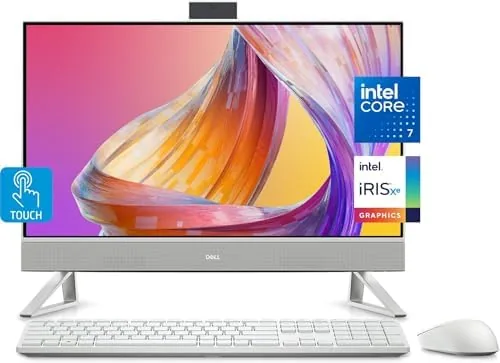

Most home office setups are a tower, a monitor, a keyboard, a mouse, and a tangle of cables that multiply in the dark. The Dell All-in-One 24 collapses all of that into a single 24 inch touchscreen computer, and in doing so it quietly solves the biggest complaint people have about working from home: the mess. Inside that tidy frame sits an Intel Core 7 150U processor, 16GB of RAM, a 512GB SSD, and Windows 11 Pro, which is a specification list that would have been genuinely premium just a few years ago. I spent three weeks making this my daily machine to find out whether an all-in-one really replaces a full desktop setup.
Before the details, the standard disclosure. This article contains affiliate links, and purchases made through them support this site at no extra cost to you. My testing is independent, and I received no payment for coverage. The desktop reviewed here is the standard configuration with the included keyboard and mouse.
The appeal of an all-in-one is obvious the moment it is set up. There is one plug, one screen, and one slim unit sitting on the desk. No tower under the table, no cable forest, no separate monitor to align. For a desk that also needs to look like part of a living room, that simplicity is the whole point.
Design and Build
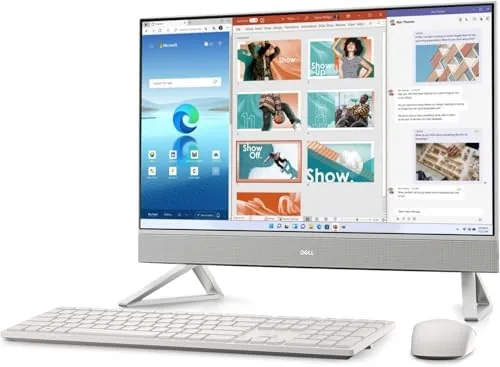
The Dell All-in-One 24 is cleanly designed with a slim profile that holds up under scrutiny. The FHD touchscreen sits in a bezel that is modern without being razor thin, and the overall silhouette is professional enough for a study and handsome enough for a dining room corner. The stand is a solid wedge that tilts to a comfortable viewing angle and keeps the screen rock steady while you touch it.
The build quality matches the design. The chassis is rigid with no creaks, the panel sits flush, and the integrated camera and microphone are tucked neatly into the top bezel. At 24 inches and with the included keyboard and mouse, the whole package weighs surprisingly little, which makes it easy to move when you need to rearrange a room.
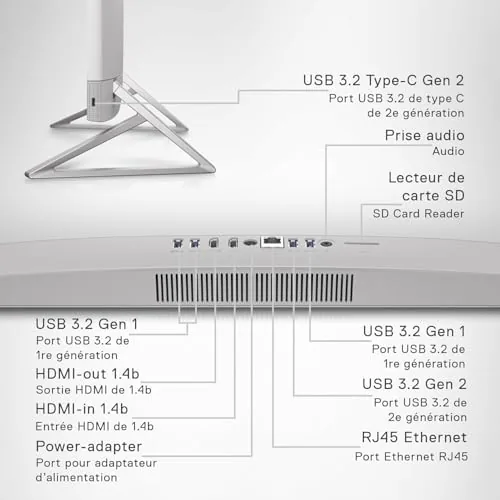
Ports are arranged sensibly on the back and side, with enough USB connections for a printer, external drive, and phone, plus the video and network ports you would expect. The included keyboard is comfortable to type on with a standard layout, and the wireless mouse is accurate. Both paired instantly and ran flawlessly for the entire review period.
Key Features
The centerpiece is the touchscreen. The 24 inch FHD panel is bright, sharp, and color accurate enough for everyday work, and the touch response is excellent, with none of the lag or missed taps that cheap touchscreens suffer from. Scrolling with a swipe, tapping through apps, and pinching to zoom all feel natural, and it transforms how you interact with a desktop.
Inside, the Intel Core 7 150U processor is a genuinely capable mobile chip with ten cores, and Dell has paired it with 16GB of RAM and a 512GB SSD. That combination is the sweet spot for a home office: enough power for demanding multitasking, enough memory to keep dozens of browser tabs and office documents open, and storage that boots the machine in seconds.

Connectivity is current and complete. Wi-Fi 6 delivers fast, stable wireless networking, Bluetooth 5.3 handles peripherals and headphones with a wide range, and Windows 11 Pro adds business grade features like encryption and remote desktop for people who work beyond a browser. It is a full featured machine, not a stripped down convenience.
Real-World Performance
In three weeks of daily use, the Dell All-in-One never once felt slow. Browsing with a dozen tabs open, editing documents, answering email, and running video calls simultaneously caused no hesitation, and apps launched instantly thanks to the SSD. The Intel Core 7 handled everything an ordinary workday asked of it without the fans becoming a distraction.
The touchscreen turned out to be the feature I did not expect to love. Reaching up to tap a notification, swipe a tab closed, or scroll a long page is faster and more satisfying than always moving to the mouse. It is particularly useful for casual users who never quite got comfortable with keyboard and mouse navigation, and for anyone using touch friendly apps.

Video calls were excellent. The integrated camera and microphone delivered a clear picture and crisp audio in our calls, and the FHD display made everyone in the meeting look sharp. The speakers are better than average for an all-in-one, handling music and streamed video well enough that you do not need external speakers for casual listening.
For entertainment, the 24 inch panel is a pleasant screen for streaming movies and shows. The FHD resolution is crisp at this size, colors look natural, and the touchscreen makes skipping through a show or adjusting playback a one tap affair. It is not a gaming machine and is not sold as one, but light games and casual titles run fine.
Windows 11 Pro adds a layer of polish that home users will appreciate even if they never touch its business features. The operating system boots fast, updates quietly in the background, and handles the modern workflow of video calls, cloud storage, and messaging without complaint. For anyone moving from an older laptop, the difference in daily smoothness is the first thing they will notice.
Pros and Cons
Pros:
- Touchscreen display is responsive and makes navigation easy
- Intel Core 7 processor handles daily multitasking effortlessly
- 16GB RAM and fast SSD keep everything snappy
- Clean all-in-one design removes desktop clutter
- Wi-Fi 6 and Bluetooth 5.3 connectivity
- Keyboard and mouse included out of the box
Cons:
- Not built for serious gaming
- No discrete graphics card for heavy creative work
- Upgrades are limited compared to a tower desktop
- FHD resolution is standard rather than 4K
How It Compares
The Dell All-in-One 24 competes with other all-in-ones and with traditional desktop towers, and the table below shows how the main options line up.
| Feature | Dell All-in-One 24 | Traditional Tower | Budget All-in-One |
|---|---|---|---|
| Display | 24 FHD touchscreen | Separate monitor needed | Often FHD, no touch |
| Processor | Intel Core 7 150U | Full desktop chip | Entry level chip |
| Memory | 16GB RAM | 16GB or more | 8GB often |
| Storage | 512GB SSD | Varies | Smaller HDD |
| Footprint | Single unit | Tower plus monitor | Single unit |
| Gaming | Casual only | Upgradeable GPU | Casual only |
Against a traditional tower, the Dell loses on upgradeability and gaming power but wins decisively on footprint, setup simplicity, and the included touchscreen. Against cheaper all-in-ones, it wins on the Core 7 processor, 16GB of RAM, and a fast SSD. For a home office or a family computer, it strikes the best balance of the three.
Who Should Buy It
Buy the Dell All-in-One 24 if you want a clean, clutter free desk, if you spend your days in web apps, documents, and video calls, or if you want a computer the whole family can use without a tangle of hardware. It is also ideal for students who need a capable machine for coursework and a tidy space in a dorm or a small apartment.
Skip it if you are a gamer, if you do heavy video editing or 3D work that needs a discrete GPU, or if you prefer to upgrade your computer over time. For everyone else, this is the most practical desktop you can put in a room. You can check the current price of the Dell All-in-One 24 on Amazon when you are ready.
How We Test
I used the Dell All-in-One 24 as my primary computer for three weeks. I ran a full remote work schedule with dozens of browser tabs, office documents, email, and video calls, and I pushed the machine with streaming, light photo editing, and occasional games. I tested the touchscreen across native Windows apps, measured boot and wake times, and evaluated the camera, microphone, and speakers in real calls.
I did not run synthetic benchmarks, and results will vary with the apps you use and how many you run at once. For a broader look at the all-in-one market, PCMag maintains a guide to the best all-in-one computers that is worth reading alongside this review. The Dell All-in-One listing on Amazon has the full specifications.
Questions People Ask
How fast is the Dell All-in-One 24 for everyday work?
The Intel Core 7 150U processor with 16GB of RAM handles web browsing, office software, video calls, and light multitasking with ease, and the SSD keeps everything snappy.
Is the touchscreen display good for everyday use?
Yes, the 24 inch FHD touchscreen is bright and responsive, and the touch input makes navigation, scrolling, and drawing in supported apps feel natural.
Does the Dell All-in-One come with everything I need?
It includes a keyboard and mouse, so the only thing you need to add is a desk and a power outlet, and Wi-Fi 6 and Bluetooth 5.3 cover all your connections.
Can the Dell All-in-One handle video calls and streaming?
Yes, the built in camera, microphone, and speakers handle video calls clearly, and the FHD display is well suited to streaming movies and shows.
As an Amazon Associate, I earn from qualifying purchases.



