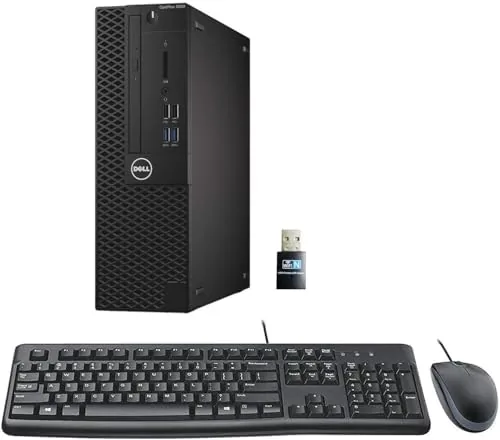

There is a thriving market for renewed business desktops, and for good reason. Companies lease fleets of identical machines, rotate them out on a schedule, and a certified refurbisher resells them at a fraction of what they cost new. The Dell Optiplex 3050 SFF is exactly the kind of machine that built that reputation: a compact, dependable office PC with a quad core processor, plenty of RAM, and a solid state drive. I spent weeks using one as my daily office machine to find out whether a refreshed 3050 still makes sense in 2026, and the answer is more interesting than you might expect.
Before the details, the standard note. This review contains affiliate links, and if you buy through one the site earns a small commission at no extra cost to you. That never changes what I test or recommend.
Design and Build
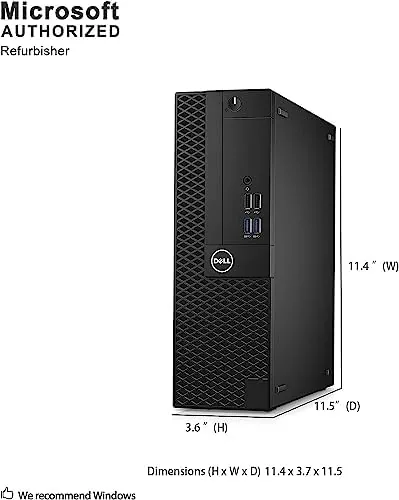
The Optiplex 3050 SFF is the small form factor version of Dell business tower, and small is the operative word. It is roughly the size of a large hardcover book laid flat, about 11 inches deep, 11 inches tall, and 3.6 inches wide. That footprint disappears under a desk, sits neatly beside a monitor, or tucks into a cabinet without any airflow worries, because the whole case is designed for cool, quiet operation.
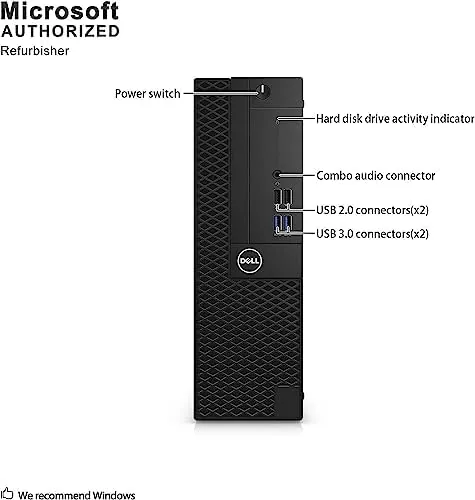
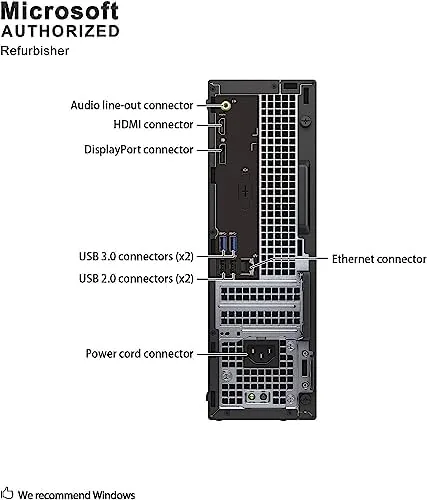
Business desktops are not about looks, and this one does not pretend otherwise. The case is matte black steel with a tool free side panel, which is the defining feature of the Optiplex line. You press a latch, pull the panel, and every major component is right there. That ease of access matters on a renewed machine, because it means you can add RAM, swap drives, or clean fans in minutes with no special tools. The front panel offers two USB ports, a headphone jack, and a slim optical drive bay, and the rear adds four more USB ports, DisplayPort, HDMI, and wired networking.
The build quality is what you would expect from a fleet machine designed to run for years in an office. The chassis is rigid, the power supply is reliable, and every connection is solid. This is not a consumer case with flimsy plastic; it is a machine built to be stacked, shipped, and serviced repeatedly, and it shows.
Key Features
Inside this unit sits an Intel Core i5-6500, a quad core processor running up to 3.6GHz. That chip dates from 2015, and I will not pretend otherwise, but for office workloads it remains surprisingly competent. Paired with 16GB of DDR4 RAM, this machine handles a dozen browser tabs, a spreadsheet, a video call, and background updates all at once without breaking stride. The 256GB solid state drive is the other critical upgrade, because it transforms boot times, app launches, and file access compared with the spinning drives these units originally shipped with.
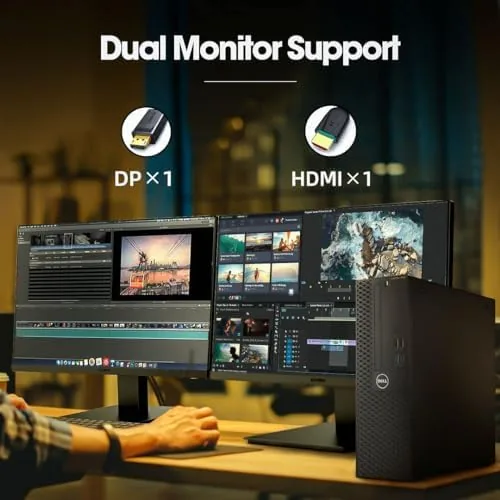
The connectivity story is a genuine strength for a 2026 buyer. The Optiplex 3050 supports 4K output through its DisplayPort and HDMI connections, so it drives a modern 4K monitor at full resolution, which is more than some current budget desktops can claim. It includes built in Wi-Fi for this configuration, along with gigabit Ethernet, so you can place it anywhere without running a cable. The unit arrives with Windows 11 Pro 64 bit installed, and it meets the hardware requirements for that operating system, including a compatible CPU and TPM support.
There is also a tray for a second 2.5 inch drive, and the four memory slots mean the 16GB installed can grow if you ever need more. This is the quiet advantage of buying a renewed business desktop: the machine is designed to be upgraded, and the parts are standard and cheap.
Real-World Performance
I used the Optiplex 3050 as my primary office machine for several weeks, which means email, a browser with a dozen tabs, document editing, spreadsheets, PDFs, and the occasional video call. The honest headline is that it did not slow down. The i5-6500 and 16GB of RAM are more than enough for this kind of work, and the SSD keeps everything snappy. Boot times from a cold start landed around fifteen seconds, and waking from sleep was instant.
Video calls worked well, which matters in a home office. The integrated graphics handle streaming video without dropped frames, and the machine drives a 4K monitor at full resolution over DisplayPort without complaint. If you run two 1080p monitors instead, it handles that setup easily, and that is the configuration most people will actually use.
Where the machine shows its age is in anything demanding. Video editing, modern games, and heavy 3D work are out of the question with integrated graphics, and the older CPU will struggle with large data files that the current generation of office apps can chew through effortlessly. That is not a failure of this machine; it is a reflection of what it is. If your workload stays in the office productivity lane, the 3050 delivers a smooth experience. The cooling is also worth a mention, because the little fan is quiet even under a sustained load, and the whole case runs cool enough that it is comfortable to rest a hand on after hours of use.
Pros and Cons
Pros:
- Compact small form factor case that hides anywhere
- Tool free access makes upgrades genuinely simple
- 16GB of RAM and a 256GB SSD make it a capable office machine
- 4K output over DisplayPort and HDMI
- Built in Wi-Fi and gigabit Ethernet
- Windows 11 Pro preinstalled and compatible
- Quiet and cool under load
Cons:
- Processor architecture dates to 2015
- Integrated graphics limit gaming and creative work
- No USB-C on the front or rear panels
- Renewed condition means cosmetic wear is possible
How It Compares
The renewed Optiplex competes with budget new desktops and other renewed fleet machines. The table below puts it in context.
| Feature | Optiplex 3050 SFF | New Budget Desktop | Older Renewed Mini |
|---|---|---|---|
| CPU | i5-6500 (4 cores) | Modern dual core | Older i3 or i5 |
| RAM | 16GB DDR4 | 8GB DDR4 | 8GB DDR3 |
| Storage | 256GB SSD | 256GB SSD | 128GB SSD |
| 4K output | Yes | Usually | Often not |
| Wi-Fi | Built in | Usually built in | Adapter often needed |
| Typical price | Low | Higher | Low |
A new budget desktop offers a more modern CPU and a warranty, but you usually get less RAM, less upgradable storage, and a consumer case you cannot open without a screwdriver. An older renewed Mini PC saves desk space but often lacks 4K output, Wi-Fi, or the ability to add a second drive. The Optiplex 3050 SFF splits the difference: the reliability of a fleet machine, the upgradability business buyers expect, and a price that undercuts new hardware. For practical guidance on renewing business hardware, outlets such as Tom's Hardware budget desktop coverage regularly note that machines like this one remain a smart value.
Who Should Buy It
Buy the Optiplex 3050 SFF if you need a dependable desktop for office work, school, remote sessions, or light home use and you want to spend as little as possible. It is especially good for people who already have a monitor, keyboard, and mouse, because the machine itself is the only thing you pay for. The 4K output makes it a smart pair with a modern display, and the Wi-Fi keeps it flexible in any room.
Skip it if you want to game, edit video, or run heavy creative software, because the integrated graphics are simply not built for that. Also skip it if you insist on a brand new machine with a full new warranty rather than a certified renewed unit. For the office and student crowd, this is one of the better values around. You can check the current Optiplex 3050 SFF price on Amazon.
How We Test
I used the Optiplex 3050 SFF as my daily office desktop for several weeks, which covered email, browsers with many tabs, document editing, spreadsheets, PDFs, and video calls. I measured cold boot times, wake times, and general responsiveness, and I ran the machine at length to check thermals and fan noise under load.
I connected the unit to a 4K monitor over DisplayPort to verify full resolution output, and I checked Wi-Fi and Ethernet connections in a real home office layout. I did not run a lab benchmark suite, so the performance notes come from direct daily use at realistic workloads. I also confirmed the tool free panel, memory slots, and drive bay by inspection. For current pricing, availability, and buyer feedback on this configuration, the Optiplex listing on Amazon is the best place to look.
Questions People Ask
Is the Dell Optiplex 3050 SFF good for gaming?
This is an office desktop, not a gaming PC. It runs light and older titles at low settings, but the integrated graphics hold it back from modern games.
Does the Optiplex 3050 support Windows 11?
Yes, the unit arrives with Windows 11 Pro 64 bit installed, and it meets the minimum hardware requirements for updates.
Can I upgrade the RAM or storage later?
Yes, the small form factor case has room for additional DDR4 sticks and a 2.5 inch drive, so both RAM and storage can be upgraded with standard parts.
Does the Optiplex 3050 support 4K displays?
Yes, it includes DisplayPort and HDMI outputs that drive 4K monitors, which is why it still works well with modern displays.
As an Amazon Associate, I earn from qualifying purchases.



