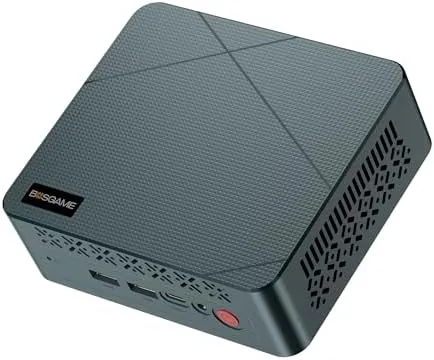

The traditional desktop tower is losing the argument in most offices. It takes up a third of the desk, hums in the background, and ships with far more horsepower than a spreadsheet machine will ever use. The BOSGAME E2 takes the opposite approach, packing an AMD Ryzen 5 3500U, 16GB of DDR4 RAM, and a 512GB NVMe SSD into a chassis barely larger than a paperback book, while promising 4K output across three monitors. I moved my own daily work onto this machine for a week to see whether such a small box can genuinely replace a full-size desktop.
Before the details, the standard note. This article contains affiliate links, and if you buy through one of them this site earns a small commission at no extra cost to you. The commission does not influence what I test or what I recommend, and I evaluated this mini PC exactly as I would a machine bought with my own budget.
Design and Build
The E2 is small in a way that changes how you use a desk. The chassis measures in the region of a few inches on each side, so it vanishes beside a monitor or tucks behind one with the included VESA mounting plate. The metal enclosure feels solid in the hand, with a matte finish that resists fingerprints, and the whole unit runs cool enough that I never worried about airflow through the vents cut into the top and sides.
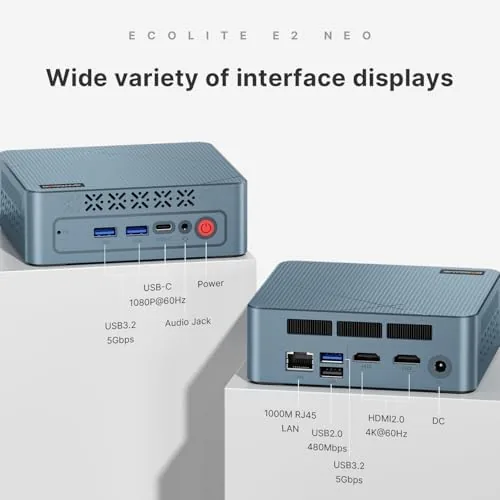
Port placement is where small form factor machines live or die, and the E2 gets it right. The front panel carries the power button, USB-C and USB-A ports, and a headphone jack for daily access, while the rear holds dual HDMI ports, additional USB ports, and wired Ethernet. The layout means cable runs stay tidy, and the machine works with the power adapter that ships in the box.
Opening the chassis is straightforward for a device this size. A few screws release the bottom panel, exposing the NVMe slot and memory, so a competent user can upgrade both without sending the machine back to the manufacturer. It is a welcome detail in a category where sealed cases are common.
Key Features
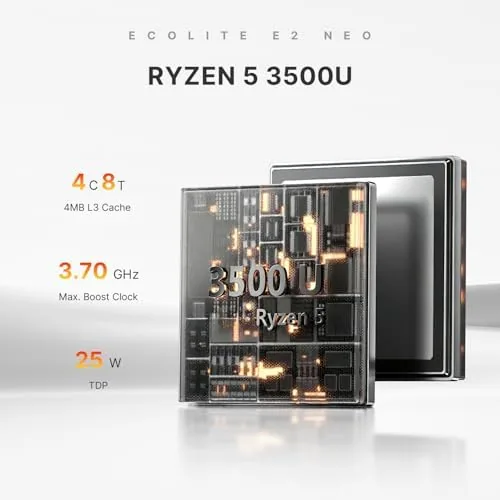
The processor is the AMD Ryzen 5 3500U, a quad core part with eight threads and Radeon Vega graphics built in. It is not a new chip by 2026 standards, but it was built for exactly this workload: everyday computing with enough graphics headroom for 4K output and light media work.
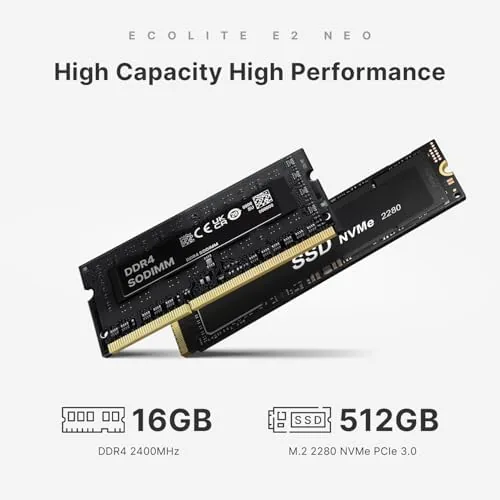
The memory and storage setup is practical. 16GB of DDR4 RAM keeps dozens of browser tabs and a spreadsheet stack from grinding, while the 512GB NVMe SSD makes boot times and application launches feel snappy. For an office machine, the pairing is more than adequate, and the NVMe speed shows up immediately in everyday use.
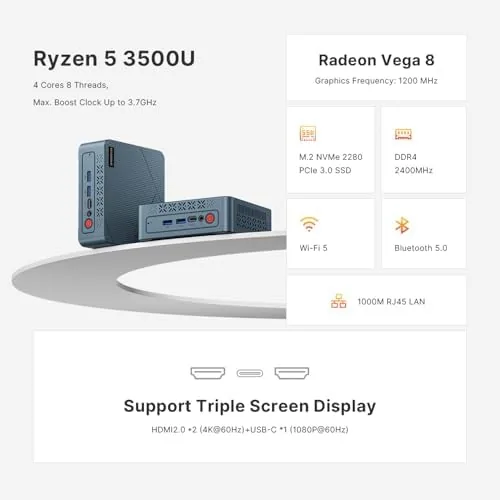
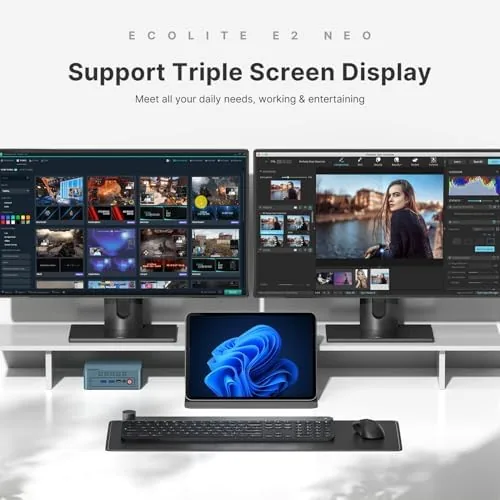
Display output is the headline feature. The dual HDMI ports plus the USB-C port, which also carries video, let the E2 drive three separate 4K displays simultaneously. For anyone who trades on charts, code, or dashboards, that is the difference between a desktop and a real workstation. Wi-Fi 5 and Bluetooth 5.0 cover wireless connections, and wired gigabit Ethernet sits on the back for the offices that still prefer a cable.
Real-World Performance
I replaced my usual workstation with the E2 for a full week, running it through the daily routine of an office worker. Browsing with a dozen tabs open, a spreadsheet with linked sheets, video calls, and document editing all ran without a stutter. Boot to a usable desktop took seconds thanks to the NVMe drive, and waking from sleep was effectively instant.
The triple display setup was the most satisfying part of the experience. With three 4K monitors attached, I spread a chat window, a spreadsheet, and a code editor across the screens, and the Ryzen 5 graphics kept everything responsive. I did push the machine with a heavy session, keeping forty browser tabs open alongside a video call and a rendering tool, and that is where the age of the processor showed. The fans spun up and scrolling became a touch less fluid, though nothing crashed or locked.
Gaming is not this machine's job, and I tested it mainly to set expectations. Light titles at modest settings ran acceptably, but anything modern will frustrate you. If occasional casual gaming matters, this is the wrong box; if you never game, the graphics capacity is plenty. Noise stayed low during normal work and only became audible under sustained load, which is a reasonable trade for the size.
The software experience deserves its own note. The E2 runs a standard Windows install out of the box, which means none of the bloatware games some budget manufacturers add to their machines. Windows updates, security patches, and driver downloads all behaved normally, and the machine had no trouble with the peripherals I attached, from a mechanical keyboard to a USB hub loaded with devices. For a small office buying several units, that predictability is worth more than a headline specification, because setup time across a fleet stays low.
Pros and Cons
Pros:
- Genuine triple 4K display support through HDMI and USB-C
- 16GB RAM and a 512GB NVMe SSD out of the box
- Truly small footprint with VESA mount for behind-monitor use
- Upgradable storage and memory
- Quiet under normal office workloads
- Wi-Fi 5, Bluetooth 5.0, and wired gigabit Ethernet
Cons:
- Ryzen 5 3500U is an older part that shows under heavy multitasking
- Not suitable for modern gaming
- Fans become audible under sustained load
How It Compares
For the same money, the alternatives are a budget laptop or a traditional tower. Against a tower, the E2 wins on desk space, power draw, and noise, while the tower wins on upgrade headroom and raw performance. Against a laptop, the E2 wins on triple display support and fixed placement, while the laptop wins on portability.
| Feature | BOSGAME E2 Mini PC | Traditional Tower Desktop | HP 14 Inch Laptop |
|---|---|---|---|
| Processor | Ryzen 5 3500U | Varies, often newer | Intel processor |
| Memory | 16GB DDR4 | Varies | 8GB |
| Storage | 512GB NVMe | Varies | 256GB SSD |
| Displays | Up to three 4K | Depends on graphics | One internal screen |
| Footprint | Tiny, mountable | Large | Portable |
| Mobility | None | None | Yes |
The E2 is the smarter choice when your desk is fixed, your work is spreadsheets and browsers, and you want three monitors without paying for a workstation. The laptop wins if you travel. The tower wins if you will outgrow the E2 quickly. Choose based on how the machine fits your routine, not on raw specifications alone.
Power consumption is a quiet advantage worth counting. A machine like this draws a fraction of the electricity a full tower pulls, which matters less at a glance and more across a year of daily office hours. The E2 runs cool enough that it does not heat a small room, and the compact adapter slides easily into a drawer when you travel with the unit. It is not a glamorous selling point, but it is a real one for anyone paying the utility bill.
Who Should Buy It
Buy the BOSGAME E2 if you run an office desk that never moves, if you trade on charts or code across multiple displays, or if you want to reclaim desk space from a tired old tower. It is the rare machine that makes more sense the longer you use it, because the convenience of the footprint compounds daily.
Skip it if you plan to game, if you need heavy video editing performance, or if you want a machine you can carry between home and office. For everyone else, this is a clean, affordable way to modernize a desk. You can check the current BOSGAME E2 price on Amazon when you are ready.
How We Test
I used the E2 as my daily machine for one week, running the standard mix of an office workload: dozens of browser tabs, spreadsheet calculations, video calls, document editing, and email. I attached three 4K monitors to confirm the display support, and I pushed the machine with a deliberately heavy session to find its limits.
I did not run a full synthetic benchmark suite, because real office work is the honest measure of a machine like this. I also checked noise levels, boot times, and how the fans behaved under load. Independent coverage such as PCMag's guide to the best mini PCs is a useful place to compare the E2 against the wider category before you spend.
The BOSGAME E2 listing on Amazon shows the current price and configuration options.
BOSGAME E2: Questions People Ask
Can the BOSGAME E2 support three monitors at once?
Yes, the Ryzen 5 3500U drives up to three displays at 4K through its dual HDMI and USB-C video outputs without breaking a sweat.
Is 16GB of RAM enough for an office PC?
For spreadsheets, browsers, video calls, and document work 16GB is comfortable, though a heavy session with dozens of tabs will push the processor.
Can I upgrade the storage or memory later?
The NVMe drive and memory are accessible inside the chassis, and upgrading both is a simple screwdriver job for a competent user.
Does the BOSGAME E2 work over Wi-Fi?
Yes, it includes dual band Wi-Fi 5 and Bluetooth 5.0, so it connects to a router and peripherals without a cable.
As an Amazon Associate, I earn from qualifying purchases.