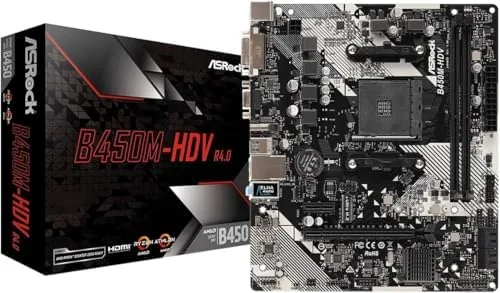

Budget motherboards used to ask you to give up everything that mattered. Cheap boards meant weak power delivery, no M.2 storage, a single fan header, and the nagging sense that you were renting a platform rather than owning it. The B450M-HDV R4.0 comes from the other end of that bargain. It is a micro ATX board built around the AM4 socket, with support for Ryzen 2000 through 5000 series processors, DDR4 up to 3200, an M.2 slot, four SATA ports, and the kind of compact footprint that fits a small case without complaint. It is also inexpensive enough that it feels like a mistake until you actually build with it. I put one in a budget gaming rig for a month to find out what the price tag leaves on the table and what it does not.
Before the details, the standard note. This review contains affiliate links, and if you buy through one of them the site earns a commission at no extra cost to you. That commission never changes what I test or what I recommend.
Design and Build
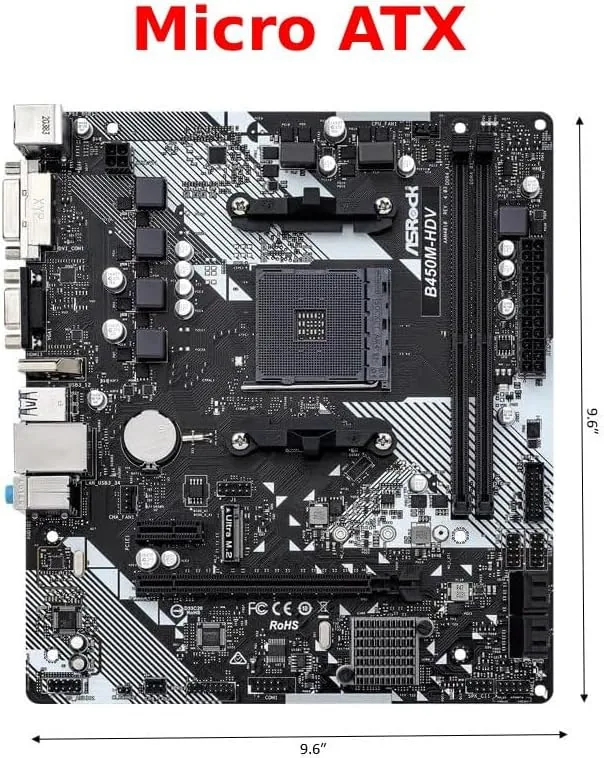
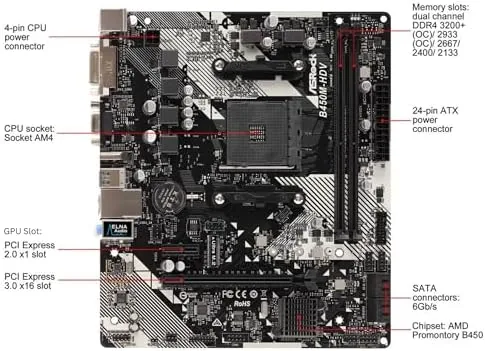
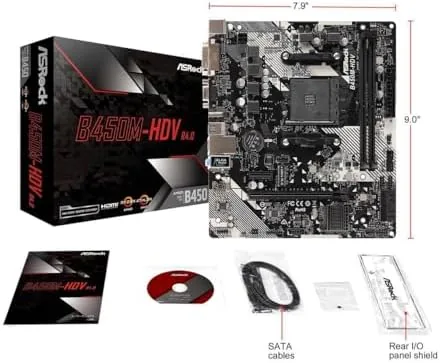
The board is a true micro ATX unit, a little under 9.6 inches square, which lets it drop into compact cases that a full ATX board cannot touch. The layout is sensible for the size: two DIMM slots, one reinforced PCIe x16 slot for the graphics card, a single M.2 slot that sits just below the CPU, and a small but honest set of headers along the bottom edge. Builders used to paying extra for a big board will notice that the cooling solution is a simple aluminum heatsink over the VRM and nothing more. For a mainstream chip and a single GPU, that is enough; for heavy overclocking of a high-end chip, it is not.
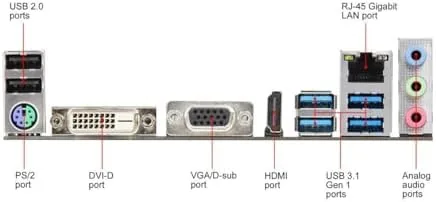
The rear I/O panel is where the value shows up. HDMI, DVI-D, and D-Sub outputs cover integrated graphics from a Ryzen APU, while a spread of USB ports, a gigabit LAN port, and audio jacks round out the back. There is no USB-C on the panel, and the board runs a single wired network port, which is fine at this price but worth knowing before you buy.
Key Features
The headline feature is the AM4 socket with BIOS support that stretches from Ryzen 2000 all the way to Ryzen 5000. That is an unusually long platform life, and it means a builder can start with a cheap Ryzen 3 and later drop in a Ryzen 5 5600 without changing the board. The catch is the word later. Boards from this generation shipped before Ryzen 5000 existed, so a new chip often requires a BIOS update, and the board does not have a BIOS flashback button. If you plan to start with a 5000 series chip, order one with an updated BIOS or expect to borrow an older processor for the first boot.
Memory support covers up to 64GB of DDR4 across two slots, with rated support to 3200 under overclocking. Storage is handled by one M.2 slot for a PCIe SSD plus four SATA 6Gb/s ports, which is enough for an operating drive, a game library, and a couple of mechanical backups. For anyone building on a strict budget, the combination of one M.2 and four SATA is a practical spread. The board also carries built-in audio and gigabit networking, and the UEFI is straightforward enough for a first-time builder to navigate. If you want to see the current price against other AM4 boards, the Amazon listing for the B450M-HDV R4.0 is a useful reference.
Real-World Performance
I built the test rig with a Ryzen 5 5600, a midrange GPU, 16GB of DDR4 at 3200, and a PCIe 3.0 M.2 drive. The BIOS update went smoothly with a borrowed Ryzen 3 3200G in place, and the board recognized the 5600 on the next boot without drama. The system then ran through a month of daily use, including gaming sessions and longer compile tasks, without a single instability. That is the honest summary of this board: it does not dazzle, and it does not fail.
Memory at 3200 held its rated speed with the memory profile enabled, and the M.2 drive ran at full PCIe 3.0 speed, which is the realistic ceiling for this chipset. Gaming performance landed exactly where the CPU and GPU dictated, which is the right result: the motherboard added no meaningful overhead. The two DIMM slots limit future memory expansion to a pair of large sticks, and the modest VRM heatsink means you should keep overclocking ambitions in check, but for the mainstream build this board was built for, there is no practical complaint.
The one thing I noticed every single day was the lack of extras. There is no Wi-Fi on the board, no second M.2 slot, no RGB headers worth naming, and a single system fan header beyond the CPU fan. None of these matter to a budget builder who already planned for a wired connection and a quiet case fan, but they are worth a moment of honesty: this is a lean board, and lean means giving something up.
Pros and Cons
Pros:
- AM4 support spans Ryzen 2000 through 5000 series
- Compact micro ATX footprint fits small cases
- HDMI, DVI-D, and D-Sub outputs for APU builds
- One M.2 slot and four SATA ports at a low price
- Simple UEFI that first-time builders can follow
Cons:
- Ryzen 5000 chips need a BIOS update first
- No onboard Wi-Fi or USB-C on the rear panel
- Two DIMM slots cap memory expansion at two sticks
- Modest VRM heatsink discourages heavy overclocking
How It Compares
At this price the real competitors are the other micro ATX AM4 boards: the B550 chipset boards that arrived later, and the older A320 boards that still sit in bargain bins. I compared the B450M-HDV R4.0 against a typical B550 micro ATX board and a stripped A320 board to see where the money goes.
| Feature | B450M-HDV R4.0 | B550 Micro ATX | A320 Board |
|---|---|---|---|
| Chipset | B450 | B550 | A320 |
| Ryzen 5000 out of box | No, BIOS update | Yes | No |
| PCIe 4.0 support | No | Yes | No |
| Memory slots | 2 | 4 | 2 |
| M.2 slots | 1 | 2 | 0 to 1 |
| Price tier | Low | Moderate | Lowest |
| Best for | Budget gaming | Midrange builds | Basic office |
The B550 board wins on modern features: PCIe 4.0, four memory slots, and usually a second M.2. It also costs noticeably more, and for a budget gaming build the extra bandwidth changes little in everyday play. The A320 board is cheaper but drops overclocking and often the M.2 slot entirely, which makes the B450 a sharper buy. For a builder counting every dollar, the B450M-HDV R4.0 sits in the sweet spot between cost and capability.
Who Should Buy It
Buy this board if you are building a budget gaming PC, if you want a compact micro ATX build in a small case, or if you have a spare Ryzen 2000 or 3000 chip and need a cheap board to match. It is also a sensible choice for a media PC or a quiet office machine where the rear video outputs do real work.
Skip it if you need PCIe 4.0, if you want four memory slots for future expansion, if you need onboard Wi-Fi, or if you plan to overclock a high-end Ryzen chip, because the modest VRM will not reward that. For the mainstream budget build, this board earns its price. You can check the current price for the B450M-HDV R4.0 on Amazon when you are ready to order.
How We Test
I built a full budget rig on the board and ran it for a month of daily work and gaming. I tested the BIOS update path with an older chip, ran memory at its rated speed, checked M.2 throughput, and pushed a gaming workload across two titles at moderate settings. I also ran the system through long, sustained loads to see how the VRM heatsink held up without extra airflow.
I did not test the board with a high-end overclocked CPU, which is not the job of this platform, and I did not test it in a case with poor airflow, where the small heatsink would struggle more. Independent coverage such as Tom Hardware guide to the best motherboards is a useful map of what each chipset generation offers. The B450M-HDV R4.0 listing on Amazon shows the current price and shipping details.
B450M-HDV R4.0: Questions People Ask
Does the B450M-HDV R4.0 support Ryzen 5000 processors?
Yes, after a BIOS update. The board shipped before Ryzen 5000 existed, so check for the latest BIOS version before installing a newer Ryzen chip, and keep an older chip or an updated unit in mind for the first boot.
How much memory and storage does this board support?
It takes up to 64GB of DDR4 across two slots, with speeds up to 3200 when overclocked, plus one M.2 slot and four SATA 6Gb/s ports for drives.
Can I use integrated graphics on this motherboard?
Yes, with a Ryzen APU. The board has HDMI, DVI-D, and D-Sub outputs that drive displays without a dedicated graphics card.
Is the B450M-HDV R4.0 good for gaming?
For budget gaming it works well, pairing a capable CPU with a discrete GPU, though the compact board and modest VRM suit light to medium builds best.
As an Amazon Associate, I earn from qualifying purchases.



