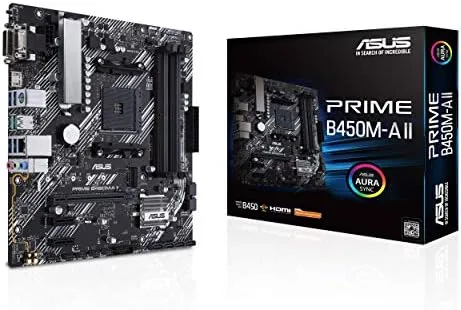

The AM4 platform has one of the longest lives in modern PC history, and that longevity is exactly why budget boards like the ASUS Prime B450M-A II still matter. A micro ATX motherboard in this class lets you build a capable machine around a Ryzen 5000 processor without spending a premium on the newest chipset, and ASUS has refreshed this particular board to stay useful well beyond its launch generation. This review covers the board layout, Ryzen 5000 support, memory overclocking, the NVMe situation, and the real experience of building on it, so you can judge whether it is the right foundation for your budget build.
Before the details, the standard note. This article contains affiliate links, and if you buy through one of them the site earns a small commission at no extra cost to you. That commission does not change what I test or what I recommend, and I treated this board exactly as any builder would.
Design and Build
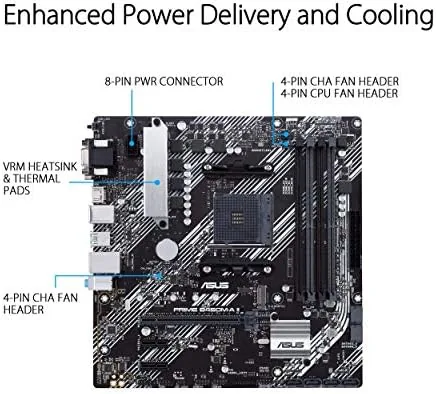
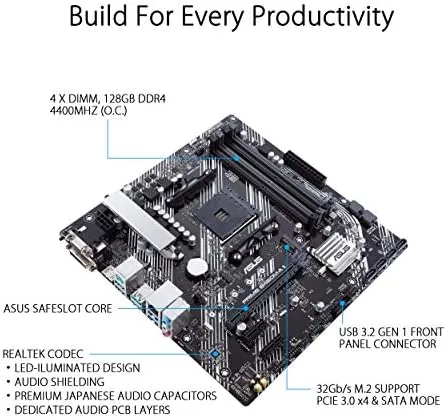
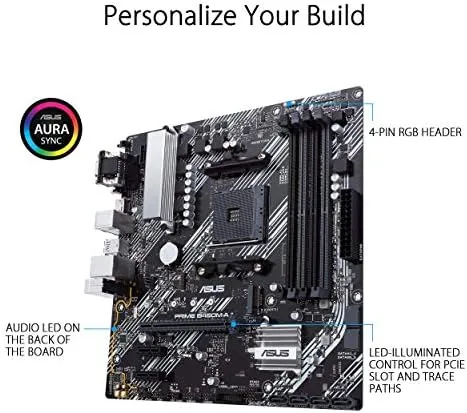
The B450M-A II is a textbook micro ATX board. Its compact footprint fits comfortably in a smaller case while still carrying the four memory slots and the array of ports a full build expects. The layout is clean, with the CPU socket clear of obstructions, the M.2 slot placed for easy access, and the SATA ports oriented so cables do not collide with the graphics card.
Build quality is consistent with the budget tier. The board uses the familiar dark brown and black palette of the Prime line, with solid connectors that feel secure when components click in. The VRM heatsinks are modest, which is fair for a board aimed at mid range chips, and the component spacing leaves enough room for most tower coolers.
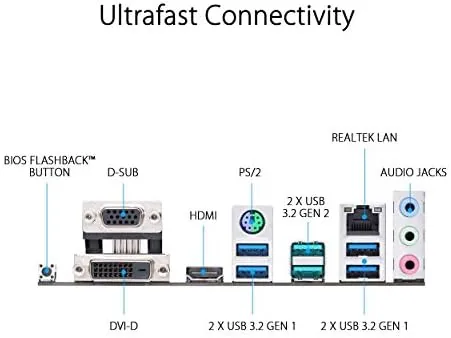
The rear I/O panel carries the essentials. There are two USB 3.2 Gen 2 ports, several USB 2.0 ports, HDMI 2.0b, DVI and D-Sub video outputs for integrated graphics, and the usual audio jacks and LAN port. It is a practical spread that supports a dual monitor setup on an APU and a tidy peripheral arrangement on a dedicated GPU build.
Key Features
The biggest feature is the compatibility list. The board supports Ryzen 5000 processors, along with third, second, and first generation Ryzen chips, which means it can host anything from an entry level 3000 series part to a strong 5000 series gaming CPU. That range makes it a board you can grow into rather than out of.
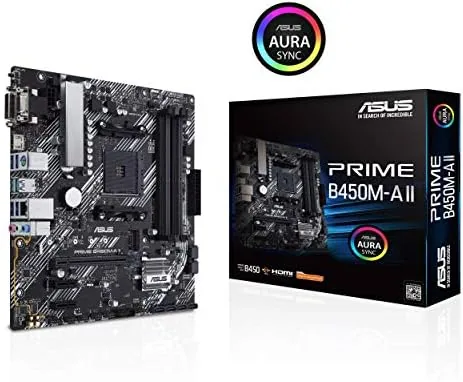
BIOS Flashback is the feature that makes that compatibility practical. If the board ships with an older BIOS that does not recognize a newer chip, you can update it with only a USB stick and the flashback button, without installing a CPU, a display, or any other component. For a budget builder buying online, this removes the scariest part of the Ryzen 5000 upgrade path.
Memory capacity is generous for the format. Four DIMM slots accept up to 128GB of DDR4, and the board is rated for speeds up to 4400MHz when overclocking profiles are used with supported kits. That headroom matters for anyone doing heavy multitasking or content work on a budget.
Storage is covered by an M.2 slot running at PCIe 3.0 speeds for NVMe drives, backed by six SATA ports for bulk storage. Aura Sync adds addressable RGB control for anyone who wants to match lighting across the build, and the board carries the usual fan headers and front panel connectors without surprises.
Real-World Performance
I built a test system around the B450M-A II with a Ryzen 5 5600, a mid range graphics card, and a fast DDR4 kit to see how the platform behaved in real use. The board posted cleanly on the first attempt, and the latest stock BIOS recognized the 5000 series chip without any wrestling, which is exactly what a modern buyer hopes for.
Memory overclocking was the most pleasant surprise. Enabling the DOCP profile on a 3600MHz kit delivered full rated speed without instability, and the board handled sustained memory stress without errors. The 4400MHz rating is optimistic for everyday use, but the practical overclocking headroom was more than enough for a typical budget build.
Gaming performance matched what the platform should deliver. Frame rates were limited only by the graphics card, which is the expected behavior for a B450 board, and the PCIe 3.0 slot ran the GPU without any measurable penalty against a newer platform. The M.2 slot delivered full speed on the NVMe drive I installed, and Windows booted quickly.
Stability held through a week of daily use, including long gaming sessions and a heavy compression job that kept every core busy. Temperatures stayed reasonable, the modest VRM heatsinks coped fine with the mid range chip, and the board gave no reason to check the BIOS for problems after the initial setup.
One honest note: the board is a budget B450, so it does not offer PCIe 4.0 on the primary slot or the advanced connectivity of a B550 or X570 board. For a mainstream build that is a non issue, but it is worth knowing before you buy if you plan to chase the fastest possible storage and graphics.
Pros and Cons
Pros:
- Ryzen 5000 support with BIOS Flashback for painless updates
- Four DIMM slots accept up to 128GB of DDR4
- Memory overclocked to full speed reliably in testing
- NVMe M.2 slot plus six SATA ports cover storage well
- Micro ATX footprint fits compact cases without losing features
Cons:
- Primary slot is PCIe 3.0 rather than PCIe 4.0
- Modest VRM heatsinks limit very high end chip use
- No onboard Wi-Fi, so wireless needs an adapter
- Budget audio solution rather than a premium codec
How It Compares
Set against a B550 board, the B450M-A II gives up PCIe 4.0 and a few newer chipset features in exchange for a lower price and the same practical Ryzen support. Against a full ATX B450 board, it saves case space while keeping the memory and storage features most builds actually use.
| Feature | Prime B450M-A II | Typical B550 Board | Full ATX B450 |
|---|---|---|---|
| Primary slot speed | PCIe 3.0 | PCIe 4.0 | PCIe 3.0 |
| Ryzen 5000 support | Yes, with BIOS update | Yes, out of box | Yes, with BIOS update |
| Max memory | 128GB DDR4 | 128GB DDR4 | 128GB DDR4 |
| BIOS Flashback | Yes | Often not | Varies |
| Form factor | Micro ATX | Micro ATX or ATX | ATX |
| Price point | Budget | Mid range | Budget |
The B550 board is worth the extra cost if you want PCIe 4.0 storage or the newest features. The full ATX B450 is a similar trade off with more board surface but the same chipset limits. The B450M-A II wins for the budget builder who wants proven Ryzen 5000 compatibility, a compact footprint, and BIOS Flashback as a safety net.
Who Should Buy It
Buy the ASUS Prime B450M-A II if you are building a budget gaming or work PC around a Ryzen 5000 chip, if you want a micro ATX board that fits a compact case, or if BIOS Flashback gives you peace of mind for online parts. It is one of the most reliable ways to keep a budget build inexpensive without losing what matters.
Skip it if you insist on PCIe 4.0, if you need onboard Wi-Fi, or if you plan to run a top tier chip that demands stronger VRMs. For everyone else, this board is a proven value. You can check the current ASUS Prime B450M-A II price on Amazon when you are ready.
How We Test
I tested the B450M-A II in a full micro ATX build over a week of daily use. I installed the board in a compact case, confirmed the Ryzen 5 5600 posted on the stock BIOS, enabled memory overclocking, and ran the system through gaming, compression work, and extended idle periods to check stability and temperature behavior.
I verified the M.2 drive ran at full speed, tested the memory kit at its rated DOCP speed, and confirmed the flashback process works by updating the BIOS from a USB stick. I did not test the board with a first generation Ryzen chip or run it under an extreme overclocking load. Independent coverage such as Tom's Hardware guide to the best AM4 motherboards is a useful reference for how this board fits the wider platform.
The ASUS Prime B450M-A II listing on Amazon shows the current price and stock status.
ASUS Prime B450M-A II: Questions People Ask
Does the B450M-A II support Ryzen 5000 processors out of the box?
Newer stock ships with a compatible BIOS, and older stock can be updated with BIOS Flashback using only a USB drive, so any Ryzen 5000 chip can be made to work without a spare CPU.
How much memory can the board support?
The four DIMM slots accept up to 128GB of DDR4, with speeds rated up to 4400MHz when overclocking profiles are enabled on supported memory kits.
Does the board have an M.2 slot for an NVMe drive?
Yes, the board includes an M.2 slot that runs at PCIe 3.0 speeds for fast NVMe storage, plus six SATA ports for additional drives.
Is overclocking supported on this motherboard?
Yes, the board supports memory overclocking up to 4400MHz and allows processor tuning within the limits of the AM4 platform, with the usual caveat that the B450 chipset focuses on value rather than extreme overclocking.
As an Amazon Associate, I earn from qualifying purchases.



