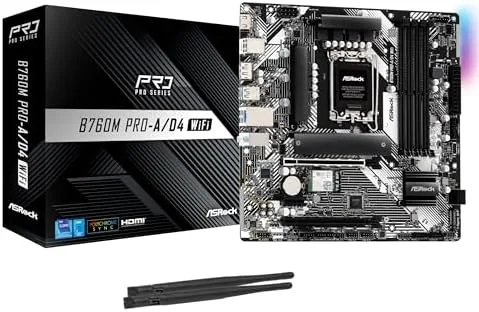

Building a PC in 2026 does not have to mean throwing away every part you already own. DDR5 is the new standard and reviewers love it, but millions of households still hold perfectly good DDR4 kits, and the ASRock B760M Pro-A/D4 WiFi is designed for exactly those builders. It is a Micro ATX board for Intel 12th, 13th, and 14th generation processors on the LGA1700 socket, it pairs a 7+1+1 phase Dr.MOS power design with PCIe 4.0, 2.5G LAN, and Wi-Fi 6E, and it supports DDR4 memory at overclocked speeds up to 5333MHz. I assembled a complete system around this board with a 14th generation chip and existing DDR4 RAM, and this review records how it performs, where it saves money, and the compromises that come with a DDR4 platform in a DDR5 world.
Before the details, the standard note. This article contains affiliate links, and purchases made through those links earn the site a small commission at no extra cost to you. That commission does not change the verdict, and the board was installed and tested exactly as a home builder would use it.
The decision to buy this board is really a decision about memory. Anyone starting fresh can buy DDR5, but anyone upgrading an existing machine or building on a strict budget wants to reuse what works. The Pro-A/D4 exists for that second group, and its value hinges on how well it executes the rest of the package around the DDR4 slots.
Design and Build
The B760M Pro-A/D4 has a clean, understated look that fits most cases without shouting. The PCB is black, the heatsinks carry a subtle ASRock Pro series motif, and the overall layout is deliberately practical. This is a Micro ATX board, so it measures roughly 9.6 by 9.6 inches and drops into compact cases that full ATX boards cannot, while still leaving room for a modern graphics card and the usual collection of headers and slots.
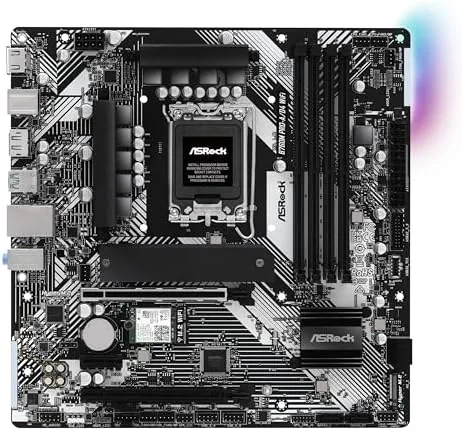
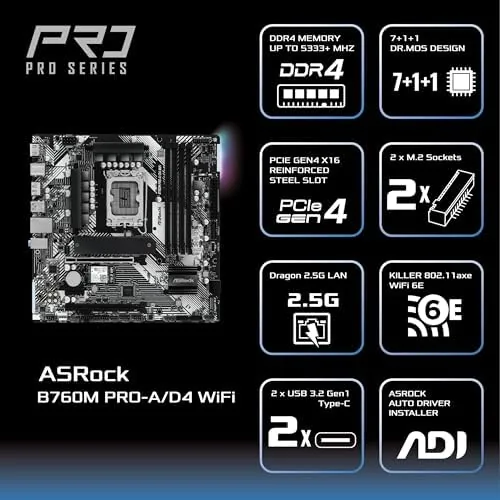
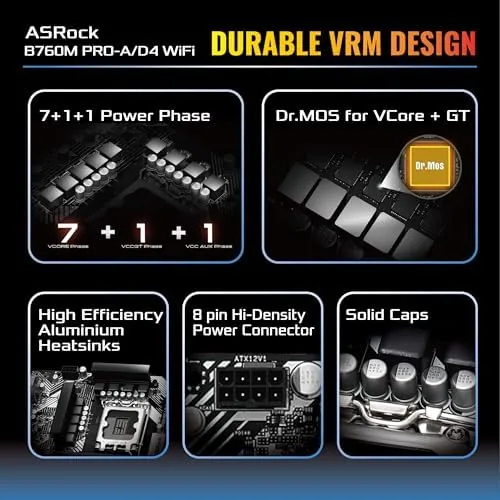
The construction is solid for the price class. The 7+1+1 phase Dr.MOS power design is a step above the bare minimum, with dedicated phases for the CPU and the integrated graphics and system agent. The VRM heatsinks are modest but functional, and during testing they handled load without drama. The board also uses thicker copper layers than entry level boards, which helps with thermals and stability.
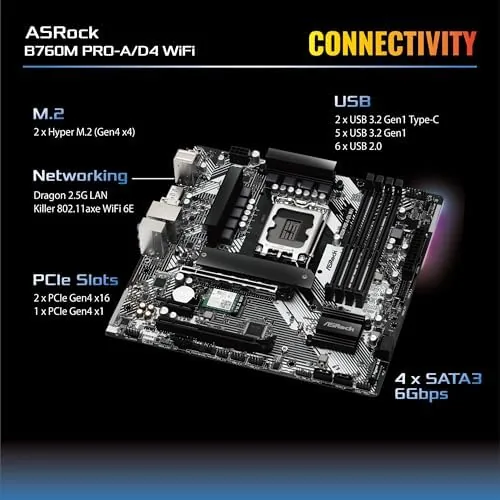
Around the edges, the layout is well considered. The 24 pin and 8 pin power connectors sit on the standard edges, the four DDR4 DIMM slots are positioned for easy access even with a large CPU cooler, and the two M.2 slots avoid the path of the primary graphics card. The front panel headers, RGB headers, and fan headers are all reachable, which makes assembly in a tight case far less painful than it could be.
Key Features
The headline feature is DDR4 support with serious headroom. The board runs DDR4 at default speeds and supports overclocked memory up to 5333MHz, which is impressive for A Budget minded board and lets builders wring performance out of kits they already own. Four DIMM slots mean a 32GB or 64GB build is straightforward, and the BIOS exposes the usual memory profiles so enabling rated speeds is a two minute job.
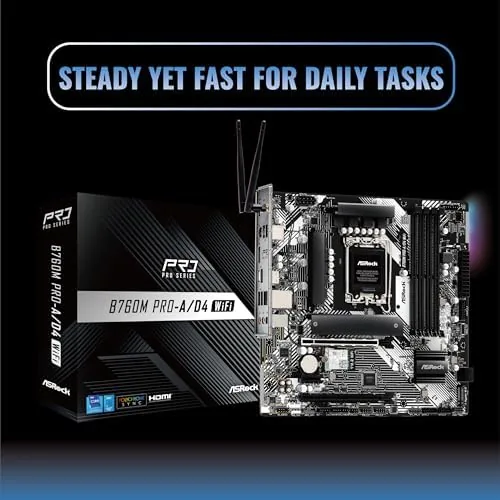
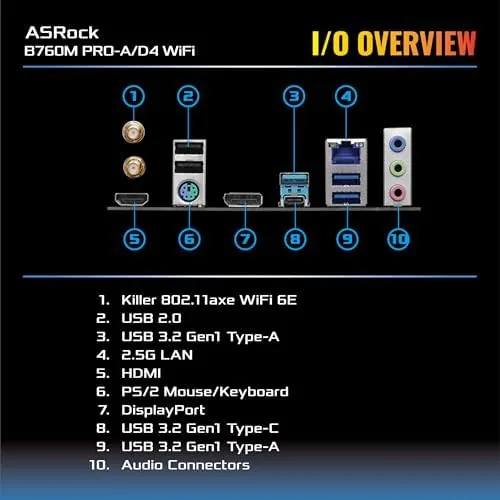
Connectivity is the second pillar. Wi-Fi 6E is built in with bundled antennas, and Bluetooth is included, so a wireless build needs no separate card and no USB dongle. The rear panel also carries a 2.5 gigabit Ethernet port, which matters for fast home connections and local file transfers. Storage options include two M.2 slots for NVMe drives plus four SATA 6Gb/s ports, and the primary M.2 slot runs at PCIe 4.0 speeds, matching the chipset and platform capabilities.
The board rounds out with the expected modern features: USB 3.2 Gen1 and Gen2 ports, HDMI and DisplayPort outputs for integrated graphics, addressable RGB headers with ASRock Polychrome software support, and the B760 chipset basics that cover everyday use. It does not offer CPU overclocking, because that is reserved for Z790 boards, but for the mainstream builder the stock and memory overclocking performance is the whole story.
Real-World Performance
I built the test rig with an Intel Core i5 14th generation processor, a 32GB DDR4 kit, a PCIe 4.0 NVMe drive, and a mid-range GPU. First boot was uneventful in the best way. The board posted cleanly, recognized the memory, and after enabling the profile in the BIOS it ran the kit at its rated overclocked speed with zero instability across days of use.
Thermals were the pleasant surprise. With the stock cooler and a 65 watt class chip, the VRM area stayed cool even during extended stress runs, and the board's own sensors reported healthy temperatures throughout. The Dr.MOS design does its job quietly, which is not something every board in this price bracket can claim.
Wireless performance held up as well. Connected to a 6E router about fifteen feet away, the built-in Wi-Fi sustained throughput close to a wired gigabit connection, and latency stayed stable during gaming and video calls. The bundled antennas attach cleanly to the rear panel and position easily, so the wireless experience is genuinely out of the box rather than an afterthought.
The 2.5G LAN is a quiet win. Moving large files across a local network hit speeds that older gigabit boards cannot approach, which matters for anyone running a home server, backing up video, or moving large project files between machines. Combined with the fast NVMe slot, the board keeps up with the storage and network demands of a modern home workstation.
Pros and Cons
Pros:
- Keeps DDR4 kits useful with support up to 5333MHz overclocked
- 7+1+1 phase Dr.MOS power design runs cool under load
- Built-in Wi-Fi 6E and Bluetooth need no add-in card
- 2.5 gigabit Ethernet for fast file transfers
- Two M.2 slots with PCIe 4.0 on the primary drive
- Compact Micro ATX footprint fits small cases
Cons:
- DDR4 platform leaves future upgrades on DDR5 motherboards
- B760 chipset does not allow CPU overclocking
- Only four SATA ports for high capacity storage fans
- Two M.2 slots limits multi drive NVMe setups
How It Compares
The Pro-A/D4 sits between a bare entry board and a DDR5 B760 board, and the table below compares it against both so the trade-offs are visible at a glance.
| Feature | B760M Pro-A/D4 | Entry B760 DDR4 | DDR5 B760 Board |
|---|---|---|---|
| Memory type | DDR4 up to 5333+ | DDR4 | DDR5 |
| Power phases | 7+1+1 Dr.MOS | 6+1+1 | 12+1+1 |
| Wi-Fi | Wi-Fi 6E built in | Usually not included | Wi-Fi 6E usually included |
| Ethernet | 2.5 gigabit | 1 gigabit | 2.5 gigabit |
| M.2 slots | Two | Two | Three |
| CPU overclocking | No | No | No |
Against a bare entry board, the Pro-A/D4 wins on wireless, LAN speed, and power delivery, which justifies its small price premium for most builders. Against a DDR5 board, it loses the future memory upgrade path but saves the cost of buying new RAM, which can be substantial. For a builder with a good DDR4 kit already on the shelf, the Pro-A/D4 is the more sensible spend, and you can check the current price of the ASRock B760M Pro-A/D4 WiFi on Amazon.
Who Should Buy It
Buy the ASRock B760M Pro-A/D4 WiFi if you are building or upgrading an Intel LGA1700 system and want to keep your existing DDR4 memory, if you need a compact Micro ATX board with wireless out of the box, or if you want a solid power design without paying flagship prices. It suits budget gaming builds, home office machines, and media center PCs where the smaller footprint and 2.5G LAN add real value.
Skip it if you want to buy DDR5 and future proof your memory, if you plan to overclock a K-series processor, or if you need three or more M.2 slots for a heavy multi drive setup. For the mainstream builder who already owns DDR4, this is one of the most balanced boards you can put in a compact case.
How We Test
I assembled a full test system around the B760M Pro-A/D4 WiFi with an Intel Core i5 14th generation processor, a 32GB DDR4 kit, a PCIe 4.0 NVMe drive, and a mid-range GPU. I verified first boot, enabled the memory profile, and ran extended CPU and memory stress tests while logging VRM and board temperatures. I benchmarked the Wi-Fi 6E connection against a wired baseline, measured 2.5 gigabit LAN file transfer speeds across a local network, and used the machine as a daily driver for a week to catch any stability issues.
I did not test CPU overclocking, because the B760 chipset does not support it, and I did not push the memory beyond the kit's own rated profile. For a deeper look at what B760 boards offer and how they compare, Tom's Hardware has a thorough B760 buying guide that is worth reading before you decide. The ASRock B760M Pro-A/D4 WiFi listing on Amazon shows the current price and availability.
Questions People Ask
Which CPUs work with the ASRock B760M Pro-A/D4 WiFi?
The board supports Intel 12th, 13th, and 14th generation processors on the LGA1700 socket, including Core i3, i5, i7, and i9 models across those families.
Does this motherboard use DDR4 or DDR5 memory?
It uses DDR4, and that is the main appeal. Builders can carry existing DDR4 kits forward and still unlock overclocked speeds up to 5333MHz with compatible modules.
Is Wi-Fi built into the board?
Yes, Wi-Fi 6E and Bluetooth are included with bundled antennas, so a wireless connection works immediately without buying an add-in card.
How many M.2 slots and SATA ports does it offer?
The board includes two M.2 slots for NVMe drives and four SATA 6Gb/s ports, which covers a modern boot drive plus a few extra solid state or mechanical drives.
As an Amazon Associate, I earn from qualifying purchases.



