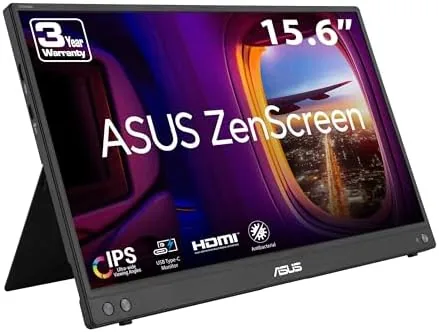

Travel exposes the limits of a single laptop screen. A spreadsheet, a video call, and a code editor cannot share fourteen inches of display without constant tab switching, and the open coffee shop table is where that frustration hits hardest. The ASUS ZenScreen MB16AHV is a 15.6 Inch 1080p monitor that folds down to roughly the size of a laptop and connects over USB-C, turning any desk into a dual display setup. I carried it across two weeks of trains, airport lounges, and hotel desks to see whether it earns a permanent place in a travel bag.
Before the details, the standard note. This article contains affiliate links, and if you buy through one of them the site earns a small commission at no extra cost to you. That commission never changes what I test or what I recommend.
Design and Build
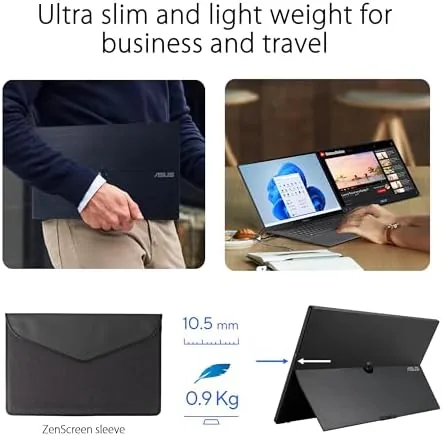
The MB16AHV is built around a simple idea: a full size 15.6 inch panel that lives inside a slim chassis barely thicker than the screen itself. The frame is aluminum, with a matte finish that resists fingerprints, and the whole unit weighs less than a typical thin and light laptop. It slides into the included protective sleeve and then into a backpack sleeve that most laptops never fill.
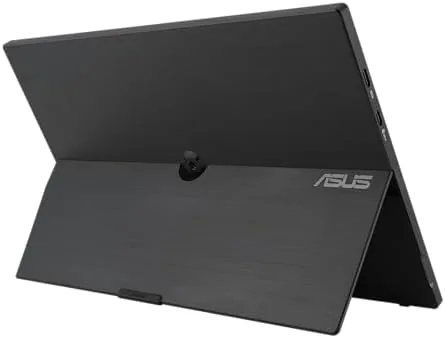
What makes it portable in practice is the kickstand. The back panel folds out into a sturdy stand that holds the monitor at a useful angle, and the hinge is firm enough that the screen does not wobble when you type. The stand tucks flat when folded, and the overall footprint stays compact enough for the cramped real estate of a train tray table.
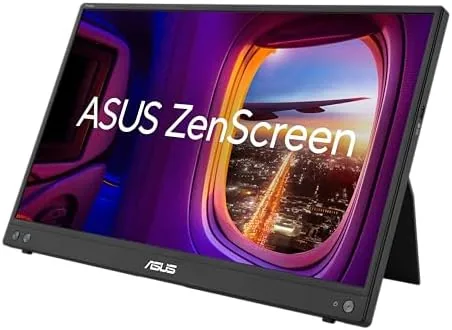
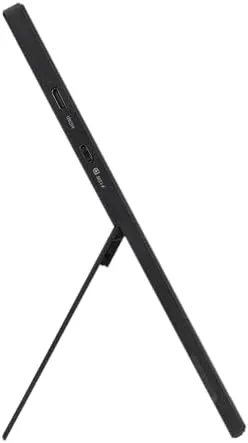
The ports are arranged for travel. A USB-C port handles both video and power on most laptops, a Mini HDMI port covers devices without USB-C display output, and there is a headphone jack for private audio. The physical buttons are minimal, with a power key and a small joystick that navigates the on screen menu. The build feels premium in hand, with no flex in the panel and a clean, modern look that fits the ZenScreen family.
Key Features
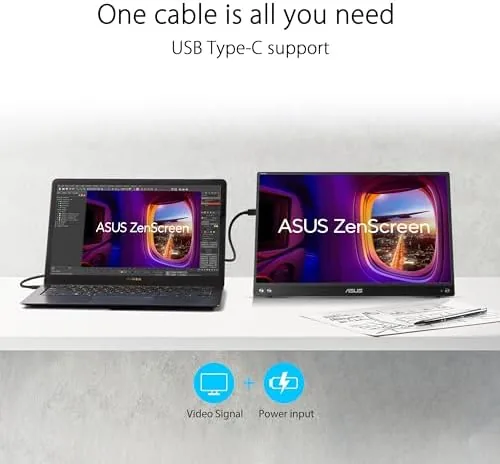
The single cable connection is the feature that makes the MB16AHV practical. On a MacBook or a modern PC with a USB-C port that supports display output, one cable carries the video signal and the power, so there is no separate power brick to pack. For older laptops or devices with only HDMI, the Mini HDMI port steps in, and the monitor can draw power over USB-C in that mode.
The 1080p panel is a 15.6 inch IPS display with an anti-glare coating. The matte finish cuts reflections in bright airport lounges and sunlit offices, which is the difference between a usable screen and a mirror. A blue light filter reduces eye strain during long sessions, and the menu lets you dial the filter strength to taste. The result is a screen that stays legible in the lighting conditions where portable monitors actually get used.
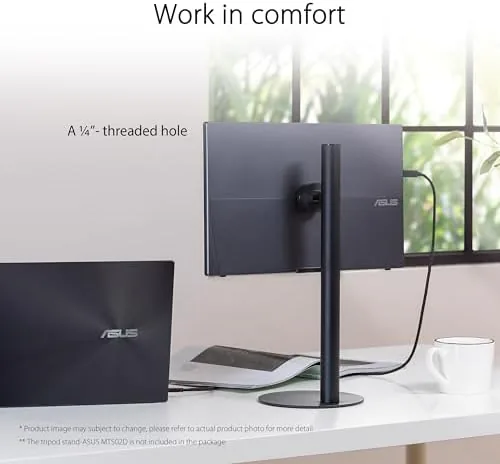
The kickstand is matched by a tripod mount, which sits in the frame for anyone who wants to place the monitor on a photography tripod or a stand. For a current look at the price and available models, the Amazon listing for the ASUS ZenScreen MB16AHV is a useful reference.
Real-World Performance
My first session was the classic travel setup: a laptop, a spreadsheet, and a video call running side by side. The MB16AHV extended the desktop without a hitch, and the extra real estate turned a cramped workday into a comfortable one. The 1080p resolution is sharp enough at 15.6 inches for spreadsheets, email, and browser work, and text renders crisply on the IPS panel.
The anti-glare coating proved its value on a sunny window seat. A bare glossy panel would have become a mirror, but the matte finish kept the screen readable, and the blue light filter made a long editing session noticeably easier on the eyes. On a dim hotel desk at night, the brightness was more than enough, though the panel is not a high brightness display and struggles in direct, bright daylight.
I ran the monitor on both a MacBook and a Windows laptop, and the single cable worked perfectly on each. The MacBook detected it instantly, and the Windows laptop recognized it as a standard display without extra drivers. I also connected a console over Mini HDMI for a quick gaming session, and the response felt smooth enough for casual play, which is a bonus rather than a primary use case. On the train I ran the monitor from the laptop battery for a full two hour work stretch, and the drain was modest enough that I never worried about reaching the next outlet, which is exactly the peace of mind a travel display should give.
The one shortcoming is brightness. The panel is rated at a modest peak brightness, and in a very bright room the image can look washed out compared to a premium laptop display. The trade off is battery life and slimness, and it is a fair one for a travel monitor, but anyone who works primarily outdoors should take note.
Pros and Cons
Pros:
- Single USB-C cable carries video and power
- Compact, light build with an included travel sleeve
- Anti-glare coating keeps the screen readable in bright rooms
- Blue light filter reduces strain during long sessions
- Built in kickstand and tripod mount for flexible setup
- Mini HDMI input works with consoles and older laptops
Cons:
- Peak brightness is modest in very bright conditions
- No touch screen support
- USB-C power delivery depends on the host laptop
- Speaker is small and quiet
How It Compares
Portable monitors split into two camps: the small high resolution panels for specific tasks and the full size 15 to 16 inch models like this one. I compared the MB16AHV against a smaller 13 Inch Portable Monitor and a larger high resolution 16 inch model to map the trade offs.
| Feature | MB16AHV 15.6" | 13" Portable | 16" High Res |
|---|---|---|---|
| Resolution | 1080p | 1080p | 1440p |
| Size and weight | Compact | Smallest | Larger |
| Single cable | USB-C yes | USB-C yes | USB-C yes |
| Anti-glare | Yes | Varies | Varies |
| Kickstand | Built in | Some | Often built in |
| Price | Mid range | Lower | Higher |
Against the 13 inch model, the MB16AHV wins on screen real estate and the stronger kickstand, giving you a true dual display work area instead of a supplementary panel. Against the 16 inch high resolution model, the MB16AHV wins on price and portability, while the larger model offers more pixels for photo editing. For a travel companion that balances size, weight, and everyday usefulness, the MB16AHV is the strongest all rounder of the three.
Who Should Buy It
Buy the ZenScreen MB16AHV if you travel with a laptop and work in spreadsheets, code, writing, or video calls. It suits road warriors, students who study in libraries, and remote workers who drift between desks and want A Second Screen without hauling a full monitor.
Skip it if you need a high resolution panel for professional photo editing, if you work mainly in very bright outdoor conditions, or if you rarely need more than one screen. For everyone else, this is a dependable way to double your workspace on the road. You can check the current price for the ASUS ZenScreen MB16AHV on Amazon when you are ready to upgrade your travel setup.
How We Test
I tested the MB16AHV over two weeks across a train, an airport lounge, and two hotel rooms. I connected it to a MacBook and a Windows laptop over USB-C, ran it with a console over Mini HDMI, and used it for full workdays of spreadsheets, writing, and video calls.
I checked the anti-glare performance on a sunny window seat, the blue light filter over an evening session, and the kickstand stability while typing. I did not test it for professional color grading, since it is a 1080p panel aimed at productivity rather than color critical work. For a broader perspective on portable displays, independent reviews such as Tom's Hardware portable monitor coverage provide useful context. The ASUS ZenScreen MB16AHV listing on Amazon shows the current price and available options.
ASUS ZenScreen MB16AHV: Questions People Ask
Does the ASUS ZenScreen MB16AHV work with a MacBook?
Yes. It connects to most MacBooks over USB-C with a single cable for video and power, and it also accepts Mini HDMI for other laptops and consoles.
How does the kickstand work?
The case back folds out into a kickstand that holds the monitor at a comfortable viewing angle, and the frame also has a tripod mount hole for flexible positioning.
Is the screen anti-glare?
Yes. The panel has a matte anti-glare coating that cuts reflections in bright offices and near windows, though peak brightness is still modest outdoors.
Does it come with a protective sleeve?
Yes. A padded protective sleeve is included so the monitor can be slipped into a bag without scratching the panel during travel.
As an Amazon Associate, I earn from qualifying purchases.



