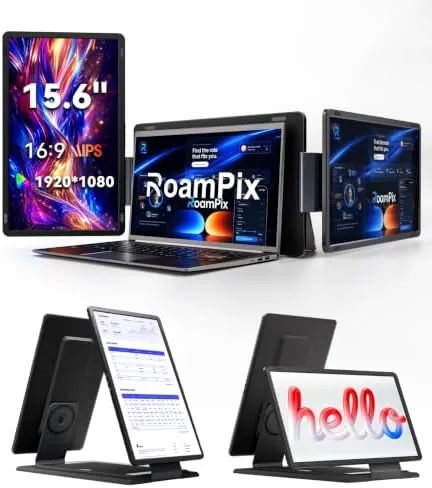

Working on a single laptop screen is a compromise that productivity experts love to criticize, but carrying a separate Portable Monitor introduces its own problems: another cable, another power brick, another thing to lose in a bag. The 15.6 inch laptop screen extender takes a different approach. It clips onto the side of your laptop and unfolds into an extra FHD 1080P IPS panel, and with a second extender on the other side you get a genuine triple monitor workstation that packs down flat and rides in your bag alongside the laptop it serves.
I used this screen extender for two weeks with both Windows and Mac laptops, spanning documents across panels, running code on one screen while reference material sat on another, and taking the whole setup on the road. This review covers the display quality, the compatibility, and the honest limitations of portable triple screen life.
Before the details, the standard note. This article contains affiliate links, and if you buy through one of them the site earns a small commission at no extra cost to you. That commission never changes what I test or what I recommend.
Design and Build
The extender is a slim panel with a fold out clip assembly that attaches to the edge of the laptop lid. The clip mechanism is the part that matters, because a loose grip means the screen sags, and this unit grips firmly enough that the panel stayed put through a full day of typing, scrolling, and the occasional lap adjustment. When the panel is closed against the laptop, the whole assembly is thin enough to slip into a laptop sleeve, and the design protects the screen surface on both sides.
The build quality is solid for the price. The panel is an IPS display, which means wide viewing angles and accurate colors rather than the washed out look of cheap TN panels, and the frame is stiff enough that the screen does not flex when you push it back to adjust the angle. The connection runs through a short cable from the panel to your laptop, and the mount leaves the keyboard and trackpad fully accessible, so the extender genuinely adds screen area rather than stealing your workspace.
Key Features
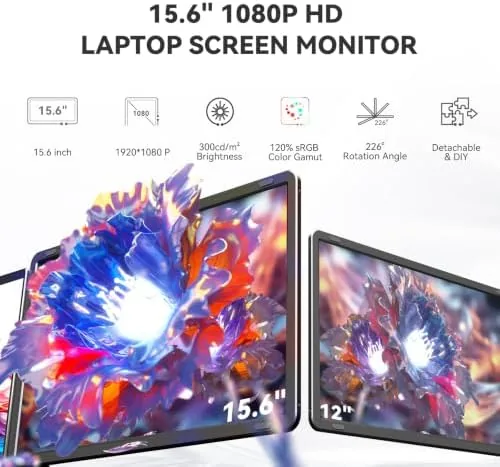
The FHD 1080P IPS panel is the core feature. At 1080p, the display has sharp enough detail for documents, code, video, and spreadsheets, and the IPS technology keeps colors consistent when you glance across the panel at an angle, which matters when the screen sits off to the side of your main display. Text renders cleanly, and the brightness held up well in a brightly lit room and an outdoor cafe.
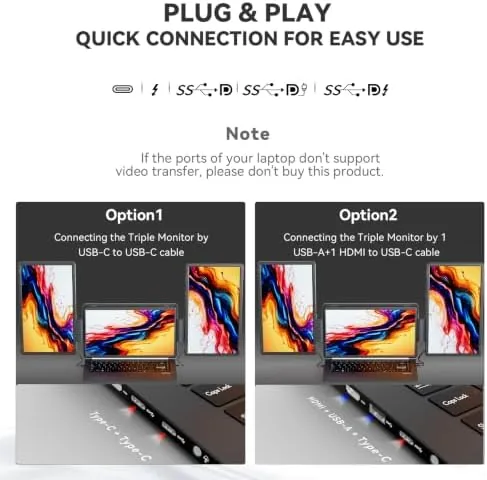
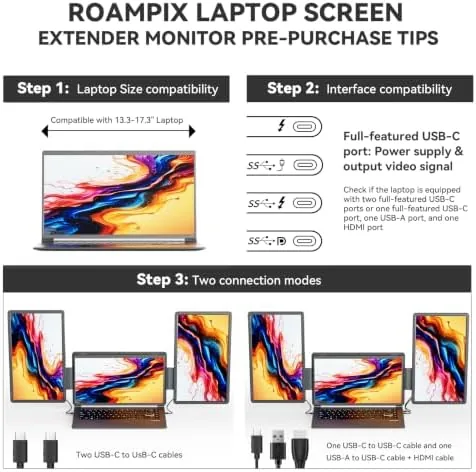
Connectivity covers both major ecosystems. The extender accepts video over USB-C and HDMI, so it works with Windows laptops, MacBooks, and a wide range of devices that have a compatible output. The setup process is the same as connecting any monitor: plug in, and the operating system recognizes the new display, then you arrange it in the display settings. No driver installation was required on either platform in my testing.
The travel reality is the feature that sells it. Because the extender is thin, folds flat, and draws power and signal over a single cable, it converts a coffee shop or hotel desk into a real workstation without a monitor stand, a power brick, or a bag full of accessories. Paired with a second unit on the other side, you get the three panel setup that desktop users take for granted, packed into the footprint of a laptop.
Real-World Performance
I ran the extender through a full work week on a Windows laptop and then switched to a MacBook for the second week, and the experience was consistently solid. On Windows, the panel appeared instantly as a second display, and I arranged it to the right of the main screen, then dragged a document and a reference window over. On the Mac, the same process took seconds, and the display settings recognized the resolution without any wrestling.
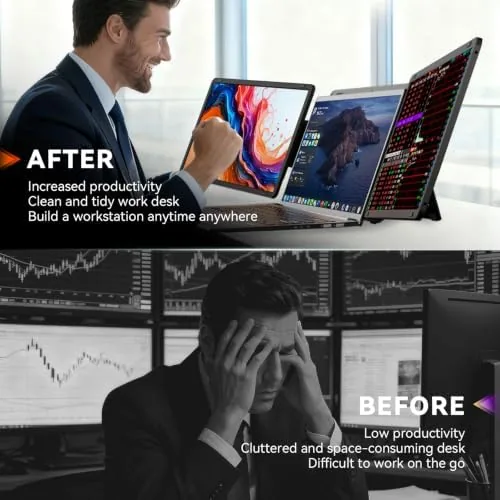
The triple screen setup was the highlight. With an extender on each side of the laptop, I worked with an email client on the left panel, a code editor on the laptop screen, and documentation or a browser on the right, and the workflow genuinely accelerated compared with tab flipping. The IPS panels kept colors consistent across all three screens, and the 1080p resolution gave crisp text at the sizes I normally use.
The honest limitations are connection bandwidth and positioning. The extenders draw their signal and power over a single cable, which works cleanly with a modern USB-C laptop, but an older machine with limited USB-C bandwidth can force a lower resolution or need a separate power input. The panels also sit at the sides rather than at eye level, so the viewing angle takes a little getting used to, and the whole rig needs a stable surface, since the side mounted screens are not meant for your lap. None of these issues outweighed the productivity gain, but they are real.
Pros and Cons
Pros:
- FHD 1080P IPS panels with accurate colors
- Triple monitor workflow without a desktop tower
- Works with both Windows and Mac laptops
- Connects over USB-C and HDMI
- Thin, flat design packs into a laptop bag
- Simple plug and play setup on both platforms
Cons:
- Older USB-C ports may limit resolution or power
- Side screens sit off to the side, not at eye level
- Needs a stable desk, not a lap
- Two units required for a full triple setup
How It Compares
Portable display options fall into two camps: standalone portable monitors that you prop up next to a laptop, and side mount extenders like this one that clip to the lid. I compared the extender against a standalone 15.6 Inch Portable Monitor to show where each approach wins.
| Feature | Side Mount Extender | Standalone Portable Monitor | Desktop Dual Monitor |
|---|---|---|---|
| Setup time | Seconds, clip on | Needs stand and cable | Permanent |
| Portability | High, packs flat | Moderate | None |
| Screen size | 15.6 inches each | 15.6 inches | 24 inches and up |
| Positioning | Side mounted | Adjustable stand | Adjustable arm |
| Power | Single cable | Single cable | Dedicated outlet |
| Price | Moderate | Moderate | Higher |
A standalone portable monitor offers more flexible positioning and doubles as a separate screen you can hand to someone or mount at eye level, but it needs a stand, takes up desk space, and packs less elegantly. A desktop dual monitor setup delivers the best ergonomics and screen size, but it is tied to one desk and cannot travel. The side mount extender wins on convenience, turning any surface into a three screen office in seconds, and for travelers that trade is worth more than a few degrees of ergonomic perfection.
Who Should Buy It
Buy this extender if you work across multiple documents or applications and hate tab switching, if you travel regularly and want a real workstation in hotel rooms and cafes, or if you want the productivity of a triple monitor setup without buying a desktop. It suits developers, writers, researchers, analysts, and anyone who lives in spreadsheets or long documents.
Skip it if you already have a dedicated home desk with dual monitors and only want a fixed setup, or if you work mostly on a laptop screen and do not need the extra real estate. For everyone who wants productivity that travels, this is a practical and affordable upgrade, and you can check the current price of the 15.6 inch laptop screen extender on Amazon to see if it fits your bag and budget.
How We Test
I tested the screen extender for two weeks as my primary productivity accessory. I attached it to a Windows laptop and a MacBook, arranged the displays in both operating systems, and ran my standard workload of email, code, documents, and a browser across the combined panels. I also attached a second extender for a full triple screen setup and used it for a full day of work.
I packed the assembly into a laptop bag and carried it on a trip to verify the travel claim, tested the panel in bright light and an outdoor cafe, and confirmed the connection works over both USB-C and HDMI. For broader perspective on portable displays, the monitor coverage from Tom's Hardware on monitors provides useful context. If this extender sounds like your next productivity upgrade, the laptop screen extender listing on Amazon shows the full details and current pricing.
Questions People Ask
What laptops fit this screen extender?
It is designed for laptops with screens between 13.6 inches and 17.3 inches, and the clip mechanism grips the lid firmly, so it works with a wide range of Windows and Mac models.
Does the extender work with Windows and Mac laptops?
Yes. The panel connects over USB-C or HDMI, and both Windows and Mac operating systems recognize it as a standard display, so no special drivers are required.
Do I need a second extender for a triple monitor setup?
Yes. One extender creates a dual screen setup with your laptop, and a second unit attached to the other side gives you the full three panel workstation.
Can I use the panel as a standalone monitor?
Yes. When it is not clipped to a laptop, the panel works as a regular portable monitor for any device that supplies video over USB-C or HDMI.
As an Amazon Associate, I earn from qualifying purchases.