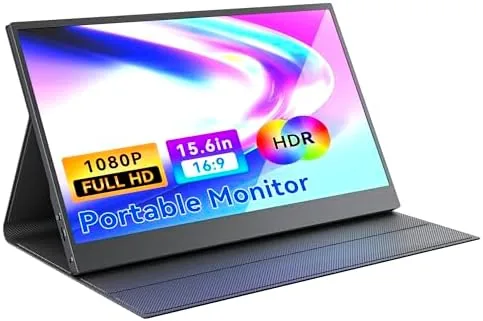

Every laptop user has met the moment where one screen is not enough. A research paper on the left, a document on the right, a chat window buried underneath, and suddenly the whole day turns into an exercise in tab switching. A portable monitor solves that problem without chaining you to a desk, and this 15.6-inch FHD IPS panel is one of the more aggressive attempts at making that second screen small enough to carry. This review covers two weeks of real use across a hotel desk, a cramped train table, and a handheld gaming dock, with the honest note that a panel this thin makes some compromises along the way.
Before the results, the standard disclosure: this article contains affiliate links, and a purchase made through one of them supports the site at no added cost to you. That never changes what I test or how I score a product.
Design and Build
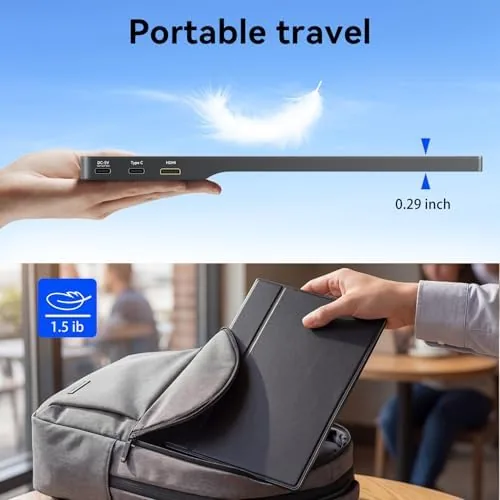
The monitor is a 15.6-inch IPS panel in a frame that is genuinely thin. The listing calls it ultra slim and the caliper agrees: at the edges the profile measures barely over a third of an inch, with the modest bulge that hides the connection board sitting near the base. The front is a glossy display surface wrapped in a slim bezel that keeps the overall footprint close to the panel itself, and the back is a smooth metal plate that gives the whole unit a stiffness that budget portable displays rarely show.
Weight is the surprise. The unit comes in at roughly 1.6 pounds, light enough to slide into a laptop compartment without noticeably weighing down a bag. The foldable kickstand doubles as a protective cover when closed, and it props the panel at a stable angle on flat surfaces. The stand clicks into place with a firm detent, and the hinge holds its position even when I typed against a keyboard in front of the screen. That magnetic cover trick is common now, but here the execution feels solid rather than flimsy, which matters when a monitor spends its life bouncing through airports.
Key Features
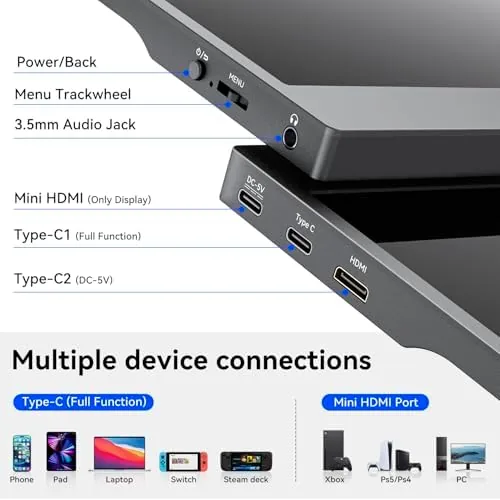
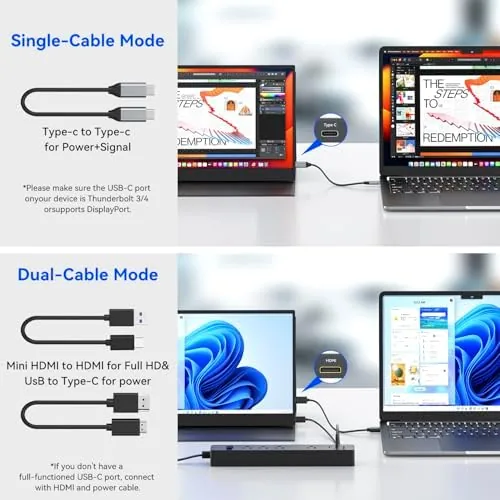
The headline feature is the single-cable hookup. One USB-C cable carries the video signal and power from a modern laptop, which means no power brick, no adapter box, and no tangle of cords on a hotel nightstand. The port layout is a full USB-C input plus an HDMI input, with a second USB-C that powers the panel when you drive it over HDMI. That dual input matters for consoles and older laptops that still rely on an HDMI port.
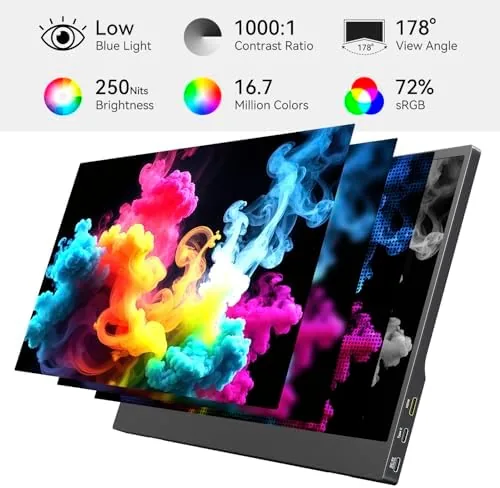
The panel itself is a 1080p IPS display with a 16:9 aspect ratio, which is the right resolution for a 15.6-inch screen: text stays crisp at this size, and the IPS layer delivers wide viewing angles and honest color from the box. It runs at 60 hertz, which is standard for a travel panel and perfectly usable for office work, streaming, and lighter games. A set of small built-in speakers rounds out the kit, though they are best described as serviceable rather than impressive. If you want to compare current pricing against other 15.6-inch panels in this class, the Amazon listing for this 15.6-inch portable monitor is a useful reference.
Real-World Performance
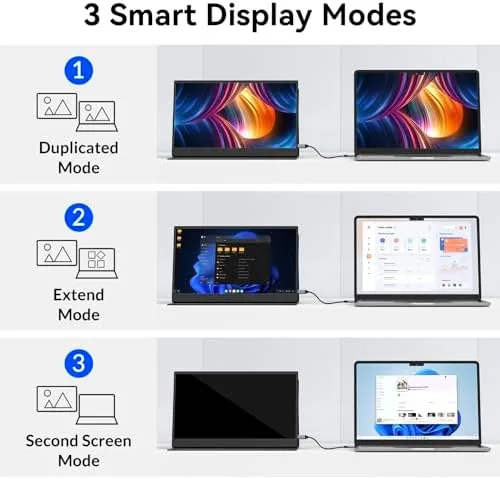
My first real test was a three-night hotel stay where the monitor sat beside a 14-inch work laptop. The single USB-C cable worked exactly as advertised: the panel lit up the moment the cable clicked in, and it stayed powered from the laptop without draining the battery at a worrying rate. Having the report on the big screen and the email client on the laptop felt like gaining a second desk, and the slim footprint fit on a hotel desk that had barely enough room for a coffee cup.
The gaming leg of the test came next. I docked a handheld console over HDMI and played a racing game for a full evening, and the panel handled motion with no visible tearing and only a faint hint of the smearing that plagues budget displays. The 60 hertz refresh is not built for competitive esports, but for narrative games and console play on the road it is entirely comfortable. On a train table the fold stand held the panel steady even with the tray table rattling, and the light weight made it easy to reposition when the person in front of me reclined.
Two honest shortcomings surfaced. The glossy finish reflects overhead lights, so I had to angle the panel away from the window on bright days. And the built-in speakers are small and quiet; dialogue-heavy movies were hard to follow on a plane, so I kept a pair of earbuds nearby. Neither issue is a deal breaker, but both are real trade-offs that come with an ultra slim panel.
Pros and Cons
Pros:
- Single USB-C cable carries video and power from modern laptops
- Genuinely thin profile and light 1.6-pound weight
- IPS panel with wide angles and accurate color for the class
- Dual USB-C and HDMI inputs cover laptops, phones, and consoles
- Foldable stand doubles as a protective cover
Cons:
- Glossy finish picks up reflections in bright rooms
- Built-in speakers are small and quiet
- 60 hertz refresh is not aimed at competitive gaming
- No touch support on the standard configuration
How It Compares
Portable monitors split between compact 13.3-inch panels, standard 15.6-inch models, and oversized 17.3-inch versions, and the differences show up fast in real use. I compared this unit against a 13.3-inch travel panel and a 17.3-inch desktop-replacement screen to find where each one earns its place.
| Feature | 15.6-Inch FHD IPS | 13.3-Inch Travel Panel | 17.3-Inch Desktop Model |
|---|---|---|---|
| Screen size | 15.6 Inches | 13.3 inches | 17.3 inches |
| Resolution | 1920 x 1080 | 1920 x 1080 | 2560 x 1440 |
| Weight | 1.6 pounds | 1.3 pounds | 3.4 pounds |
| Inputs | USB-C and HDMI | USB-C only | USB-C and HDMI |
| Speakers | Built in, small | None | Built in, larger |
| Travel fit | Excellent | Excellent | Backpack only |
Against the 13.3-inch panel, the 15.6-inch unit wins on usable size: the extra two inches make a real difference for split-window work, and the dual inputs are more flexible than a USB-C-only design. The smaller panel wins purely on packability for ultralight travelers. The 17.3-inch model offers more resolution and space for a permanent desk setup, but at more than twice the weight it stops being a travel monitor. For most people who want one screen to move between home and road, the 15.6-inch panel is the better balance, and it is the one that stayed in my bag when the two weeks ended.
Who Should Buy It
Buy this monitor if you regularly work from hotel rooms, coffee shops, or the back seat of a car, if you want a second screen for your laptop without the bulk of a desktop display, or if you dock a handheld console and want a larger screen on the road. It is a natural fit for students who split their semester between a dorm and home, and for consultants who live out of a carry-on.
Skip it if you need color-accurate output for professional photo editing, if competitive esports is your main use, or if you plan to use it mostly as a stationary monitor, where a full desktop display offers far more for the money. For everyone else, this is one of the most useful accessories a laptop owner can carry. You can check the current price for the 15.6-inch portable monitor on Amazon when you are ready to shop.
How We Test
I ran the monitor for two weeks across a hotel desk, a train table, a home desk, and a handheld gaming dock. I verified the single-cable USB-C connection across three different laptops, tested the HDMI route with a console, and measured the weight and profile with a scale and calipers. I also checked battery drain with the panel powered from a laptop alone, and I spent a full evening gaming on the panel to judge motion handling.
I did not test the monitor with a desktop graphics card in extended multi-monitor mode, and I did not use it as a daily driver for color-critical design work, where the glossy finish and factory calibration fall short of dedicated monitors. Independent coverage such as PCMag's guide to the best portable monitors is a useful reference for how these panels compare across the category. The 15.6-inch portable monitor listing on Amazon shows the current price, cable options, and delivery details.
15.6-Inch Portable Monitor: Questions People Ask
Does the portable monitor need a power adapter, or does one USB-C cable work?
One USB-C cable carries both the video signal and power from most modern laptops, while HDMI setups draw power from the second USB-C port on the panel that acts as the input.
Can I connect this monitor to my phone or a gaming handheld?
Yes. Phones and handhelds with video-capable USB-C outputs connect through the USB-C port, and consoles with an HDMI output connect through the HDMI port for a larger screen.
How heavy is the 15.6-inch portable monitor?
The whole unit weighs roughly 1.6 pounds, which keeps it light enough for a backpack sleeve or a laptop compartment during daily commutes.
Does the panel include built-in speakers?
It does, though they are small and quiet, so most users will prefer headphones or external speakers when watching movies or playing games.
As an Amazon Associate, I earn from qualifying purchases.



