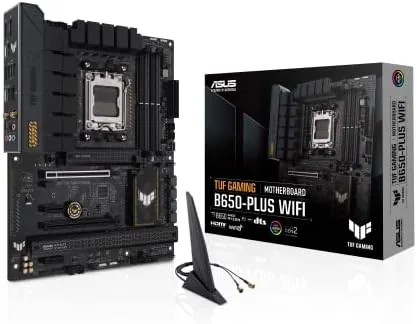

Building a Ryzen 7000 system used to mean making an awkward trade between an entry board that cut too many corners and a flagship board that cost more than the processor. The ASUS TUF Gaming B650-PLUS WiFi sits between those extremes with a clear philosophy: deliver the essential modern specs, add a rugged build, and price it for builders who want to spend their money on a graphics card instead. I built a complete test system around this board and used it daily for two weeks, and this review records what impressed me, what I would change, and who should buy it.
Before the details, the standard note. This article contains affiliate links, and if you buy through one of them the site earns a small commission at no extra cost to you. That commission does not influence what I test or recommend, and I treat every board the same way whether it arrives for review or comes from my own wallet.
Design and Build
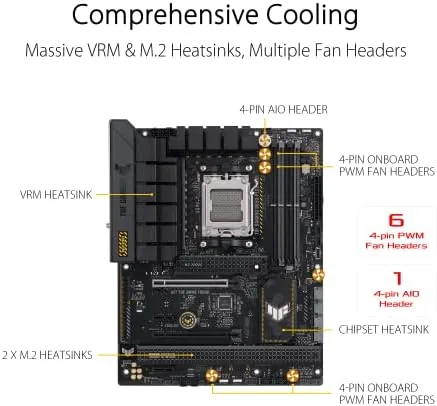
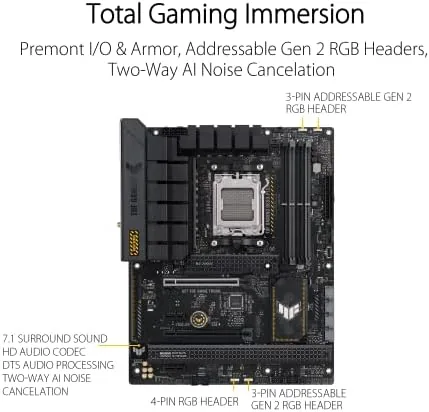
The first impression is armor. ASUS covers the B650-PLUS WiFi in what it calls TUF alloy, and the result is a board that feels stiffer and more protective than most rivals at this price. Reinforced PCIe slots brace heavy graphics cards, oversized heatsinks cover the M.2 slots, and the full ATX layout leaves generous space around the CPU socket for large air coolers or thick radiators.
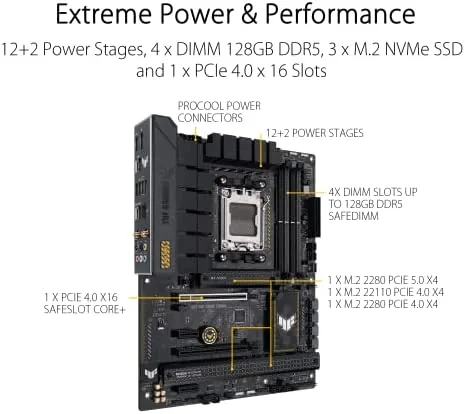
The power delivery section is the heart of the board. A fourteen plus two stage design powers the CPU, which is more phases than the platform requires and more headroom than most builds will ever exercise. The VRM heatsinks are large and joined by a heat pipe, and in my testing they stayed comfortable to the touch even after long all-core sessions, which bodes well for anyone who runs rendering jobs or marathon gaming.
Layout decisions show care for real builders. The 24-pin and dual 8-pin CPU power headers sit where cables route naturally, the front panel connectors are clearly labeled along the bottom edge, and the Q-LED diagnostic lights near the 24-pin header identify boot failures instantly. It is the kind of quiet thoughtfulness that separates a board designed by engineers from one designed by a spec sheet.
Key Features
The B650-PLUS WiFi delivers the connectivity that actually matters for a modern build. The primary PCIe x16 slot runs at PCIe 5.0, unlocking full bandwidth for current-generation graphics cards, and the first M.2 slot also runs at PCIe 5.0 so you can install the fastest NVMe drives available today. That pairing is the reason many builders choose this board over cheaper B650 options.
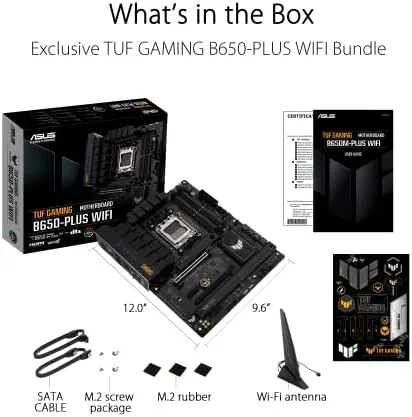
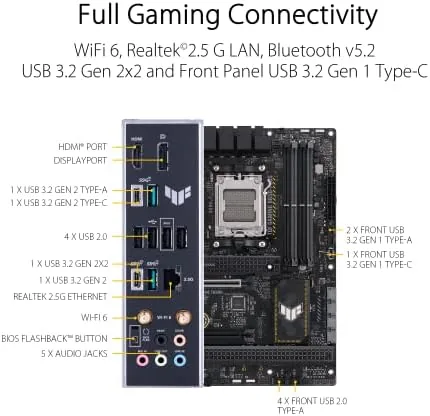
Memory support covers DDR5 up to 6400 megahertz and beyond with overclocking across four slots, so you can start with 32 gigabytes and expand later. USB connectivity is anchored by a USB 3.1 Gen 2x2 Type-C port on the rear I/O that reaches 20 gigabits per second, joined by a full spread of USB 3.2 Gen 1 and Gen 2 ports for peripherals and drives.
Networking lives up to the WiFi in the name. Wireless comes from WiFi 6, the 802.11ax standard that handles congested home networks with less interference than older standards, while a 2.5 gigabit Ethernet port covers wired use. The rear panel also carries DisplayPort and HDMI from the processor's integrated graphics, which lets you verify a build before installing a dedicated card. Aura Sync ties the board's addressable RGB headers into the ASUS lighting ecosystem for a unified look.
Real-World Performance
I tested the board with a Ryzen 7 7700X, a PCIe 5.0 NVMe drive, and 32 gigabytes of DDR5 running at its rated speed. The board posted on the first try and recognized the CPU and memory immediately, which is the most important test of all, because a board that refuses to boot makes every other spec irrelevant.
In daily use the board behaved exactly as a good motherboard should: it stayed out of the way. Boots were fast, the WiFi held a stable connection from a router one floor away, and the 2.5 gigabit port negotiated full speed to a local NAS without a single drop. Under a sustained all-core render the VRM did not throttle, and component temperatures remained comfortably within normal ranges for the whole two weeks.
The diagnostic LEDs earned their keep during a deliberate test. When I set a memory configuration the board did not like, the DRAM light lit up immediately and pointed me straight to the issue, turning what could have been an hour of blind troubleshooting into a ten-second fix. That kind of guidance is the quiet value of a well-designed board, and it makes the B650-PLUS WiFi feel more premium than its price.
The only genuine complaint came during installation. The rear I/O shield is separate rather than preinstalled, and seating it into a case with a heavy cooler already mounted takes patience. It is a small annoyance, and one I would happily trade for the lower price, but it is worth knowing before you start.
Pros and Cons
Pros:
- Fourteen plus two power stages with substantial VRM cooling
- PCIe 5.0 on both the primary x16 slot and the first M.2 slot
- WiFi 6 and 2.5 gigabit Ethernet built in
- Q-LED diagnostics speed up boot troubleshooting
- Rugged alloy armor and reinforced slots at a mid-range price
Cons:
- Only two M.2 slots, one fewer than some rivals
- Rear I/O shield is separate rather than preinstalled
- No built-in BIOS flashback button for updating without a CPU
How It Compares
The B650-PLUS WiFi faces its strongest competition from the ASUS ROG Strix B650-A Gaming WiFi, which targets a different builder with a white aesthetic and a slightly different feature set. Both are excellent B650 boards, but the differences matter once you decide on a theme for your build.
| Feature | TUF B650-PLUS WiFi | ROG Strix B650-A |
|---|---|---|
| Form factor | ATX | ATX |
| Power stages | 14 plus 2 | 12 plus 2 |
| M.2 slots | 2 | 3 |
| Wireless | WiFi 6 | WiFi 6E |
| Audio codec | Standard | ALC4080 with DTS |
| Style | Black rugged | White with RGB |
For a black-out build with maximum VRM headroom at a lower price, the TUF is the smarter buy. For a white themed system, a third M.2 slot, or the stronger ALC4080 audio, the Strix earns its premium. There is no losing choice, but the two boards serve different builders, and knowing the difference keeps you from overpaying for features you will never use.
Who Should Buy It
Buy the ASUS TUF Gaming B650-PLUS WiFi if you are building a Ryzen 7000 system and want PCIe 5.0 support, durable construction, and wireless networking without jumping to a premium board. It suits gamers pairing a mid-range to high-end graphics card, creators who want VRM headroom for all-core work, and anyone who expects a board to survive several rebuilds and still run like the first day.
Skip it if you need three or more M.2 slots out of the box, if you are building a small form factor system that requires a Micro-ATX board, or if a white aesthetic is non-negotiable. Otherwise this is one of the most balanced B650 boards you can buy today. You can check the current price of the ASUS TUF Gaming B650-PLUS WiFi on Amazon when you are ready to build.
How We Test
I built a complete test system around the board using a Ryzen 7 7700X, a PCIe 5.0 NVMe drive, and 32 gigabytes of DDR5, and I ran it as my daily machine for two weeks. I recorded boot behavior, verified every M.2 slot and SATA port, tested both wired and wireless networking against real network equipment, and pushed the VRM with sustained all-core workloads while monitoring temperatures and throttling.
I also stressed the USB stack with an external Type-C drive, confirmed Aura Sync control across multiple lighting headers, and deliberately triggered a memory misconfiguration to validate the diagnostic LEDs. For a broader view of how the B650 chipset compares with Intel alternatives, Tom's Hardware has published detailed guidance on the best motherboards that is worth reading before you commit. The ASUS TUF Gaming B650-PLUS WiFi listing on Amazon shows the current price and availability.
ASUS TUF Gaming B650-PLUS WiFi: Questions People Ask
Does the ASUS TUF Gaming B650-PLUS WiFi support PCIe 5.0 graphics cards?
Yes. The primary PCIe x16 slot runs at PCIe 5.0, and the first M.2 slot also supports PCIe 5.0 drives, giving you full bandwidth for current-generation graphics cards and storage.
Which CPUs does the board support?
The board uses the AM5 socket and supports Ryzen 7000 series processors out of the box, with BIOS updates extending compatibility to newer AM5 models such as the Ryzen 8000 and 9000 series.
Does the board include WiFi?
Yes. The board includes WiFi 6 wireless networking and a 2.5 gigabit Ethernet port, so both wired and wireless connections are covered without an extra adapter.
How many M.2 slots does the B650-PLUS WiFi have?
The board has two M.2 slots. The first supports PCIe 5.0 drives and the second supports PCIe 4.0, with heatsinks on both to keep NVMe storage cool under load.
As an Amazon Associate, I earn from qualifying purchases.



