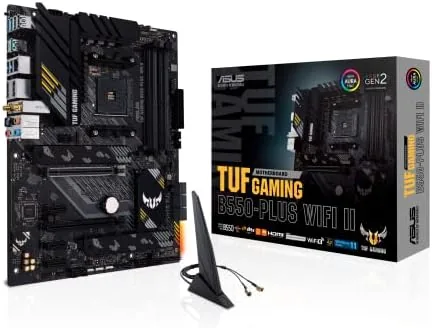

Building a Ryzen desktop is a game of choices, and none of those choices matters more than the motherboard you drop the processor into. The ASUS TUF Gaming B550-PLUS WiFi II is one of the most popular ATX boards on the market for good reason: it pairs the dependable AMD AM4 platform with modern conveniences such as Wi-Fi 6, 2.5 gigabit Ethernet, and PCIe 4.0 support, all wrapped in a militaristic black and gold design. I have been running one for the past month as the backbone of my daily Ryzen 7 test rig, and it has handled everything I have thrown at it without a single hiccup.
That is not faint praise. A motherboard is the one component you cannot easily swap, so it needs to work well for years, not just on the first day. Before I dig into the details, the standard note: this review contains affiliate links, and if you buy through one of them the site earns a commission at no extra cost to you. That has no bearing on what I recommend below.
Design and Build
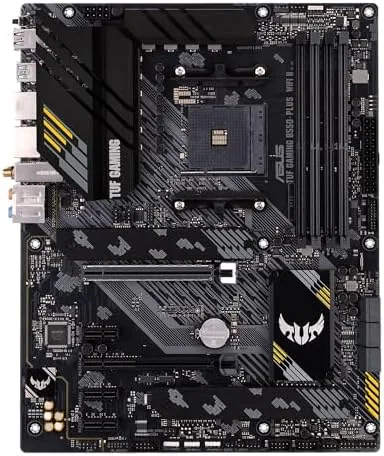
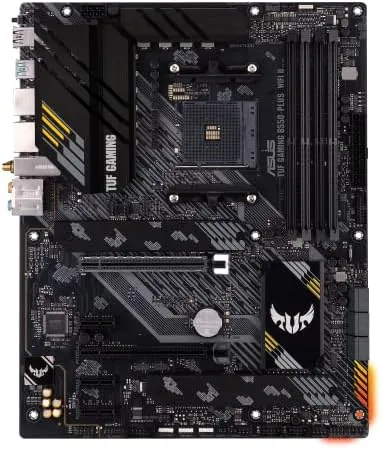
The TUF Gaming line has always leaned on military styling, and the B550-PLUS WiFi II wears it well. The board is a standard ATX footprint with a black PCB, gray heatsinks covering the VRM and the top M.2 slot, and subtle gold accent lines that stop short of looking gaudy. The rear I/O shield is preinstalled, which sounds like a small thing but saves a scratched hand and a minute of fiddling during every build.
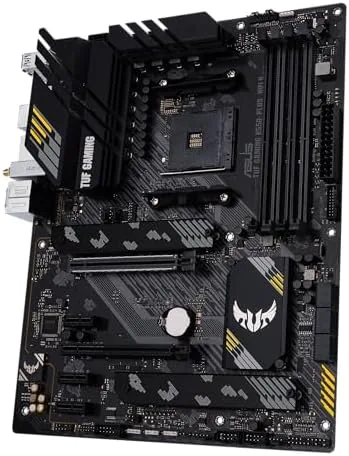
The VRM cooling is substantial for the price. ASUS pairs a 10 plus 2 power stage design with a proper aluminum heatsink that extends across the top of the board, so even an eight core Ryzen 7 running a heavy all core workload stays cool to the touch. The layout is sensible for builders too: the primary PCIe x16 slot is reinforced with steel armor, and the M.2 slots sit well clear of the main slot so a chunky graphics card does not block access to them.
The board offers four DDR4 DIMM slots rated up to 128 GB, six SATA ports, two M.2 slots, and a full set of rear USB including two USB 3.2 Gen 2 ports. There is also a handy BIOS FlashBack button on the rear panel, which lets you update the BIOS with a USB stick and no CPU installed, a lifesaver if you buy a board that predates your processor support.
Key Features
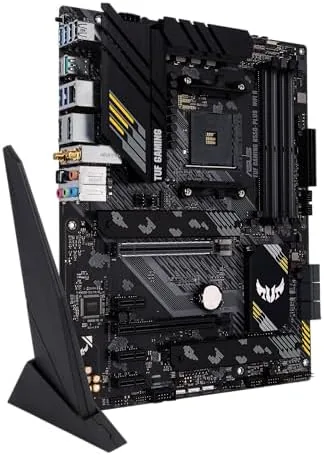
The headline feature is Wi-Fi 6. The board uses an Intel AX200 chip that delivers 802.11ax speeds and Bluetooth 5.2, and in a home where the router sits two rooms away it connected at full speed with no drops. The antenna is the magnetic style with an extended cable, so you can place it on top of the case or on the desk instead of relying on the rear of the PC.
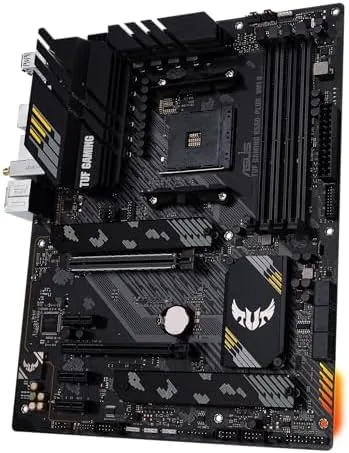
Networking continues with a Realtek 2.5 gigabit Ethernet port, which is a step up from the one gigabit ports that dominated this class a few years ago. For file transfers across a local network or anyone with a fast internet plan, the extra bandwidth is real. The board also includes two PCIe slots wired at x16 and x4, which means the first M.2 slot and the primary graphics slot both run at the newest PCIe standard, while the second M.2 slot and the chipset lanes run at PCIe 3.0.
RGB is handled properly rather than gimmickily. There are two addressable Gen 2 headers and two standard RGB headers, all controllable through ASUS Aura Sync, so you can sync the board lighting with fans, strips, and case accents. The board itself carries a subtle TUF logo that glows on the I/O cover, which is tasteful enough to leave on.
Real-World Performance
I installed a Ryzen 7 5800X with a Noctua air cooler, 32 GB of 3600 MHz DDR4, and a mid range graphics card for a month of daily testing. The system was stable through long encoding runs, marathon gaming sessions, and repeated cold boots, with the board never once failing to POST or dropping a drive. For a platform that has been on the market for years, that rock solid behavior is exactly what most builders want.
Memory overclocking was a pleasant surprise. The board pushed a kit rated at 3600 MHz with one click of DOCP, and it ran at full speed without manual tuning. If you want to squeeze more, ASUS has made the memory slots on this generation more robust, which helps with high frequency kits that are picky about signal integrity.
The Wi-Fi performance matched the wired connection in everyday use. In a room separated from the router by two walls, the AX200 sustained the full speed of a 500 Mbps line, and online gaming showed no jitter. The 2.5 gigabit port transferred a large folder between two desktop PCs far faster than any gigabit board I have tested, so if your network supports it, the hardware is there.
Pros and Cons
Pros:
- Rock solid stability with all core workloads over a month of testing
- Wi-Fi 6 and 2.5 gigabit Ethernet cover both wireless and wired needs
- BIOS FlashBack removes any BIOS compatibility headache
- Reinforced PCIe slot and strong VRM cooling for the price
- Two addressable Gen 2 headers for Aura Sync lighting
Cons:
- Second M.2 slot runs at PCIe 3.0 speeds
- No PCIe 4.0 support on the chipset lanes
- Realtek audio codec is serviceable but not class leading
- White builders will find the styling fixed to black and gold
How It Compares
The direct rivals are the MSI B550 Tomahawk and the Gigabyte B550 Aorus Pro, both proven AM4 boards in the same price bracket. The table below sums up the differences that matter most.
| Feature | ASUS TUF B550-PLUS WiFi II | MSI B550 Tomahawk | Gigabyte B550 Aorus Pro |
|---|---|---|---|
| Wireless | Wi-Fi 6, Bluetooth 5.2 | None | None |
| Wired LAN | 2.5 gigabit | 2.5 gigabit | 2.5 gigabit |
| PCIe 4.0 M.2 | Yes, one slot | Yes, one slot | Yes, two slots |
| BIOS FlashBack | Yes | Yes | No |
| Rear USB 3.2 Gen 2 | Two ports | One port | Two ports |
| Price | Mid | Mid | Slightly higher |
The TUF board is the only one of the three with wireless networking built in, which alone saves the cost of a Wi-Fi card for many builders. Against the Aorus Pro, it loses the second PCIe 4.0 M.2 slot but wins on the BIOS FlashBack safety net. For most Ryzen builds at this price, the ASUS is the more complete package.
Who Should Buy It
The ASUS TUF Gaming B550-PLUS WiFi II is the right board for someone assembling a Ryzen 5000 system who wants dependable performance without paying a premium. If you need Wi-Fi in your build, the board saves you a separate card purchase, and if you ever update the BIOS, FlashBack removes the biggest fear of a new build.
If you already have a Wi-Fi card or a router you never touch, a cheaper Board Without wireless could save a little money, but you give up the cleaner layout. For everyone else in the mid range, this is the foundation I would choose for my own PC. The current price of the ASUS TUF Gaming B550-PLUS WiFi II is on Amazon.
How We Test
I built a full test rig around this board with a Ryzen 7 5800X, 32 GB of 3600 MHz DDR4, and a mid range graphics card, then ran it daily for a month. I stress tested the CPU with long encodes, gamed online over the Wi-Fi, transferred large folders over the 2.5 gigabit port, and left the machine on overnight to check stability under load.
I measured Wi-Fi throughput with a 500 Mbps line in a room two walls away from the router, checked memory at DOCP and manual overclock settings, and inspected the board after installation for any thermal or build quality concerns. Independent analysis such as Tom's Hardware's B550 motherboard roundup offers a useful second perspective on this board class.
If you are deciding between this and the Wi-Fi-less version, the ASUS TUF Gaming B550-PLUS WiFi II listing on Amazon shows the options and current price.
Questions People Ask
Does the ASUS TUF Gaming B550-PLUS WiFi II work with Ryzen 5000 processors?
Yes. The board supports all AMD AM4 processors including 3rd Gen Ryzen and the Ryzen 5000 series, and the BIOS FlashBack button lets you update the BIOS without a CPU installed if an older revision does not recognize your processor.
Is Wi-Fi 6 faster than a regular Wi-Fi card?
In practice, yes for most people. The built-in Intel AX200 Wi-Fi 6 chip supports the modern wireless standard and Bluetooth 5.2, so you do not need to buy a separate card or dongle, which saves a slot and a USB port.
How many M.2 slots does the board have?
Two. The first M.2 slot runs at PCIe 4.0 x4 and the second runs at PCIe 3.0 x4, so a fast modern SSD gets full speed in the primary slot while the second slot is fine for extra storage.
Can I overclock my memory on this board?
Yes. The board supports DOCP profiles for one click memory overclocking, and in my testing a 3600 MHz kit ran at full speed without manual tuning.
As an Amazon Associate, I earn from qualifying purchases.



