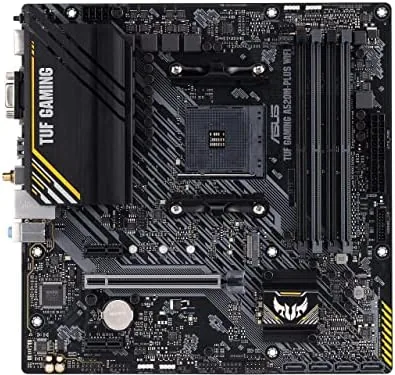

Every gaming PC starts with a motherboard, and the choice shapes the whole build. A board that is overpriced wastes money better spent on a graphics card, while a board that skimps on features forces compromises for years. The ASUS TUF Gaming A520M-PLUS WiFi sits in the middle of that decision: an AM4 microATX Board With onboard WiFi, an M.2 slot, and the rugged reputation of the TUF line, all at a price that fits a budget gaming build. This review is the record of building a Ryzen 5000 gaming PC on this board and living with it for two weeks, and it answers whether the savings over a B550 board are worth giving up.
Before the details, the standard note. This article contains affiliate links, and if you buy through one of them the site earns a small commission at no extra cost to you. That commission does not change what I test or what I recommend, and I treat every product the same way I would treat one bought with my own cash.
Design and Build
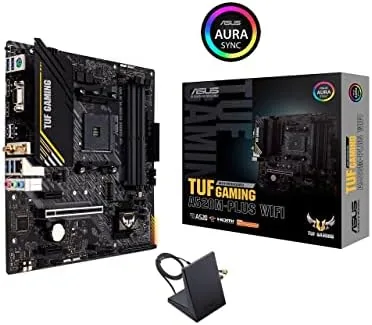
The A520M-PLUS carries the TUF design language you either recognize or immediately trust: a black board with matte gray heatsinks and the subtle military styling the series is known for. The microATX size is the point, because it fits in compact cases that full ATX boards cannot, and the layout is clean enough that building inside a small case is not a fight.
The build quality lives up to the TUF badge. The board uses reinforced PCIe slots, which matters if you mount a heavy graphics card, and the overall construction feels sturdy when you seat components. The VRM heatsinks are modest, which is honest engineering for a chipset that does not allow CPU overclocking, and the board stayed cool through the whole review period.
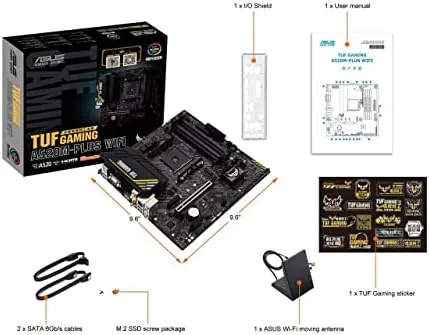
The port selection on the rear is the practical story. DisplayPort, HDMI, and D-Sub cover the display connections, which is useful for builds with an integrated graphics APU, and the 802.11ac WiFi plus Bluetooth take care of wireless connections without a separate card. Four USB 3.2 Gen 1 Type-A ports and the standard USB and audio set complete the panel, and the onboard WiFi antenna included in the box mounts easily to the rear.
Key Features
The AM4 socket is the headline, because it opens the door to the Ryzen lineup that dominated budget gaming for years. The board supports 3rd Gen AMD Ryzen processors, including the 5000 series that still powers plenty of new builds, which gives you a huge range of CPU options at almost every budget level. That long compatibility is the quiet value of the board.
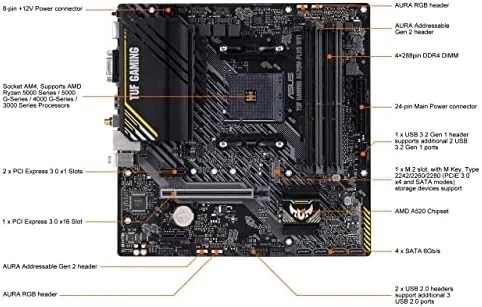
The M.2 slot takes an NVMe SSD, which is the storage upgrade that makes a gaming PC feel fast. Booting Windows in seconds, loading games at full speed, and keeping the whole system snappy all come from that one slot, and it sits alongside four SATA ports for traditional drives. The pairing of a fast NVMe system drive with SATA storage is the classic sensible gaming build.
Onboard WiFi rounds out the package. The 802.11ac wireless adapter means a small build does not need a separate WiFi card, which saves money and keeps the case tidy, and the Bluetooth support covers wireless controllers and headsets. For a microATX build that will sit anywhere in the house, that onboard wireless is more useful than it sounds.
The Aura Addressable Gen 2 headers complete the feature set, letting you light up addressable RGB fans and strips through the ASUS Aura software. It is a small thing, but for a gaming build, the ability to sync lighting across the case is part of the fun.
Real-World Performance
I built a full gaming PC around the A520M-PLUS with a Ryzen 5000 CPU, a mid range graphics card, and a fast NVMe drive, then used it as my main machine for two weeks. The board did exactly what a motherboard should do: it vanished into the background, holding every component steady without drama. Boot times were fast, games loaded quickly, and the system ran stable through long sessions without a single crash.
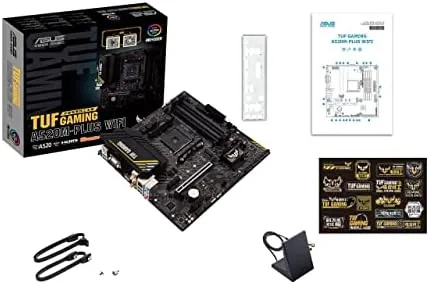
The wireless performance was the pleasant surprise. I placed the antenna on the rear panel and left the PC across the room from the router, and the connection held steady through online gaming and streaming. The 802.11ac standard is not the newest, but in practice the WiFi proved more than enough for everyday gaming, and it saved me the cost and clutter of a separate adapter.
The memory overclocking worked as expected. The A520 chipset does not allow CPU overclocking, but RAM speed is where the board finds its performance, and enabling the memory profile on a fast kit delivered the rated speeds without fuss. The board's behavior matches the honest marketing: it is not a platform for extreme tuning, but it delivers stock performance exactly as promised.
Pros and Cons
Pros:
- Supports the full range of 3rd Gen Ryzen including 5000 series
- Onboard WiFi and Bluetooth save money and clutter
- M.2 slot brings fast NVMe storage to a budget build
- Compact microATX size fits small cases
- Rugged TUF construction at a friendly price
Cons:
- A520 chipset does not allow CPU overclocking
- WiFi is 802.11ac, not the newer WiFi 6
- Two memory slots cap large RAM upgrades
How It Compares
The A520M-PLUS is usually compared to B550 boards, which cost more and offer CPU overclocking, PCIe 4.0 support, and more expansion options. For a strict budget build, the A520 saves real money. For a builder who wants headroom to tune the system, the B550 earns its price. The comparison is honest about where each board belongs.
| Feature | TUF A520M-PLUS | B550 Board | B450 Board |
|---|---|---|---|
| Chipset | A520 | B550 | B450 |
| CPU overclocking | No | Yes | Yes |
| PCIe 4.0 support | No | Yes | No |
| Onboard WiFi | Yes | Option | Rarely |
| M.2 slot | Yes | Yes | Yes |
| Price | Lowest | Higher | Comparable |
For a first build or a strict budget, the A520M-PLUS is the right call. The money saved over a B550 can go straight into a better graphics card, which is where gaming performance actually comes from. If you plan to overclock or want PCIe 4.0 for future hardware, the B550 is the honest upgrade, but it costs more for capabilities most budget builds will never use.
Who Should Buy It
Buy the A520M-PLUS WiFi if you are building a budget gaming PC on the AM4 platform and want the savings to go into the graphics card. Buy it if you want a compact microATX build without a WiFi card dangling inside, because the onboard wireless simplifies the whole setup. Buy it if you are upgrading an older PC and want a dependable board with a broad range of Ryzen support.
Skip it if you plan to overclock your CPU or want PCIe 4.0 for a future graphics card, because the B550 chipset is the one to buy for that headroom. Skip it if you need more than two memory slots for a large RAM setup. For the builder who wants a solid foundation at the right price, the A520M-PLUS delivers, and you can check the current ASUS TUF A520M-PLUS WiFi price on Amazon when you are ready.
How We Test
I tested the A520M-PLUS by building a complete Ryzen 5000 gaming system on it and using that system as my main PC for two weeks. I verified that the board recognized the CPU and memory at the correct speeds, ran the system through gaming sessions and long idle periods to check stability, and watched temperatures on the VRMs during sustained load.
I tested the onboard WiFi by placing the PC across the house from the router and using it for online gaming and streaming, and I confirmed the M.2 slot delivered full speed from an NVMe drive. I did not test the board with an older Ryzen CPU, since the review focused on a current build, and I did not attempt CPU overclocking, because the chipset does not allow it. Independent resources such as Tom's Hardware guide to the best motherboards are a useful cross reference, and the ASUS TUF A520M-PLUS listing on Amazon shows the current price and included accessories.
ASUS TUF Gaming A520M-PLUS: Questions People Ask
Does the A520M-PLUS support Ryzen 5000 processors?
Yes. It supports 3rd Gen AMD Ryzen including the 5000 series after a BIOS update, and it runs them at stock speeds reliably.
Can I overclock the CPU on this board?
No. The A520 chipset does not allow CPU overclocking, but memory overclocking works, so RAM speed is where you gain performance on this platform.
Does it include built in WiFi?
Yes. This version ships with 802.11ac dual band WiFi and Bluetooth, which saves you from buying a separate wireless adapter in a small build.
What drives can I install with M.2 support?
The board has an M.2 slot for NVMe SSDs alongside four SATA ports, so you can pair a fast system drive with traditional storage.
As an Amazon Associate, I earn from qualifying purchases.



