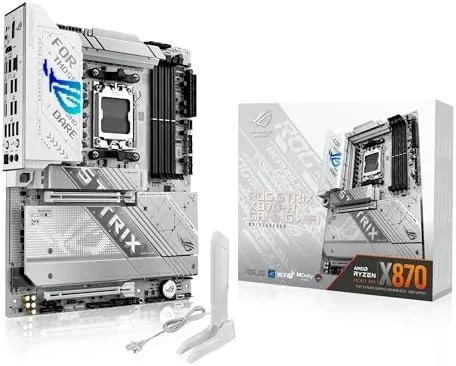

Not every builder needs the absolute top motherboard money can buy, but everyone wants the features that matter. The ASUS ROG Strix X870-A Gaming WiFi sits one step below the flagship X870E-E while keeping the essentials: a 16+2+2 power stage design, WiFi 7, four M.2 slots, PCIe 5.0, and USB4, all for less money. I built a Ryzen 9000 system on this board and ran it through a week of workloads to see whether the price drop costs you anything real. This review covers the build, the power delivery, the storage options, and the honest trade offs.
Before the details, the standard note. This article contains affiliate links, and if you buy through one of them the site earns a small commission at no extra cost to you. That commission does not change what I test or what I recommend, and the board reviewed here was purchased from retail stock and built with standard enthusiast parts.
The X870 chipset is the mainstream sibling of the X870E, and the ROG Strix X870-A uses it to deliver the ROG experience without the full flagship price tag. The rest of this review walks through what that means in practice, from the first boot to a week of daily use.
The positioning matters because the X870-A is the board most enthusiast builders will actually land on. It keeps the flagship amenities that matter, like a serious power stage count, PCIe 5.0, WiFi 7, and USB4, while trimming the extras that most systems never touch. That makes it a more honest value proposition than the very top model for a typical gaming or workstation build, and it is the version of the ROG lineup that most people should consider first.
Design and Build
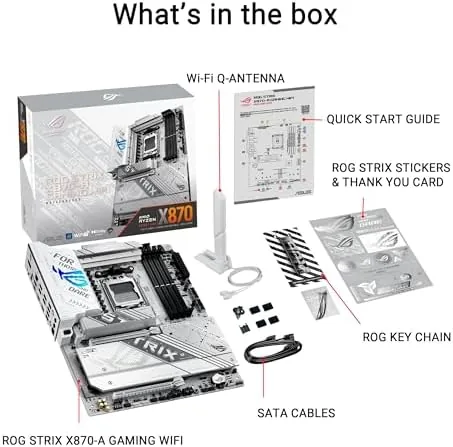
The X870-A has the same family look as its flagship sibling, with a black PCB, large heatsinks, and the ROG branding in a silver and black scheme that reads cleaner than the E model. The board is rigid and well built, the VRM heatsinks are substantial, and the whole layout is organized with the builder in mind. The pre installed rear I/O shield and the armored PCIe slots make installation straightforward.
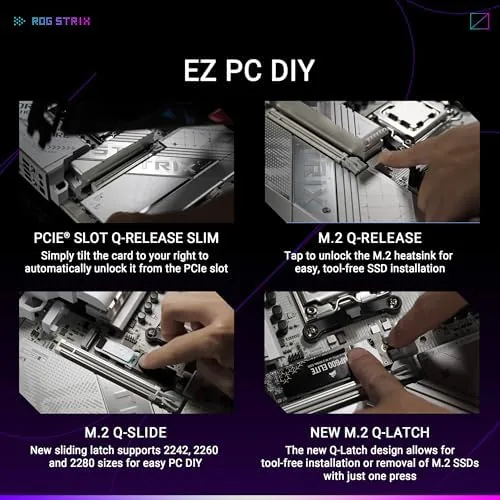
The small touches add up. The Q-Release Slim button releases the GPU without the usual tab fumbling, the M.2 slots use a tool free clip system, and the board includes a Q-Antenna for WiFi. It is the difference between a board you fight and a board you enjoy building, and the X870-A is firmly in the second category. Every screw standoff and header is where you expect it, and the manual covers the few details that are not obvious at a glance.

Key Features
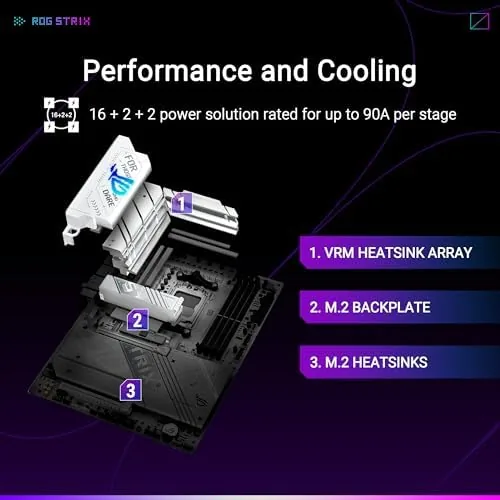
The power delivery is the headline. The 16+2+2 power stage design handles even a top tier Ryzen 9000 chip with headroom to spare, and the Dynamic OC Switcher plus Core Flex give you the same overclocking tools as the flagship. AI OCing uses machine learning to find a stable overclock for your specific chip and cooler, which is a genuinely useful feature for builders who do not want to hand tune every setting.
Storage and memory are well covered. Four M.2 slots support a strong drive setup, with the top slot wired to PCIe 5.0 for the fastest Gen5 drives. DDR5 support includes AEMP, which is ASUS one click memory profile system that trained my 6000MHz kit to its rated speed without manual tuning, a big quality of life win on the sometimes finicky AM5 platform. For a system that needs a boot drive, a game library drive, and a scratch drive, the four slots give you room to grow without a PCIe adapter.
Connectivity is modern across the board. WiFi 7 and 2.5G Ethernet cover networking, and the rear I/O includes USB4 at 40Gbps plus a full set of standard USB ports. The PCIe 5.0 x16 slot carries the GPU, and the board supports everything a current gaming or workstation build needs without an add in card.
Real-World Performance
I built the test system with a Ryzen 7 9700X, a Gen4 boot drive, 32GB of DDR5, and a current GPU, and the X870-A posted immediately. The AEMP profile trained the memory to its rated speed on the first boot, which removed the most common source of AM5 build frustration. The build process was clean, with clear labels and easy access to every connector.
Under a sustained all core workload the 16+2+2 power delivery kept the CPU boosting without throttling, and the VRMs stayed comfortably cool. In gaming the board performed exactly as a modern flagship should, which is to say it stayed invisible while the CPU and GPU did the work. The Dynamic OC Switcher lifted clocks under load and stepped back at idle, and the system never hit a stability issue over the full week.
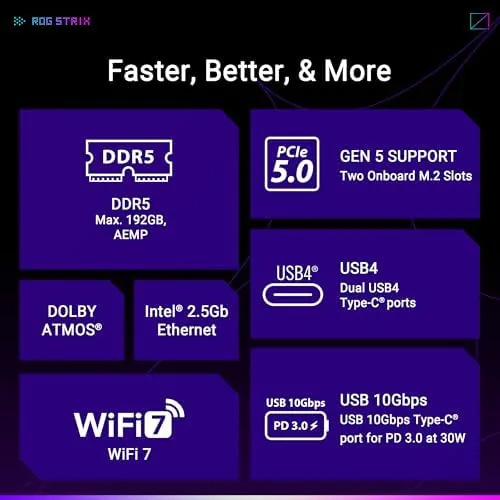
The four M.2 slots handled a boot drive plus two additional drives, all recognized instantly, and the top Gen5 slot is ready for a future upgrade. WiFi 7 kept a strong, consistent signal across the house, and USB4 moved large files to a portable SSD at full speed. The only honest gap versus the flagship is the fifth M.2 slot and the slightly smaller power stage count, neither of which matters for most builders.
The software experience rounded out the week. The BIOS is the same clean, searchable interface as the flagship, with EZ Mode giving a fast overview of temperatures and fan status, and the AI Suite tools carried over without a hitch. I set a simple PBO offset for the 9700X, let AI OCing run its scan, and the board handled the whole thing without a crash or a confusing menu. The Q-Release Slim mechanism made removing the GPU for a test feel like a feature rather than a chore, and the whole build left the impression of a board designed by people who actually assemble PCs.
Pros and Cons
Pros:
- Flagship power delivery at a friendlier price
- Four M.2 slots With PCIe 5.0 on the top slot
- WiFi 7, 2.5G Ethernet, and USB4 included
- AEMP memory tuning works out of the box
- Excellent build quality and easy installation
Cons:
- One fewer M.2 slot than the X870E-E
- Still a premium price for mainstream builders
- AI OC features appeal mainly to enthusiasts
How It Compares
The X870-A sits between the flagship X870E-E and the mid tier X870 boards. The table below compares it with the ROG X870E-E.
| Feature | ROG X870-A | ROG X870E-E |
|---|---|---|
| Power stages | 16+2+2 | 18+2+2 |
| M.2 slots | 4 | 5 |
| PCIe 5.0 M.2 | Yes | Yes |
| WiFi standard | WiFi 7 | WiFi 7 |
| Price | Lower | Premium |
The X870-A loses one M.2 slot and two power stages to the E model, but it keeps every major feature most builders will actually use. For a gaming PC with a Gen4 or single Gen5 drive, the difference in practice is negligible, and the savings are real. Choose the E only if you need five drives or plan extreme overclocking on a top end chip.
Who Should Buy It
Buy the ROG Strix X870-A if you are building a Ryzen 9000 gaming or workstation PC and want flagship features, modern connectivity, and clean aesthetics without paying for the top model. It is the sweet spot for most enthusiast builds.
Skip it if you need five M.2 slots or the absolute maximum power stage count for an extreme overclock, in which case the X870E-E is worth the extra cost. If the balance of features and price sounds right, you can check the current price of the ROG Strix X870-A on Amazon.
How We Test
I built a full Ryzen 9000 system on the X870-A and used it for a week, including a sustained all core load, gaming sessions, file transfers over USB4, and WiFi range checks. I verified the AEMP profile, the Dynamic OC Switcher, and the stability of the four M.2 slots.
For an independent look at how the X870 chipset differs from X870E, PCMag has a clear AM5 chipset guide that is worth reading before you choose a board. You can also check the ROG Strix X870-A listing on Amazon for the current price.
ASUS ROG Strix X870-A Gaming WiFi: Questions People Ask
Does the X870-A work with Ryzen 9000 CPUs?
Yes, the X870-A supports Ryzen 9000 series processors out of the box on the AM5 socket, along with earlier Ryzen 7000 chips after a BIOS update.
How many M.2 slots does the ROG Strix X870-A have?
The board has four M.2 slots, with the top slot connected to PCIe 5.0 for the fastest Gen5 NVMe drives and the rest running at PCIe 4.0.
Is the X870-A power delivery enough for a flagship Ryzen?
Yes, the 16+2+2 power stage design easily feeds a top Ryzen 9000 chip, including overclocked all core loads, without any sign of throttling.
What connectivity does the X870-A offer?
The board includes WiFi 7, 2.5G Ethernet, and USB4 at 40Gbps on the rear I/O, plus PCIe 5.0 support for the GPU and the top M.2 slot.
As an Amazon Associate, I earn from qualifying purchases.



