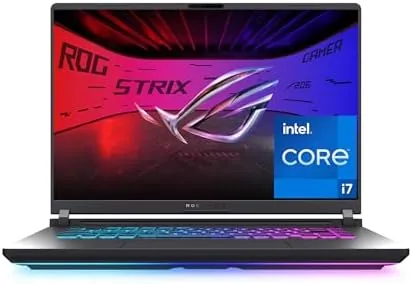

Gaming laptops have a bad habit of asking you to pay for a logo. The flagship models carry triple digit price tags and RGB that could light a stadium, while the sensible machines sit a tier down, quieter and cheaper, doing most of the same work. The 2025 ASUS ROG Strix G16 sits firmly in that sensible tier with an unusually good hand of cards. It pairs the NVIDIA RTX 5060 with an Intel Core i7-14650HX, wraps them in a 16-inch 16:10 FHD+ panel running at 165Hz, and adds a 1TB Gen 4 SSD and Wi-Fi 7, all at a mainstream asking price. This review covers three weeks of daily gaming and office work on the G615JMR-AS74 configuration.
Before the details, the standard note. This article contains affiliate links, and if you buy through one of them the site earns a small commission at no extra cost to you. That commission does not change what I test or what I recommend, and every laptop here gets the same treatment as one bought with my own money.
Design and Build
The ROG Strix G16 looks the part without going overboard. The chassis uses a matte dark finish with subtle ROG branding, and the keyboard backlighting can run full RGB or settle into a calm single color depending on your mood. The plastic construction is firm with minimal flex in the base, and the hinge opens smoothly to a comfortable 150 degrees or so.
Ports cover the practical bases. Two USB Type-A ports, a USB Type-C port with display support, HDMI 2.1 for an external monitor, an RJ45 Ethernet jack, and a 3.5mm audio jack mean most gamers can plug in their peripherals and display without a dongle. The laptop is not light at roughly 5.5 pounds, but that is normal territory for a 16-inch gaming machine, and the power brick is the usual brick.
The 16-inch form factor deserves a mention. The 16:10 aspect ratio gives you noticeably more vertical screen space than the old 16:9 panels, which helps in spreadsheets, code, and documents as much as it helps in games that support the taller view.
Key Features
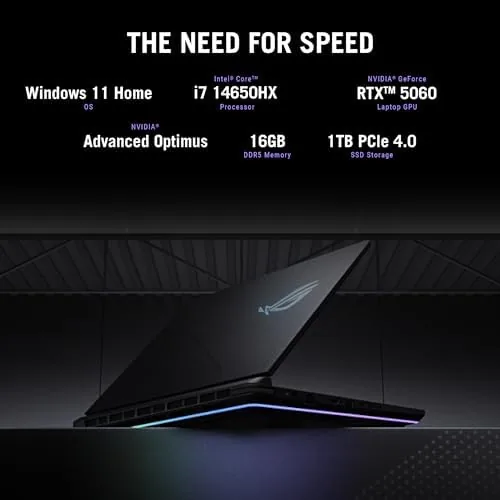
The RTX 5060 is the headline, and in this laptop it behaves. The mobile 5060 with 8GB of VRAM is squarely a 1080p gaming chip, and the G16's FHD+ panel is exactly the right partner for it. Current AAA titles run at high settings with frame rates that comfortably clear 60 fps, and competitive shooters push well past the 165Hz refresh ceiling.

The Intel Core i7-14650HX keeps the CPU side from being an afterthought. Its performance cores and efficient cores handle games, streaming, and multitasking together, and the 16GB of DDR5 memory is a sensible pairing for this class. The 1TB PCIe Gen 4 SSD delivers fast game loads and quick system boots, with Gen 4 speeds that are still the sensible choice for gaming.
Wi-Fi 7 rounds out the networking story. On a Wi-Fi 7 router the laptop pulls strong throughput and low latency, and it also makes a smart pairing for the wired Ethernet port when you want the lowest possible ping for ranked play. The MUX switch and the 165Hz panel with a 3ms response round out a feature list that reads like the checklist a mainstream gamer actually wants.
Real-World Performance
I gamed on the G16 for three weeks across shooters, open-world titles, and strategy games, and the RTX 5060 delivered exactly what the specs promise. A competitive shooter ran at high settings with frame rates pinned near the 165Hz ceiling, while a demanding open-world title held a steady high framerate at high settings, with DLSS giving headroom to push quality higher.

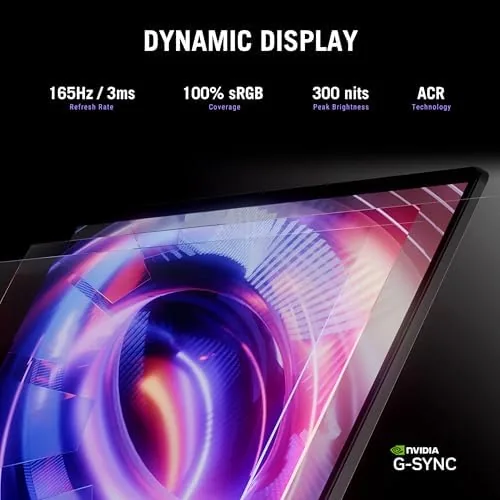
The display is a strong match for the hardware. The 16:10 FHD+ panel at 165Hz makes motion feel fluid, the fast 3ms response keeps ghosting in check, and the adaptive sync support smooths out frame rate dips. Colors are good for a gaming panel, and the matte finish cuts reflections in bright rooms.
Thermals are managed well for the class. The dual fans spin up under load but stay within reasonable noise levels, and the keyboard deck stays comfortable during long sessions. The performance mode delivers the full GPU, and a silent mode keeps the fans down for lighter work and travel. The Armoury Crate software keeps the fan curves, lighting, and performance profiles one click away, and after a week of tweaking I found a quiet profile for desk work and a maximum profile for ranked matches, so the machine adapts to the moment instead of the other way around.
As a work machine, the G16 holds up. The 16:10 display, the comfortable keyboard with decent travel, and the fast SSD make it a capable daily driver, and the RTX 5060 even accelerates photo editing and video previews. Battery life lands around 4 to 5 hours of mixed use, which is respectable for a gaming laptop and fine for a workday away from a wall outlet if you travel light.
Pros and Cons
Pros:
- RTX 5060 delivers strong 1080p gaming at high settings
- 165Hz 16:10 FHD+ display with a fast 3ms response
- Capable Core i7-14650HX with 16GB of DDR5
- 1TB Gen 4 SSD and Wi-Fi 7 networking
- Comfortable keyboard and sensible port selection
Cons:
- Battery life is modest for non-gaming use
- Plastic chassis at a price where some rivals use metal
- 8GB of VRAM limits very high resolution gaming
How It Compares
The ROG Strix G16 competes in the busiest segment in gaming laptops, and the comparison with its neighbors clarifies the value.
| Feature | ROG Strix G16 2025 | Budget Gaming Laptop | Flagship RTX 5080 Laptop |
|---|---|---|---|
| GPU | RTX 5060 | RTX 4050 | RTX 5080 |
| Display | 16 inch 165Hz FHD+ | 15.6 inch 144Hz | 16 inch 240Hz QHD |
| CPU | i7-14650HX | i5 class | i9 class |
| Storage | 1TB Gen 4 | 512GB | 1TB Gen 4 |
| Networking | Wi-Fi 7 | Wi-Fi 6 | Wi-Fi 7 |
| Typical price | Mid | Lowest | Highest |
A budget laptop with an RTX 4050 saves money but drops below the 60 fps comfort zone in demanding titles and comes with a smaller, slower display. A flagship with an RTX 5080 is dramatically faster, but the price jump is steep and the extra power is wasted unless you game on a high refresh QHD monitor. The G16 hits the middle with authority.
Who Should Buy It
Buy the ROG Strix G16 if you want a gaming laptop that handles current games well without paying the flagship tax. It is the right machine for students and working adults who need one device for games, classes, and office work, and the 16:10 display makes it a better all-rounder than most gaming laptops.
It is also a strong pick for esports players who want high frame rates on a fast panel, and for anyone upgrading from an older gaming laptop who wants current performance without the newest silicon premium. The Wi-Fi 7 and Gen 4 SSD make it feel modern in daily use.
Skip it if you demand maximum graphics at 1440p or higher, because the flagship GPUs own that territory. If your gaming happens at 1080p, the G16 is one of the best balanced machines in its class. You can check the current ROG Strix G16 price on Amazon when you are ready.
How We Test
I tested the ROG Strix G16 as my primary machine for three weeks, splitting time between gaming and office work. I ran a mix of competitive shooters, open-world titles, and strategy games at different quality settings, watching frame rates, thermals, and fan noise under sustained load.

I measured the 165Hz panel for response and smoothness, tested the Wi-Fi 7 throughput on a compatible router and over Ethernet, and judged the SSD with large game loads. I also used the laptop for everyday work to assess the keyboard, display, and battery life outside gaming.
For a deeper look at the current gaming laptop landscape, PCMag's guide to the best gaming laptops provides broad context. My own verdict after three weeks is that the ROG Strix G16 2025 is one of the most balanced gaming laptops you can buy at this price.
The ROG Strix G16 listing on Amazon shows current configurations and pricing.
ASUS ROG Strix G16: Questions People Ask
Can it run modern games at high settings?
Yes, the RTX 5060 handles current AAA titles at high settings in FHD with frame rates that easily clear 60 fps, and esports games push well past 165 fps.
How good is the battery life?
Expect roughly 4 to 5 hours of mixed everyday use, which is solid for a gaming laptop, though heavy gaming is best done plugged in.
Does the 165Hz display support G-Sync?
The FHD+ panel runs at 165Hz with a fast 3ms response, and it works with adaptive sync features to reduce tearing during gameplay.
Is the 1TB SSD fast?
Yes, it is a PCIe Gen 4 drive, and game loads and system boot times are noticeably quick, with room for a second drive in many configurations.
As an Amazon Associate, I earn from qualifying purchases.



