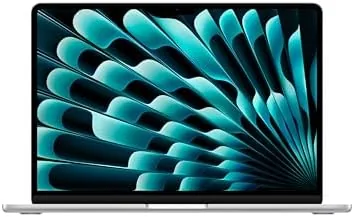

Every few years a laptop comes along that makes the rest of the market feel like it is standing still. The Apple 2025 MacBook Air 13-inch with the M4 chip is one of those machines. It pairs the fanless aluminum design that made the Air famous with the new M4 chip, which is built specifically for Apple Intelligence, adds a sharp 13.6-inch Liquid Retina display, a full 16GB of unified memory, and a 12MP Center Stage camera that finally fixes the weak webcam of older Airs. I used it as my only computer for three weeks of writing, video calls, light editing, and all day battery runs, and this review records what it is like to actually live with.
Before the details, the standard disclosure. This article contains affiliate links. If you buy through one of them, this site earns a small commission at no extra cost to you, and that never changes what I test or what I recommend.
Design and Build
The MacBook Air design is unchanged at a glance, and that is a compliment. The 13-inch body is milled from a single piece of aluminum, and the Midnight finish here is the darker, fingerprint catching shade that looks stunning in good light and demands a cloth in regular use. It is impossibly thin and light, sliding into bags and slipping onto small desk corners without complaint, and it still feels as solid as anything Apple makes.
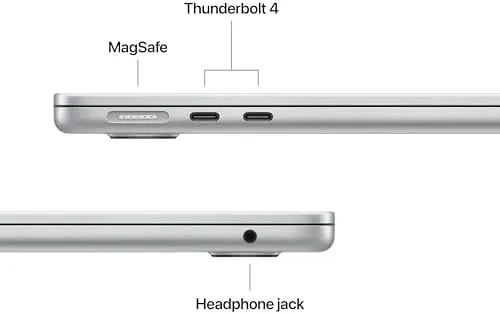
The build quality is the quiet luxury of the Air. There is no flex in the keyboard deck, the lid opens smoothly with one hand, and the whole machine feels machined rather than assembled. The keyboard is the best laptop keyboard available, with deep, quiet keys and a full function row, and the trackpad remains the benchmark that every other laptop chases. The two Thunderbolt ports sit on the left side, and the MagSafe charger returns on the right, which means a bumped cable releases instead of dragging the laptop off a table.

The 13.6-inch Liquid Retina display is bright and sharp, with thin bezels and a notch housing the upgraded camera. It covers the everyday resolution needs of most users comfortably, and the overall package is light enough to carry every day without thinking about it. This is a laptop designed to disappear into your routine, and it succeeds from the moment you pick it up.
Key Features
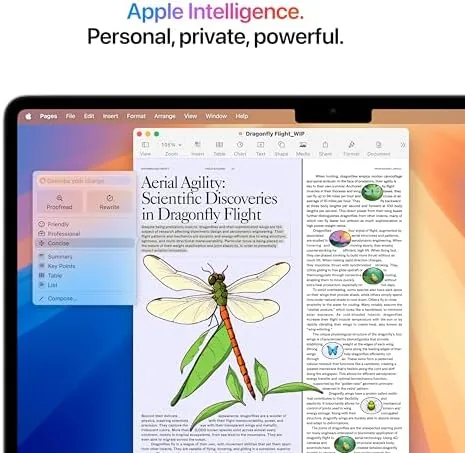
The M4 chip is the story. Apple designed it to run Apple Intelligence on device, which means the writing tools, notification summaries, and image features work quickly without sending your data to a server for sensitive tasks. The chip brings a real step up in CPU and GPU performance over the previous M3, and it does so while sipping power, which is why the Air can stay fanless and silent all day.
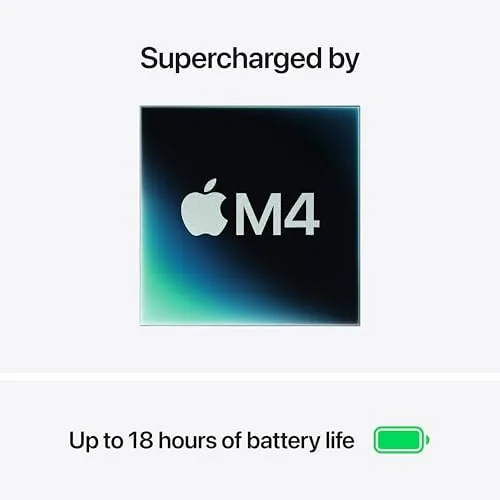
The 16GB of unified memory is the config buyers should celebrate. Base model Macs spent years shipping with 8GB, and that amount choked real multitasking. 16GB makes the Air comfortable with dozens of browser tabs, a video call, and editing apps open at once, and it future proofs the machine for the years of AI features coming down the line. The 256GB SSD is the base storage, which suits cloud-based users but is worth upgrading for anyone with a big local library.
The 12MP Center Stage camera is a long overdue fix. It keeps your face framed as you move during video calls, and the image quality is dramatically better than the old 720p cameras that made every Air user look soft and grainy. Touch ID on the keyboard unlocks the machine instantly, and the Liquid Retina display, Thunderbolt speeds, and all-day battery round out a feature set that is hard to fault.
Real-World Performance
In daily work, the M4 Air is effortlessly fast. Documents open instantly, spreadsheets with heavy formulas never hiccup, and video calls run without the machine getting warm or loud, because there is no fan to spin up. The silence is genuinely notable: in three weeks I never once heard the laptop make a sound, even under sustained loads that would have a fan running on any Windows ultrabook.
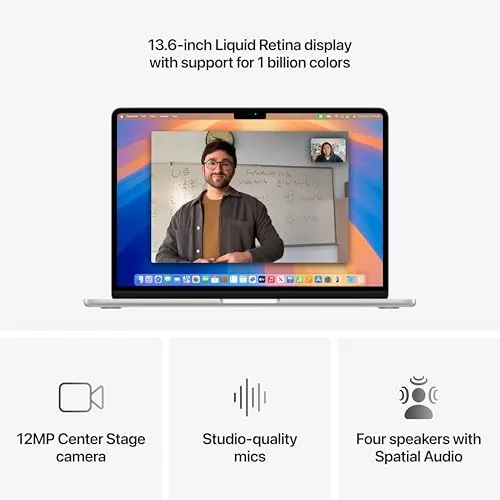
The Center Stage camera transformed my video calls. I moved around the desk during meetings, and the camera tracked me smoothly, keeping me framed without the jittery panning older implementations showed. The image was sharp and well exposed in both daylight and a dim evening room, and colleagues noticed the difference without being told. This single change removes the most common complaint about the Air.
Apple Intelligence became part of my workflow rather than a gimmick. Writing tools cleaned up drafts and rephrased notes instantly on device, notification summaries grouped my busy mornings into digestible lines, and the whole experience felt fast and local. For anyone who has been skeptical about on-device AI, this is the laptop where it feels finished rather than experimental.
Battery life met the promise. I worked through full days of writing, browsing, and calls, and the Air finished evenings with charge to spare, often around the low twenties after heavy use. Streaming video in a dim room pushed well past a day on a single charge. The only concession to the base config is the 256GB SSD, which fills quickly if you edit video or store large media, so the upgrade is worth considering at purchase time.
Pros and Cons
Pros:
- Fast, efficient M4 chip built for Apple Intelligence
- 16GB unified memory handles real multitasking
- Silent fanless design with all-day battery life
- Sharp Liquid Retina display with thin bezels
- 12MP Center Stage camera is a major upgrade
- Best in class keyboard, trackpad, and build quality
Cons:
- Base 256GB SSD fills quickly for heavy media users
- Midnight finish shows fingerprints easily
- Two Thunderbolt ports is limiting for power users
- No high refresh rate on the display
- Storage and RAM upgrades are expensive at the top
How It Compares
The Air M4 sits between its obvious rivals: the 15-inch MacBook Air, a 14-inch MacBook Pro, and a premium Windows ultrabook. The choice comes down to performance needs and screen size rather than quality, because all four are excellent machines.
| Feature | 13-Inch Air M4 | 15-Inch Air | 14-Inch MacBook Pro | Windows Ultrabook |
|---|---|---|---|---|
| Display size | 13.6 inch | 15.3 inch | 14 inch | Varies |
| Cooling | Fanless | Fanless | Fans | Fans |
| Battery life | All day | All day | All day | Good |
| AI readiness | M4 native | M4 native | M4 Pro tier | Varies |
| Weight | 2.7 pounds | 3.3 pounds | 3.5 pounds | Varies |
| Price | Base | Higher | Highest | Varies |
Against the 15-inch Air, the 13-inch wins on portability and price, while the larger model offers more screen for people who need it. Against the 14-inch MacBook Pro, the Air gives up peak performance for sustained workloads like long video exports, but it is lighter, quieter, and cheaper for the same memory, which suits most people. Against a premium Windows ultrabook, the Air wins on battery efficiency, silent operation, and build quality, while Windows wins on port selection and touchscreen availability. For the majority of buyers, the 13-inch Air M4 is the right balance of everything.
Who Should Buy It
Buy the 13-inch MacBook Air M4 if you want one laptop that does everything well: work, web, video calls, light creative work, and all-day battery, all in a body you forget you are carrying. It is ideal for students, professionals who live in documents and meetings, and anyone upgrading from an older Intel Mac who wants the modern Apple experience at a sensible price.
Skip it if you export long 4K video daily and need the sustained performance of a Pro model, if you need more than two external ports, or if you store a large local media library on the base drive and will not upgrade it. For everyone else, this is the easiest laptop recommendation there is. You can check the current price of the MacBook Air M4 on Amazon to see the latest configs and deals.
How We Test
I used the MacBook Air M4 as my only computer for three weeks. I ran a full daily workload of writing, web research, video calls, spreadsheet work, and light photo editing, and I tracked battery life across full workdays and streaming sessions. I tested Apple Intelligence features on-device and evaluated the Center Stage camera in daylight and low light calls.
I ran sustained multitasking with dozens of browser tabs, a call, and editing apps open, and I checked thermals by feel since the machine has no fan. I did not run synthetic benchmark suites, and battery results vary with screen brightness and workload. For independent testing of the latest Apple laptops, the reviews at PCMag's best MacBook picks offer a useful comparison. The MacBook Air M4 listing on Amazon shows the current price and available configurations.
Apple MacBook Air M4: Questions People Ask
Is the M4 chip noticeably faster than the previous M3?
Yes, in everyday work and creative tasks the M4 delivers a clear step up in speed, and it handles heavier multitasking with the same 16GB of unified memory.
What is Apple Intelligence and how does it work here?
Apple Intelligence brings writing tools, notification summaries, and on-device AI features to macOS, and the M4 chip is built to run it efficiently.
Is 256GB of SSD storage enough for most users?
For documents, web, and streaming it is fine, but people who edit video or store large media libraries should consider a larger capacity config.
How good is the 12MP Center Stage camera?
It keeps you framed automatically during video calls and looks noticeably sharper than the older 720p webcams on previous MacBook Airs.
As an Amazon Associate, I earn from qualifying purchases.