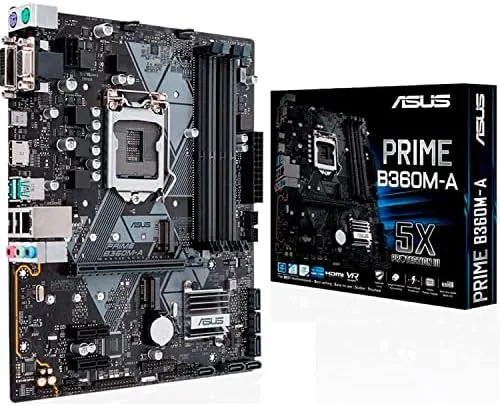

Most of a PC build is decided by the motherboard, and most of a motherboard decision comes down to one question: does it give you the features you need without paying for the ones you do not? The ASUS PRIME B360M-A answers that question for a large group of builders, because it pairs the budget friendly B360 chipset with the essentials: M.2 storage, DDR4 2666, HDMI, Intel Optane support, and an RGB header. I built a complete system around this board to see whether it holds up as a daily workhorse.
A note before the review. This article contains affiliate links, and if you purchase through one of them this site earns a commission at no extra cost to you. That never changes what I test or recommend.
Design and Build
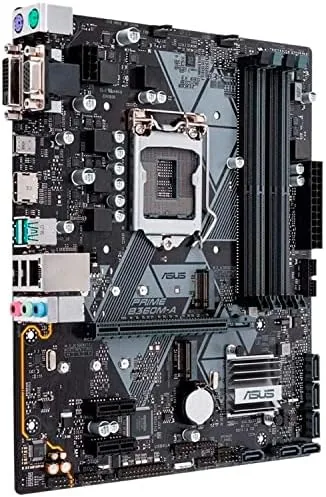
The B360M-A is a micro ATX board, which makes it the natural fit for compact cases that do not need the space of a full ATX layout. The PCB is a clean matte black with the subtle gray accents ASUS uses across the PRIME line, and the layout is thoughtfully arranged for a small case, with the 24 pin connector, CPU socket, and front panel headers placed where a builder can actually reach them.
The micro ATX size is worth pausing on, because it expands your case options considerably. A B360M-A fits in small towers and media center cases that would reject a full ATX board, while still offering four memory slots and a full length primary PCIe slot, so you give up almost nothing by going small.
Build quality is exactly what you expect from ASUS in this tier. The PCIe slots are reinforced at the primary graphics slot, which matters because modern GPUs are heavy, and the M.2 slot includes a screw mount that keeps the drive firmly seated. The VRM area has a modest heatsink, which is appropriate for a board that runs locked processors rather than overclocking monsters.
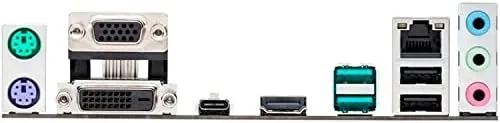
There is no onboard Wi-Fi, so plan for a cable or a cheap wireless card, but for a wired home network setup the board keeps things simple and dependable. The rear panel has the usual four USB slots, a gigabit Ethernet port, audio jacks, and the video outputs, all labeled clearly enough that a first time builder can plug everything in without consulting the manual.
Key Features
The defining feature set starts with the LGA-1151 socket, which accepts eighth generation Intel Core processors out of the box, with ninth generation support arriving through a BIOS update. That opens the door to a wide range of Core i3, i5, and i7 chips depending on your budget. The B360 chipset locks CPU overclocking, so this board is built for processors that run at stock speeds.
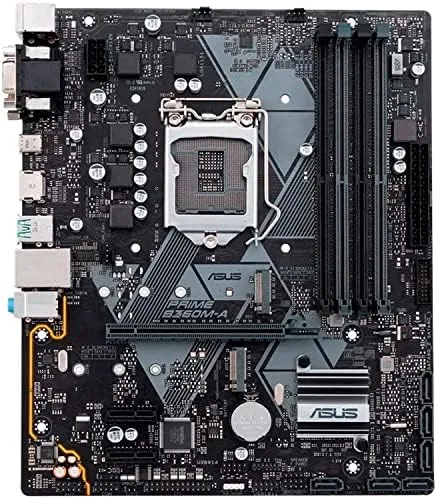
Memory support reaches DDR4 2666MHz, which is the natural partner for a B360 build, and there are four DIMM slots for up to 64GB in a compact board. Storage is covered by a single M.2 slot that supports both NVMe and SATA drives, plus four SATA 6Gbps ports for traditional drives. Intel Optane memory is supported, so a small Optane module can accelerate a large mechanical drive if you go that route.
The four SATA ports are positioned so they do not collide with a long graphics card, a detail that has ended many budget builds in cable gymnastics. Everything routes cleanly, and the M.2 slot sits well clear of the primary PCIe lane, so an NVMe drive under its own small heatsink never interferes with the GPU above it.
On the rear I/O, the board offers HDMI output for the integrated GPU, USB 3.1 Gen 2 for fast external drives, and the usual USB 3.0 and 2.0 ports. There is also a 4-pin Aura Sync RGB header for lighting, which syncs with other ASUS Aura components for a unified look. Audio is handled by the standard onboard codec, which sounded perfectly acceptable through a modest headset for gaming and video calls, with no hiss or dropouts.
Real-World Performance
I built the test system with an eighth gen Core i5, 16GB of DDR4 2666, and a mid range GPU, then used it as a daily workstation for two weeks. The board recognized every component on the first boot, which sounds like a low bar until you have fought a board that refuses to post. Memory ran at the rated 2666MHz with XMP enabled without drama.
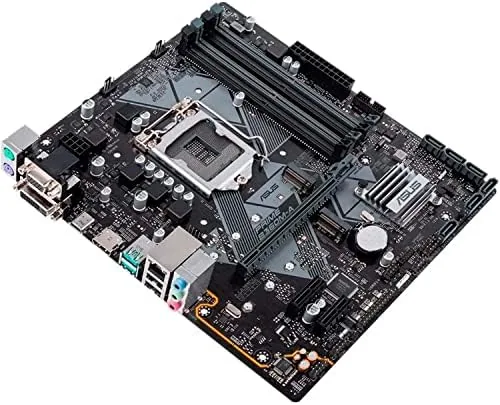
Real world use was uneventful in the best way. An NVMe drive in the M.2 slot delivered the snappy boot and load times you expect, and the SATA ports handled a large data drive without issue. USB 3.1 Gen 2 moved large file transfers at full speed, and the integrated GPU drove a 1080p display cleanly through HDMI for a secondary monitor.
The board stayed cool and stable through long work sessions. BIOS updates applied cleanly through the ASUS interface, and the fan headers delivered clean control so the system ran quiet. There were no blue screens, no dropped devices, and no memory glitches in the entire test, which is the quiet competence this board is built for.
I also pushed the daily workload beyond office tasks. A few hours of gaming with a mid range GPU ran smoothly, and the board fed the graphics card without any of the power hiccups that budget boards sometimes show under load. Whether the machine is grinding through spreadsheets or a game session, the B360M-A does not become the weak link in the system.
Pros and Cons
Pros:
- M.2 slot supports fast NVMe drives
- Four DIMM slots for up to 64GB of DDR4 2666
- Compact mATX size fits most cases
- Aura Sync RGB header for coordinated lighting
- Reinforced primary PCIe slot for heavy GPUs
- Reliable, stable daily performance
Cons:
- No CPU overclocking support on B360
- No onboard Wi-Fi or Bluetooth
- Single M.2 slot limits drive options
How It Compares
The natural comparison is against the Z390 chipset, which allows overclocking and offers more connectivity, and against the budget H310 chipset, which strips features to cut cost. The table shows where the B360M-A lands.
| Feature | PRIME B360M-A | Z390 Board | H310 Board |
|---|---|---|---|
| CPU overclocking | No | Yes | No |
| M.2 slot | Yes | Yes | Varies |
| DDR4 speed support | 2666MHz | Higher | 2666MHz |
| RGB header | Yes | Yes | Often no |
| Price | Mid | High | Low |
If you run a locked processor, and most builders with a K-less chip do, a Z390 board spends extra money on overclocking you cannot use. An H310 board saves money but drops the M.2 and RGB features. The B360M-A sits in the sensible middle, keeping the features that matter while skipping the overclocking premium. You can check the current price of the ASUS PRIME B360M-A on Amazon to see how it lands.
Who Should Buy It
Buy the B360M-A if you are building a dependable everyday PC around an eighth or ninth generation locked processor, if you want the speed of an NVMe M.2 drive without the cost of a Z390 board, or if you are putting together a compact build in a small case. It is also a strong choice for office builds and budget gaming rigs where stability matters more than overclocking bragging rights.
Skip it if you need to overclock your CPU, where a Z390 board is required, or if you want onboard Wi-Fi out of the box. For the broad middle of the builder market, this board is a dependable, sensible foundation. The ASUS PRIME B360M-A listing on Amazon has the full spec sheet and compatibility notes.
How We Test
I built a complete system around the B360M-A with an eighth gen Core i5, 16GB of DDR4 2666, an NVMe SSD, and a mid range GPU, then used it as a daily workstation for two weeks. I verified memory speeds, tested NVMe boot performance, moved large files over USB 3.1 Gen 2, ran the integrated GPU on a secondary display, and monitored temperatures and stability through long sessions.
I did not stress test CPU overclocking, because this chipset does not support it, and I judged the board by the locked processor use case it is actually designed for. For deeper reading on how motherboard chipsets compare, Tom's Hardware maintains a thorough motherboard buying guide that pairs well with this review.
ASUS PRIME B360M-A Motherboard: Questions People Ask
Can I overclock the CPU on the B360M-A?
No. The B360 chipset locks CPU overclocking, so this board is designed for locked processors that run at stock speeds, and overclocking requires a Z390 board.
Which processors fit the LGA-1151 socket?
The board supports eighth generation Intel Core processors out of the box, with ninth generation chips supported after a BIOS update to the current version.
Does the board support NVMe M.2 drives?
Yes. The single M.2 slot supports both NVMe and SATA drives, which gave the test build fast boot times and snappy application loading.
Does the Aura Sync header work with RGB fans?
Yes. The 4-pin Aura Sync RGB header controls compatible ASUS Aura lighting and fans, and it syncs with other Aura enabled components for a unified look.
As an Amazon Associate, I earn from qualifying purchases.



