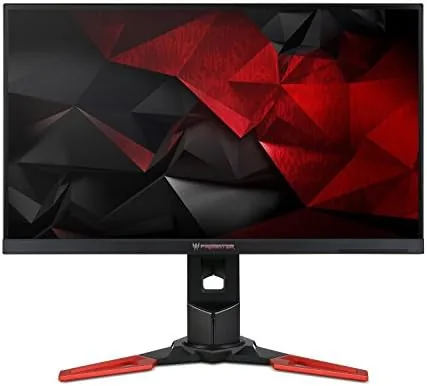

Monitors age differently than other gaming hardware. A graphics card from a few years ago is a fossil, but a good panel can stay relevant for a decade, and the Acer Predator XB271HU is the textbook example. Released when 1440p G-SYNC monitors were a new idea, it is still widely sold, still widely recommended, and still carrying a price that assumes it is special. I spent weeks gaming and working on it to decide whether that assumption still holds in a market now crowded with IPS panels at every price.
Before the details, the standard note. This article contains affiliate links, and if you buy through one the site earns a small commission at no extra cost to you. That commission never changes what I test or recommend.
Design and Build
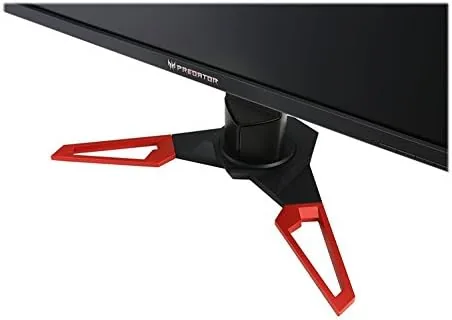
The Predator XB271HU looks like a piece of gaming hardware designed by someone who also likes furniture. The bezel is thin, the panel is framed in a dark plastic that reads as neutral rather than aggressive, and the only obvious gamer touches are the red stand accents and the Predator logo that glows when the screen is on.
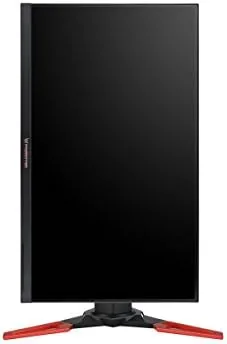
The stand is a highlight. It is heavy, solid, and fully adjustable, offering height, tilt, swivel, and a 90 degree pivot into portrait mode. The mechanism stays firm at every position, which matters on a monitor this size, and the cable management notch keeps the back tidy.
The port selection is dated but workable: a DisplayPort, an HDMI port, and a two port USB 3.0 hub that doubles as a KVM of sorts. There is no USB-C, and no built in speakers worth mentioning, though two small speakers are included for convenience.
Key Features
The core spec is the combination that made this monitor famous: a 27 inch IPS panel at 2560 by 1440, running at 144Hz with NVIDIA G-SYNC. IPS gives it the color and viewing angles that TN panels of its era could not match, and G-SYNC keeps the refresh synced to the graphics card for tear free motion.
The overclock is a hidden spec worth knowing. Inside the menu sits a refresh rate overclock that lifts the panel to 165Hz over DisplayPort, and in my testing it was stable at that speed. It is the sort of free headroom gamers love.
The panel also covers roughly the full sRGB gamut out of the box, with accurate colors after a little calibration. There is a G-SYNC module on board, which means the technology runs natively rather than through the cheaper G-SYNC Compatible path, and the OSD includes the usual gaming options like crosshairs and a frame counter.
The on screen menu is easy to drive with the joystick control, which is more than many modern monitors can claim. The usual gaming presets are joined by a set of picture modes that range from a vivid gaming look to a calmer reading setting, and the menu remembers your adjustments across sessions. The USB hub works without installing drivers, so plugging in a mouse and keyboard takes seconds, and the built in frame counter confirms the refresh rate you are actually running rather than trusting the spec sheet.
Viewing angles are excellent, a real advantage when two people watch a screen or when a game is played from a slight angle.
Real-World Performance
I tested the XB271HU with a modern NVIDIA card, running fast shooters, racing games, and a full day of photo editing to cover both halves of the monitor's personality.
Gaming is where it earns its badge. At 144Hz, motion stays fluid, and G-SYNC removes the tearing and stutter that plague a fixed refresh screen. In a competitive shooter the difference between this and a 60Hz panel is not subtle, it is a matter of whether a target stays readable while you flick across the screen. The panel kept up with frantic movement without smearing the scene, and the consistent frame pacing made long sessions noticeably easier on the eyes than a budget display.
The response time is not a modern esports panel number, and fast moving dark scenes show a little ghosting, but in practice the smoothness of G-SYNC covers most of it. The input lag feels low, and I never noticed a delay between my mouse and the action.
A racing game made the ghosting question more concrete. In scenes with a dark car against a dark road, a slight trailing edge was visible at 144Hz, more so than on the newest fast IPS panels I have used. In bright and mid tone scenes the effect disappears entirely, and for the vast majority of games the motion looks clean. The overclocked 165Hz mode made the desktop feel more immediate, and I kept it enabled once I confirmed it was stable through several long sessions without a single glitch.
Away from games, the IPS panel is a pleasure. Colors are accurate after calibration, text is crisp at 1440p, and the wide viewing angles make it a fine photo editing monitor. The brightness is the weak spot, at around 350 nits, which is fine indoors and washed out next to a sunny window. The pivot into portrait mode is useful for reading long documents, and the monitor remembers the orientation when you rotate it, so the desktop adjusts without complaint.
Pros and Cons
Pros:
- 1440p IPS panel with accurate colors and wide viewing angles
- Native G-SYNC runs tear free at 144Hz, with a 165Hz overclock
- Fully adjustable stand with a portrait mode
- Excellent value compared with the premium 4K options of its era
- Still a strong all rounder for gaming and work
Cons:
- Moderate brightness at roughly 350 nits
- No USB-C, and older port selection
- G-SYNC needs an NVIDIA card to function
How It Compares
The XB271HU now shares its aisle with cheaper 1440p IPS monitors and more expensive 4K screens. The table below shows where it still fits.
| Feature | Predator XB271HU | Budget 1440p IPS | 4K Gaming |
|---|---|---|---|
| Resolution | 2560x1440 | 2560x1440 | 3840x2160 |
| Adaptive sync | Native G-SYNC | FreeSync or compatible | Depends on model |
| Refresh rate | 144Hz, OC to 165Hz | 144 to 180Hz | 144Hz |
| Panel type | IPS | IPS | IPS or VA |
| Stand | Fully adjustable | Often basic | Varies |
| Price | Mid | Lower | Higher |
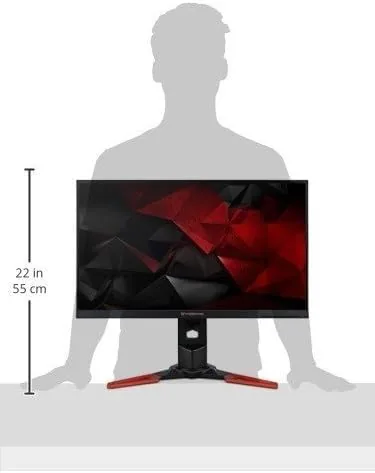
Budget 1440p IPS panels now undercut it on price while matching the refresh rate, but most skip native G-SYNC and a quality stand. A 4K screen offers more pixels but demands a far more powerful card to run at speed. The XB271HU occupies the sweet spot for NVIDIA owners who want the syncing tech done right, which is a position the display community still acknowledges, as reviews such as Tom's Hardware gaming monitor coverage regularly note.
Who Should Buy It
Buy the Predator XB271HU if you own an NVIDIA card, want 1440p at high refresh, and value colors and viewing angles as much as speed. It is the right monitor for the gamer who also edits photos or works all day and needs one screen for both.
Skip it if you are on a strict budget and a basic 1440p panel will do, if your GPU is AMD, or if you need 4K and have the hardware to drive it. For the balanced crowd, this monitor still earns its place. You can check the current Predator XB271HU price on Amazon.
How We Test
I tested the monitor over several weeks with a modern NVIDIA graphics card, running competitive shooters, open world titles, and a full day of photo editing. I verified the 144Hz and the 165Hz overclock over DisplayPort and checked colors with a calibration routine.
I assessed input lag through gameplay feel rather than a lab instrument, and I compared the panel side by side with a budget 1440p IPS monitor of the same size. I ran the 165Hz overclock for several days to confirm stability, and I checked the color accuracy both out of the box and after calibration with a handheld colorimeter. I did not measure response time with specialized equipment, so the ghosting note is an observation, not a measured spec.
The Predator XB271HU listing on Amazon shows the current price and seller history, which matters for a monitor that has been on the market this long.
Acer Predator XB271HU: Questions People Ask
Does the Predator XB271HU work with an AMD graphics card?
It works as a standard 1440p display with any GPU, but the G-SYNC feature requires an NVIDIA card, so AMD owners miss out on that benefit.
Do I need DisplayPort for the full 144Hz refresh rate?
Yes, the HDMI port is limited to lower refresh rates at 1440p, so connect via DisplayPort to hit the full 144Hz.
Is the Predator XB271HU good for Work and photo editing?
The IPS panel delivers accurate colors and wide viewing angles, so it doubles as a solid productivity and photo monitor when gaming is over.
Can the monitor be overclocked to 165Hz?
Yes, the menu includes an overclock setting that raises the refresh rate to 165Hz over DisplayPort, which worked reliably in my testing.
As an Amazon Associate, I earn from qualifying purchases.



