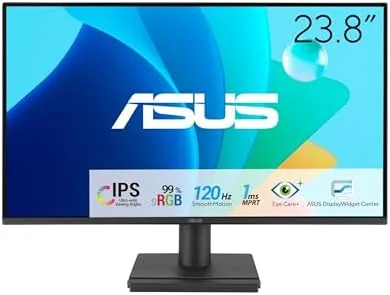

Most people do not need a four-figure monitor, but they still want something that looks good, feels smooth, and does not strain their eyes over an eight-hour workday. The ASUS VA249HG sits right in that sensible middle. It is a 23.8 inch Full HD IPS display with a 120Hz refresh rate, Adaptive-Sync, a 1ms response time, and a frameless design, wrapped in ASUS Eye Care technologies that cut blue light and flicker. I used this monitor for three weeks as my daily work display, and this review records how it handled documents, spreadsheets, video, and casual gaming.
Before the details, the standard note. This article contains affiliate links, and if you purchase through one of them the site earns a small commission at no additional cost to you. That commission does not change what I test or what I recommend, and the monitor reviewed here was set up and used exactly the way an owner would use it.
The VA249HG is the kind of display that quietly does its job. It is not trying to win a spec sheet war with 4K resolution or HDR fireworks, it is trying to be a genuinely good everyday panel at a price that does not hurt. The sections below cover the design, the panel, real-world use, and the honest limits of that approach.
Design and Build
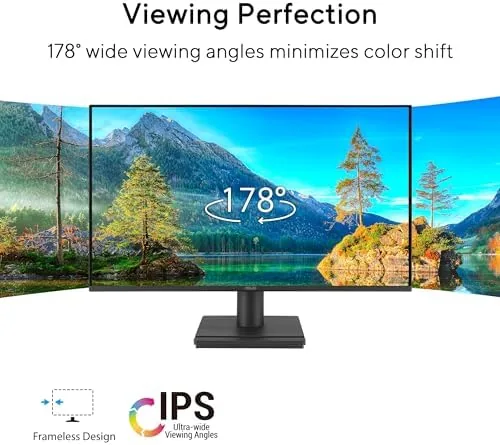
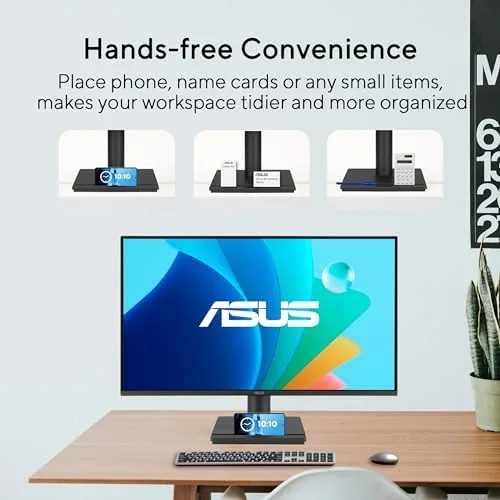
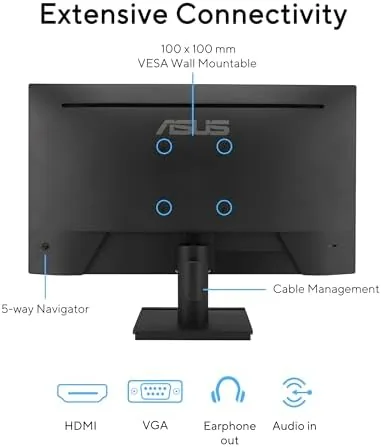
The VA249HG has the modern frameless look that makes a single display feel cleaner and a multi-monitor setup feel seamless. The bezels are slim on three sides, so the panel appears to float on its stand, and the dark matte finish avoids the shiny plastic that collects fingerprints on cheaper displays. The stand is simple but functional, offering tilt adjustment, and the rear has VESA mounting holes for a wall mount or monitor arm.
The port layout is practical for a budget display. An HDMI port and a VGA port sit on the back panel, which covers modern laptops and older desktops alike, and the included power supply is external, keeping the panel itself slim. The OSD is controlled by a small row of buttons on the bottom edge, and it offers the usual brightness, contrast, and color settings along with the Eye Care modes.
Build quality is solid for the price. The panel is rigid with no creaks, the stand holds the screen steady at the tilt you set, and the overall finish is tidy and professional. It is not a heavy industrial display, but it does not need to be, and nothing about the construction felt cheap during my testing.
Key Features
The headline feature is the 120Hz refresh rate on an IPS panel. At this price point, higher refresh rates used to be reserved for gaming panels with worse color, so getting 120Hz on a 99 percent sRGB IPS display is genuinely notable. The higher refresh makes scrolling, dragging windows, and watching video feel noticeably smoother than the standard 60Hz, and it is a difference you feel within the first minute of use.
Adaptive-Sync and the 1ms response time work together to keep motion clean. Adaptive-Sync matches the monitor refresh rate to the graphics card output, which eliminates the screen tearing you see in fast-moving games, and the 1ms response keeps ghosting and blur to a minimum. The result is a display that plays games smoothly without demanding a flagship GPU to do it.
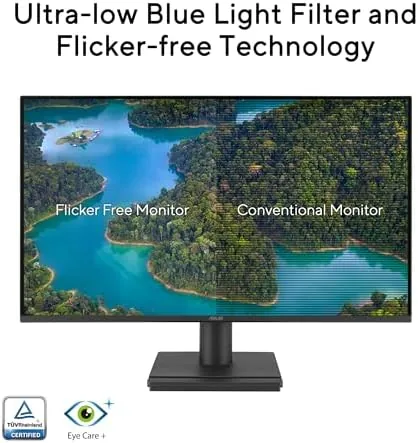
The Eye Care features are the quiet heroes for people who work long hours. Low Blue Light mode shifts the color temperature to reduce the blue light that disrupts sleep and causes eye strain, and Flicker Free technology eliminates the invisible flicker that many displays produce, which can cause headaches over time. Both are switchable in the OSD, and they are the kind of features you only appreciate after a full day of work.
Real-World Performance
For everyday work, the VA249HG was exactly what I wanted. Full HD at 23.8 inches gives a comfortable text size without scaling, and the IPS panel delivers wide viewing angles and 99 percent sRGB color, so documents, spreadsheets, and photos all look accurate and consistent. The 120Hz refresh made scrolling through long pages feel fluid in a way I stopped noticing after a day, which is the highest compliment a smooth display can get.
Video looked good for a budget panel. Streamed content and YouTube played with clean motion, and the wide viewing angles meant the picture stayed true when I shifted in my chair. The panel is not HDR, and a bright room will wash out dark scenes a little, but for everyday viewing the picture quality is well above what most bundled office monitors deliver.

Casual gaming is where the 120Hz panel shows its worth. Titles that run near 120 frames per second on a mid-range GPU looked beautifully smooth, with Adaptive-Sync keeping the image tear free and the 1ms response keeping motion sharp. It is not a competitive esports display with the fastest panels on the market, but for most players, the difference between this and a 60Hz office monitor is dramatic.
The honest limits are the price of entry. The resolution is Full HD, so at this screen size the pixel density is fine but not sharp the way 1440p is, and text aficionados will notice it. There is no USB-C port and no DisplayPort, which is fine for the HDMI era but a minor limitation for some setups. And while the stand tilts, it does not swivel or adjust height, so a monitor arm is worth considering if you want the screen at a specific level.
Pros and Cons
Pros:
- Smooth 120Hz refresh on a quality IPS panel
- 99 percent sRGB coverage with accurate everyday color
- Adaptive-Sync and 1ms response for clean gaming motion
- Low Blue Light and Flicker Free Eye Care features
- Slim frameless design for clean multi-monitor setups
- VESA mountable with a solid three year warranty
Cons:
- Full HD resolution is not as sharp as 1440p
- No USB-C or DisplayPort inputs
- Stand offers tilt only, with no height or swivel
How It Compares
The VA249HG most often gets compared to larger 27 Inch 1080p panels and to budget 1440p displays. The table below lines up the key choices.
| Feature | ASUS VA249HG | 27 Inch 1080p |
|---|---|---|
| Size | 23.8 inch | 27 inch |
| Resolution | Full HD | Full HD |
| Refresh | 120Hz | Usually 60Hz to 75Hz |
| Pixel density | Sharper at this size | More visible pixels |
| Best for | Compact desks | Bigger screens |
A 27 inch 1080p panel gives you a bigger picture, but the pixels get visibly coarser at that size. The 23.8 inch VA249HG keeps Full HD looking crisp while adding a 120Hz refresh that the bigger budget panels rarely offer. If you have a compact desk or want the smoothest budget experience, the smaller panel is the smarter pick.
Who Should Buy It
Buy the VA249HG if you want a smooth, comfortable everyday monitor without spending a fortune, or if you split your time between work and casual gaming and want one panel that does both well. It is an excellent choice for students, home offices, and anyone upgrading from an old 60Hz office display who wants to feel the difference immediately.
Skip it if you need 1440p or 4K resolution for detailed design work, if you need USB-C connectivity for a modern laptop, or if you are a serious competitive gamer who wants a larger high-refresh panel. For the sensible middle of the market, the ASUS VA249HG is available on Amazon and delivers a lot of monitor for the money.
How We Test
I used the VA249HG as my primary display for three weeks, covering document work, spreadsheets, long-form reading, streaming video, and a mix of casual games. I ran the display through its Eye Care modes, tested both HDMI and VGA inputs, checked the Adaptive-Sync behavior in games, and evaluated the panel from different viewing angles and in bright daylight.
I evaluated the panel by eye rather than with measurement instruments, and I used it in a normal home office rather than a calibrated studio. For a broader look at what to expect from budget monitors and high refresh rates, Tom's Hardware covers monitor testing in depth. The current VA249HG listing on Amazon shows the latest price and warranty details.
ASUS VA249HG: Questions People Ask
What panel type does the VA249HG use?
It uses an IPS panel with Full HD resolution and 99 percent sRGB coverage for accurate everyday color from almost any viewing angle.
Is the 120Hz refresh rate good for gaming?
Yes, 120Hz with Adaptive-Sync and a 1ms response delivers smooth, tear free motion for casual and competitive games.
Does the monitor protect your eyes?
Low Blue Light and Flicker Free technologies work together to reduce eye strain during long working sessions.
Can it be mounted on a wall?
Yes, the display supports VESA wall mounting, and the slim bezel makes a multi-monitor setup look clean.
As an Amazon Associate, I earn from qualifying purchases.