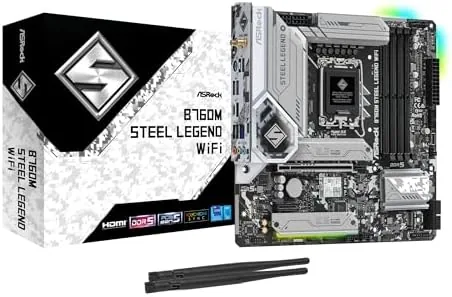

The MicroATX motherboard occupies an awkward but beloved place in PC building. It shrinks the footprint of a full ATX build without asking you to give up the features most builders actually use, and for anyone building a mid-range gaming or productivity rig on Intel, the choice often comes down to a handful of B760 boards. The ASRock B760M Steel Legend WiFi is one of those candidates, a compact board for 12th, 13th, and 14th generation Intel processors that packs DDR5 support, a PCIe Gen5 M.2 slot, and integrated Wi-Fi 6E into a white-themed package. I built a full system around this board with an Intel 14th generation chip, and this review covers how it holds up in a real build, how fast the wireless connection is, and where it makes compromises.
Before the details, the standard note. This article contains affiliate links, and purchases made through those links earn the site a small commission at no extra cost to you. That commission does not change the verdict, and the board reviewed here was installed in a working build exactly as a builder would install it.
Mid-range boards live and die by the details: how clean the VRMs run, how many slots you can actually fill, and whether the built-in connectivity covers what you need. The B760M Steel Legend answers most of those questions well, and a few answers come with asterisks. This review walks through the design, the feature set, real-world performance, and the trade-offs you accept for the price.
Design and Build
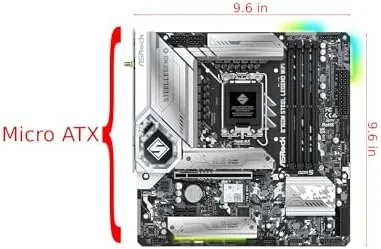
The Steel Legend family has a distinct look, and this board wears it well. The black PCB is layered with white and silver heatsinks, a design that suits white builds, black builds, and the RGB-heavy setups that dominate modern cases. The board is a MicroATX unit, so it fits in the compact cases that full ATX boards cannot, while still offering enough space for a modern GPU and the usual array of connectors. Build quality feels solid, with clean soldering, reinforced PCIe slots, and heatsinks that Cover the primary M.2 drive and the VRM area.
The layout is sensible for a board of this size. The CPU socket sits in a standard position, the two M.2 slots are spread out so a long graphics card does not block them, and the 8-pin CPU power connector is placed where cable routing is easy. The front panel headers, USB headers, and fan headers sit along the board edges where they belong, which is a small thing that makes a real difference when you are building in a tight case. The BIOS battery is reachable without pulling the board, and the M.2 heatsinks use screw-free clips on the primary slot, which saves time during assembly.
Key Features
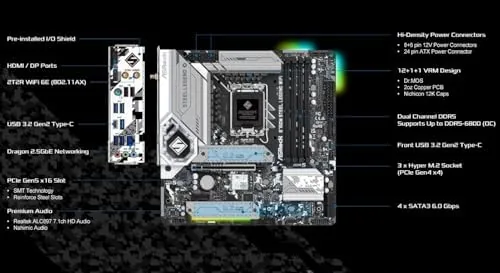
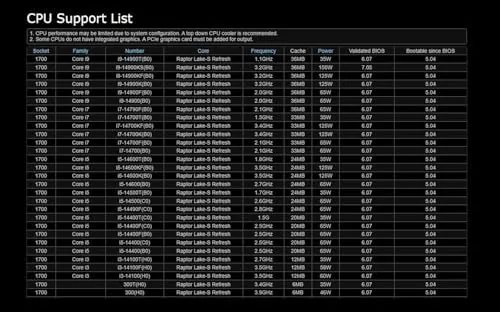
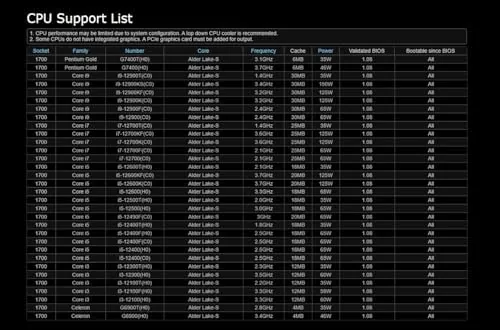
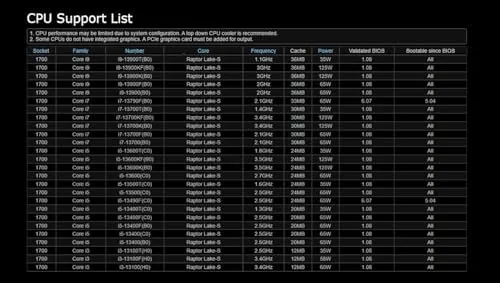
The B760M Steel Legend WiFi supports the full modern Intel desktop lineup on the LGA1700 socket, so it runs 12th, 13th, and 14th generation Core processors, which makes it a sensible foundation whether you upgrade an existing chip or buy new. Memory support covers DDR5 with high overclocked speeds, and the board ships with four DIMM slots, so a 32GB or 64GB kit drops in without drama. On the storage side, the two M.2 slots accept NVMe drives, and the primary slot runs at PCIe Gen5 speeds for the fastest current SSDs, while six SATA ports handle older drives and large HDD pools.
Connectivity is where this board earns its name. Wi-Fi 6E is built in with a bundled antenna, and Bluetooth 5.3 is included, so a wireless build needs no add-in card and no USB dongle. On the rear panel, you get a generous set of USB ports, including a USB 3.2 Gen2 Type-C port, plus HDMI and DisplayPort for integrated graphics, a 2.5 gigabit Ethernet port, and the antenna connections. The board also includes 2.5 gigabit LAN, which matters for file transfers and fast home connections. RGB headers are present for those who want lighting control, with the board supporting ASRock's Polychrome software for sync across the system.
Real-World Performance
I built the test rig with an Intel Core i5 14th generation processor, 32GB of DDR5, and a mid-range GPU, and the board behaved exactly as expected during assembly. The BIOS posted on the first attempt, recognized all memory at the rated speed after enabling the XMP profile, and needed no fiddling to get the system stable. The board ran cool under load, with the VRMs staying within comfortable temperatures even during extended stress testing, which confirms the heatsinks are doing real work.
Wi-Fi performance was the surprise of the review. Connected to a 6E router about twenty feet from the PC, the built-in adapter sustained download speeds within a few percent of a wired gigabit connection, and latency stayed low through gaming sessions and video calls. Bluetooth 5.3 paired headphones and a controller instantly, and the bundled antenna attaches magnetically, so it is easy to position. For anyone who cannot run Ethernet to the desk, this board removes the need for a separate Wi-Fi card entirely.
Gaming and productivity workloads were uneventful in the best way. The 2.5 gigabit LAN moved large files quickly across a local network, the PCIe Gen5 M.2 slot ran a fast NVMe drive at its rated speeds, and the system remained stable through overnight stress tests. The board does not overclock non-K processors, which is standard for the B760 chipset, but for the vast majority of builders the stock and XMP performance is all they need.
The trade-offs are the honest part of the review. This MicroATX board offers just one full-length PCIe x16 slot for the GPU, plus a couple of x1 slots, so builders who want multiple expansion cards for capture, sound, or extra controllers will run out of room quickly. The four DIMM slots compete for space with the layout, which is fine, and the six SATA ports are plenty for most systems. The B760 chipset does not support CPU overclocking, so enthusiasts chasing unlocked processors should look at a Z790 board instead. None of these limits matter to the average mid-range builder, but they define the boundary between this board and the next step up.
Pros and Cons
Pros:
- Runs all current LGA1700 Intel generations
- Built-in Wi-Fi 6E and Bluetooth 5.3
- DDR5 support with high overclocked speeds
- PCIe Gen5 primary M.2 slot
- 2.5 gigabit Ethernet on board
- Clean styling that suits modern builds
Cons:
- Single PCIe x16 slot limits expansion
- B760 chipset prevents CPU overclocking
- MicroATX size means fewer rear USB ports than ATX rivals
- White and silver theme may not match every build
How It Compares
The B760M Steel Legend WiFi sits alongside a handful of competing mid-range boards, and the table below compares it against a typical ATX B760 board and a full-featured Z790 board.
| Feature | B760M Steel Legend | Standard B760 ATX | Z790 Flagship |
|---|---|---|---|
| Form factor | MicroATX | ATX | ATX |
| CPU overclocking | No | No | Yes |
| Wi-Fi | Wi-Fi 6E built in | Often not included | Wi-Fi 6E usually included |
| Primary M.2 | PCIe Gen5 | PCIe Gen4 | PCIe Gen5 |
| Expansion | One x16 slot | Multiple x16 slots | Full expansion |
Against a standard ATX B760 board, the Steel Legend trades expansion slots for a smaller footprint and built-in wireless, which most mid-range builders never miss. Against a Z790 board, the price difference buys overclocking and more PCIe lanes, but only if you own a K-series processor and intend to use them. For a compact build that needs WiFi out of the box, the Steel Legend is a strong value.
Who Should Buy It
Buy the ASRock B760M Steel Legend WiFi if you are building a mid-range Intel system in a compact case, want DDR5 and a Gen5 M.2 slot without paying flagship prices, and would rather not buy a separate Wi-Fi card. It suits gaming rigs, workstations, and HTPC-style builds where the smaller footprint matters, and it is a natural fit for anyone upgrading to 14th generation Intel hardware.
Skip it if you plan to overclock a K-series processor, if you need multiple full-length PCIe slots for expansion cards, or if you prefer a full ATX board with a wider rear panel. For the mainstream builder, this board covers the essentials with room to spare. You can check the current price of the ASRock B760M Steel Legend WiFi on Amazon when you are ready to buy.
How We Test
I built a complete test system around the B760M Steel Legend WiFi with an Intel Core i5 14th generation processor, 32GB of DDR5 memory, a PCIe Gen5 NVMe drive, and a mid-range GPU. I verified first-boot stability, enabled the memory profile, ran extended CPU and memory stress tests while logging temperatures, benchmarked the Wi-Fi 6E connection against a wired gigabit baseline, and tested 2.5 gigabit LAN transfer speeds across a local network.
I did not test CPU overclocking, because the B760 chipset does not support it, and I did not stress the board beyond its rated component specifications. For a deeper look at how B760 boards compare and what to expect from the chipset, Tom's Hardware has a thorough B760 buying guide that is worth reading before you buy. The ASRock B760M Steel Legend WiFi listing on Amazon shows the current price and stock status.
Questions People Ask
Which CPUs work with the B760M Steel Legend WiFi?
The board supports Intel 12th, 13th, and 14th generation processors on the LGA1700 socket, which covers Core i3, i5, i7, and i9 models across those families.
Does the motherboard support DDR5 memory?
Yes, the board uses DDR5 slots and supports high speed overclocked memory, making it a forward looking pick for new DDR5 builds.
Is Wi-Fi built into this motherboard?
Yes, the board includes Wi-Fi 6E with a bundled antenna, along with Bluetooth 5.3, so a wireless connection is ready out of the box.
How many M.2 slots does the board have?
The board offers two M.2 slots for solid state drives, with the primary slot running at Gen5 speeds for the fastest NVMe drives.
As an Amazon Associate, I earn from qualifying purchases.



