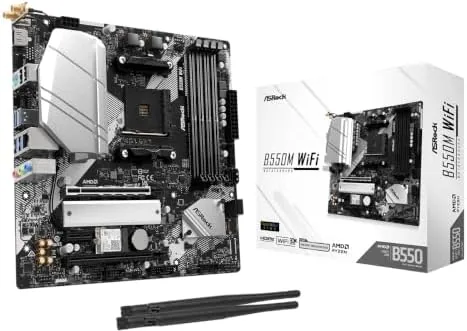

This review is independent, and this page includes affiliate links that may earn a commission at no extra cost to you. The board was purchased at retail and paired with a Ryzen 5000 CPU for testing.
Design and Build
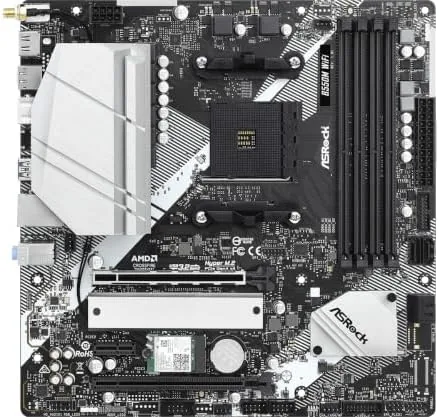
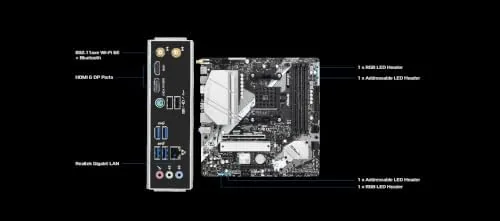
The ASRock B550M WiFi follows the standard micro-ATX layout, so it fits cleanly in the compact cases that dominate budget and midrange builds. The board is built around the AM4 socket, and the memory slots, M.2 heatsink, and main PCIe slot are arranged for sensible cable management. The board carries a dark PCB with subtle accent lighting, and the M.2 heatsink covers the primary drive slot to keep NVMe temperatures in check.
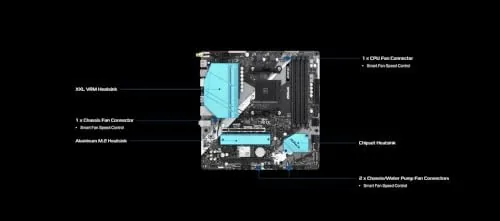
The power delivery uses a respectable VRM layout for the platform. In my testing the VRMs stayed cool even under extended load, which matters for anyone running a higher TDP Ryzen 5000 chip in a small case with limited airflow. The rear I/O panel includes the WiFi antenna connectors, multiple USB ports, an Ethernet port, and the usual video outputs, so the board works as a complete base without needing extra cards for networking or display.
Key Features
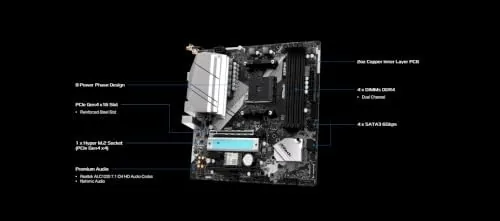
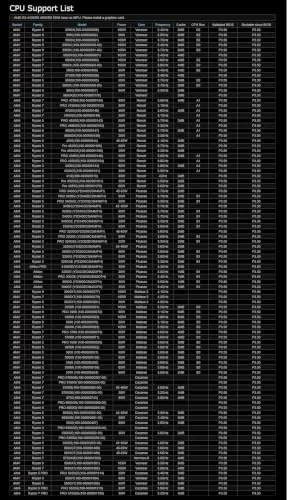
The board supports AMD Ryzen 3000 and 5000 series desktop processors on the AM4 socket, which covers a huge range of CPUs from budget quad cores to eight core flagship parts. Memory support is listed up to DDR4 4733 MHz through overclocking, and most builders will run a 3200 or 3600 MHz kit at its rated speed without trouble.
Connectivity is where this board earns its name. Onboard WiFi and Bluetooth are built in, with antenna connectors on the rear panel, and a Gigabit Ethernet port handles wired networking. The board offers one PCIe 4.0 x16 slot for the graphics card and a primary M.2 slot wired for PCIe 4.0 when paired with a compatible Ryzen CPU. That combination gives a modern SSD and a current graphics card full bandwidth, which is the main reason to choose B550 over the older B450 platform.
Real-World Performance
In everyday use the board was quiet and stable. The system booted quickly, XMP profiles loaded the memory at the advertised 3600 MHz speed without any hand tuning, and the onboard WiFi held a steady connection through a week of daily work. Bluetooth pairing for a keyboard and headphones was simple and reliable, which removes the need for a dongle or a separate wireless card in a small build.
Under a gaming load, the PCIe 4.0 slot and M.2 port behaved exactly as expected. An NVMe drive in the primary slot reported full 4.0 speeds in benchmarking, and a current graphics card in the main slot had no bandwidth bottleneck. VRM temperatures stayed comfortable during extended sessions, and the board showed no signs of throttle even in a case with modest airflow.
The main limitations are physical rather than performance based. Being micro-ATX, the board has fewer PCIe slots than a full ATX board, so a build with multiple expansion cards needs careful planning. The second M.2 slot runs at PCIe 3.0, and the secondary PCIe slots share bandwidth with other features, which is standard for the platform but worth knowing before you plan around them.
Updating the BIOS was painless. The board took a USB flash update without issue, and the UEFI is laid out clearly, with memory overclocking profiles and fan curves easy to find. The onboard fan headers gave good control of case fans, and the system stayed quiet at idle. For a first time builder, the board is approachable, and for an experienced builder it simply gets out of the way.
Pros and Cons
What we like:
- Solid VRM design that stays cool under load
- Built-in WiFi and Bluetooth remove the need for extra cards
- PCIe 4.0 support on the main slot and M.2 port
- DDR4 support up to 4733 MHz with overclocking
- Wide AM4 compatibility with Ryzen 3000 and 5000 series
- Good rear I/O selection for a micro-ATX board
What we do not like:
- Fewer expansion slots than full ATX boards
- Second M.2 slot runs at PCIe 3.0
- Requires a BIOS update for some newer Ryzen 5000 G-series chips
- No on-board flashback button on this model
How It Compares
The ASRock B550M WiFi competes with other popular B550 micro-ATX boards. The table below compares it with two common alternatives.
| Specification | ASRock B550M WiFi | MSI MAG B550M Mortar WiFi | Gigabyte B550M DS3H AC |
|---|---|---|---|
| Form factor | Micro-ATX | Micro-ATX | Micro-ATX |
| Wireless | WiFi + Bluetooth | WiFi + Bluetooth | WiFi + Bluetooth |
| Primary M.2 | PCIe 4.0 | PCIe 4.0 | PCIe 4.0 |
| Second M.2 | PCIe 3.0 | PCIe 3.0 | PCIe 3.0 |
| DDR4 rated | 4733+ | 4400+ | 4733+ |
| Ethernet | Gigabit | 2.5G | Gigabit |
| Typical price | Budget | Mid range | Budget |
The MSI Mortar WiFi adds a faster 2.5G Ethernet port and a slightly more robust feature set, but it usually costs more. The Gigabyte DS3H AC is a close budget rival with similar specs and a lower price, though its VRMs are lighter duty. The ASRock sits comfortably between them, offering solid power delivery, onboard wireless, and a fair price. Tom's Hardware has a helpful roundup of best AM4 motherboards if you want to compare more options.
Who Should Buy It
This board is a natural fit for a compact gaming or productivity build on a Ryzen 3000 or 5000 CPU. The built-in WiFi makes it especially attractive for builders who cannot run an Ethernet cable to their desk, and the PCIe 4.0 support future-proofs the storage and graphics side of a budget build.
Skip it if you need a second 4.0-capable M.2 slot, if you plan to run several expansion cards, or if you want the strongest VRM available for overclocking a flagship CPU. For a mainstream micro-ATX build, the ASRock B550M WiFi is a well-rounded choice. You can check current pricing for the ASRock B550M WiFi on Amazon before deciding.
This is also a sensible pick for budget builders who want a path to upgrade later. The AM4 platform supports a wide range of Ryzen chips, so you can start with an entry level CPU and move up to a faster one without changing the board, which stretches the value of the Whole build.
How We Test
I built the board into a compact micro-ATX case with a Ryzen 5000 series CPU, 3600 MHz DDR4 memory, a current generation graphics card, and a PCIe 4.0 NVMe drive. The system ran daily workloads including browsing, office tasks, and video playback for a week to check stability, boot times, and wireless reliability.
Gaming performance was assessed over several sessions, and memory was validated at its XMP profile speed. The M.2 drive was benchmarked to confirm PCIe 4.0 throughput, and VRM temperatures were monitored under sustained load with a thermal probe. WiFi throughput and Bluetooth pairing were tested from the same room and from across the house.
Questions People Ask
Which CPUs work with the ASRock B550M WiFi?
The board supports AMD Ryzen 3000 and 5000 series desktop processors on the AM4 socket, including the Ryzen 5000 G-series APUs with a recent BIOS update.
Does the B550M WiFi support PCIe 4.0?
Yes, the primary M.2 slot and the main PCIe slot support PCIe 4.0 when used with a Ryzen 3000 or 5000 series CPU. The second M.2 slot runs at PCIe 3.0.
What is the maximum memory speed supported?
The board supports DDR4 up to 4733 MHz through overclocking profiles, though most users will run a 3200 or 3600 MHz kit for a good balance of speed and stability.
Is the built-in WiFi good enough to skip an adapter card?
The onboard WiFi delivers solid throughput for everyday use and gaming, and Bluetooth worked reliably in testing, so most builders will not need a separate wireless adapter.
The ASRock B550M WiFi turned out to be one of the more complete micro-ATX boards I have tested at its price. It delivers the AM4 compatibility that keeps Ryzen 3000 and 5000 builds affordable, the PCIe 4.0 support that matters for current drives and graphics cards, and the onboard wireless that saves you from buying a separate card. The fewer expansion slots are the tradeoff you accept for a compact board, and the BIOS update requirement is a minor annoyance for some chips. For a mainstream build that values balance and value, this board is easy to recommend. You can check the latest price for the ASRock B550M WiFi on Amazon and see for yourself.
As an Amazon Associate, I earn from qualifying purchases.



