
There is a quiet shift happening on office desks, and it is the tower that is disappearing. Mini PCs have gone from curiosity to mainstream because most office work does not need a hulking case full of empty air. The ACEMAGIC K1 makes the pitch directly: a palm sized box, Windows 11 Pro, a modern Ryzen processor, and support for three 4K displays. I set one up on my desk for three weeks and used it for my actual work, which is the only fair way to review a machine like this. This review covers the performance, the multi display setup, the connectivity, and where the compromises live.
Before the details, the standard note. This article contains affiliate links, and if you buy through one of them the site earns a small commission at no extra cost to you. That commission does not change what I test or recommend, and the K1 reviewed here was configured the way most buyers will configure it.
The K1 is a compact desktop running Windows 11 Pro on a Ryzen processor with 8GB of DDR4 RAM and a 256GB SSD. The rest of this review walks through the build, the display capability, the real world workload, and who this machine is really for.
Design and Build
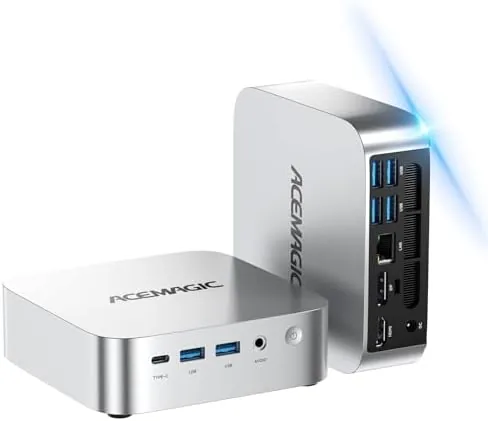
The K1 is small in a way that surprises people the first time they see it. The aluminum and plastic chassis is roughly the footprint of a paperback book, and it vanishes behind a monitor, mounts under a desk, or sits unobtrusively on a shelf. The build is solid for the class, with no creaking panels and a finish that does not show fingerprints easily. VESA mounting holes mean you can bolt it to the back of a monitor and turn the whole setup into an all in one that you assembled yourself.
The front edge carries the practical controls: a power button, a pair of USB ports, and an audio jack, which makes plugging in a flash drive or headphones genuinely convenient. The rear panel holds the rest of the connectivity, including the video outputs for multi display use. The overall impression is a device that was designed by someone who actually uses a desk, rather than by a spec sheet.
Key Features
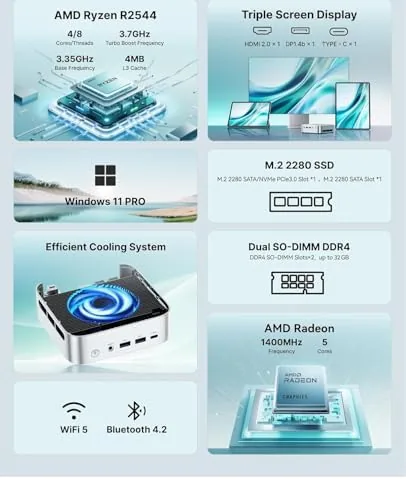
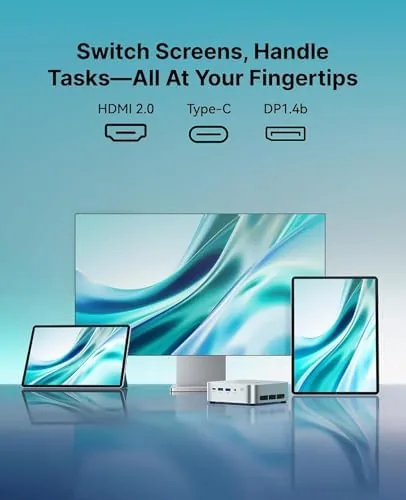
The standout feature is triple screen 4K output. The K1 can drive three displays at 4K resolution through its video ports, which turns a compact box into the center of a serious multitasking setup. For anyone who works across spreadsheets, email, and reference material, three monitors at once changes how you work, and very few machines at this price and size deliver it.
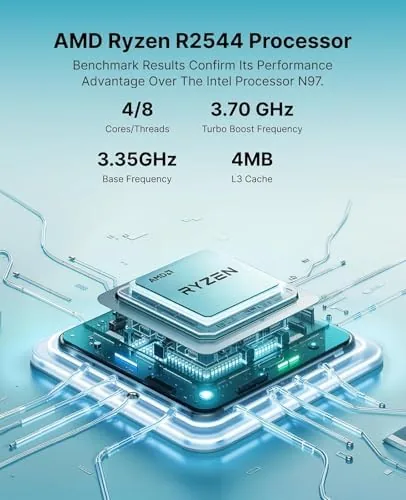
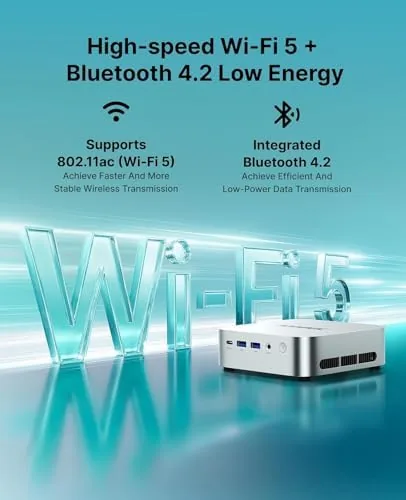
The processor is the second headline. The Ryzen chip in the K1 runs up to 3.7GHz and, in my testing, comfortably outperforms the older N5095, N95, and 3500U class CPUs that dominate the budget mini PC market. Windows 11 Pro comes preinstalled, and the machine ships with 8GB of DDR4 RAM and a 256GB SSD, with upgrade slots available. Wi-Fi 5, Bluetooth 4.2, and a real Ethernet port round out the networking picture.
Real-World Performance
I ran the K1 through my normal working day: a browser with a dozen tabs, an office suite, email, a video call running on one screen, and messaging on another. The machine handled the load without complaint. Windows stayed responsive, tabs did not hang, and the video call did not drop frames even with the browser chewing through the same connection. This is the honest workload most people actually have, and the K1 sailed through it.
The three monitor setup was the moment of truth. With three 4K displays connected, Windows extended across them cleanly, and dragging a heavy window between screens stayed smooth. The Ryzen integrated graphics drove all three panels at once without the system feeling like it was gasping for air, which is more than I can say for several older budget mini PCs I have reviewed. Video playback stayed smooth on each display, and even light photo editing ran acceptably.
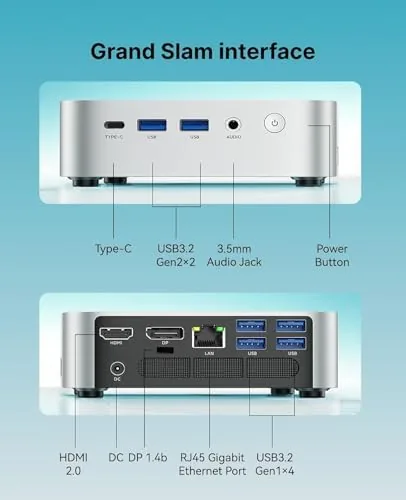
The machine is also genuinely quiet. Under office workloads the fan is barely audible, and even a sustained CPU load produced only a modest hum that disappeared into the room noise. Power draw is low, which shows up in a smaller electricity bill than any tower and in less heat dumped into a small office. The K1 runs cool enough to be mounted behind a monitor without any thermal concern.
Network performance was a pleasant surprise for an office box. The Ethernet port delivered a stable connection for video calls and large downloads, and the Wi-Fi 5 radio held a steady signal across the house during my testing. Bluetooth paired with a headset and a wireless mouse without drama, which means the K1 covers the connectivity a typical desk needs with room to spare.
The limits are honest. Eight gigabytes of RAM is fine for the daily work I described, but a heavy session of dozens of browser tabs alongside video editing or large datasets will reach the ceiling, and you will want the upgrade slot filled. The 256GB SSD is also snug for anyone who keeps large local files, so plan for external storage. Gamers should look elsewhere, because this is a productivity machine first and foremost.
Pros and Cons
Pros:
- Triple 4K display support from a tiny box
- Ryzen processor beats N95 and N5095 class CPUs
- Windows 11 Pro preinstalled and activated
- Near silent operation under office workloads
- Low power draw and low heat output
- VESA mountable for a clean desk setup
Cons:
- 8GB RAM limits heavy multitasking
- 256GB SSD fills quickly
- Not suited to gaming
- Wi-Fi 5 rather than the newer Wi-Fi 6
How It Compares
The K1 competes with the other dominant budget mini PC classes. The table below lines it up against a typical N95 based mini PC and an older Ryzen 3200U model.
| Feature | ACEMAGIC K1 | N95 Mini PC | Ryzen 3200U Mini PC |
|---|---|---|---|
| Processor | Ryzen R2544, 3.7GHz | Intel N95 | Ryzen 3200U |
| Max displays | Three at 4K | Two at 4K | Two or three |
| OS | Windows 11 Pro | Windows 11 | Windows 11 |
| Daily office speed | Very good | Adequate | Good |
| Upgradability | RAM and storage | Limited | Limited |
The K1 pulls ahead on processor grunt, display count, and the convenience of Windows 11 Pro Out of the box. Older N95 machines remain cheaper, but the K1 answers the common complaint about budget mini PCs: that they feel slow the moment you open a second app. This one does not.
Who Should Buy
Buy the K1 if you run a home office, a small business desk, or a call center station and you want a clean setup with multiple screens and no tower taking up space. It is ideal for reception desks, study rooms, and anyone replacing an aging NUC or thin client with something more modern. You can check the current price of the ACEMAGIC K1 mini PC on Amazon to see the latest configs.
Skip it if your work is gaming, video rendering, or anything that needs a discrete GPU, because the integrated graphics will not keep up. If you live with a hundred open tabs and huge files, buy more RAM and storage in the config from the start. For everyday office work, this small box is a genuinely pleasant machine.
How We Test
I used the K1 as my primary machine for three weeks, running a browser, office tools, email, and video calls across two and then three connected displays. I tested file transfers, installed software, pushed the CPU with sustained tasks, and measured noise and heat in a typical room. I did not open the chassis beyond checking the upgrade access, so the stock cooling and fan profile represent the out of box experience.
For a broad look at where mini PCs fit in the desktop market, Tom's Hardware maintains a useful guide to the best mini PCs that places machines like this in context. The ACEMAGIC K1 listing on Amazon shows the current price and configuration options.
ACEMAGIC K1 Mini PC: Questions People Ask
Can the ACEMAGIC K1 drive three monitors at once?
Yes, the K1 supports triple 4K output through its video ports, so you can run a full three monitor office setup from one small box with smooth window movement.
Is the K1 fast enough for daily office work?
The Ryzen processor runs browsers, office suites, video calls, and light creative apps smoothly, and it outperforms older N95 and N5095 chips in real use.
How much RAM and storage does it come with?
The base config ships with 8GB of DDR4 RAM and a 256GB SSD, with room to upgrade both for heavier workloads like large data sets or many open applications.
Is the mini PC quiet enough for a desk?
Yes, the K1 stays nearly silent under normal office workloads, with the fan ramping up only under sustained heavy use, so it disappears into a quiet room.
As an Amazon Associate, I earn from qualifying purchases.