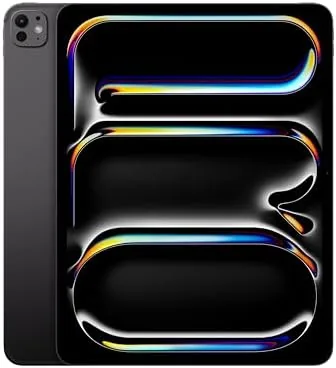

For years the question was whether an iPad could replace a laptop, and the answer kept being almost. The 13 inch iPad Pro with the M4 chip is the closest Apple has come to settling the argument, because it pairs a display that rivals a high end monitor with a processor that outruns many laptops and a 5G radio that keeps it online anywhere. I made it my only work machine for a week, handling email, documents, spreadsheets, video calls, and creative tasks, to test whether a professional can genuinely live without a computer.
Before the details, the standard note. This article contains affiliate links, and if you buy through one of them the site earns a small commission at no extra cost to you. That commission does not change what I test or what I recommend, and the iPad reviewed here was used exactly the way an office professional would use it.
The rest of this review covers the display for real work, the multitasking experience, the 5G connectivity, and the honest limits of replacing a computer with a tablet.
Design and Build
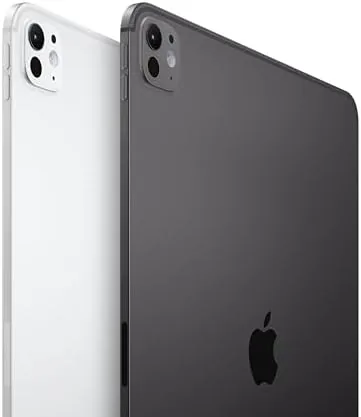
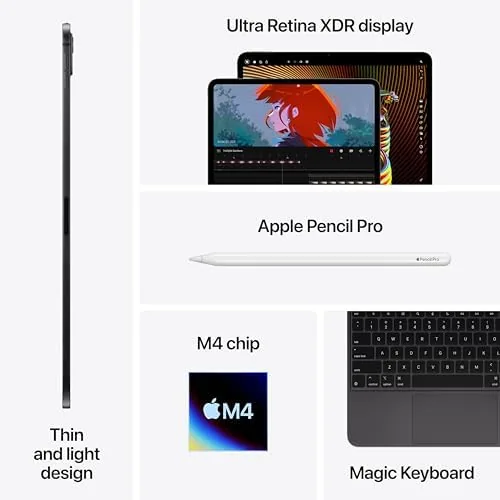
The 13 inch iPad Pro is the thinnest product Apple has ever made, and that fact never stops being surprising when you pick it up. The Space Black finish is professional and understated, and the huge 13 inch display leaves almost nothing but screen on the front. Paired with the Magic Keyboard, it closes into a package barely thicker than a laptop lid, and it weighs noticeably less than the lightest MacBooks, which makes a full working day in a shoulder bag effortless.
The build quality is exceptional. The aluminum body has no flex even at this size, the hinge on the Magic Keyboard holds the screen at any angle without wobble, and the trackpad is responsive enough for precise cursor work. The four speaker system is genuinely loud, the USB C port carries Thunderbolt speeds, and the power button holds Face ID, which unlocks the tablet before you finish sitting down at the desk.
Key Features
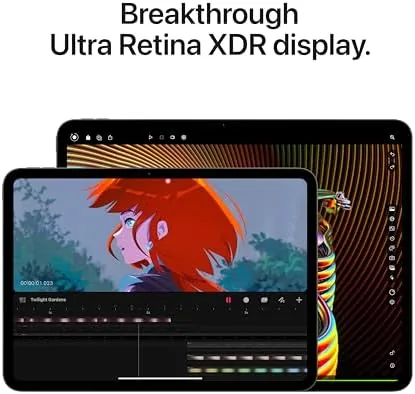
The Ultra Retina XDR display is the star for professional work. The 13 inch tandem OLED panel reaches 1000 nits of full screen brightness and 1600 nits for HDR, with perfect contrast and a 120Hz refresh that makes every scroll and document edit feel instant. For anyone who reads contracts, reviews spreadsheets, or edits photos all day, the crispness and brightness reduce eye strain in a way that is hard to go back from.
The M4 chip and the 5G radio complete the Productivity package. The M4 delivers roughly 1.5 times the performance of the M2 with an advanced GPU and media engine, so video editing, rendering, and multitasking all run at desktop speed. The 512GB of storage handles large files with room to spare, and the 5G cellular radio with eSIM support keeps the tablet online on the road without a phone hotspot. Multitasking runs through Stage Manager, Split View, and Slide Over, all of which the M4 handles without breaking a sweat.
Real-World Performance
Using the 13 inch iPad Pro as my only work device was a revelation in some ways and a reminder of limits in others. For the core of office work, email, documents, spreadsheets, video calls, and web research, the iPad handled everything at full speed with a display that made long reading sessions genuinely comfortable. The trackpad and keyboard worked together well enough that I stopped thinking about the input and just worked.
Multitasking held up under pressure. I ran a document in Split View beside a research browser, with a messaging app in Slide Over and a video stream in the corner, and the M4 never slowed or closed a background app. The 120Hz screen kept everything feeling immediate, and the large 13 inch canvas made the split layouts feel usable rather than cramped, which is where this size earns its price over the 11 inch model.
The 5G connection made the road feel like the office. On a work trip with no reliable Wi-Fi, the iPad joined video calls, synced large files, and streamed reference material over the cellular network without pause, and eSIM setup took minutes. The battery held through a full working day of mixed use, which is the number that matters when the tablet is your only machine and there is no charger nearby.
The limits were fewer than expected but real. A few tasks still need full desktop software, like complex spreadsheet macros or specialized Windows apps, and iPadOS occasionally reorganizes how a web tool behaves. The Magic Keyboard is excellent but expensive, and together with the Pencil Pro, the full setup costs like a MacBook. None of these stopped me from completing the week, but they are the honest boundaries a buyer should know. The Magic Keyboard deserves its own mention, because it turns the tablet into a real workstation. The keys are quiet and comfortable for a full day of typing, the trackpad supports the entire gesture set, and the floating hinge lets you angle the screen until the lighting suits the room. By midweek I stopped treating the iPad as a tablet with a keyboard attached and started treating it as a laptop that happens to have a touch screen, which is exactly the shift the Pro is designed to create.
Pros and Cons
Pros:
- Huge, bright tandem OLED display ideal for reading and editing
- M4 chip delivers laptop class performance
- 5G cellular keeps the tablet online anywhere
- 512GB of storage for large files and projects
- Thin, light body that disappears into a bag
- Excellent multitasking with Stage Manager and Split View
Cons:
- High price, especially with the Magic Keyboard
- Some workflows still need desktop software
- Magic Keyboard and Pencil Pro sold separately
- No headphone jack
How It Compares
The most useful comparison for professionals is against a lightweight laptop, and the table below shows how the iPad Pro stacks up against a MacBook Air.
| Feature | iPad Pro 13 M4 | MacBook Air |
|---|---|---|
| Form | Tablet with optional keyboard | Laptop |
| Display | Tandem OLED, touch | Standard laptop panel |
| Touch | Yes, with Pencil | No |
| Connectivity | 5G cellular included | Wi-Fi only, needs hotspot |
| Software | iPadOS, app based | Full desktop OS |
| Price | Comparable with keyboard | Comparable |

Choose the iPad Pro if you value a touch screen, the Pencil, and built in cellular more than desktop software flexibility. Choose the MacBook Air if your work depends on full desktop apps or complex tools that iPadOS cannot run. For document, web, and creative work, the iPad Pro now holds its own; for everything else, the laptop still has the edge.
Who Should Buy It
Buy the 13 inch M4 iPad Pro if you work primarily in documents, email, web, and creative apps, if you want the best screen in a portable device, or if you travel and need an always connected machine. It is a natural fit for consultants, writers, designers, and executives who carry their work everywhere.
Skip it if your work depends on desktop only software, if you prefer a conventional laptop form, or if your budget is better spent on a MacBook Air that covers more ground. For professionals who live in email, documents, and creative apps, the Pro changes what a workday feels like, and the week with no laptop on the desk proved that point. For the right user, this is the closest thing to a desktop in a bag. You can check the current price of the iPad Pro 13 M4 on Amazon when you are ready.
How We Test
I used the 13 inch M4 iPad Pro as my only work machine for a full week, handling email, documents, spreadsheets, video calls, and research, and I tested the 5G connection during a trip away from Wi-Fi. I ran heavy multitasking sessions and tracked battery life across complete working days.
I used the Magic Keyboard and the Apple Pencil Pro with the tablet, both of which are sold separately, and I did not run synthetic benchmarks. For an independent review of the M4 iPad Pro, CNET has a thorough review of the iPad Pro 13 M4 that is worth reading. The iPad Pro 13 M4 listing on Amazon shows the current price and configuration.
iPad Pro 13 M4 Productivity: Questions People Ask
Can the 13 inch iPad Pro replace a laptop?
For most professional tasks it can, especially with the Magic Keyboard, though a few workflows still demand full desktop software.
Is the 13 inch M4 iPad Pro good for multitasking?
The M4 chip handles multiple apps in Split View, Slide Over, and Stage Manager without slowing down, and 512GB leaves room for large files.
Does the iPad Pro 13 support 5G?
This model includes 5G cellular with eSIM and nano SIM support, so it stays connected on the road without hunting for a hotspot.
How does the Ultra Retina XDR display look for documents?
The tandem OLED panel renders crisp text and bright whites, which makes long reading and document work far easier on the eyes.
As an Amazon Associate, I earn from qualifying purchases.



