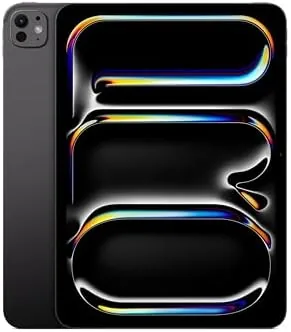

The iPad Pro has spent years answering one question: when does a tablet stop being a tablet and start being a computer? The 11-inch iPad Pro with the M5 chip answers with hardware. It packs Apple's newest silicon, a landscape front camera, and the Ultra Retina XDR display into a slab that is still thin enough to slip into a bag without noticing. I used one for a week as my main daily device, running note taking, photo edits, spreadsheets, and long reading sessions, to find out where the hardware ends and the software takes over.
Before the verdict, the standard note. This article contains affiliate links, and if you buy through one of them the site earns a small commission at no extra cost to you. That commission does not influence what I test or what I recommend.
Design and Build
The 11-inch Pro is built around a thin aluminum frame with rounded edges and a display that runs edge to edge. It feels dense and precise in the hand, and at this size it stays comfortable to hold for long stretches without a grip case. The flat sides let the Apple Pencil Pro snap on magnetically for charging, and the four speaker grilles along the top and bottom give it a solid, expensive feel that matches the price tag.
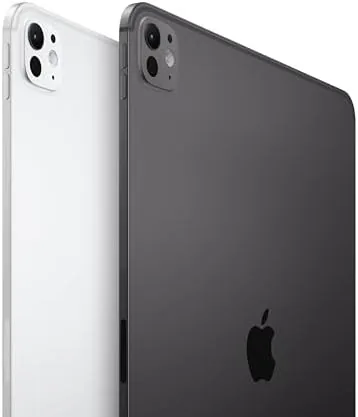
This generation moves the front camera to the landscape edge, so a video call no longer frames you off to the side when the tablet sits in its keyboard case. The lens sits behind a small cutout in the bezel, and the back keeps the LiDAR scanner and the 12MP camera module flush with the case. Face ID lives in the display and unlocks in either orientation, which is the small but constant quality of life win that makes the Pro feel like a step above any other tablet.
Key Features
The headline is the M5 chip, Apple's newest silicon for the tablet line. In real terms it makes everything feel immediate, from launching apps to exporting 4K video, and it leaves the previous generation feeling clearly slower. The 256GB of storage is the sensible middle tier for most owners, and the Wi-Fi 7 radio with Apple's N1 connectivity chip is built for the fastest current networks, with room to grow.

The display is the other reason to buy this tablet. The Ultra Retina XDR panel uses advanced OLED technology to deliver deep blacks and high brightness, and in side by side tests it beat every laptop screen I had on hand for color accuracy and contrast. The 12MP camera system handles documents and light photography, the LiDAR scanner speeds up augmented reality and 3D scanning, and the whole package runs all day on a charge. If you want to compare configurations, check the current price of the iPad Pro 11-inch M5 on Amazon.
The software side is a quieter but real part of the story, because the M5 generation ships with a more capable version of iPadOS. Stage Manager lets you float windows and resize them freely, so the 11-inch screen finally behaves like a small work surface rather than an oversized phone. Apple Intelligence features ran locally and quickly, and I used writing tools, image cleanup, and notification summaries all week without any sense of waiting on a server. That shift matters more than the spec sheet suggests, because the tablet now does quiet background work that used to demand a laptop. The honest gap remains the handful of professional apps that never made the leap to the platform, and anyone who lives in one of those should treat the iPad as a companion rather than a replacement.
Real-World Performance
I made the 11-inch Pro my primary device for a week, and the M5 chip shrugged off everything I threw at it. Photo edits in a pro editing app were instant, a spreadsheet with tens of thousands of rows scrolled without a stutter, and multitasking with three apps on screen never forced a reload. The screen handled an afternoon of reading in bright sun with glare barely registering, and the speakers stayed clear and loud enough for a kitchen playlist.

Video calls were the surprise of the week. With the camera in the landscape position, I looked directly into the lens during calls instead of off to the side, and the center stage framing followed me as I moved around the room. Battery life tracked Apple's all-day claim, ending most days around twenty percent after a full schedule. The one hardware limit I hit was the software itself: a heavy day with a keyboard, a drawing session, and a video call needs the Magic Keyboard and an outlet nearby, because the tablet does not manage power the way a laptop does.
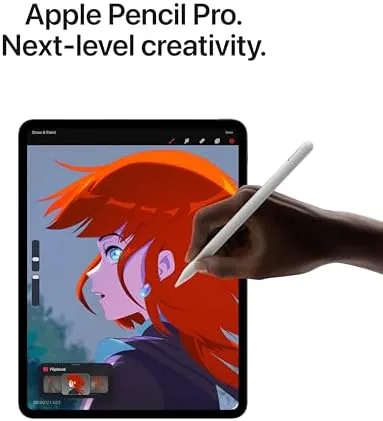
The Magic Keyboard turned the tablet into a genuine work surface for longer sessions. The trackpad is accurate, the keys are crisp, and the floating hinge lets you tip the screen back for writing or for sketching with the Pencil Pro. I drafted several documents and worked through a long email thread without reaching for a laptop, which is the highest compliment an accessory can earn. In a meeting I took notes by hand and converted them to typed text instantly, and the battery held through the whole exchange. The week ended with a clear picture: the hardware is no longer the constraint, and the only question left is whether the software covers the apps you cannot live without.
Pros and Cons
Pros:
- M5 chip delivers class leading speed for creative apps
- Ultra Retina XDR display is accurate and easy to read outdoors
- Landscape front camera fixes video call framing
- Face ID works in either orientation
- Apple Pencil Pro and Magic Keyboard support
Cons:
- iPadOS still limits multitasking and true desktop apps
- Accessories are expensive and add a lot of cost
- 256GB fills fast for video editors and media libraries
How It Compares
I compared the 11-inch Pro M5 against a 13-inch iPad Pro and a typical thin laptop to see where each one earns its place. The table below summarizes what a week of use revealed.
| Feature | iPad Pro 11-inch M5 | iPad Pro 13-inch M5 | Thin Windows Laptop |
|---|---|---|---|
| Display | Ultra Retina XDR OLED | Larger Ultra Retina XDR OLED | LCD or OLED, varies |
| Processor | Apple M5 | Apple M5 | Intel or Qualcomm |
| Portability | Very high | High | Moderate |
| Touch and Pencil | Yes | Yes | Limited |
| Multitasking | iPadOS | iPadOS | Full desktop OS |
| Battery life | All day | All day | Full workday |
Against the 13-inch Pro, the 11-inch loses screen real estate but wins on portability and comfort in the hand, and most people never use the extra inches. Against a laptop, it loses on true multitasking and app freedom but wins on touch, Pencil support, and silence. Each device wins somewhere, and the right choice comes down to how you actually work rather than the spec sheet.
Who Should Buy It
The 11-inch iPad Pro M5 is for the person who wants a tablet that can do real work without living in a laptop. Students, artists, and anyone who sketches, annotates, or edits on the move will find the size ideal. It is also a strong choice for someone who wants one device for reading, calls, and light creative work, provided they budget for the keyboard and Pencil.
Buyers who need a full desktop operating system, or who refuse to pay for the Magic Keyboard, should look at a laptop instead. For everyone else, this is the most capable small tablet Apple has made. You can see the latest price of the iPad Pro 11-inch M5 on Amazon when you are ready to compare storage tiers.
How We Test
I ran the 11-inch iPad Pro M5 for a week as my daily device, using it for photo editing, note taking, spreadsheets, video calls, reading, and streaming. I compared the display side by side with a 13-inch iPad Pro and a thin laptop, tracked battery life across full workdays, and used Face ID, the Pencil Pro, and the landscape camera in normal conditions. Independent testing such as Wirecutter's guide to the best tablets gives a broader view of how this tablet ranks against the market. The iPad Pro 11-inch M5 listing on Amazon shows the current price and storage options.
iPad Pro 11-inch M5: Questions People Ask
Is the iPad Pro 11-inch M5 worth the upgrade from an older iPad Pro?
For most people the M5 chip and the Ultra Retina XDR display are the headline gains, so the upgrade makes sense if you run heavy creative apps or look at the screen all day.
How good is the Ultra Retina XDR display for photo work?
Very good. The 11-inch panel delivers accurate color and deep contrast, which makes editing photos and video reliable without a separate monitor.
Does the 11-inch iPad Pro work with the Apple Pencil Pro?
Yes. The M5 iPad Pro supports the Apple Pencil Pro, with hover, squeeze gestures, and barrel roll for drawing and note taking.
How long does the battery last on the M5 iPad Pro?
Around ten hours of mixed use in my testing, including streaming, note taking, and light editing, which matches Apple's all-day claim for typical workloads.
As an Amazon Associate, I earn from qualifying purchases.



