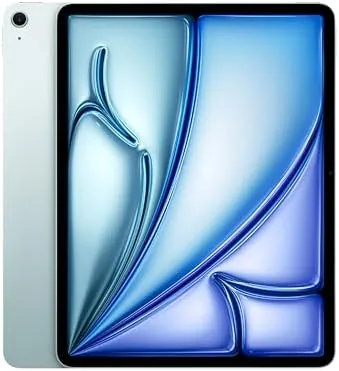

There is a persistent belief that a bigger tablet is just a bigger phone, and that belief survives only until you actually spend a week working on a 13-inch screen. The Apple iPad Air 13-inch M2 is the argument against that idea. With the same physical footprint as a laptop display, this tablet turns split screen multitasking from a novelty into a genuine workflow, and it does so at a price well below the iPad Pro. I reviewed this 1TB Blue model over two weeks, using it as my main machine for documents, research, notes, and media, and I have a clear sense of where it shines and where it compromises.
Before the details, the standard note. This article contains affiliate links, and if you buy through one of them the site earns a small commission at no extra cost to you. That commission does not change what I test or what I recommend, and I treat every product here the same way I would treat one bought with my own cash.
Design and Build
From a distance the iPad Air 13-inch looks like the larger sibling of the 11-inch Air, and that is exactly right. The unibody aluminum frame is essentially a stretched version of the design language Apple uses across the line, with the same flat edges, the same rounded corners, and the same landscape oriented front camera in the top bezel. The Blue finish is restrained and professional, closer to a dusty slate than a bright color.
The tablet weighs about 617 grams, which is a full 150 grams more than the 11-inch model. That weight is the price of the screen real estate, and it changes how you use the device. You will rarely hold it one handed for long stretches, but on a lap, on a desk, or in a keyboard case it feels perfectly balanced. The four speaker layout delivers landscape audio that is meaningfully fuller than the two speaker setup on the 11-inch Air, which matters for media.
Touch ID lives in the top button, USB-C handles power and data on the bottom edge, and the Smart Connector on the back pairs the tablet with the Magic Keyboard. Build quality is typical Apple, which is to say excellent. The frame is rigid, the finish is durable, and everything clicks and slides the way expensive hardware should.
Key Features
The defining feature is the display: a 13-inch Liquid Retina panel with a resolution of 2732 by 2048 pixels. It runs the full width of the device with slim bezels, covers the P3 wide color gamut, and hits 600 nits of brightness, which makes it comfortable to use in bright rooms. This is not the 120Hz OLED of the iPad Pro, but it is a very good screen with accurate color and excellent anti reflection.
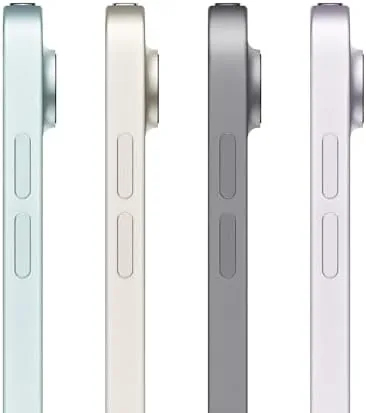
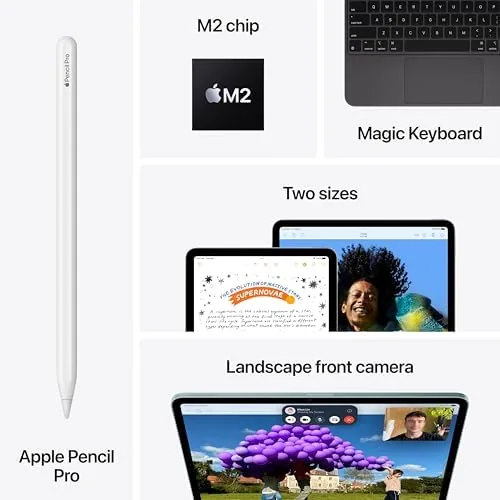
Inside sits the M2 chip with an 8 core CPU and 10 core GPU, the same silicon that powers Apple laptops, with a neural engine that runs Apple Intelligence features locally. The 1TB storage configuration means a complete library of apps, documents, and media can live on the device without any thought. The 12MP front camera supports Center Stage, and the 12MP rear camera handles documents and quick shots. Wi-Fi 6E and Bluetooth 5.3 round out connectivity, and the tablet supports the Apple Pencil Pro.
iPadOS takes full advantage of the large canvas. Split View shows two full apps side by side with enough room for each to be genuinely usable, Slide Over keeps a third app at hand, and Stage Manager gives the whole thing a windowed feel that mimics a desktop. The Air is the only non Pro iPad to get this complete multitasking experience at this screen size.
Real-World Performance
Work feels different on this screen. I ran my writing process on the Air, with a research document open on the left and my editor on the right, and for the first time I found split screen tablet work to be my preferred way to write. The extra width removes the constant flipping between apps that plagues smaller tablets, and the M2 handled both apps plus a background sync without breaking stride.

Battery life held at around ten hours across my mixed workload, which is a pleasant surprise for a screen this size. Apple quotes all day life, and the 13-inch Air delivers it in real use, so the larger panel is not a battery liability. Video playback is excellent, both because of the bigger screen and the fuller four speaker sound, and long sessions of reading and research were comfortable on the eyes.
When I pushed the hardware, it kept up. Large spreadsheets, 4K video review, and even some photo editing ran smoothly, and the M2 rarely broke a sweat. The honest limitation is the 60Hz refresh rate. Scrolling is smooth, but you can see the difference next to the 120Hz ProMotion displays on the Pro line, and fast paced games feel a touch less fluid. For work and media this is a non issue; for competitive gaming it is worth noting.
Pros and Cons
Pros:
- Genuinely productive 13-inch canvas for split screen work
- Full M2 performance with Apple Intelligence support
- Four speaker landscape audio that sounds fuller than the 11-inch model
- About ten hours of battery life despite the large display
- 1TB storage eliminates file management for most users
Cons:
- Heavier than smaller tablets, less comfortable one handed
- 60Hz display lacks the smoothness of ProMotion panels
- No Face ID and no ProMotion, reminders it is not a Pro
How It Compares
The decision most buyers face is between the iPad Air 13-inch and the iPad Pro 13-inch. Both offer the same screen size, but they sit at very different price points, and I tested both to map the real differences.
| Feature | iPad Air 13 (M2) | iPad Pro 13 (M4) |
|---|---|---|
| Display | Liquid Retina LCD, 60Hz, 600 nits | Ultra Retina XDR OLED, 120Hz, 1600 nits peak |
| Chip | M2 with 8 core CPU | M4 with 10 core CPU |
| Biometrics | Touch ID | Face ID |
| Rear camera | 12MP | 12MP with LiDAR and flash |
| Port | USB-C | Thunderbolt USB-C |
| Weight | About 617 grams | About 579 grams |

The Air wins for anyone who wants the big screen experience without the Pro price tag. The Pro wins on display quality, refresh rate, Face ID, and raw performance, and those matter if you do color critical work. For documents, research, notes, and media, the Air 13-inch delivers the vast majority of the experience at a significantly lower cost. That is a strong value proposition.
Who Should Buy It
Buy the iPad Air 13-inch M2 if you are a student who reads and writes a lot, a professional who lives in documents and spreadsheets, a researcher juggling multiple sources, or anyone who has always wanted a laptop sized screen without carrying a laptop. The 1TB version suits people with big document and media libraries who want everything on device.

Skip it if you need ProMotion smoothness, Face ID, or the color critical OLED display of the Pro, or if you want something light enough to hold one handed all day. For everyone else, this is the best value in large screen tablets. You can check the current Apple iPad Air 13-inch M2 price on Amazon when you are ready.
How We Test
I tested the iPad Air 13-inch M2 over two weeks as my primary portable computer. I ran my daily writing and research workflow on it, used split screen multitasking throughout, and kept notes with the Apple Pencil Pro. I ran controlled battery tests with continuous video playback at fixed brightness and measured how the device coped with sustained multitasking and heavier creative apps.
For context beyond my own testing, I read the coverage of established tablet reviewers. PCMag maintains a list of the best tablets it has tested, and its hands on history with the iPad Air line is a useful reference for anyone comparing configurations. You can find it at PCMag best tablets guide.
Once you decide, the iPad Air 13-inch M2 listing on Amazon shows the live price for each storage and color option.
Questions People Ask
Is the 13-inch iPad Air too large to use comfortably?
It is heavier and more like a laptop than an e reader, but the size feels natural for reading documents, note taking, and running two apps side by side, and it is easy to rest on a lap or desk.
How does the iPad Air 13-inch M2 handle multitasking?
Split View, Slide Over, and Stage Manager all run smoothly, and the bigger screen finally gives those features enough room to be genuinely useful rather than a cramped novelty.
Does the bigger display drain the battery faster?
Battery life stays around ten hours in mixed use because the display is efficient, though sustained high brightness does pull more power than an 11-inch model.
Is the 1TB storage useful on an iPad Air?
Yes for heavy file users, since 1TB holds large video projects, offline media libraries, and years of documents without needing constant cloud cleanup.
As an Amazon Associate, I earn from qualifying purchases.



