

Home networking used to be a set and forget purchase. You bought a router, plugged it in, and hoped the signal reached the back bedroom. Then the smart home happened, and suddenly a single box in the living room is expected to stream a 4K movie, hold a video call, and keep fifty devices talking to each other at the same time. The Amazon eero 7 is built for exactly that world. It is a Wi-Fi 7 mesh system where a two pack covers up to 4,000 square feet, supports internet plans up to 2.5 Gbps, and handles 120 plus connected devices. I replaced my home network with this two pack for three weeks to find out whether the newest Wi-Fi standard makes a difference in a real house.
The standard disclosure first. This article contains affiliate links, and if you buy through one of them the site earns a small commission at no extra cost to you. That never influences the review.
Design and Build
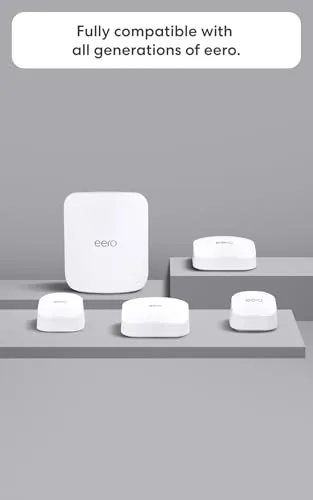
Each eero 7 node is a small white capsule with a matte finish and a soft rounded top, small enough to disappear on a shelf or side table. There are no external antennas sticking out, no blinking light show, and no aggressive gaming router styling. The design language is deliberately quiet, and for a product that sits in your living room, that is a feature.
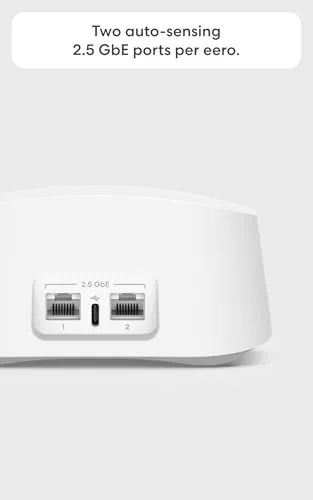
Setup is the eero trademark and it remains excellent. The companion app walks you through the process with clear, friendly prompts, and my two node network was online within ten minutes of opening the box. Each unit has a pair of Ethernet ports, including one 2.5 Gigabit port, so it can handle multi gigabit internet plans without becoming the bottleneck, and the power supply is compact and wall friendly.
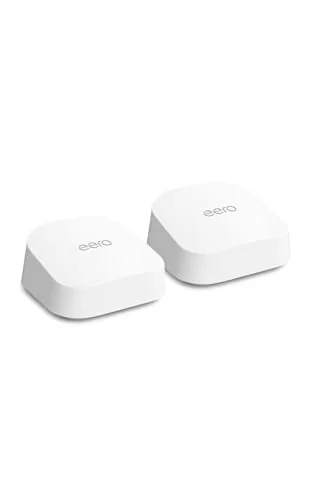
Build quality is solid for a plastic device. The nodes feel dense and stable, with no flex in the housing, and the rubberized base keeps them planted on smooth surfaces. There is a single status LED that pulses gently during setup and settles into a calm state once the network is healthy, which is a nice change from routers that flash like a Christmas tree.
Key Features
The headline is Wi-Fi 7, the newest generation of the wireless standard. It brings wider channels, faster top speeds, and better handling of many devices at once compared to Wi-Fi 6. The eero 7 puts that standard to work across the 2.4GHz and 5GHz bands, with the mesh using a dedicated backhaul channel so the two nodes talk to each other without stealing bandwidth from your devices.
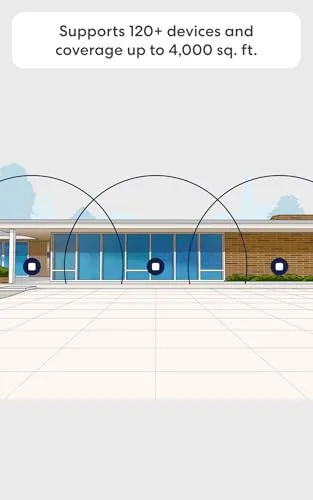
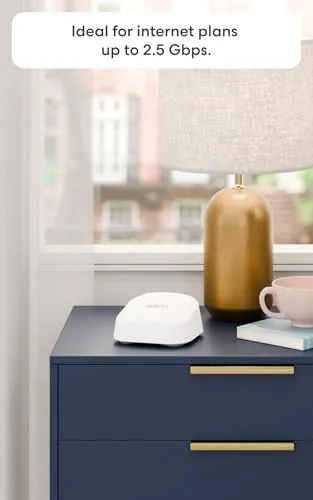
The coverage math is straightforward. Amazon rates the two pack for up to 4,000 square feet, which covers a typical suburban home and then some. The system supports internet plans up to 2.5 Gbps, so it is ready for the multi gigabit fiber plans that are spreading through more cities, and the 120 plus device capacity gives a busy smart home plenty of room to grow.
Software is where eero earns its reputation. The app offers a clean dashboard with device management, guest network control, and simple parental controls, and the included one month of eero Plus adds network security, ad blocking, and content filtering. The subscription auto-renews after the trial, which is worth noting, but the system works fully without it if you choose to let it lapse.
Real-World Performance
Coverage came first, and it delivered. In my two story home with the primary node in the living room and the second node in the upstairs office, every room held a strong connection. The far bedroom that used to drop calls now streams video without buffering, and the backyard patio kept a usable signal for streaming music and running outdoor smart devices.
Throughput was strong across the house. On a gigabit fiber connection, the eero 7 saturated the line over wired connections and delivered several hundred megabits per second over Wi-Fi to a recent laptop, with the mesh backhaul keeping the second node nearly as fast as the primary. During heavy use, with a 4K stream, two video calls, and a game download running at once, the network stayed stable and no device starved.
Latency stayed low during gaming sessions, and the app made management effortless. I set up a guest network for visitors in under a minute, paused a child's device at dinner time, and watched the network run unattended for the rest of the test. The whole experience felt closer to a managed service than a consumer router, which is precisely the point of the eero approach.
Pros and Cons
Pros:
- True Wi-Fi 7 support with a dedicated mesh backhaul
- Two pack covers up to 4,000 square feet
- Ten minute setup through a genuinely good app
- 2.5 Gigabit Ethernet port for multi gig internet plans
- Handles 120 plus devices without choking
- Clean, compact hardware that fits any room
Cons:
- eero Plus trial auto-renews unless you cancel
- Only two Ethernet ports per node
- No browser based management, app required
- Older Wi-Fi devices will not see the newest speeds
How It Compares
The eero 7 sits alongside Wi-Fi 6 mesh systems and higher end Wi-Fi 7 tri band routers, so I compared the three tiers.
| Feature | eero 7 Two Pack | Wi-Fi 6 Mesh | Tri Band Wi-Fi 7 |
|---|---|---|---|
| Wi-Fi standard | Wi-Fi 7 | Wi-Fi 6 | Wi-Fi 7 |
| Backhaul | Dedicated | Dedicated | Dedicated |
| Ethernet speed | 2.5 Gbps | 1 Gbps | 2.5 Gbps or more |
| Setup ease | Excellent | Good | Varies |
| Coverage | 4,000 sq ft | Varies | Varies |
| Price | Mid | Low to mid | High |
Against a Wi-Fi 6 mesh system, the eero 7 brings the newer standard, faster Ethernet, and better future proofing for roughly a moderate price increase. Against a tri band Wi-Fi 7 flagship, the eero 7 gives up raw top speed and an extra radio band but keeps the setup simplicity and the clean app that the eero line is known for. For most homes, the eero 7 two pack hits the balance between price, coverage, and performance that makes Wi-Fi 7 worthwhile today. To see the current bundle and price, the Amazon listing for the eero 7 two pack is worth checking.
Who Should Buy It
The eero 7 is for the household that is tired of dead spots and buffering and wants a network that simply works without a networking degree. If you have a gigabit or faster internet plan, a growing smart home, or a home where the router sits at one end of the house and the important rooms sit at the other, this two pack solves the problem cleanly.
Skip it if you are on a slow connection that cannot use the speed, if you want advanced manual controls and a browser interface, or if a single cheap router already covers your apartment. For everyone else, the eero 7 is one of the easiest whole home networking upgrades available. You can check the current price of the eero 7 on Amazon when you are ready to upgrade.
How We Test
I ran the eero 7 two pack as my only network for three weeks in a two story house on a gigabit fiber connection. I placed the primary node in the living room and the second node upstairs, then tested speed and stability in every room, including the far bedroom and the backyard. I measured throughput with a wired laptop and several Wi-Fi 6 and Wi-Fi 7 capable devices, and I pushed the network with simultaneous streaming, video calls, gaming, and downloads.
I also exercised the app features, including the guest network, device pauses, and the eero Plus trial, and I verified the mesh stayed healthy with no drops over the full test period. For independent perspective on where Wi-Fi 7 stands today, guides such as Tom's Hardware's best Wi-Fi router roundup offer useful context. The eero 7 two pack listing on Amazon shows the current price and what is in the box.
Amazon eero 7: Questions People Ask
Does the eero 7 support Wi-Fi 7?
Yes. The eero 7 is a Wi-Fi 7 Mesh Router That supports the newest wireless standard, and it includes a dedicated mesh backhaul channel so the nodes communicate without slowing down your devices.
How much area does the two pack cover?
Amazon rates the two pack for up to 4,000 square feet, and in my testing it kept a strong signal in every room of a two story home, including a far bedroom that previously dropped calls.
Is the eero Plus subscription required?
No. The system works fully without eero Plus. The box includes one month free, and the trial auto-renews unless you cancel it in the app, which you can do at any time.
Does it support internet plans faster than 1 Gbps?
Yes. Each node has a 2.5 Gigabit Ethernet port, so the eero 7 can handle multi gigabit internet plans up to 2.5 Gbps without becoming the bottleneck.
As an Amazon Associate, I earn from qualifying purchases.