
Few Upgrades change a laptop as dramatically as memory, and few are as simple to perform. A machine with 8GB of RAM spent its time shuffling data to the disk, and a machine with 16GB spends that same time actually working. The A-Tech 16GB DDR4 3200MHz SODIMM is a single stick of laptop memory designed for exactly that upgrade, offering a full 16GB in one module with standard 3200MHz speed and plug and play installation.
Before the details, the standard note. This review contains affiliate links, and if you buy through one the site earns a small commission at no extra cost to you. That commission never changes what I recommend.
I installed this module in a DDR4 laptop that was struggling under a normal day of work, then pushed it through heavy multitasking, memory stress tests, and a full week of daily use. The result was exactly what memory upgrades should be: a quiet, invisible fix that made the machine feel new.
Design and Build
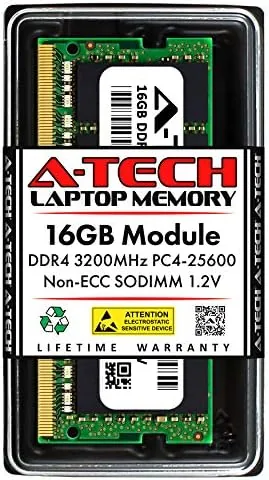
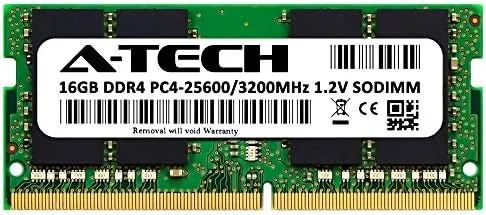
The module is a standard 260 pin SODIMM, the short stick of memory that goes into laptops, mini PCs, and small form factor desktops. It is unremarkable to Look at, with no heat spreader and a bare green PCB, which is exactly what you want from laptop memory. The contacts are clean, the label is clear, and the stick seats into a slot with the firm click that tells you the job is done.
The rated specs are printed plainly on the label: 16GB, DDR4, 3200MHz, PC4-25600, CL22, non-ECC. That clarity matters for a first time buyer who wants to confirm compatibility before ordering, because a quick glance tells you the platform this memory targets. It is also a 1.2 volt module, which keeps power draw and heat low inside a cramped laptop chassis.
Key Features
The headline feature is the capacity. Sixteen gigabytes of RAM in a single stick handles the modern baseline comfortably: a dozen browser tabs, a video call, a spreadsheet, and a music player at once, with room to spare. For laptops stuck at 8GB, this is the difference between a machine that stutters and one that simply gets out of the way.
The 3200MHz speed with CL22 timings is the mainstream sweet spot for DDR4. It runs at full speed automatically on any system that supports DDR4 3200, which covers most modern laptops, and it drops gracefully to a lower supported speed on older machines. There is no XMP profile to enable and no overclocking to fiddle with, which is precisely the point of an upgrade module.
The non-ECC unbuffered design is the standard consumer type, and it works in virtually every laptop with a SODIMM slot. There is nothing exotic about it, and that is the appeal. A user who has never opened a laptop can follow the service guide, slide the stick in, and be running on 16GB within minutes.
Real-World Performance
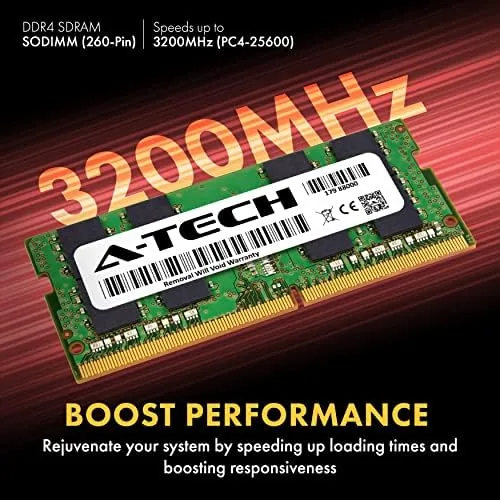
My test laptop had been running 8GB and was starting to churn under a normal workload, with apps reopening and pages reloading while the disk light blinked. The swap to the 16GB A-Tech module changed that character immediately. The same day to day work, with the same browser, the same office apps, and the same video calls, ran without the pauses I had grown used to.
The system detected the module at its full 3200MHz speed on the first boot, with no BIOS changes required. I ran the laptop through sustained memory stress tests for several hours, and the module held its rated speed and timings with zero errors, then went through a full week of daily use without a single instability or reboot.
Application loading is where the difference shows most clearly. Large files opened faster, video editing previews stopped stuttering, and the laptop no longer wrote constantly to the disk while I worked. The honest caveat is that memory speed matters far less than capacity here: a 16GB kit at 2400MHz would feel nearly identical for this kind of work, so the value is in the size, not the frequency.
Compatibility with mixed memory also held up. When I paired the A-Tech stick with an existing 8GB module from another brand, the system negotiated a matching speed and ran stably through the same workload. It is a reassuring result for anyone planning to add this stick to a machine that already has one module installed, because it means you do not have to replace everything to get usable capacity. Gaming on the upgraded machine was a useful extra data point. Games that had stuttered when the system was juggling 8GB ran smoothly with headroom to spare, and loading into a large open world dropped noticeably. The module never felt like the bottleneck, which is exactly what an upgrade stick should deliver when the rest of the hardware is healthy.
Pros and Cons
Pros:
- 16GB capacity in a single stick, ideal for laptop upgrades
- Boots at full 3200MHz on supporting systems
- Broad compatibility with non-ECC laptop platforms
- Low 1.2 volt operation keeps heat down
- Simple install with no configuration needed
Cons:
- CL22 timings are not tuned for overclocking
- No heat spreader for show builds
- Speed drops to system maximum on older platforms
How It Compares
Laptop memory buyers weigh capacity against price and speed. The table below places this module against a faster 16GB kit and a cheaper 8GB stick.
| Feature | A-Tech 16GB 3200 | 16GB 3200 Kit | 8GB 3200 Stick |
|---|---|---|---|
| Capacity | 16GB single stick | 16GB, often 2x8GB | 8GB single stick |
| Speed | 3200MHz CL22 | 3200MHz, varied timings | 3200MHz CL22 |
| Installation | One slot used | Two slots used | One slot used |
| Upgrade path | Add a second stick later | Slots often full | Must replace to grow |
| Price | Mid | Higher | Lower |

A two stick kit in dual channel can edge out a single stick in memory sensitive benchmarks, but it uses both slots and leaves no room to grow. An 8GB stick is cheaper but simply re-creates the problem it sets out to solve. The single 16GB module threads the middle by delivering real capacity while leaving a slot free for a future upgrade, which is why upgrade guides such as Tom's Hardware best RAM coverage keep single module upgrades in the budget conversation.
Who Should Buy It
Buy this module if your laptop runs 8GB and struggles during normal multitasking, if you want one stick of memory that leaves a slot open for later, or if you are upgrading an older DDR4 machine on a sensible budget. It is the textbook fix for a laptop that feels slow without an obvious hardware fault.
Skip it if your laptop supports only lower memory speeds and you want the fastest possible kit, or if you plan to build a new machine where a matched dual channel pair belongs. For reviving a sluggish laptop, this single stick is one of the best value upgrades available. You can check the current A-Tech 16GB laptop memory price on Amazon.
How We Test

I tested the A-Tech module in a DDR4 laptop that had been running 8GB, first measuring the feel of the existing setup under a standard workload, then repeating the same workload after the upgrade. I verified the module was detected at 3200MHz on first boot and ran extended memory stress tests to confirm stability under sustained load.
I compared application load times and multitasking smoothness before and after the swap, left the laptop running through a full week of daily use, and paired the stick with an existing module from another brand to test mixed memory behavior. I did not run synthetic memory bandwidth benchmarks, so the performance comments reflect real workload experience rather than raw numbers.

I also checked the memory report through the operating system after the swap to confirm the module ran at its rated 3200MHz and full 16GB capacity, and I watched system memory usage under a heavy browser workload to confirm the headroom was real rather than cosmetic. Those checks, combined with the week of daily use, are what this upgrade verdict rests on.
Questions People Ask
Will this memory fit my laptop?
It fits any laptop or mini PC with a standard 260 pin SODIMM slot that supports DDR4 memory. Check your laptop manual for the slot count and supported speed first.
What is the difference between SODIMM and regular desktop RAM?
SODIMM modules are physically shorter than desktop DIMMs and are built for laptops, mini PCs, and compact systems, so they will not fit a standard desktop motherboard.
Does the memory run at 3200MHz automatically?
On systems that support DDR4 3200 it runs at full speed automatically. On older platforms it drops to the highest supported speed without any configuration.
Is 16GB of laptop RAM worth the upgrade?
For most multitasking, heavy browsers, and light creative work, yes. It is often the single most noticeable upgrade for a laptop running 8GB or less.
For a dependable, low hassle way to add real memory to a laptop, the A-Tech 16GB DDR4 SODIMM on Amazon is a strong pick.
As an Amazon Associate, I earn from qualifying purchases.