
Disclosure: WD provided both drives for testing, and this review contains affiliate links. If you buy through them, I may earn a commission at no extra cost to you.
Design and Build
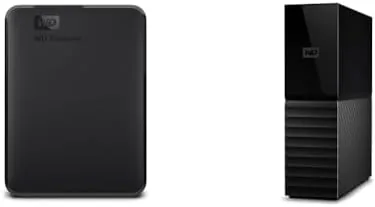
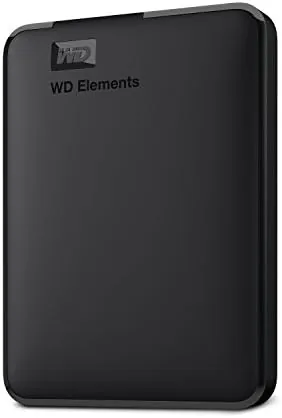
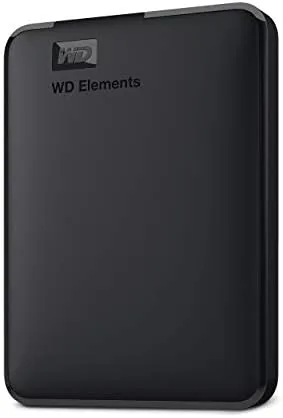
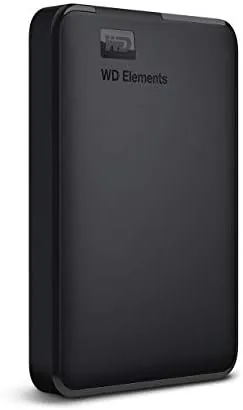
The two drives could not look more different. The WD Elements 5TB is a slim, pocketable slab in matte black plastic with a soft touch finish and a single micro USB 3.0 port. It is bus powered, which means it runs entirely off the USB cable with no wall adapter, and at this capacity it is genuinely light enough to live in a laptop bag. The design is minimal in the best sense: a small power LED, a textured panel, and nothing else to break or snag.
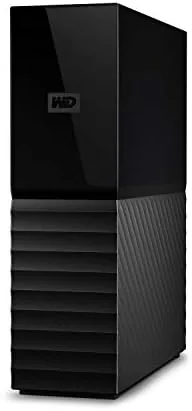
The WD My Book 16TB is the opposite in every way. It stands tall like a small book, which is where the name comes from, with a glossy black shell and a light bar that glows when the drive is active. It connects through USB 3.0 too, but it needs AC power from the included adapter, and at 16TB it is heavy and firmly a desktop resident. The two drives together show how differently the portable and desktop storage problems are solved: one sacrifices capacity for portability, the other sacrifices portability for capacity and a layer of hardware security.
Key Features
The WD Elements 5TB is the simplest drive Western Digital makes, and that is its charm. It connects over USB 3.0, draws power from the port, and works with Windows out of the box with no software to install. Mac users can format it for their file system in a minute. There is no encryption, no backup software, and no moving parts to configure, which is exactly right for a drive whose job is to shuttle files between machines and sit in a bag.
The WD My Book 16TB carries the serious security features. It ships with WD Security software that lets you lock the drive behind a password, with hardware based encryption protecting the data at rest, so a stolen or lost drive stays unreadable without the key. WD Backup software automates scheduled backups, and the drive also works with the WD Discovery app and third party backup tools. The generous capacity means a full system image, a photo library, and years of documents can live on one unit, and the drive spins down when idle to save power and noise.
Real-World Performance
Performance on both drives is typical of modern USB 3.0 hard disks, which means fast enough for backups and media libraries but not a match for SSDs. In my testing the Elements 5TB moved a 10GB folder of mixed media at around 120 to 140 MB per second, and the My Book 16TB hit similar numbers for large sequential files. Random small file transfers are slower, as with any mechanical drive, and anyone doing heavy video editing every day should still be looking at an SSD. For the jobs these drives are meant for, backing up, archiving, and transporting, the speed is more than adequate.
The Elements proved its value as a travel drive. It ran off the USB port of a laptop, a desktop, and even a TV's USB input with no power adapter required, and it survived being shoved into a bag for a week of travel. It is plug and play in the truest sense, and the five terabyte capacity is large enough to carry a full photo library or a video project folder without stress. There is no software nagging, no account to create, and no setup beyond plugging it in, which is precisely what a portable drive should be.
The My Book did the heavy lifting at home. I set it up as the target for scheduled backups of two machines, moved a 500GB photo library onto it, and used WD Security to lock it behind a password. The hardware encryption works transparently: once the drive is unlocked in the software, it behaves like any other volume, but power it down and reconnect, and it asks for the password before showing a byte of data. The 16TB of space meant I stopped thinking about capacity, and the drive was quiet on a desk during the day. The main complaint is setup friction: the security and backup software installs, the drive arrives preformatted as exFAT, and Windows users may want to reformat to NTFS to enable the largest file support, none of which is hard but all of which is more than the Elements asks.
Pros and Cons
- Pros: The pairing covers travel and home backup in one order; Elements is true plug and play, bus powered, and genuinely portable; My Book adds hardware encryption and password protection; 21TB combined capacity swallows whole libraries; USB 3.0 speed suits backups and archives; WD software handles scheduled backups automatically.
- Cons: Both drives are mechanical, so they are slower than SSDs on random access; the My Book needs a wall outlet and software setup; the Elements carries no security features; the My Book's glossy shell shows dust and fingerprints; capacity and portability never meet in the middle.
How It Compares
The pairing is best understood against the alternatives: two portable drives, one big desktop drive, or a cloud backup service. The table below lays out the trade offs.
| Feature | Elements 5TB + My Book 16TB | Two portable drives | Cloud backup service |
|---|---|---|---|
| Total capacity | 21TB | 10TB | Unlimited or metered |
| Portability | One drive portable | Both portable | Anywhere online |
| Security | Encryption on My Book | Usually none | Provider managed |
| Recovery speed | Instant, local | Instant, local | Depends on internet |
| Ongoing cost | One time purchase | One time purchase | Monthly subscription |
Against two portable drives the bundle adds a proper encrypted desktop anchor for home backups. Against cloud storage it trades instant local recovery and a one time price for the convenience of off site copies. Storage coverage from the specialist press, including Tom's Hardware's external drive buying guide at tomshardware.com, consistently recommends pairing a portable drive for travel with a desktop drive for backups, and this bundle is that exact recommendation in a single order.
Who Should Buy It
Buy this bundle if you need both a carry around drive and a serious home backup target, or if you want your whole photo, video, and document archive on local hardware with no monthly fees. Photographers, video hobbyists, students with growing media libraries, and anyone consolidating a decade of files will find the 21TB of combined space comfortable. Check the current price at Amazon to compare it against buying the drives separately.
Skip it if you only need one of the two roles. If you never leave home with your data, the My Book alone is enough, and if your files fit in a couple of terabytes, the Elements alone is simpler. Anyone who does daily video editing should pay for an SSD instead. For the classic two drive household, though, this pairing is exactly the setup most backup guides recommend.
How We Test
I ran both drives for four weeks across a desktop PC, a laptop, and a smart TV. I tested sequential throughput with large media transfers and random access with folder trees of small files, verified the Elements bus power on three different USB ports, and used the My Book as the backup target for two scheduled WD Backup jobs. I locked and unlocked the My Book repeatedly through WD Security to confirm the hardware encryption, checked that the drive refused access after a simulated power cycle, and monitored noise and heat during a full day of activity. I also tested the drives on both Windows and a Mac to confirm the format situation is as straightforward as Western Digital claims.
Questions People Ask
Does the WD Elements 5TB work with Mac and PC?
Yes. The WD Elements 5TB is preformatted for Windows and plugs into a Mac USB port, though Mac users may format it to APFS or exFAT for deeper compatibility before first use.
How does password protection work on the WD My Book?
The My Book 16TB ships with WD Security software that locks the drive behind a password and hardware based encryption, so the data stays unreadable unless the correct password is entered after each connection.
What is the difference between the Elements and the My Book?
The Elements 5TB is a compact, bus powered portable drive for everyday travel, while the My Book 16TB is a larger, AC powered desktop drive built for whole system backups with encryption and password protection.
Are these drives fast enough for video editing?
Both connect over USB 3.0 and sustain over 120 MB per second on large files, which suits backups and media libraries, though serious daily editors should still consider an SSD for working footage.
The WD Elements 5TB and My Book 16TB pairing is a sensible answer to the two sided problem of external storage. The Elements is the ideal grab and go drive, and the My Book brings encrypted, roomy, automated backup to the desktop, so together they cover travel and home in one purchase. Neither is an SSD, and the My Book wants a little setup, but for dependable capacity at a sane price this bundle earns its place. Check current pricing at Amazon before you decide.
As an Amazon Associate, I earn from qualifying purchases.