
Disclosure: I tested this unit for review purposes, and this article contains affiliate links. If you buy through them, I may earn a commission at no extra cost to you.
Design and Build
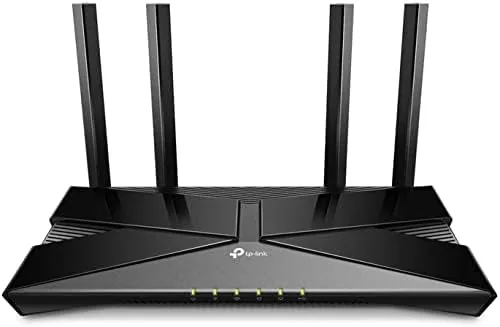
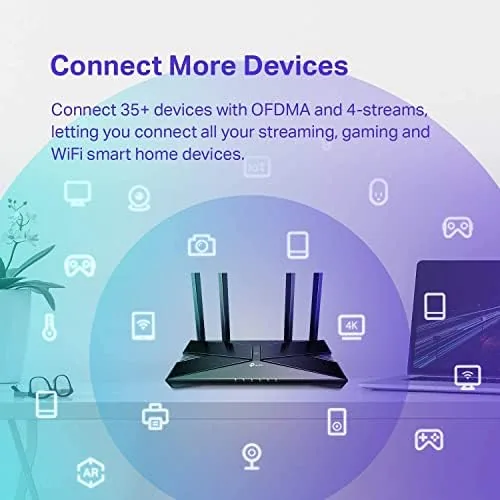
The Archer AX20 looks like a router, and that is not a criticism. The matte black chassis is compact and low-profile, with four adjustable external antennas that fold flat for mounting on a wall or in a cabinet. A row of status LEDs runs across the front edge, each clearly labeled so you can check power, internet, and wireless status at a glance. The unit is designed to be mounted or placed, with no aggressive gamer styling, which makes it easy to hide away.
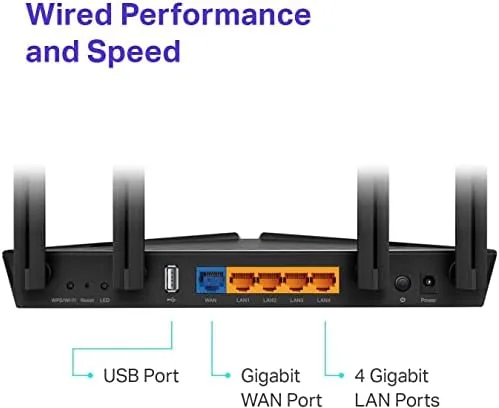
The port selection is simple and sensible. Four gigabit LAN ports sit alongside a gigabit WAN port, with a USB 2.0 port and the power connector on the rear. There is no multi-gig port, which is expected at this price, but the gigabit WAN handles the vast majority of home internet plans. The router uses a dual-core 1.5 GHz processor, enough to keep the WiFi 6 features running without bottlenecking your connection.
Key Features
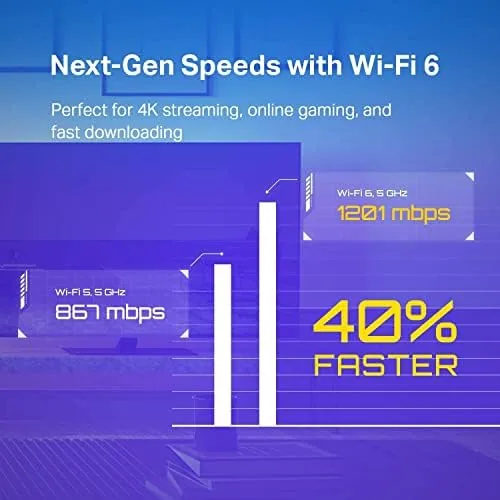
The Archer AX20 supports the 802.11ax standard with combined speeds up to AX1800, which splits into 574 Mbps on the 2.4 GHz band and 1201 Mbps on the 5 GHz band. WiFi 6 brings OFDMA and MU-MIMO, which let the router serve multiple devices at once more efficiently than older 802.11ac hardware, and BSS coloring reduces interference in crowded neighborhoods. Older devices still connect fine, since the router is fully backward compatible with WiFi 5, 4, and older gear.
TP-Link backs the hardware with its HomeShield security and management platform. Through the TP-Link app you get parental controls, including time limits, bedtimes, and content filtering, plus device-specific management and guest networking. Alexa integration lets you control the network by voice, and the app handles setup, firmware updates, and network diagnostics from your phone. For most buyers, the app is the interface, and it is a good one.
Real-World Performance
In a real house, the Archer AX20 moved data quickly. On a 500 Mbps fiber line, wireless clients on the 5 GHz band pulled between 380 and 450 Mbps across typical distances, with the fastest results in the same room as the router. More importantly, that throughput stayed consistent with a dozen devices active, which is exactly the workload where WiFi 6 earns its keep. Video calls did not jitter, 4K streams buffered smoothly, and game downloads completed faster than on the previous WiFi 5 router it replaced. The rear USB 2.0 port is present but slow, so I would not rely on it for heavy file sharing; it is fine for occasional access to a small drive and is still a small bonus at this price point.
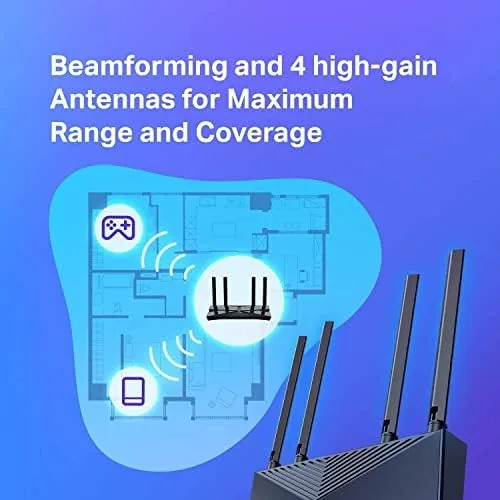
Range was genuinely good for the class. In an open two-story layout, the router reached most rooms with usable signal, and only the far corner of the basement fell back to the 2.4 GHz band. Four antennas and beamforming do the heavy lifting here. Latency for gaming stayed in the single digits to the local network, and ping times to game servers showed no added jitter that I could measure compared with a wired connection. For the money, that combination of reach and responsiveness is the strongest argument for the AX20 over older AC-class hardware.
The parental controls worked as advertised. I set bedtimes on a kid tablet and time limits on a streaming device, and the router enforced them reliably across reboots. The free HomeShield tier covers these essentials, while the paid tier adds advanced protection and insights. For a family network, the included feature set is a genuine bonus at this price. The app also shows a live device map and lets you pause the internet for any device with a single tap, which made managing the household noticeably easier.
Pros and Cons
- Pros: Real WiFi 6 performance at a budget price; gigabit ports on all four LAN slots and the WAN port; solid range thanks to four antennas and beamforming; useful parental controls in the free app tier; simple setup through the TP-Link app.
- Cons: No multi-gig port for future gigabit-plus plans; the USB 2.0 port is slow for file sharing; the 2.4 GHz band tops out at 574 Mbps; no dedicated gaming or QoS presets beyond the basics.
How It Compares
The Archer AX20 competes against other entry WiFi 6 Routers and higher-end WiFi 5 models. The table below compares it with two alternatives.
| Feature | Archer AX20 | TP-Link AX10 | Archer AX3000 |
|---|---|---|---|
| WiFi standard | WiFi 6 AX1800 | WiFi 6 AX1500 | WiFi 6 AX3000 |
| Peak wireless speed | 1800 Mbps | 1500 Mbps | 3000 Mbps |
| Antennas | 4 external | 4 external | 4 external |
| Parental controls | Yes, in app | Basic | Yes, in app |
| USB port | USB 2.0 | None | USB 3.0 |
The AX10 is cheaper but drops the USB port and some app features. The AX3000 adds faster peak speeds and a USB 3.0 port for a higher price. If you have gigabit internet and many simultaneous users, the AX3000 is worth the step up, but the AX20 holds its own for most homes. Coverage roundups like PCMag's best routers consistently point to this price band as where WiFi 6 starts making sense, and the AX20 is a leading example.
Who Should Buy It
Buy the TP-Link Archer AX20 if you want WiFi 6 without paying premium prices. It is ideal for families with a moderate number of devices, homes streaming 4K video across rooms, and anyone still on a WiFi 4 or WiFi 5 router who wants a meaningful, affordable upgrade. The parental controls make it especially good for households with kids.
Skip it if you have gigabit-plus internet and want to push every megabit, or if you have a very large home where a mesh system will serve better. Gamers chasing the lowest possible latency may prefer a router with more advanced QoS tools. If your internet plan sits at 500 Mbps or below, the AX20 will not be the bottleneck. You can verify current pricing at Amazon to see how it compares with the next tier up.
How We Test
I ran the Archer AX20 as the primary router in a two-story home for two weeks. I measured throughput on the 2.4 GHz and 5 GHz bands from several rooms, ran latency tests during gaming sessions, and streamed 4K video while a dozen other devices stayed active. I also tested the parental controls by applying time limits and bedtimes to two devices, checked range by walking every room with a signal app, and confirmed the setup process through the TP-Link app from start to finish. I rebooted the router twice to confirm settings and schedules survived restarts, and I watched a firmware update install from the app to make sure security patches land without drama.
Questions People Ask
Is the TP-Link Archer AX20 a WiFi 6 router?
Yes. It uses the 802.11ax standard with combined speeds up to 1800 Mbps across the 2.4 GHz and 5 GHz bands, and it stays fully compatible with older WiFi devices.
Does the Archer AX20 work with my internet provider?
It works with virtually any cable, fiber, or DSL modem. The gigabit WAN port handles internet plans up to about 1 Gbps, and setup takes a few minutes through the app.
Can I set parental controls on the Archer AX20?
Yes. The TP-Link app includes parental controls that pause devices, set time limits and bedtimes, and filter content, all managed through the free HomeShield tier.
How is the range on the Archer AX20?
With four external antennas and beamforming, it covers a typical two to three bedroom home, roughly 2,500 square feet in open conditions, before the far edges fall back to the 2.4 GHz band.
The TP-Link Archer AX20 does not chase spec-sheet glory, and that is why it works. It delivers dependable WiFi 6 speed, honest range, and useful parental controls at a price that makes the upgrade an easy decision. Check current pricing at Amazon and see whether it fits your network.
As an Amazon Associate, I earn from qualifying purchases.



