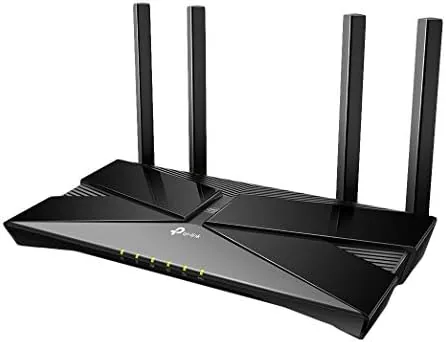

The home network has quietly become the most important appliance in the house. Every phone, laptop, television, speaker, and smart bulb depends on it, and a router that chokes under a busy evening brings the whole household to a stop. The TP-Link Archer AX50 arrives with WiFi 6 on board, a triple core processor, and a price that puts next generation wireless within reach of ordinary homes. This review is the record of two weeks with the AX50 as the main router in a busy household, measuring speed, coverage, and how the Alexa voice control actually behaves in daily use.
Before the details, the standard note. This article contains affiliate links, and if you buy through one of them the site earns a small commission at no extra cost to you. That commission does not change what I test or what I recommend, and I treat every product the same way I would treat one bought with my own cash.
Design and Build
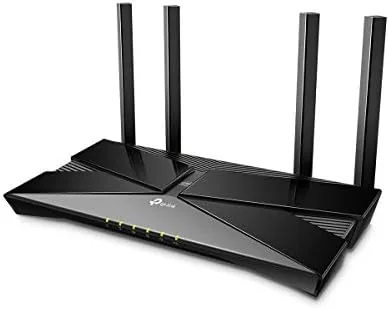
The AX50 has the look of a serious networking product rather than a toy. The body is a flat, angular slab of matte plastic with four antennas that fold up from the rear, and it sits flat on a desk or shelf without any fuss. The antennas are adjustable, which is more than cosmetic, because pointing them at the areas you use most actually improves the signal in real homes with walls and floors in the way.
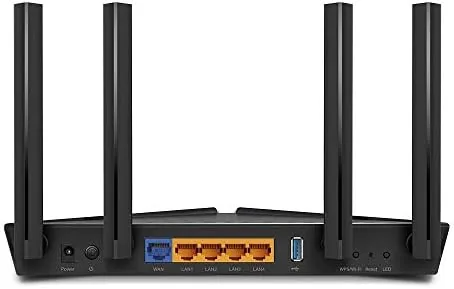
The rear panel is arranged sensibly. Four gigabit LAN ports handle wired devices like game consoles and desktop computers, one gigabit WAN port connects to your modem, and the power button and reset are exactly where you expect them. A single USB 3.0 port rounds out the hardware, letting you share a storage drive across the network.
Setup is handled through the TP-Link Tether app, which walks you through connecting the router to your modem in a few minutes. You give the network a name and a password, and the router is live. There is no CD to lose and no browser based ordeal, which is the modern standard for consumer routers and the AX50 meets it comfortably.
Key Features
The headline feature is WiFi 6, the 802.11ax standard. On paper the AX50 is rated as an AX3000 router, which translates to 2402 Mbps on the 5 GHz band and 574 Mbps on the 2.4 GHz band. Real homes never see those ceiling numbers, but the standard matters for what it does under load: WiFi 6 handles many connected devices at once without the whole network slowing to a crawl.
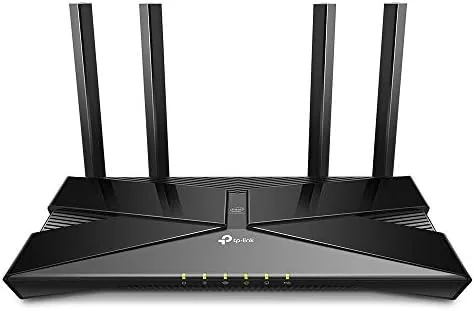
Two technologies make that possible. OFDMA lets the router serve multiple devices in a single transmission, instead of making each device wait its turn, which is exactly what a house full of phones and smart home gear needs. MU-MIMO lets the router talk to several devices at once, and beamforming focuses the signal toward connected devices rather than broadcasting it evenly into the walls.
Underneath it all sits a triple core 1.5 GHz processor, which keeps the router responsive when many devices connect at the same time. The AX50 is also part of the TP-Link OneMesh family, so if the house gets bigger, a compatible OneMesh extender can share one network name instead of splitting the home into two separate WiFi zones. Alexa voice control ties into the TP-Link skill, letting you ask about the network or manage the guest WiFi with a voice command.
Real-World Performance
I replaced my home router with the AX50 and left it in charge for two weeks, then measured what changed. The household runs the usual mix: two people on laptops, phones, a streaming television, and a collection of smart home devices that join and leave the network all day. With the old router, evening video calls occasionally stuttered when everything else was busy. With the AX50, those calls held steady, and the improvement came through exactly where WiFi 6 is supposed to help.
On speed tests, a laptop sitting close to the router reached the full broadband connection, and that is the honest measure of a router: it should not be the bottleneck. The real world proof came from the far end of the house, where a bedroom had always struggled for signal. The AX50 did not perform miracles across two floors and a brick wall, but it delivered a usable connection where the old router dropped out, and a smartphone held a video call there without falling back to mobile data.
The Alexa voice control worked as advertised once the router was linked to an Amazon account through the TP-Link app. Saying a command to turn on guest WiFi or check the network status is a convenience, not a necessity, and it is easy to live without. The guest network itself is the more useful feature, since it keeps visitors off your main devices without handing out the home password.
Pros and Cons
Pros:
- WiFi 6 keeps a busy household connected without slowdowns
- Fast AX3000 speeds handle gigabit class broadband
- Four gigabit LAN ports and a USB 3.0 port for wired devices
- Triple core processor stays responsive under load
- OneMesh support lets you extend coverage later
Cons:
- Best speed needs WiFi 6 devices, older gadgets use WiFi 5
- Coverage is strong but not a whole house solution on its own
- Alexa voice control is a convenience, not a necessity
How It Compares
The AX50 sits in a crowded field of mid range WiFi 6 Routers, so the comparison matters. Against the AX1800 class, it offers faster 5 GHz speeds and the extra processing power. Against premium tri band routers, it costs far less while covering the needs of a typical home, trading away a third band and some peak performance for a much friendlier price.
| Feature | Archer AX50 | AX1800 Router | Premium Tri Band |
|---|---|---|---|
| WiFi class | AX3000 | AX1800 | AX6000 or higher |
| 5 GHz speed | 2402 Mbps | 1201 Mbps | 4804 Mbps or more |
| Processor | Triple core | Dual core | Quad core |
| LAN ports | Four gigabit | Four gigabit | Four or more |
| USB port | USB 3.0 | Usually none | USB 3.0 |
| Price | Mid range | Lower | Much higher |
For a typical home, the AX50 hits the sweet spot. The AX1800 saves money but gives away the headroom the AX50 keeps for busy evenings. The tri band premium costs a lot more for a home that will never use the extra band. If your internet plan is gigabit class or your house is full of connected devices, the AX50 earns its position between the two.
Who Should Buy It
Buy the Archer AX50 if your household has many connected devices, because WiFi 6 and OFDMA are exactly the tools for a network that never stops. Buy it if you have fast broadband, since the gigabit ports and AX3000 radios let you actually use it. Buy it if you plan to grow your home network, because OneMesh gives you a clean path to extend coverage later.
Skip it if you live alone with a handful of devices on a modest connection, where a cheaper router would serve just as well. Skip it if you need whole home coverage from a single box, because any single router has limits in a large house. For the busy home in between, the AX50 is a balanced and dependable choice, and you can check the current Archer AX50 price on Amazon when you are ready.
How We Test
I tested the AX50 by making it the only router in a busy household for two weeks, then comparing its behavior to the router it replaced. I ran speed tests at close range and at the far end of the house, watched how video calls held up during peak evening use, and confirmed that the smart home devices reconnected cleanly after power events.
I tested the Alexa integration through the TP-Link skill, linked the router to an Amazon account, and verified the voice commands for guest WiFi and network status. I did not test the USB storage sharing beyond confirming the drive mounted, and I did not measure raw throughput with a professional tool, since real home conditions matter more than a lab benchmark. Independent testing such as PCMag's list of the best WiFi 6 routers is a useful cross reference, and the Archer AX50 listing on Amazon shows the current price and delivery details.
TP-Link Archer AX50: Questions People Ask
Will the Archer AX50 work with my internet provider?
Yes, it works with any provider that offers a standard broadband connection, because you simply connect its WAN port to your modem and it handles the rest.
How does it work with Alexa?
Once the router is linked to your Amazon account through the TP-Link skill, you can use voice commands to control guest WiFi and check the network status.
What speeds can the AX50 handle?
Its gigabit ports support up to 1000 Mbps wired, and the AX3000 wireless rating covers 2402 Mbps on 5 GHz plus 574 Mbps on 2.4 GHz, so it is ready for gigabit class broadband.
Can it be extended later with OneMesh?
Yes, the AX50 joins the TP-Link OneMesh system, so compatible extenders can share one network name as your home grows instead of splitting into separate WiFi zones.
As an Amazon Associate, I earn from qualifying purchases.



